On frame 86, the truck box is perfect. By frame 143, it has drifted onto the trailer beside it. By frame 210, the original truck is occluded and the track silently jumps to a new vehicle. A frame-level spot check can approve all three boxes while the sequence is unusable for tracking.
Video quality lives in time. The task is not only to place geometry, but to preserve identity through motion, occlusion, camera cuts, entrances, and exits. Unitlab's timeline, tracks, interpolation, and auto-tracking are most valuable when the team decides which motion patterns each method may handle—and where a human must take over.
Video annotation is not image annotation repeated hundreds of times. Every labeled object must remain coherent as the scene changes, the camera moves, subjects overlap, and visibility disappears. A box that looks correct on one frame can still belong to the wrong track. A mask can be precise yet flicker from frame to frame. A convenient propagation tool can save hours—or spread one mistake across an entire sequence.
The current Unitlab video workspace combines image-style spatial tools with a frame timeline, track rows, playback controls, machine-learning auto-tracking, and deterministic interpolation. Used together, these features allow teams to choose the right level of automation for each motion pattern instead of forcing every object through one propagation method.
This guide explains how the live interface works and, more importantly, how to turn its controls into a scalable video-labeling policy.
See Unitlab AI’s video annotation workflow in action
Unitlab AI is an enterprise multimodal data platform for AI teams to curate, annotate, manage, version, and prepare training data at scale. This walkthrough shows frame-accurate annotation, AI-assisted segmentation and tracking, timeline operations, review, and production dataset workflows for enterprise video data.
Explore Unitlab’s multimodal data annotation platform.
What the Unitlab video workspace adds
The core visual toolset will feel familiar to an image annotator. Video projects can use boxes, cuboids, polygons, masks, skeletons, lines, and keypoints, depending on the attached ontology. The inspector still provides objects, classes, comments, properties, tags, and appearance controls.
Video adds the temporal layer:
- a current-frame counter;
- previous- and next-frame controls;
- playback and frame-by-frame navigation;
- rows representing annotated object tracks;
- a timeline that can be zoomed from 1× to 10×;
- loop control; and
- propagation controls for tracking or interpolation.
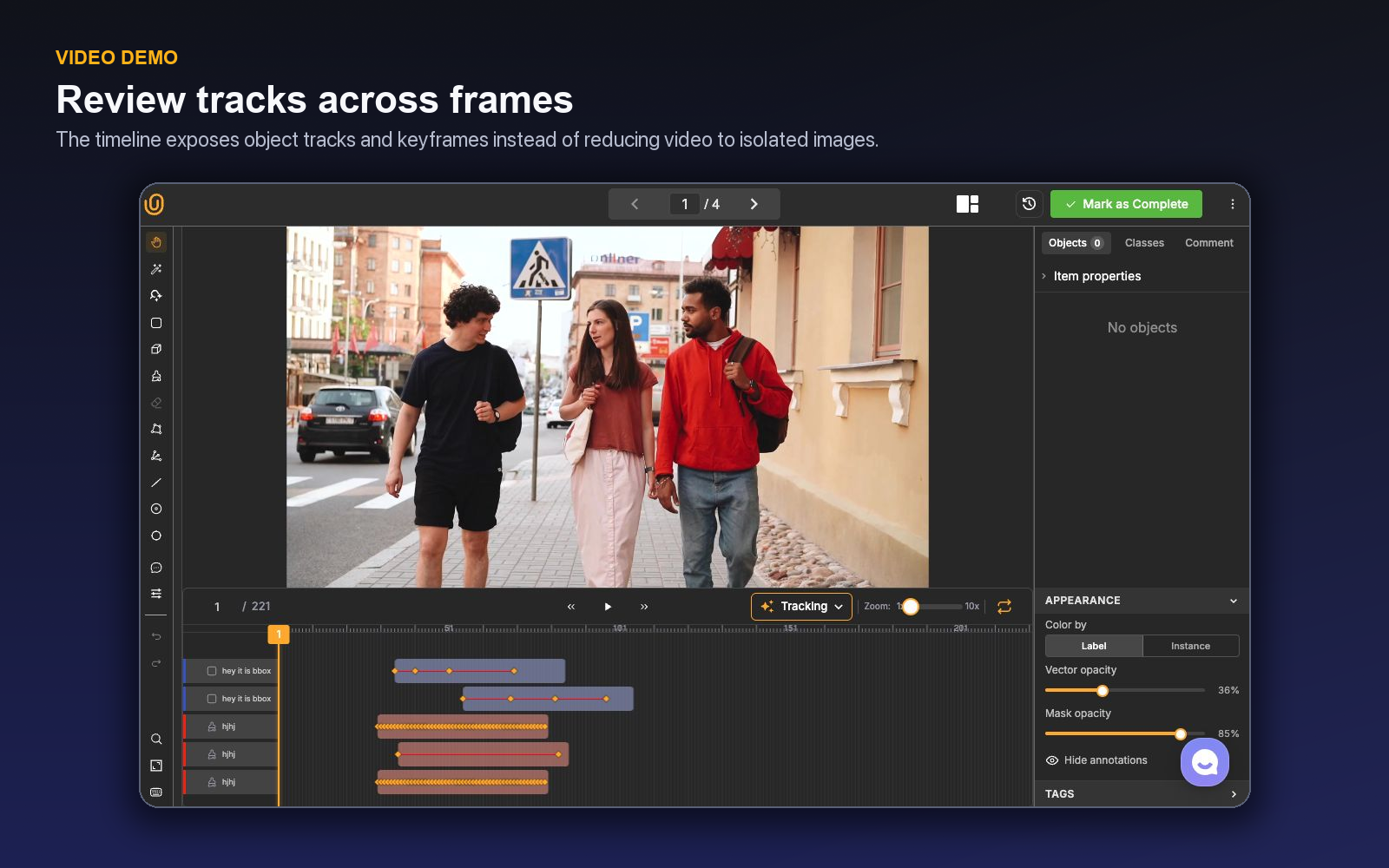
The object track is the durable unit. A car that exists for 120 frames should usually remain one track with a stable identity, not 120 unrelated boxes. That identity is what supports downstream motion analysis, tracking metrics, event logic, or sequence understanding.
Auto-tracking and interpolation solve different problems
The live tracking menu makes the distinction explicit:
- Auto-Tracking — Predict later frames with ML
- Interpolation — Tween between keyframes
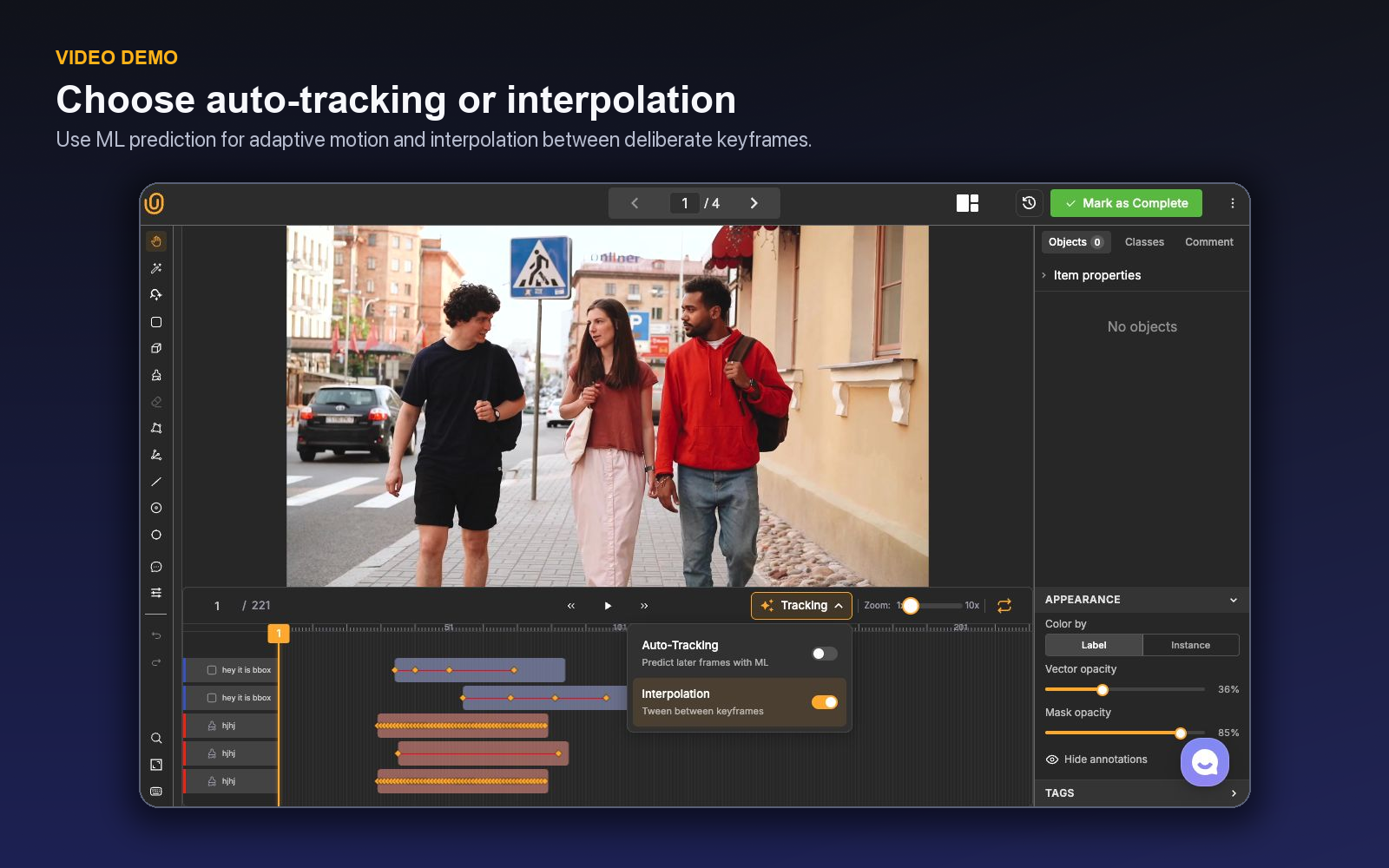
These methods should not be treated as faster and slower versions of the same feature.
Interpolation: controlled motion between known states
Interpolation uses labels on keyframes and fills the transition between them. It is well suited to predictable motion, gradual scale changes, and shots where the object's appearance and visibility remain stable. The annotator establishes ground truth at meaningful moments, then inspects the generated in-between geometry.
The main advantage is determinism. The resulting path is constrained by human-selected states. The main risk is false smoothness: real motion may change suddenly, an object may become occluded, or a camera cut may make a continuous tween conceptually wrong.
Create a new keyframe whenever:
- direction or speed changes materially;
- the object changes scale or orientation abruptly;
- occlusion begins or ends;
- a shape boundary changes in a way the interpolation misses;
- the camera cuts, shakes, or changes viewpoint; or
- the class or visibility state changes.
Auto-tracking: directional model proposals
Auto-tracking predicts object geometry with machine learning. Right-click a supported object and open Auto track to choose Track full annotation, Track forward, or Track backward. Full tracking runs in both directions from a reliable middle-frame seed; forward tracking handles later frames; backward tracking recovers earlier frames from a clearer later appearance. Direction availability follows the current frame, so backward is unavailable at the first frame and forward is unavailable when no later frame remains.
Several objects can be tracked in one operation. Hold Command on macOS or Ctrl on Windows/Linux and right-click objects to build a multi-selection, then choose the same full, forward, or backward action. Each selected object keeps its own identity and timeline row. Group actions such as bring all to front, send all to back, duplicate all, and delete all are available from the same multi-object menu.
Auto-tracking proposes a temporal track; the annotator still owns identity, geometry, and the moment a track should stop.
The right mental model is “proposal over time.” A reviewer must watch for identity switches, drift toward a nearby object, boxes that grow into the background, and tracks that continue after the object disappears. These failures are temporal; a spot check of only the first and last frame can miss them.
| Situation | Prefer interpolation | Consider auto-tracking |
|---|---|---|
| Smooth, predictable movement | Yes | Optional |
| Irregular movement with stable appearance | Limited | Yes |
| Long complete occlusion | No continuous tween | Use cautiously and split or correct |
| Camera cut | No | Restart after the cut |
| Dense, similar objects crossing | Only with frequent keyframes | High identity-switch risk |
| Small object near visibility limit | Frequent manual checks | High drift risk |
Define track identity before labeling
Most costly video errors are policy errors disguised as drawing errors. The team needs an explicit definition of identity.
If a person leaves the frame and re-enters, is that the same track? If two visually identical products overlap on a conveyor, how should the annotator preserve identity? When a vehicle is fully hidden behind a building, does its track pause, continue through an estimated position, or end? Different use cases require different answers.
A practical track policy should cover:
- Birth: the first frame at which an object is labelable.
- Death: the final frame at which it is labelable.
- Partial occlusion: how geometry and properties change while some portion remains visible.
- Full occlusion: whether the track is paused, estimated, or terminated.
- Exit and re-entry: when a new track ID is required.
- Class changes: whether a state change uses a property or a new object.
- Cuts: how each new shot resets temporal continuity.
Write these rules into project instructions and illustrate them with frame sequences. A single still image cannot explain a temporal decision.
Build a video-ready ontology
The same Unitlab ontology system used for images can define video objects, properties, and relations. Avoid creating separate classes for every temporary state. If vehicle remains the same semantic object while it becomes partially occluded, represent occlusion as a property rather than changing the class.
Useful properties often include visibility, truncation, motion state, confidence category for uncertain human judgments, or scene-specific attributes. Keep property changes aligned to keyframes when downstream systems need temporal transitions.
Mark a class property Dynamic when its value can change while object identity remains stable. A person track can keep one ID while Helmet status changes from Not visible to Present and then Absent. Setting the value on a new frame creates a property keyframe and a child row beneath the object track.
Dynamic Item Properties provide the same temporal labeling for the complete scene rather than one object. Weather, Camera state, Traffic density, or Procedure phase can change across frames and appear as independent timeline ranges. Static Item Properties span the full item; dynamic values divide the sequence into explicit states.
Relations should be used only when they produce valuable structure. A person–vehicle relation may matter to an activity model, for example, but adds review burden. Every relation should answer a concrete downstream question.
Design annotation around shot structure
Video should be segmented operationally before it is annotated geometrically. Long clips with multiple cuts or unrelated events are hard to navigate and easy to review poorly. If upstream preparation can produce coherent sequences, tracking policies become simpler and quality measurements become meaningful.
For each sequence:
- scan the clip once before drawing;
- identify cuts, occlusion-heavy intervals, and dense interactions;
- create initial objects on a clear frame;
- decide propagation mode per object rather than per clip;
- add keyframes at motion changes;
- review at normal playback speed for identity and at frame level for geometry; and
- leave a comment when the source is genuinely ambiguous.
Timeline zoom helps with dense keyframe work. Looping a short difficult interval can reveal flicker or identity drift that is hard to see during a full-length playback.
The timeline is also an editor. Colored bars show active ranges, diamonds mark keyframes, and the vertical playhead identifies the current frame. Clicking a row synchronizes the canvas and inspector; dragging a segment handle changes its start or end; right-clicking opens tracking, hide/show, delete, and mask-interpolation actions where applicable. Auto zoom on timeline click can center the selected annotation. For masks with at least two manual keyframes, Interpolate mask creates intermediate masks and Clear interpolation removes only those generated frames.
Review needs two passes
A reliable reviewer separates temporal integrity from spatial accuracy.
The temporal pass watches the clip in motion. The reviewer checks whether IDs remain stable, tracks begin and end correctly, annotations disappear during excluded intervals, and motion looks coherent. The spatial pass pauses on representative and difficult frames to inspect tightness, mask boundaries, keypoints, properties, and class selection.
Trying to perform both passes simultaneously makes it easy to miss one dimension. A smooth track may still be spatially loose; a set of individually precise frames may still contain an identity switch.
Unitlab workflows can place Review after Annotate and route accepted or rejected results accordingly. For new projects, require full review and classify rejections. Once performance stabilizes, use targeted or sampled review without losing a clear rejected path.
Quality signal: Count corrections per track and per labeled minute, not only per frame. Frame-level counts can make one propagated error look like hundreds of independent mistakes—or hide a severe identity failure inside a high volume of correct boxes.
Unitlab's video annotation QA workflows connect frame-level checks with review of track identity, continuity, and temporal labels.
A concrete operating example
Consider a traffic-analysis project that labels vehicles with bounding boxes and a visibility property. An annotator watches each clip once, marks camera cuts, and chooses a clear starting frame for every visible vehicle. Vehicles moving steadily through an open lane use interpolation, with keyframes added at turns and scale changes. A vehicle crossing behind a bus receives a keyframe before occlusion and another after it reappears; the project policy determines whether that remains one identity.
For a motorcycle weaving between cars, the annotator may try Auto-Tracking if the project has a validated running model. The resulting track is watched at normal speed for identity and paused at crossings for geometry. A reviewer performs the temporal pass first, then samples frames around turns, occlusion, and entry or exit. Rejections identify whether the cause was identity, geometry, visibility, or instruction ambiguity.
This example shows why teams should not set one keyframe interval such as “every ten frames.” Motion and uncertainty determine keyframes. A static ten-frame rule can overspecify easy motion and underspecify a sudden turn.
Diagnose common failure patterns
Track flicker usually signals too few keyframes, unstable geometry, or inconsistent property changes. Add keyframes at real state transitions and inspect mask or box conventions.
Identity swaps occur when similar objects cross or overlap. Review in motion, temporarily hide unrelated tracks, and split or correct the track under the identity policy.
Track fragmentation creates several IDs for one continuous object. Clarify re-entry and occlusion rules and inspect start/end behavior.
Phantom continuation occurs when propagation keeps labeling an object after it leaves or becomes fully excluded. Review track death deliberately rather than assuming the tool will infer the policy.
Smooth but wrong interpolation appears when geometry follows a mathematically plausible path that the object did not take. Place keyframes at direction, scale, and visibility changes.
A full timeline pass: birth, change, occlusion, and exit
Take a 20-second construction clip in which two workers enter from the left, one briefly disappears behind equipment, and a third person crosses in the foreground. The project requires a person track, a dynamic helmet_status property, and a scene-level work_zone_state Item Property. This is short enough to review completely but rich enough to expose the decisions that break longer jobs.
Watch the clip once without drawing. Mark the camera cut, identify where each person first becomes labelable, and note the intervals where visibility makes helmet status genuinely unobservable. Start each object on a clear frame. A stable walker may use forward tracking from the first strong seed; the person who is clearest near the middle can use full bidirectional tracking; an object that only needs the earlier segment can be tracked backward from a later, reliable seed. When two workers move together, multi-object tracking can propagate the selected group, but the result still needs an identity check at every crossing.
The timeline turns those choices into an auditable record. Each object row shows its active range and keyframes. Expand the row to see a Dynamic property beneath it. Set helmet_status = present only while the helmet is visible, change it to not_visible during the occlusion, and set the next supported value when evidence returns. Do not create a new person merely because the property changed. On a separate Item Property row, change work_zone_state from inactive to active when the work event begins; that value describes the whole scene, not one worker.
Pause before the equipment occlusion. Add a clean manual keyframe, run only through the interval where appearance is reliable, and stop when the track begins to drift. After the person reappears, apply the project's identity rule: retain the original ID only if continuity can be supported. A comment can record a genuinely ambiguous reappearance, while an issue is appropriate if the policy itself does not tell reviewers what to do.
Review in two modes. At normal speed, watch for an ID jumping from one person to another, a track continuing after exit, flicker in the dynamic state, or an Item Property transition that happens too early. Then scrub the keyframes and the frames around every occlusion, direction change, and range boundary. Inspect boxes or masks for tightness at the smallest and largest object scales. If masks have manual keyframes on both sides of predictable motion, use mask interpolation and inspect the generated midpoint; clear the interpolation if it crosses the wrong boundary without removing the manual anchors.
The reviewer should return a precise cause, not “bad track.” Useful rejection categories include identity switch, fragmented identity, incorrect birth or death, geometry drift, missed state keyframe, invalid property value, and unsupported continuity. Those categories reveal whether the remedy belongs in the annotation, tracking strategy, ontology, or instructions.
Finally, compare operations rather than raw output volume. Record accepted tracked seconds per hour, manual keyframes per accepted track, corrections per occlusion, property-keyframe corrections, and reviewer scrubbing time. Full, forward, backward, and grouped tracking are valuable when they reduce reviewed effort for the motion pattern at hand. They are not interchangeable buttons, and the strongest team is the one that knows when to stop propagation.
Before the sequence is accepted, the reviewer should be able to reconstruct every transition from the timeline alone: when each object enters, when evidence becomes uncertain, which frames carry manual keyframes, where a Dynamic value changes, and when the track ends. Select each row and confirm that the canvas, inspector, and playhead describe the same object. Then hide the selected track and scan for an unlabeled duplicate that may have been created after reappearance.
This gate is especially important after batch or multi-object tracking. Efficient propagation can multiply one mistaken seed across the sequence. A short identity audit at crossings, occlusions, births, and deaths prevents the most expensive error in video annotation: a plausible-looking track that attaches the correct geometry to the wrong identity.
A tracking pilot that compares the modes fairly
Select clips containing steady motion, camera motion, scale change, crossings, short and long occlusion, re-entry, and true object exit. Include classes with boxes and masks if both appear in production. Define identity, visibility, re-entry, birth, death, and Dynamic-property rules before anyone runs tracking.
Assign the same representative clips to manual keyframe interpolation, full bidirectional tracking, forward tracking, backward tracking, and multi-object tracking where each mode is plausible. Do not compare modes on different difficulty distributions. Record seed placement, manual keyframes, propagation range, stops, corrections, and final review time.
Review each result twice. The temporal pass counts identity switches, fragmentation, phantom continuation, missed ranges, and incorrect property transitions. The spatial pass samples the smallest object, largest object, turns, occlusion boundaries, crossings, and mask interpolation midpoints. Separate a tool failure from a policy failure: uncertain re-entry under an undefined rule is not evidence against tracking.
Choose the operating policy by motion pattern. Predictable geometry may favor interpolation; a reliable early seed may favor forward tracking; a clear middle frame may favor full tracking; a later clear frame may justify backward tracking. Group tracking is appropriate only when the selected objects remain independently verifiable.
Set stopping rules and review intensity. Require annotators to stop at the first identity uncertainty, add manual anchors around state changes, and perform a full temporal pass before submission. New or high-risk patterns receive full review; mature patterns can move to targeted sampling only after correction rates stabilize.
The final comparison uses accepted tracked seconds per hour, corrections per track, identity errors, reviewer scrubbing, and property-keyframe corrections. Generated frames are not the outcome. Stable, reviewable object history is.
Try the workflow in Unitlab
- Open the Video Annotation demo and choose one object with clear motion and one with occlusion or overlap.
- For predictable motion, place clean keyframes, apply interpolation, and inspect the midpoint and the frames immediately around direction changes.
- For appearance-driven motion, start auto-tracking from a trustworthy frame and choose full, forward, or backward propagation according to where the reliable seed sits. Stop at the first identity uncertainty instead of allowing drift to compound.
- Select two nearby objects with Command/Ctrl + right-click, run a short group track, and confirm that their identities remain separate through crossings.
- Inspect geometry, dynamic object properties, and any dynamic Item Property at track birth, state changes, occlusion, reappearance, and track death. Split or correct the track where identity changes.
- Route the sequence to review with a policy that checks continuity, not just isolated frames.
Measure corrections per tracked second, identity switches, fragmentation, missed frames, and reviewer scrubbing time. Those metrics expose propagation errors that a frame accuracy score can miss.
The decision to make
Use a short sequence with one occlusion and one crossing object. Run interpolation and auto-tracking in Unitlab, then compare total reviewed correction—not just the number of generated frames.
Continue with Unitlab’s frame-accurate video labeling.
Continue in the Unitlab documentation: Video annotation.