A call-center team labels “customer frustration” as a single event. One annotator starts the segment when the customer's voice rises; another starts when the complaint begins; a third includes the agent's interruption because it explains the reaction. All three are reasonable, and that is exactly the problem.
Audio annotation turns hidden policy into timestamps. Before drawing an event, a team must define onset, offset, overlap, speaker identity, inaudible regions, and the difference between acoustic evidence and inferred intent. The waveform can locate sound; the ontology and instructions decide what the sound means.
Audio annotation makes uncertainty visible. A sound can begin gradually, overlap with another event, disappear under noise, or mean something different depending on what happened seconds earlier. Even transcription—a task that appears straightforward—forces decisions about speakers, hesitation, non-speech sounds, punctuation, and inaudible passages.
The Unitlab audio workspace provides a waveform and temporal controls for event-oriented work, while the broader project system supplies ontologies, properties, comments, review stages, and versioned releases. Transcription-oriented projects can also use an integrated audio model that returns a speech-recognition transcript for human correction.
The platform can hold the work. The team's operating rules determine whether the resulting labels are consistent enough to train or evaluate a model.
Inside the live audio workbench
The current audio interface centers the waveform and timeline. Controls include play and pause, rewind and forward by ten seconds, current time and total duration, mute and volume, timeline zoom, playback speed, event or class selection, comments, item properties, tags, and workflow completion actions.
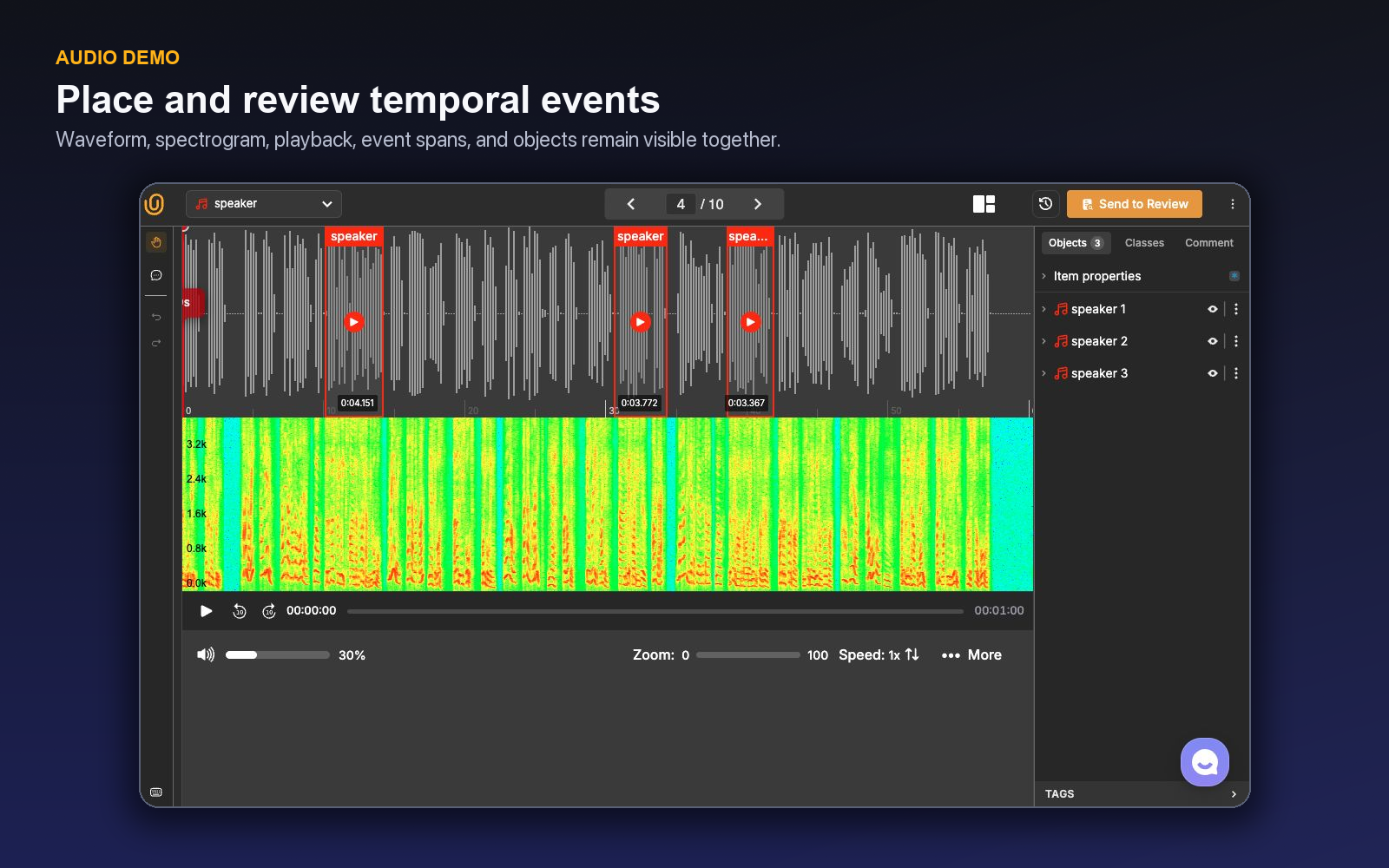
The short demo shows the actual temporal workbench: waveform and spectrogram context, event intervals, and timeline navigation.
Playback speed is particularly valuable for speech and dense event review. Slower playback can help isolate a boundary or uncertain word; faster playback can make long stretches of background easier to scan. Timeline zoom supports precise interval placement without losing the context of the full recording.
The workbench is keyboard-ready: Space plays or pauses, ↑/↓ changes volume, Alt + ←/→ changes playback speed, L toggles loop, P toggles autoplay, S toggles the spectrogram, T toggles the timeline, and Ctrl/Cmd + O/I zooms the waveform. H opens the complete context-aware shortcut guide.
The shared Unitlab project language remains visible: annotators navigate items, use classes from an ontology, add context through properties or tags, leave comments, and move work through a workflow. This matters when audio is only one part of a larger multimodal program.
The supplied demo also confirms that an audio item can load with waveform and spectrogram context plus labeled event intervals. Processing readiness should still be monitored operationally: a media item that has not finished preparing is different from a valid recording with no events.
Three common audio annotation patterns
Audio teams often use the same recording for fundamentally different tasks. Define the target output before configuring the ontology.
Event classification
The item receives one or more properties describing the recording as a whole: acceptable or corrupted, indoor or outdoor, language, dominant sound, call disposition, or acoustic condition. This is the least temporally detailed pattern and can be efficient when exact boundaries do not matter.
Use item properties rather than drawing intervals when the label applies to the entire asset. Require a text field or comment only when a structured choice cannot capture the needed context.
Item Properties can be required and can contain conditional nested questions. For example, Recording quality = Unacceptable can reveal a child reason such as clipping, background noise, missing channel, or corruption. This keeps the whole-recording decision separate from event rows on the timeline.
Event detection and segmentation
Temporal events mark when a sound occurs. Examples include alarms, glass breaks, machine states, applause, speaker turns, coughs, or acoustic anomalies. Unitlab ontologies expose Event as an audio annotation entity, allowing class definitions and properties to structure those intervals.
The essential policy is the boundary rule. Does an event include the onset and decay? Are brief gaps merged? Can two events overlap? Is background noise annotated as a class or treated as unlabeled context? These decisions change evaluation metrics and must be stable across annotators.
Transcription-oriented annotation
Transcription projects convert speech into text and may combine that output with item properties, comments, or workflow review. An integrated audio model can optionally produce a speech-recognition transcript, creating a human-in-the-loop pattern in which people correct a proposal rather than start from an empty field.
Transcription policy should cover verbatim versus normalized text, punctuation, capitalization, filler words, false starts, numbers, proper names, non-speech events, overlapping speakers, code-switching, and inaudible segments. “Write what you hear” is not enough for production consistency.
| Task | Primary unit | Best structured with | Typical ambiguity |
|---|---|---|---|
| Clip classification | Whole item | Item properties | Multiple dominant conditions |
| Event detection | Time interval | Event classes and properties | Onset, offset, overlap |
| Speaker segmentation | Time interval per speaker | Events plus identity/property rules | Crosstalk and unknown speakers |
| Transcription | Text tied to audio | Transcript field plus review | Normalization and inaudible speech |
| Acoustic quality review | Whole item or interval | Properties, tags, comments | Threshold for unacceptable noise |
Design an ontology people can hear consistently
Class names should represent audible concepts, not internal shorthand. Pair every event class with inclusion, exclusion, and confusing-neighbor examples. A machine anomaly event is difficult to apply until the annotator knows whether normal startup, shutdown, and transient load changes are included.
Properties reduce class explosion. An alarm event might have urgency, source, or clarity properties rather than separate classes for every combination. A speaker segment might carry a speaker ID and language property. Keep the primary event type stable and use properties for attributes that can change without changing the event's identity.
Relations are valuable only when the connection itself matters downstream. If a response event must be linked to the prompt that triggered it, a relation can preserve that structure. Do not add relation work merely because the schema supports it.
Unitlab's ontology versions, draft and live states, JSON view, and entity search make the schema governable. Publish a draft only after calibration and record which version produced a release.
Boundary policy is the heart of audio quality
Two skilled annotators can agree that an event occurred and still disagree by hundreds of milliseconds about its boundaries. Whether that matters depends on the model and evaluation method.
Choose a boundary convention that fits the signal:
- Perceptual boundary: mark the first and last moment a listener can identify the event.
- Energy boundary: follow the visible or measurable signal in the waveform.
- Functional boundary: include the period relevant to the downstream action.
- Fixed context: include a defined amount of audio before and after an event.
Document how to handle silence inside an event. A sentence may contain brief pauses but remain one utterance; an alarm may pulse with predictable gaps; a machine fault may be intermittent. Set merge and split rules using duration thresholds only when those thresholds reflect the model objective.
Annotators should zoom in to place final boundaries, then zoom out and listen in context. Visual waveform cues are helpful but can be misleading: two sounds may overlap in the same energy region, and an event can be perceptually meaningful before it becomes visually obvious.
Quality principle: Audit both semantic agreement (“what happened?”) and temporal agreement (“when did it happen?”). A single accuracy score hides which part of the task needs better instructions.
Use audio annotation quality assurance to apply these timing and speaker rules consistently during review and rework.
Overlap, speakers, and silence
Overlapping audio forces a schema decision. If multiple classes can occur at once, the interface and downstream representation must allow overlapping events. Reviewers should check that annotators did not force overlap into mutually exclusive segments simply to make the timeline look tidy.
Speaker work adds identity. Decide whether IDs persist only within one recording, across a session, or across a dataset. Define a category for unknown or uncertain speakers. If two people speak simultaneously, specify whether both segments are annotated and how the transcript represents crosstalk.
Silence is similarly contextual. It may be irrelevant background, a meaningful pause, a quality problem, or an event in its own right. Create a silence class only when the distinction supports a downstream need. Otherwise, unlabeled time may be the cleaner representation.
Human review and model-assisted transcription
A model-generated transcript can accelerate work, but correction behavior differs from blank-page transcription. People are more likely to overlook plausible-looking substitutions, missing short words, and punctuation that changes meaning. Review instructions should therefore require listening to the full audio, not merely reading the draft.
For event models, proposals should be reviewed for false intervals, missed events, boundary error, and class confusion. Measure total reviewed time and correction effort. A high number of proposed events is not useful if the reviewer must inspect a noisy timeline.
Unitlab workflows can place a Model stage before Annotate or Review, and Review can route rejected work back into correction. This allows a team to make model involvement explicit. Keep a manual benchmark set so changes in model or prompt behavior can be compared with a stable baseline.
A worked segmentation example
Imagine a predictive-maintenance dataset with normal_operation, impact, alarm, and mechanical_anomaly events. The team defines a perceptual boundary for alarm and impact, but a functional boundary for anomaly: the interval must contain enough context for a model to distinguish the abnormal pattern from normal load change. Short gaps inside a pulsing alarm are merged; unrelated sounds may overlap.
Annotators listen once to understand the clip, then mark events at normal speed. They slow playback and zoom for uncertain boundaries. A mechanical_anomaly interval receives a clarity property and a comment when another sound masks its onset. Reviewers first verify event presence and class, then compare temporal boundaries. Recurring confusion between load change and anomaly becomes a project issue and leads to new negative examples in instructions.
This workflow separates four decisions that are often mixed together: whether an event exists, what it is, when it occurs, and how assessable it is.
A worked transcription example
For a service-call corpus, the transcript policy uses normalized numbers but preserves negation, filler words only when they change meaning, and bracketed markers for unintelligible speech and non-speech events. Speaker IDs persist within a call but not across customers. Crosstalk can produce overlapping speaker segments.
When a speech model provides a draft, the annotator listens from beginning to end and corrects words while preserving the policy. Proper names and product numbers receive a focused second pass because plausible substitutions can be operationally costly. A reviewer samples common phrases and listens fully to low-quality or escalated clips.
The resulting transcript is not simply “accurate text.” It is text produced under a documented normalization contract.
Diagnose recurring audio errors
- Boundary creep: intervals gradually include more context than policy allows. Recalibrate with paired early/late examples.
- Forced exclusivity: annotators remove valid overlap to create a tidy timeline. Confirm whether the ontology allows concurrent events.
- Visual-only labeling: boundaries follow waveform energy without listening to meaning. Require audio playback in the completion checklist.
- Transcript anchoring: plausible model text goes unchallenged. Hide or compare the draft on calibration items to measure the effect.
- Unknown avoidance: annotators guess speakers or words because no controlled uncertainty path exists. Add one and monitor its rate.
Run one clip as a layered listening exercise
Consider a 90-second customer-support recording with two speakers, a notification tone, keyboard noise, one interruption, and a product code spoken over background music. The downstream system needs a transcript, speaker turns, the notification event, call outcome, and an audio-quality assessment. Trying to capture all of that in a single pass produces avoidable anchoring and boundary errors.
Begin with a context pass. Listen without editing and identify the conversational phases: greeting, problem description, troubleshooting, and resolution. Set Item Properties that truly describe the complete recording, such as language, channel, and overall quality. Leave the final call outcome unanswered until the conversation supports it. If quality changes during the call and that change matters, make the Item Property Dynamic so its states occupy their own temporal ranges instead of forcing one value over the entire item.
Use a second pass for event structure. Create speaker or speech intervals under the project's segmentation rule, then add the notification tone as an overlapping event. The interruption should remain two concurrent speaker segments if the ontology permits overlap. Do not shorten one speaker merely to make the timeline non-overlapping. Listen on both sides of every boundary and apply the same onset and offset convention, even when waveform energy suggests a visually neater cut.
The transcript pass follows the audio, not the model draft. Play each segment in context, correct substitutions, and pay special attention to negation, names, numbers, and product codes. If a token cannot be supported, use the controlled unintelligible convention rather than inventing a plausible word. Speaker identification, emotion, intent, and confidence belong as properties only when the task needs them and the evidence is strong enough.
The timeline is where consistency becomes visible. Long uninterrupted rows may reveal that the segmentation rule is too coarse; excessive fragmentation may reveal that pauses are being treated as boundaries. Overlapping rows show whether crosstalk was preserved. Zoom into the product-code interval, use the spectrogram when it adds evidence, and replay a slightly wider context before deciding. The correct boundary is the one defined by the contract, not the one that looks cleanest at maximum zoom.
Review the item in separate layers. First, ignore text and check event presence, class, overlap, and boundaries. Second, listen while reading the transcript. Third, verify speaker identity and properties. Fourth, evaluate Item Properties such as outcome and quality. This sequencing prevents a fluent transcript from hiding missing events or a clean timeline from hiding semantic errors.
When the reviewer rejects the item, the return path should name the failure: missed event, false event, boundary error, overlap error, speaker confusion, transcript substitution, normalization error, or unsupported property. A recurring product-code error may call for instruction examples or vocabulary handling; widespread boundary disagreement calls for a clearer segmentation policy; low-quality recordings may need a curation filter rather than stricter annotator pressure.
Use the completed clip as a calibration package. Save examples of acceptable boundary variation, true overlap, uncertain speech, and the transition between global and Dynamic Item Properties. Measure accepted audio minutes per hour, but pair throughput with event recall, temporal agreement, transcript correction rate, and reviewer listening time. A faster transcription pass is not an improvement if a second reviewer must replay the entire call to recover the missing structure.
The final listening gate
Before submission, replay the entire clip once without stopping. The timeline should read like the recording: events appear when they are audible, concurrent sounds remain concurrent, speaker identity stays stable under the project's scope, and gaps reflect policy rather than fatigue. Then replay every required or low-confidence interval with a small amount of context on both sides.
Check that no transcript segment extends beyond its supporting audio, every required property has an evidence-based value, and Item Properties describe the recording rather than one moment—unless Dynamic was intentionally enabled. Verify that a controlled unknown is used where sound quality prevents a decision. If the annotator needed to rely on external knowledge, the item is not complete under an evidence-only contract.
The reviewer repeats the same gate on a sampled subset and on every escalated clip. This makes quality observable at two levels: local boundary and word accuracy, plus the global coherence of the conversation or soundscape.
For handoff, export a sample and verify that event start and end times, overlapping rows, speaker IDs, transcripts, properties, and Item Properties retain their intended scope. Play the exported interval against the source timestamp. A label that looks correct in the Workbench but shifts after conversion is a pipeline defect, not an annotation defect.
Document sample rate or channel assumptions when they affect timing, and keep the ontology and normalization policy with the released data. The consumer needs to know whether silence is unlabeled, whether speaker IDs reset per call, and how unintelligible speech is represented.
A boundary-calibration pilot
Build a 30-minute calibration collection with clean speech, low-quality speech, music, alarms, mechanical events, overlap, long pauses, and genuine ambiguity. Preserve target-free intervals. Choose segments short enough for repeated review but long enough to retain context.
Ask annotators to label independently under a draft onset, offset, merge, split, overlap, speaker, and uncertainty policy. Compare semantic agreement separately from temporal agreement. A pair may select the same event class and disagree on boundaries; another pair may agree on timing and disagree on the event itself. Those need different instruction changes.
Use Unitlab's waveform, spectrogram, playback, zoom, event rows, properties, and Item Properties to inspect the disagreements together. Create examples at the acceptance boundary: how much silence remains inside an utterance, whether a pulsing alarm is one event, how crosstalk appears, and when background noise becomes a quality state.
If model-generated transcripts or event proposals are used, annotate part of the set from a blank start and part from suggestions. Measure anchoring through missed substitutions, unchallenged plausible words, false intervals, and boundary corrections. Keep the same audio for the comparison.
After revising the policy, label an untouched set and evaluate event recall, class agreement, temporal overlap or boundary tolerance, speaker consistency, transcript correction, and accepted minutes per hour. Add full review for low-quality, high-risk, or heavily overlapping material and sample mature, clear speech separately.
Publish the calibration examples with instructions and link the ontology and release. A boundary policy becomes credible when a new annotator can reproduce it from examples and a downstream consumer can interpret the time intervals without asking how they were drawn.
Try the workflow in Unitlab
- Open an audio project and select a short clip containing speech, silence, and overlap.
- Create events for one observable class, then zoom into the onset and offset to apply the written boundary rule.
- Add speaker or confidence properties only when the source supports them; represent inaudible or uncertain spans honestly.
- Replay each event with context on both sides and inspect the spectrogram when the waveform alone is ambiguous.
- Send the item to review and record whether corrections concern timing, class, speaker, overlap, or transcription.
Track boundary disagreement, event misses, overlap errors, speaker confusion, transcript correction, and accepted minutes per hour. A good policy makes disagreement explainable before it makes annotation fast.
The decision to make
Take one minute of difficult audio and annotate it in Unitlab with explicit onset, offset, overlap, and uncertainty rules. Review the disagreements before scaling the queue.
Continue with Unitlab’s speech and sound-event labeling and enterprise data annotation workflows.
Continue in the Unitlab documentation: Audio annotation.