In the sentence “Apple hired former Tesla engineer Jane Lee,” a simple NER task quickly becomes a policy test. Is “former Tesla engineer” a title? Does “Tesla” keep its organization label inside that phrase? Should the employment relation point from Jane to Apple or from Apple to Jane? The highlight is easy; the contract is not.
Text annotation succeeds when span boundaries, nesting, relation direction, and context rules are explicit enough that two readers can reach the same structure. Unitlab supplies entities and relations; the article's job is to show how those primitives become reliable language data.
Text annotation looks deceptively simple: highlight a phrase, choose a label, continue. At production scale, the hard questions appear immediately. Does a product name include its model number? Should a job title be part of a person's name? Can an entity be nested inside another? Which direction should a relation point? What happens when the answer depends on a paragraph that appeared much earlier?
The current Unitlab text workspace supports entity annotation, relations between entities, item properties, tags, comments, display controls, and workflow review. Combined with reusable ontologies, it gives NLP teams the structure to make those decisions explicit rather than leaving them inside each annotator's intuition.
Reader takeaway: The difficult part of text annotation is not selecting words. It is making boundary, nesting, direction, and context rules stable enough that different readers produce the same structure.
Inside the live text workbench
The interface presents the source text as the primary surface. Its controls include entity annotation, relation creation, pan and navigation, comments, text display settings, font size, line height, and shortcuts. The project inspector also provides item-level properties and tags.
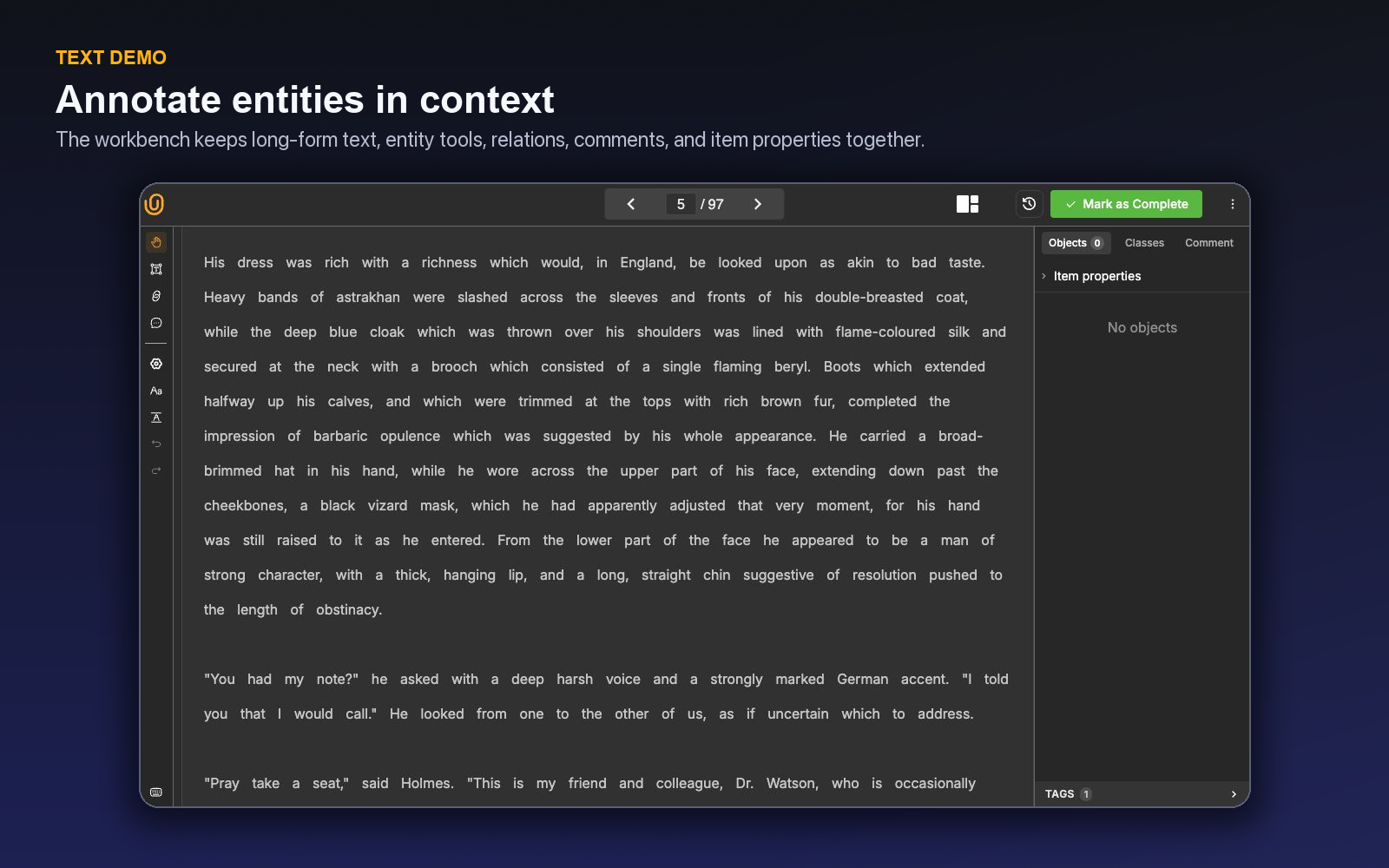
Display controls are operationally useful. Dense legal, support, or clinical text may require a different line height from short social content. Reviewers can make long-form material easier to inspect without changing the underlying data.
Entity and relation work stays inside the same project model used elsewhere in Unitlab: an ontology defines allowed structure, instructions explain edge cases, comments capture item-specific ambiguity, and the attached workflow determines whether an item proceeds to review or completion.
The active shortcuts reinforce the three core operations: T enters Entity mode, R enters Relation mode, and C opens the Comment tool. V returns to pan/navigation, ←/→ moves between text items, and H opens the context-aware shortcut guide. Shortcuts operate only in the active Workbench panel, which prevents accidental edits to passive panels in a multimodal layout.
Define entities as decision boundaries
An entity class should represent a downstream concept, not merely a word category. PERSON, ORGANIZATION, and LOCATION may be appropriate for general information extraction. A customer-support model may instead need PRODUCT, COMPONENT, SYMPTOM, ACTION_TAKEN, and OUTCOME.
For every class, define:
- positive examples;
- confusing negative examples;
- exact span boundaries;
- punctuation behavior;
- abbreviation and alias treatment;
- nested or overlapping entity policy;
- pronoun policy; and
- treatment of uncertainty.
The distinction between a definition and a boundary rule matters. “Label medications” describes the concept; it does not say whether dosage, route, frequency, and brand modifiers belong inside the same span.
| Ambiguity | Policy question | Example decision |
|---|---|---|
| Titles | Is a title inside the person span? | Keep Dr. outside Amina Rahman
|
| Product variants | Does model/version belong to the product? | Include it if downstream normalization uses the full mention |
| Possessives | Is the possessive ending included? | Exclude grammar-only suffixes unless linguistically relevant |
| Coordinated mentions | One span or several? | Split when each mention maps to a distinct entity |
| Pronouns | Are references annotated as entities? | Include only if coreference is in scope |
| Nested concepts | Can spans overlap? | Define a hierarchy or prohibit nesting explicitly |
These are examples, not universal rules. The correct choice is the one aligned with the model target and applied consistently.
Relations turn mentions into structured context
Entities answer “what appears in the text?” Relations answer “how are those things connected?” A relation may connect a person to an employer, a symptom to a product, an event to a location, or an action to an outcome.
Design relations with a clear direction and allowed endpoint types. WORKS_FOR(person, organization) is easier to validate than a generic RELATED_TO. If a connection can have meaningful attributes—such as temporal status—decide whether that belongs in a property, a relation type, or a separate event representation.
Avoid asking annotators to infer facts that the text does not support. If the sentence says a user “considered replacing the battery,” it does not establish that replacement occurred. Relation guidelines should distinguish explicit, strongly implied, and unsupported connections.
Relations can be created without leaving the item. Select the source entity, choose Add relation, name or select the relation definition, and choose the target entity or entities. Selecting an existing relation opens the same flow in update mode with its current name, description, and targets prefilled.
Use item properties for document-level context
Some labels describe the complete item: language, sentiment, document type, urgency, channel, or whether the text contains enough information. In Unitlab, single-choice, multi-choice, and text item properties can capture that context without manufacturing a span.
This keeps the schema clean. A support ticket can receive a document-level urgency property while its body contains entities for the affected component and reported symptom. Tags can support operational grouping; comments can explain an unusual item without changing the training label.
Required properties are also a useful completeness control. A live classification-style project surfaced missing required properties rather than allowing silent completion. Use requirements sparingly: a field that is mandatory but routinely unknowable encourages low-quality guesses.
Item Properties appear above entity objects in the inspector because they describe the complete text item. If the schema is missing one, Add item properties creates a single-choice, multi-choice, or typed text field in context; a child Item Property can be added beneath a selected option for conditional logic. The definition is also available in the full Ontology Builder, so an annotation-time discovery can be governed and versioned centrally.
Build the ontology in layers
Unitlab's ontology builder supports Entity and Relation structures alongside item properties. It includes draft and live states, version history, entity search, a visual summary, JSON representation, and export. That makes the schema reviewable by both domain experts and technical teams.
Start with the smallest schema that answers the initial use case. Add distinctions when calibration proves they are both valuable and reliably identifiable. Twenty labels that annotators understand will often produce more usable data than one hundred labels that collapse into confusion.
Use descriptions to state the class boundary in a sentence. Put long-form examples and edge-case policy in project instructions. If external terminology or governance material is needed, the instruction area can include a URL and file attachments, including PDF and presentation files.
Calibrate on disagreement, not easy agreement
Choose a benchmark with abbreviations, long noun phrases, pronouns, coordinated entities, negation, quoted speech, formatting artifacts, and cases that require surrounding context. Have multiple annotators work independently, then compare:
- whether a mention was found;
- which class was selected;
- exact span boundary;
- relation existence and direction;
- property values; and
- escalation of genuinely ambiguous items.
Exact-match scores are useful but incomplete. Two spans can differ by punctuation while representing the same concept; two identical spans can carry the wrong semantic class. Review the error category and its downstream cost.
When disagreement clusters around one rule, improve the ontology description or instruction example. When one annotator consistently diverges across many rules, targeted coaching is appropriate. When experts genuinely disagree, create an uncertainty or escalation policy rather than hiding the ambiguity.
Turn these calibration decisions into an NLP annotation QA workflow for span boundaries, relation endpoints, and ambiguous labels.
A worked information-extraction example
Consider a support dataset built around PRODUCT, COMPONENT, SYMPTOM, ACTION, and OUTCOME. The sentence “After replacing the battery, the Atlas Mini still shuts down under load” contains a product, component, action, and symptom. Whether “under load” belongs to the symptom span depends on the boundary policy. The action-to-component and symptom-to-product relations must have defined directions.
An item property can classify overall resolution status, while a text property captures an approved summary only if the task needs it. The annotator marks explicit mentions rather than inferring that the battery caused the shutdown. A reviewer checks missing mentions first, then boundaries, classes, and relations.
Now add “The agent suggested a charger replacement, but the customer declined.” The schema must distinguish a proposed action from a completed action. That may require an action-status property or separate relation—whichever the downstream system uses consistently. Without that distinction, the dataset teaches the model that suggestions are outcomes.
Evaluate beyond exact match
Report entity detection, class correctness, span boundary, and relation accuracy separately. Add results by entity length, frequency, document section, and ambiguity category. A model or team can have strong overall exact match while consistently missing long product names or relations across sentences.
Measure correction time as well as disagreement. A punctuation-only boundary fix and an incorrect causal relation may both count as one error but carry very different cost.
A worked support-ticket flow in the Workbench
Consider a ticket that says: “After installing firmware 4.2, the PX-200 gateway disconnects every hour. Replacing the cable did not help.” The project ontology defines PRODUCT, VERSION, SYMPTOM, and ACTION entities, plus HAS_VERSION, EXHIBITS, and ATTEMPTED_FIX relations. An Item Property records whether the ticket contains enough evidence for diagnosis.
The annotator presses T, marks PX-200 gateway as PRODUCT, firmware 4.2 as VERSION, disconnects every hour as SYMPTOM, and Replacing the cable as ACTION. Pressing R changes to relation mode: PRODUCT receives HAS_VERSION → VERSION and EXHIBITS → SYMPTOM; ACTION receives ATTEMPTED_FIX → SYMPTOM. The direction is deliberate—reversing the endpoints would create a structurally valid but semantically different graph.
At item level, the annotator sets Sufficient evidence = Yes. If the field does not yet exist, Add item properties creates it without manufacturing a text span. A genuinely ambiguous phrase receives a comment rather than a guessed entity. The item then moves to Review, where the reviewer checks boundary policy, relation direction, and whole-item completeness separately.
This small example shows why text annotation is more than highlighting. The source remains readable prose, while Unitlab turns selected evidence into a typed graph and a document-level decision that can be reviewed, versioned, and released.
When project settings allow source-text editing, treat edits as part of the data contract rather than casual cleanup. Correcting encoding or a transcription mistake may be necessary; rewriting awkward wording can change entity offsets, evidence, and downstream meaning. Record why the source changed and recheck every affected span.
Trace one support message into structured training data
Take the sentence: “Acme Logistics says invoice INV-1048 was charged twice, but the refund promised on Tuesday has not arrived.” A flat classification task might label it billing. A useful information-extraction task preserves who is involved, which document or transaction is referenced, what happened, and how those facts connect.
Start with document-level context. Under Item Properties, record fields that describe the message as a whole: channel, detected language, intent, sentiment, or escalation status. If intent = billing_dispute, a nested property can reveal a more specific reason such as duplicate_charge, incorrect_amount, or unknown. This is where conditional depth earns its value: annotators answer only the questions relevant to the selected path.
Then annotate evidence spans. Acme Logistics may be an ORGANIZATION; INV-1048 an INVOICE_ID; charged twice a PROBLEM; and Tuesday a DATE. Span rules need to decide whether determiners, punctuation, and modifiers are included. The best rule is not the most linguistically elaborate one—it is the rule that produces stable boundaries for the downstream consumer. Keep examples for nested mentions, discontinuous meaning, abbreviations, and phrases that resemble entities but should remain negative.
Relations turn the spans into a record. Link the organization to the invoice, the problem to the invoice, and the promised refund to its date only if those connections are required by the model or export. A relation should have a clear direction and allowed endpoint types. If reviewers repeatedly reverse the connection, the relation name or instructions are too ambiguous.
Use class properties for facts that belong to one entity, such as identifier_type on INV-1048 or certainty on the problem mention. Use Item Properties for whole-message outcomes. Required fields should reflect observable evidence; an annotator should not be forced to infer a customer tier that the text never states. Text properties can apply type-aware validation when the expected value is a number, date, URL, email, or identifier, which turns malformed output into a visible correction path rather than a silent export problem.
Work in two passes. First annotate spans and relations while the evidence is in view. Then collapse or hide unnecessary detail and read the message as a consumer would: can the structured record answer the intended question? Hotkeys help after the class list is stable, but they should not replace a deliberate scan for missing mentions. The Workbench also lets a qualified user add a property or relation in context; use that convenience to capture a discovered need, then reconcile it with the governed ontology before scaling.
Review must distinguish semantic disagreement from boundary disagreement. Two annotators may agree that charged twice is the problem but choose different spans. Another may classify the same evidence as PAYMENT_EVENT. Those require different remedies. Boundary examples improve span policy; class confusion may require changing the ontology; unsupported inference requires a clearer evidence rule.
Finally, test the export shape. Confirm that Item Properties, entity IDs, spans, properties, and relation endpoints retain the meaning expected by the model pipeline. Run examples with no entities, repeated IDs, multiple organizations, and contradictory statements. The goal is not to fill the page with labels. It is to produce a structured decision that remains understandable after the original annotator is no longer in the room.
Add a negative-example pass
Text projects often calibrate only on sentences rich with obvious entities. Add messages that mention product-like phrases without identifiers, dates that do not belong to an event, organizations quoted from prior correspondence, hypothetical complaints, and negated outcomes. Ask annotators to explain why each tempting span or relation should remain unlabeled.
Negative examples reveal whether the ontology describes evidence or merely keywords. If every capitalized phrase becomes an organization, the model learns typography. If any nearby date is related to the closest event, the relation policy learns proximity. If a document-level intent is copied from one phrase without reading the whole item, Item Properties become another form of span classification.
Review false additions separately from misses. A missing entity may call for a clearer inclusion rule; a false entity may reveal an overly broad trigger; a false relation often points to missing direction or endpoint constraints. Keep these cases beside positive examples in instructions so the annotator learns the boundary of the concept, not only its center.
For multilingual or translated content, decide whether spans refer to the source text, translated text, or aligned representations. Record language and translation status as Item Properties where relevant, and test whether offsets and relation endpoints survive the chosen export. The annotation contract must remain explicit even when the language layer changes.
Before release, reconstruct several records from the structured output without reading the annotation UI. Confirm that character offsets select the intended text, repeated surface forms have distinct IDs, relations point to existing endpoints, and document-level fields were not duplicated onto every entity. Include at least one empty item and one item with overlapping or nested concepts.
This consumer-side test catches a class of errors that ordinary visual review misses: Unicode normalization shifts, tokenization differences, dropped whitespace, reversed relation direction, and properties serialized at the wrong level. Text annotation is complete only when the evidence, label, and exported structure still agree.
A calibration set that teaches the edge of the concept
For each entity or classification class, assemble obvious positives, hard positives, tempting negatives, ambiguous cases, empty items, and examples with repeated or nested concepts. For relations, include valid endpoint pairs, nearby but unrelated spans, reversed direction, and one-to-many cases. For Item Properties, include documents where the overall label differs from the most salient sentence.
Ask annotators to work independently, then review both class choice and span boundary. Track exact agreement, overlap agreement, missing and false entities, relation direction, property disagreement, and unsupported inference. A low exact-match score with high semantic overlap calls for boundary policy; class confusion calls for ontology work.
Use the Workbench to test the complete schema: entity creation, properties, Item Properties, relations, comments, and required fields. Add a property in context only when the need is genuine, then reconcile it with the central ontology. Introduce hotkeys after the class order and meaning stabilize.
Revise instructions with paired examples. Show why Tuesday is or is not a date entity in context, when an organization quoted from history is included, how negation changes a label, and which textual evidence supports a relation. Include the controlled path for unknown, mixed, or insufficient evidence.
Run an untouched acceptance set and export it. Verify offsets, identifiers, typed text values, relations, nested choices, and whole-item labels. Measure reviewed records per hour together with error severity; a short boundary difference may be less costly than a false relation that changes the structured fact.
The pilot ends with a schema, example set, review rubric, and consumer test. That package is more valuable than a long list of labels because it defines how language becomes consistent data across people and time.
Try the workflow in Unitlab
Before scaling, run one deliberately ambiguous document through two annotators and a reviewer. Compare not only entity spans but also relation direction, class choice, item-level properties, and any edited source text. The resulting disagreements reveal whether the ontology defines meaning clearly enough for production—and whether source editing should remain enabled for the project.
- Open a text project and choose a paragraph containing a multi-word entity, an overlapping candidate, and a relation.
- Apply the span rule exactly—articles, punctuation, titles, and modifiers included or excluded by policy rather than instinct.
- Create the relation and verify its direction against a written subject-object example.
- Add an item property for document-level context when the answer cannot be attached to one span.
- Review the paragraph with hidden or reduced annotation display to search independently for missed entities.
Measure exact-span agreement, class agreement, relation direction errors, missed entities, and unresolved context cases. Most NLP rework comes from boundary and relation policy, not from the act of highlighting.
The decision to make
Select ten paragraphs with genuinely difficult spans. Build and test the entity-and-relation policy in Unitlab before importing a production corpus.
See how Unitlab supports structured text labeling for language AI and a data annotation platform for AI teams.
Continue in the Unitlab documentation: Text annotation.