A prompt says “person,” but the ontology says worker: only people inside the controlled zone, excluding visitors behind glass and faces on safety posters. The detector returns plausible people. The annotation policy rejects half of them. The model did what the prompt asked; the workflow asked the wrong question.
Prompt-based auto-labeling works when prompt language, class definition, source distribution, and review policy describe the same target. “Detect all objects” is a candidate-generation step, not a substitute for exhaustive inspection.
The most expensive part of object annotation is often not drawing—it is exhaustive search. An annotator must scan the full image, find every eligible instance, and apply the same inclusion rule to objects that vary in scale, appearance, and visibility. Prompt-based detection can create a candidate set in one action, but only if the prompt, ontology, and review policy define the same target.
In the Unitlab image and video workbenches, S opens the class-aware Create annotations flow for Detect all objects. It connects the selected class to an editable text prompt and runs on the current image or current video frame. “Find Class” is not the name of this operation; Detect all objects is the product action.
Evaluation rule: A detector can answer the prompt correctly and still violate the labeling policy. Test prompt alignment, exhaustive recall, and correction effort as separate questions.
The live Detect all objects flow
The current panel contains:
- the active class;
- a prompt textbox;
- a control to reset the prompt to the class name; and
- the Detect all objects action.
Selecting the person class automatically populates the prompt with person. The annotator can keep that default or replace it with a calibrated visual phrase before generating candidates on the current image or video frame.
The action requires an active bounding-box, polygon, mask, or cuboid class. The prompt defaults to the class name, accepts up to 300 characters, and can return multiple candidates up to the configured limit. A successful call consumes one AI-inference quota unit. The candidates remain proposals until the annotator reviews and accepts them.
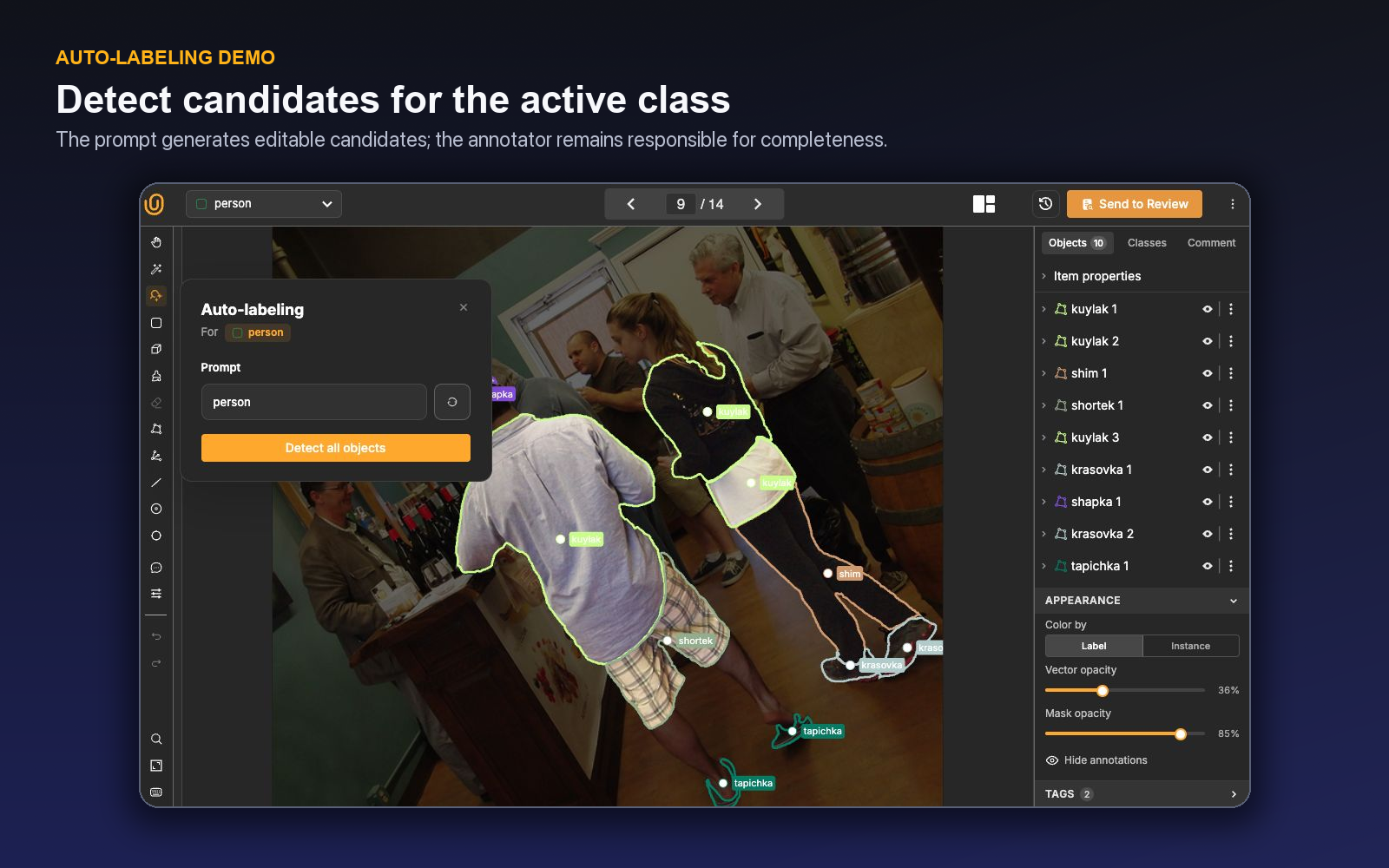
The design reduces friction: annotators do not need to type a prompt from scratch for every common class. The editable field remains important because the class name may be too broad, too internal, or poorly aligned with the visual concept the model recognizes.
Class name and detection prompt serve different audiences
An ontology name serves humans, data contracts, and downstream code. A detection prompt guides a model. They should agree semantically but do not have to be identical.
For example, an internal class called PPE_HEAD may be precise in a taxonomy yet less useful as a visual prompt than “hard hat” or another domain-approved phrase. Conversely, a broad prompt such as “person” may detect visitors when the ontology class is limited to workers.
Prompt refinement should never silently redefine the class. Write down the relationship:
- Class definition: the authoritative inclusion and exclusion rule.
- Default prompt: the phrase used to generate candidates.
- Known prompt gaps: appearances or subtypes the prompt misses.
- Known prompt leakage: visually related objects returned outside the class.
If the prompt needs a long paragraph to produce acceptable output, test whether the class itself is too broad or whether separate passes are more reliable.
Review both precision and recall
Candidate review has two directions. Precision asks: “Which proposed objects do not belong?” Recall asks: “Which eligible objects did the model fail to propose?” A reviewer who inspects only the shapes on screen may accept high precision while missing half the scene.
Use a repeatable scan pattern after detection:
- Review each proposal for class and geometry.
- Remove duplicates and out-of-scope objects.
- Inspect dense or occluded regions for merged instances.
- Scan the complete image for missed objects.
- Add missing instances manually.
- Complete required properties and relations.
- Escalate genuinely ambiguous examples.
Unitlab's object inspector, visibility controls, color-by-instance mode, opacity settings, manual geometry tools, and comments support this correction pass.
Build a prompt benchmark
Select images across the real operating distribution: clear foreground objects, small instances, occlusion, crowding, unusual viewpoints, low light, blur, rare subtypes, and confusing negatives. Establish reviewed ground truth manually, then test the prompt.
Record:
- candidate precision;
- candidate recall;
- duplicate rate;
- geometry correction rate;
- review and correction time;
- performance by object size and scene type; and
- error rate on high-cost classes.
| Pattern | Likely meaning | Action |
|---|---|---|
| High precision, low recall | Prompt or model is conservative | Require systematic missed-object scan; test approved prompt variants |
| Low precision, high recall | Prompt is broad | Tighten wording or reserve for expert review |
| Good on large objects, weak on small | Scale sensitivity | Use manual search or a specialized model for small instances |
| Duplicate candidates | Crowding or ambiguous boundaries | Strengthen instance review and deduplication |
| Strong average, weak rare subtype | Benchmark imbalance | Add subtype-specific evaluation and examples |
Compare total reviewed time with a manual baseline. Auto-labeling is successful when the accepted item becomes faster or more accurate—not when the interface displays more shapes.
Make class-aware detection part of the workflow
For a new class or source domain, use full review. Once error patterns stabilize, route difficult items or selected classes through more intensive review. Unitlab workflows can combine Model, Annotate, and Review stages, but the toolbar feature can also be used inside human annotation as a local assistive action.
These patterns are complementary. A workflow Model stage is useful for systematic inference over project items. Detect all objects is useful when an annotator decides that a class-aware pass will help with the current image. In both cases, define who accepts the proposal and how rejections return to correction.
Use comments for item-specific context and project issues for recurring behavior that needs an owner. If a prompt repeatedly confuses the same visual neighbor, update class instructions and the prompt registry rather than relying on oral reminders.
Avoid prompt drift
An editable prompt is powerful, but uncontrolled one-off edits can make output inconsistent across annotators. Decide whether annotators may change prompts freely, choose from approved variants, or use a fixed default. Record prompt changes during evaluation.
For enterprise programs, maintain a small prompt register with owner, version, target class, approved domains, benchmark result, known failure modes, and review requirement. A prompt change can alter the candidate distribution even when the ontology remains unchanged.
The ontology remains the authoritative schema. If the class changes meaning, update and version it through governance. If only the model-facing phrase changes, document the prompt revision and compare it on the stable benchmark.
A worked prompt-evaluation example
Imagine a warehouse-safety project with ontology classes person, forklift, and hard_hat. The active class person populates the default prompt with “person.” The team tests that prompt on wide scenes, occluded workers, reflections, safety posters, and people visible on monitor screens.
The proposal set is reviewed under the class rule: real people in the physical scene are included; posters and monitor content are excluded. The team measures missing small workers at the back of the warehouse separately from false proposals on printed imagery. If an approved prompt variant improves small-person recall but increases poster detections, reviewers receive a specific negative-example check.
For hard_hat, the class rule states whether hats being carried count. A prompt that detects every hard-hat-shaped object cannot resolve that semantic policy; scene context and relation to a person remain human decisions.
Estimate operational value
Calculate manual search and drawing time, candidate generation wait, proposal review, correction, missed-object scan, and final review. Add model or platform cost if relevant to the business case. Report accepted objects per hour and error by class—not raw proposed objects.
A prompt pass may have high value on dense scenes and negative value on sparse scenes. Give annotators an approved decision rule rather than forcing a universal step.
A complete current-frame detection pass
Consider a construction frame containing workers, visitors behind a fence, mannequins on a safety poster, and partially visible people at the edge. The ontology class Worker requires a visible person participating in site activity; visitors and printed depictions are excluded. The internal class name alone is not enough to communicate that boundary to a detector.
The annotator selects the box class and presses S. The Create annotations panel opens with the class name as the default prompt. For the calibrated project, the approved prompt is changed to a concise visual phrase that improves worker coverage without silently changing the ontology definition. Detect all objects runs only on this frame and consumes one successful AI-inference unit.
The returned candidates become a review set. The annotator removes the poster and fence visitor, corrects boxes that include too much background, separates a merged pair, and zooms into the frame edge for missed workers. Required object properties are completed after geometry acceptance. A second call is justified only if the prompt or class pass serves a clear purpose; repeated calls are not a substitute for a systematic source scan.
For video, the same action remains frame-scoped. Accepted objects can then become seeds for tracking, but the detection call itself does not create a verified temporal identity. The annotator must decide whether each object should be tracked full, forward, or backward and review continuity on the timeline.
A project benchmark should preserve the prompt, ontology version, source slice, configured candidate limit, inference usage, accepted candidates, manual misses, and correction time. That record distinguishes prompt improvement from a changed data distribution and lets operations decide which classes justify the quota cost.
Detect all objects should also have an exit rule. If two prompt variants still miss small or occluded instances, the annotator returns to manual annotation or uses another validated method instead of spending quota on repeated broad calls. If the class contains several visually distinct subtypes, the team can define separate approved passes—but every pass must map back to the same authoritative class definition and be deduplicated before acceptance.
The reviewer should compare the source with both visible candidates and accepted objects. That three-way check catches a subtle failure: a correct candidate may be deleted accidentally during cleanup, while an incorrect candidate may remain because its box looks plausible. Candidate generation, acceptance, and final ground truth are different states.
Turn one prompt into a controlled production policy
Suppose a safety project needs every worker in construction images. The ontology distinguishes workers from visitors and records helmet status as a property. Typing “person” may return more candidates, but it also changes the semantic task. A production prompt must follow the class definition rather than replace it.
Build a small benchmark with clear workers, visitors, partially visible people, reflections, posters, mannequins, crowds, and empty scenes. Keep negative images in the set; otherwise precision looks better than it will in production. Select the worker class in the Workbench, inspect the class-derived prompt, and change it only under a recorded version of the prompt policy.
Run Detect all objects and classify the results before accepting anything. A correct candidate has the right class and usable geometry. A class false positive depicts a real object outside the class policy. A visual false positive is not the target object at all. A duplicate overlaps another candidate for the same instance. A miss is an eligible object with no proposal. These categories matter because a single “accuracy” number does not tell the team which remedy is needed.
Review candidates from the whole image, not only from the suggestion list. Reject out-of-policy results, adjust correctable geometry, and search for missed objects at small scales, image edges, and occluded regions. Apply helmet_status only after object identity is confirmed. If the evidence does not support the property, use the controlled uncertainty option rather than turning a detection guess into a semantic guess.
The benchmark should compare at least three paths: manual annotation, the default class prompt, and the revised prompt. Measure accepted objects per hour, precision after human review, missed-object rate, duplicates, average correction time, and reviewer correction. A revised prompt that raises recall but doubles inspection noise may reduce production throughput.
Prompt drift deserves the same discipline as ontology drift. Save the prompt text, selected class, benchmark cohort, platform or model context, and observed error pattern. When the source domain changes—from indoor sites to night work, for example—rerun the benchmark instead of assuming the old prompt still represents the class.
Put the policy into instructions: when to use detection, which prompt is approved, which classes require exhaustive manual search, and which failure patterns require escalation. In the workflow, assisted items should follow the same Review path as manual items. The reviewer evaluates completeness and correctness, not how quickly candidates appeared.
The final production rule may be intentionally narrow: use the class-derived prompt on standard daytime images, review every candidate, perform a full manual scan, and fall back to manual-only work for dense night scenes. That rule is more useful than a broad claim that prompting “automates annotation.” It tells the operator what to do, tells the reviewer what to verify, and gives the team a benchmark that can be repeated after change.
Audit the misses, not only the candidates
Candidate review naturally focuses attention on what the model found. Counter that bias with a structured miss pass. Divide the image into regions, scan at an appropriate zoom, and compare every eligible object with the accepted set. Mark whether each miss is small, truncated, occluded, unusual in appearance, or excluded by a prompt wording choice.
Aggregate those miss categories after calibration. If the same class condition is repeatedly absent, a prompt revision or second prompt may help. If misses come from source quality, route the cohort through curation or add an assessability Item Property. If the class policy itself is disputed, stop optimizing the prompt and fix the ontology or instructions.
Keep at least one empty or target-free item in regular checks. A prompt that appears productive on crowded positives can create costly false proposals on negatives. The complete benchmark therefore measures candidate quality, exhaustive recall, and the operator's ability to finish correctly when the model returns nothing useful.
When the prompt or model context changes, rerun the same benchmark and record the new error distribution. That makes a prompt an accountable production configuration rather than an undocumented sentence that gradually changes between annotators.
Define the handoff to Review with assisted work in mind. The reviewer should see completed annotations, not an unexamined proposal layer. Sample accepted candidates, corrected candidates, manually added misses, and target-free images. Compare errors by prompt version and class rather than combining every assisted item into one rate.
If a prompt works for one subtype but not another, resist the urge to encode the entire ontology in a long sentence. A clearer class definition, nested property, second controlled prompt, or manual path may be easier to operate and audit. Prompt complexity should earn its place through reviewed results.
Finally, keep a stop condition. If candidate review plus miss search costs more than the manual baseline for a cohort, disable the assisted path there and revisit it only after the model, source, or class policy changes.
Include reviewer time in that decision. A prompt that saves annotators time while producing subtle false positives can shift cost downstream and increase escapes. Reviewed cost and error severity—not proposal count—decide whether the policy belongs in production.
A prompt rollout with explicit promotion gates
Start with a fixed benchmark divided into prompt-development and acceptance sets. Cover clear positives, difficult positives, empty scenes, look-alikes, rare subtypes, small and occluded objects, and every source domain expected at launch. Keep the acceptance set hidden from prompt iteration.
Evaluate the default class-derived prompt first. For each item, record generated candidates, correct candidates, class false positives, visual false positives, duplicates, missed eligible objects, geometry correction, and total reviewed time. Then change one aspect of the prompt and rerun the development set. Avoid changing prompt, class definition, threshold, and source cohort at once.
Promote only if the revised prompt improves the intended metric without creating an unacceptable error elsewhere. A recall gain may be worthwhile for exhaustive detection, but not if candidate noise overwhelms review. A precision gain may reduce noise while hiding small objects. Let the model objective and error cost decide.
Document the approved prompt with class, ontology version, source scope, model context, benchmark, expected failure modes, and manual completeness rule. Add it to project instructions. Operators should know when to run detection, how to review results, and when to fall back to manual work.
Launch on a limited cohort under full review. Compare live false proposals, misses, correction time, reviewer escapes, and quota or availability behavior with the benchmark. Expand only after the distribution is stable. If a new source or class subtype appears, return that cohort to the acceptance study.
Prompt operations need a version boundary even when the UI accepts free text. The team should be able to explain which prompt produced a release and why it was approved. That is what turns natural-language prompting into a reproducible annotation workflow.
Try the workflow in Unitlab
Define an exit rule before the benchmark begins. A prompt is production-ready only when its missed-object and false-positive rates remain acceptable across the important source slices—not when one attractive frame looks complete. Keep rejected detections in the review sample so the benchmark measures the system that annotators actually experience.
Also separate detection from temporal propagation. Detect all objects proposes compatible objects on the current image or frame; tracking carries accepted objects through a sequence. Reviewing those steps independently makes it clear whether an error came from the prompt, the initial geometry, or later motion.
- Select a class whose visual definition can be expressed clearly and open the Auto-labeling panel.
- Compare the default class-name prompt with a more precise prompt drawn from the ontology description.
- Run Detect all objects on a small, representative set; preserve empty and failed results.
- Review every candidate for scope and geometry, then scan the full image for misses.
- Record the prompt, ontology version, source slice, correction, and final acceptance.
Track precision, recall, duplicate proposals, geometry correction, no-result rate, and accepted-item time. A better prompt improves the reviewed outcome, not merely the number of shapes returned.
The decision to make
Choose one class with common false positives. Test two prompts in Unitlab on the same images and compare reviewed precision, recall, and total correction time.
See how Unitlab supports enterprise data annotation workflows.
Continue in the Unitlab documentation: Image annotation.