The first assisted mask looks impressive: most of a jacket appears in one interaction. At 400% zoom, however, the cuff is fused with the background, a thin strap is missing, and an interior gap is filled. The tool saved the first eighty percent of the work; whether it saved time depends on the final twenty.
Magic Touch should be evaluated as an interactive starting point, not a quality claim. Its value is the reduction in total accepted-mask effort after boundary correction, class assignment, and review.
Pixel-accurate masks deliver rich training signal, but they are among the most expensive labels to produce well. Thin edges, interior holes, low contrast, occlusion, and visually similar neighbors turn a simple outline into minutes of careful work. Interactive segmentation changes the starting point: the system proposes a region, while the annotator remains responsible for the final mask.
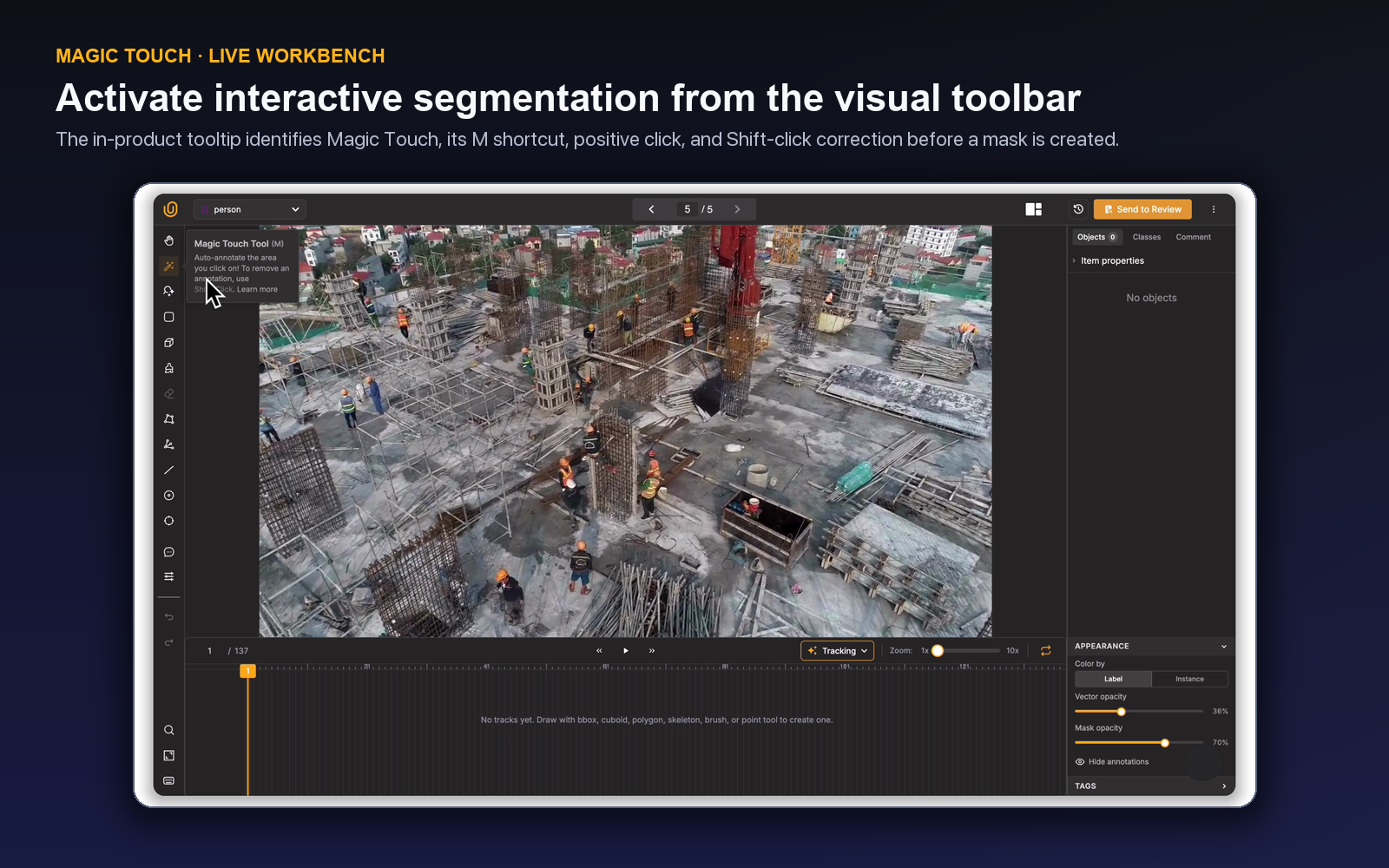
Magic Touch is available in the live Unitlab image and video toolbars. Its placement beside the manual mask controls signals the intended pattern—it assists segmentation inside the existing ontology and review system rather than creating a separate, ungoverned output.
Evaluation rule: Measure accepted-mask time, not first-mask speed. Interactive segmentation creates value only when proposal, correction, and review together take less effort at the required boundary quality.
How Magic Touch fits the workbench
Press M to activate Magic Touch in a supported visual workbench. The tool adds to the assisted mask; Shift + Click removes from it. If no compatible class exists, Unitlab opens the compact Quick Create Class dialog already configured for a Mask class, with name, color, and a numeric hotkey. Creating the class selects it and keeps the drawing tool active so annotation can continue immediately.
The class-first behavior matters. Every assisted mask must still carry a defined semantic identity. The annotator is not producing an anonymous region; the result belongs to a reusable ontology and can carry properties, relations, comments, and workflow state.
Where interactive segmentation helps most
Magic Touch is a strong candidate when objects are visually coherent but manually tracing them would be slow. Common examples include products against a background, vehicles, people, large defects, cells with clear contrast, or repeated objects with recognizable boundaries.
The benefit may be smaller when:
- the object is extremely small;
- boundaries are intrinsically ambiguous;
- foreground and background have nearly identical appearance;
- many thin disconnected structures are present;
- heavy occlusion splits the visible region; or
- the ontology requires a boundary convention different from the visual edge.
That last case is important. A model can follow pixels precisely and still violate the labeling policy. If shadows are excluded, transparent regions are handled specially, or only the visible part of an occluded object should be labeled, the human decision remains authoritative.
The correct assisted-mask loop
A robust interactive segmentation loop has five steps:
- Select the correct mask class before generating a proposal.
- Provide the interaction the tool requires on a representative part of the object.
- Inspect the entire proposed region, not only the interaction point.
- Correct the result with manual mask controls such as brush and eraser.
- Review semantic class, properties, and boundary policy before completion.
Press [ or ] to adjust brush size during correction, use F for brush and E for eraser, and use Ctrl/Cmd + Z or Ctrl/Cmd + Y for undo and redo. H opens the full shortcut guide for the active panel.
Unitlab's opacity and annotation-visibility controls support the inspection step. Lowering mask opacity helps compare the proposed edge with the image. Coloring by instance can expose accidental merges between adjacent objects.
The workbench also provides object ordering. When masks overlap, bring-to-front and send-backward controls can make inspection easier without changing the semantic label.
Benchmark correction effort, not proposal speed
An interactive model often feels fast because the first visible result appears immediately. That is not the production metric. The meaningful comparison is time to a reviewed, accepted mask.
Build a benchmark with easy, typical, and hard objects. For each method—manual polygon or brush, and Magic Touch-assisted mask—record:
- time to initial result;
- correction time;
- reviewer time;
- number of boundary corrections;
- missed regions and unwanted inclusions;
- class or instance errors; and
- final acceptance rate.
If the proposal saves 30 seconds but adds 45 seconds of careful cleanup, it is not a gain. If it produces a stable 40% reduction on clear objects but no improvement on thin structures, adopt it selectively.
| Outcome | Interpretation | Operational response |
|---|---|---|
| Fast proposal, little correction | Good fit | Make it the recommended first tool for that category |
| Fast proposal, repeated edge error | Policy or model mismatch | Add a focused review rule or use another method |
| Variable result by scene | Conditional fit | Define when annotators should switch tools |
| Slow or unusable proposal | Poor fit | Return to polygon, brush, or another geometry |
Protect instance identity
Interactive segmentation can accidentally combine touching objects or split one object into disconnected pieces. The ontology must define whether each visible instance receives a separate mask and how disconnected visible parts of one occluded object are represented.
Annotators should inspect nearby instances after accepting a proposal. In crowded scenes, color by instance and temporarily hiding other labels can reveal whether two objects were merged. Reviewers should look for systematic merge and split patterns, not only boundary accuracy.
If the downstream model is semantic segmentation, instance separation may not be required. If it is instance segmentation, the distinction is fundamental. Tool guidance should reflect the exact target.
Use the ontology to reduce ambiguity
A mask class in Unitlab can include a description, color, hotkey, attributes, single- and multi-select properties, and text properties. Use the description for the short decision boundary and project instructions for detailed visuals.
Specify:
- inclusion of shadows, reflections, holes, or transparent areas;
- visible-only versus estimated full extent;
- treatment of tiny disconnected regions;
- minimum object size;
- acceptable boundary tolerance; and
- what to do when the source is not assessable.
Required properties can ensure a completeness field is not skipped, but every requirement should provide an appropriate unknown state when the image cannot support a decision.
Review assisted and manual masks the same way
Automation source should not change the acceptance standard. A reviewer needs to inspect class correctness, full boundary coverage, exclusions, holes, overlap, properties, and instance separation. Unitlab workflows can route annotated items to Review and send rejected work back for correction.
Comments should explain item-specific ambiguity; issues should capture recurring problems that need an owner. If reviewers repeatedly correct the same Magic Touch behavior, update instructions, restrict the recommended use case, or change the tool choice. Repeated manual compensation is evidence that the operation needs redesign.
A worked segmentation example
Consider an inspection project that masks paint defects on metal panels. The ontology defines whether glare, dirt, and surface texture are excluded, and whether multiple disconnected spots form one defect instance. An experienced annotator creates a Mask class and tests Magic Touch on clear defects, low-contrast defects, thin scratches, and clustered damage.
For a large clear chip, the initial proposal covers most of the region. The annotator lowers mask opacity, erases glare included at one edge, and adds a small missed interior area. For a thin scratch, the proposal repeatedly includes surrounding texture, so the annotator switches to brush or polygon work. The tool policy becomes conditional: Magic Touch is preferred for coherent area defects, while thin linear defects use a different method.
Reviewers record whether correction concerned class, outer boundary, holes, extra background, merged instances, or missed region. The benchmark shows not only average time but which defect types gain from assistance.
Design a mask-quality rubric
Define acceptance at three levels:
- Semantic: the mask belongs to the right class and represents a valid instance.
- Topological: disconnected regions, holes, and instance separation follow policy.
- Geometric: the boundary remains within the approved tolerance at useful zoom.
Not every project needs the same tolerance. A visual content model may accept a small edge difference; a measurement application may not. Use representative reviewer examples rather than asking for “pixel perfect” without a scientific definition.
Apply that rubric in an image annotation QA workflow that checks missing instances, boundary errors, and class consistency before acceptance.
A production pass in the Workbench
Imagine a quality-inspection image containing a shallow crack on a painted surface. The ontology defines a Crack mask class with required Severity and optional Surface condition properties. The annotator presses M, selects the class, and guides the first proposal on the clearest part of the crack. The proposal covers the main body but misses a thin branch and includes a dark paint edge.
Before editing, the annotator opens View Settings. Mask opacity is reduced so the source boundary remains visible; the cursor ruler and a smaller handle/brush scale make the thin branch easier to inspect. F adds the missing region, E removes the paint edge, and [ / ] adjusts brush size. If the assisted mask includes a neighboring defect, Shift + Click removes that region from the Magic Touch result.
The annotator then checks the complete object rather than the interaction point: exterior edge, internal holes, disconnected visible parts, and contact with nearby annotations. Severity is set only after the approved boundary rule is satisfied. An unusual reflection receives a comment; a missing schema field can be added from the selected object without abandoning the task.
Review repeats the edge check at a different opacity and compares the result with nearby examples. The accepted-time metric includes proposal, correction, property completion, and reviewer effort. If the same paint edge repeatedly enters proposals, the team adds it as a negative example in instructions or narrows where Magic Touch is recommended. The feature then improves through operating evidence rather than intuition.
This workflow also protects against a common automation-bias failure. A proposal that looks polished can receive less scrutiny than a hand-drawn mask, even though it may contain systematic boundaries a human would never draw. Applying the same acceptance rubric to assisted and manual masks keeps the quality definition stable.
Segment performance by object condition. Large isolated objects, crowded instances, thin structures, low-contrast boundaries, and occluded shapes can produce very different correction costs. A project may recommend Magic Touch for two of those groups and manual polygon or brush work for the rest. The operating rule should name the switch condition so annotators do not keep retrying a poor proposal merely because an assisted tool is available.
When mask policy changes, rerun a representative benchmark. A new decision about shadows, holes, transparency, or disconnected visible regions can change correction effort even when the model has not changed. Tool performance is inseparable from the definition of an accepted mask.
Benchmark the correction loop on a genuinely hard mask
Choose an object with the boundary behavior that matters in production: a bicycle against a fence, a lesion with low-contrast edges, translucent packaging, hair, foliage, or an object partly hidden behind another instance. Easy, isolated objects make every segmentation method look good. A useful benchmark includes thin structures, holes, occlusion, and at least one neighboring object with similar color.
Define acceptance before clicking. Decide whether holes must be preserved, whether shadows are excluded, how to handle motion blur, how far an invisible boundary may be inferred, and whether disconnected visible regions belong to one instance. These are ontology and instruction decisions. Magic Touch can propose a mask, but it cannot decide what the project means by the object.
Select the correct Mask class, activate Magic Touch, and provide the interaction required to identify the target. Inspect the proposal at fit-to-screen first: does it select the correct instance and cover all major regions? Then zoom into the difficult boundary. Correct spill into a neighbor, missed thin parts, closed holes, and isolated fragments. If the proposal chose the wrong instance, clear it and reseed rather than accumulating edits on a bad starting point.
Protect identity. In a crowded image, two visually similar objects may touch. The output should remain two instances when the schema requires instance segmentation. Use instance coloring and opacity controls to inspect overlap, and hide unrelated masks temporarily when necessary. Add Class Properties only after the geometry belongs to the correct object; otherwise a perfectly valid property can become attached to the wrong instance.
Review an assisted mask exactly as a manual mask. The reviewer should not know or care which tool produced the first contour when applying the boundary rubric. Check the full image for missed objects, then check sampled masks for edge adherence, holes, thin structures, occlusion policy, and instance separation. Record correction categories so the team can distinguish a weak proposal from unclear guidance.
Measure three time components: interaction to first proposal, correction to acceptance, and reviewer correction after submission. Compare the total with a manual polygon or brush baseline on the same object cohort. Also compare error severity. Saving thirty seconds is not valuable if a missed gap changes the downstream measurement or if reviewers must reopen most masks.
Segment results by object condition. Magic Touch may be excellent for coherent products and weak for transparent or heavily occluded items. The right operating policy can enable it for one class or condition and keep a manual path for another. That is more credible than reporting one average speedup across incompatible shapes.
Finally, use the benchmark to improve the system. Repeated missed holes may call for a clearer instruction example; neighbor spill may require better instance review; systematic failure on one domain may justify another model or a different geometry. The tool is most valuable when accepted-mask evidence tells the team where assistance belongs—and where human control should remain primary.
Build the review sample around mask risk
Do not sample every assisted mask at the same rate. Give full review to new classes, thin or branching structures, transparent objects, overlapping instances, and masks used for high-cost measurement. Mature, coherent classes can move to targeted sampling only after the correction record is stable.
Within each sample, check four layers. First, identity: the mask belongs to the intended instance and class. Second, extent: all policy-defined visible regions are included and excluded regions remain outside. Third, topology: holes, gaps, and disconnected components follow the rule. Fourth, context: nearby objects, shadows, reflections, and occluders were handled consistently.
Use properties and tags to preserve useful cohorts such as assisted versus manual, object condition, and review outcome when the project design allows it. Compare correction rates over time. If reviewers repeatedly repair the same edge type, create a project issue and add a visual example to instructions; do not allow the correction to disappear as an isolated item edit.
The acceptance decision should remain source-grounded. A smooth contour is not automatically a correct contour, and a rough-looking edge may be correct for a low-resolution image. Review against the evidence and the boundary policy, not against a preference for visually elegant masks.
For video masks, decide whether Magic Touch creates a manual keyframe that will be propagated or an isolated correction. Place keyframes at real shape, motion, or visibility changes and inspect interpolation or tracking between them. A precise mask on one frame does not guarantee temporal consistency.
If the object disappears, ends, or becomes fully unobservable, stop the range according to policy. Do not let a successful assisted contour encourage phantom continuation. Review the sequence once in motion for identity and flicker, then inspect the keyframes for boundary quality. Mask assistance and tracking solve different parts of the task; the operating procedure should say how they meet on the timeline.
A 100-mask acceptance study
Build a benchmark of 100 objects across the conditions that define production cost: coherent boundaries, thin structures, holes, transparency, low contrast, motion blur, occlusion, touching instances, small scale, and target-free negatives. Keep object classes and difficulty balanced enough to compare methods.
Write the mask policy first. Define visible extent, inferred boundaries, holes, disconnected regions, shadows, reflections, occluders, and minimum useful detail. Have annotators create half the masks manually and half with Magic Touch, then switch paths on comparable examples to reduce operator bias.
Record interaction time, first-proposal quality, correction time, final annotator time, reviewer correction, and serious error category. Inspect every benchmark mask at fit-to-screen and at the difficult boundary. A small cosmetic difference is not the same as merged instances or a missing gap that changes the downstream measurement.
Segment results by condition and class. Magic Touch may reduce work dramatically for coherent products and add correction cost for transparent or branching structures. Publish an operating rule that enables the feature where reviewed cost improves and preserves a manual path elsewhere.
For video, include short sequences and compare Magic Touch keyframes with mask interpolation or tracking. Evaluate temporal flicker, identity, and propagation boundaries in addition to per-frame masks. One excellent keyframe cannot compensate for a wrong track.
Use findings to improve instructions, ontology, and review sampling. Add visual examples of recurring edge errors, full-review high-risk masks, and monitor accepted-mask time over new sources. Rerun the study after a meaningful tool, model, class, or camera change. This keeps interactive segmentation as a measured production method rather than a one-time demo.
Try the workflow in Unitlab
Treat the first calibration set as a tool-policy exercise. Record which classes usually need one positive click, which need corrective Shift-clicks, and which should start with polygon or brush because texture, transparency, or boundary ambiguity makes an interactive proposal inefficient. That class-level policy gives annotators a repeatable starting point while preserving manual judgment.
- Choose a mask class with clear inclusion and exclusion rules, then open representative easy, thin, overlapping, and low-contrast objects.
- Activate Magic Touch with the correct class selected. If the class is missing, create the mask class from the workbench rather than producing an anonymous region.
- Generate the candidate and inspect the entire contour at review zoom, including holes and narrow structures.
- Correct with manual mask tools and record why correction was needed.
- Compare the accepted result with a manual baseline on the same object slices.
Measure accepted-mask time, boundary correction area, missed components, unwanted merges, undo count, and reviewer correction. Report results by object type; a strong average can hide failure on the shapes that matter most.
The decision to make
Select twenty objects across easy and difficult boundaries. Test Magic Touch in Unitlab and compare accepted-mask effort with your manual baseline.
See how Unitlab supports an image annotation platform and AI training-data annotation.
Continue in the Unitlab documentation: Image annotation.