A field inspection arrives as a PDF report, four photos, a technician's voice note, and a thirty-second video. Exporting the files separately preserves the media but destroys the case. The model team can no longer tell which photo supports which observation or whether a missing audio file means “not recorded” or “lost in processing.”
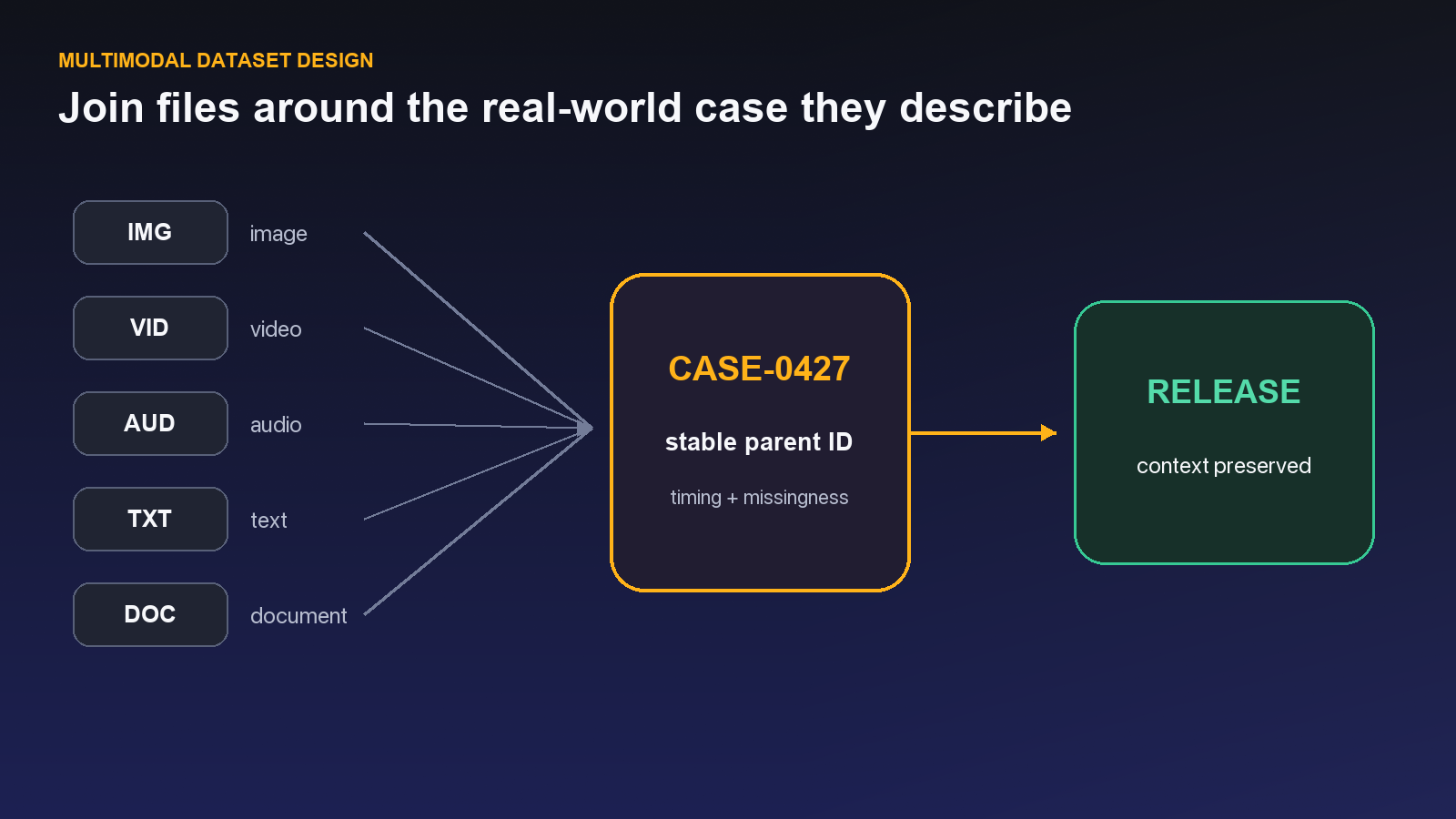
That is why a multimodal release is more than a download bundle. It must preserve the unit of work, the relationships among assets, the schema used to interpret them, and the gaps a consumer must understand.
Real-world AI systems rarely learn from one tidy media type. A support interaction may include a PDF manual, a voice call, screen captures, and a short video. An inspection record may combine forms, photographs, and sensor evidence. The useful training example is the connected package, not any single file in isolation.
Unitlab supports documents throughout the lifecycle: as source assets, native PDF annotation items, tiles in grouped multimodal work, and versioned release content. A project does not need a separate Document type. When a PDF resource opens, Unitlab selects the document workbench; when that PDF belongs to a Data Group, it can remain beside video, audio, images, or medical context in the saved layout.
The native document workflow supports multipage navigation, page-aware history, standard visual geometry, selectable embedded PDF text, and bounding boxes created from text or embedded image regions. Semantic table, equation, reading-order, or general figure extraction remains a model-assisted or manual schema decision rather than an automatic promise of the native selection layer.
Reader takeaway: Preserve the business case that connects the files. A multimodal release is trustworthy only when consumers can reconstruct which assets belong together, which schema interpreted them, and which evidence is missing.
See the Unitlab AI multimodal data platform in action
Unitlab helps AI teams curate, annotate, manage, version, and prepare multimodal training data at enterprise scale. This walkthrough shows video, documents, audio, images, synchronized layouts, workflow automation, review, and versioned datasets in one enterprise platform.
Explore Unitlab’s multimodal data annotation platform.
What a multimodal release preserves
A PDF appears as a Document resource with format metadata, page count, page dimensions, and its ground truth. A release can contain document, video, audio, image, text, and medical data together, while its sample-data table exposes preview, metadata, and annotation context.
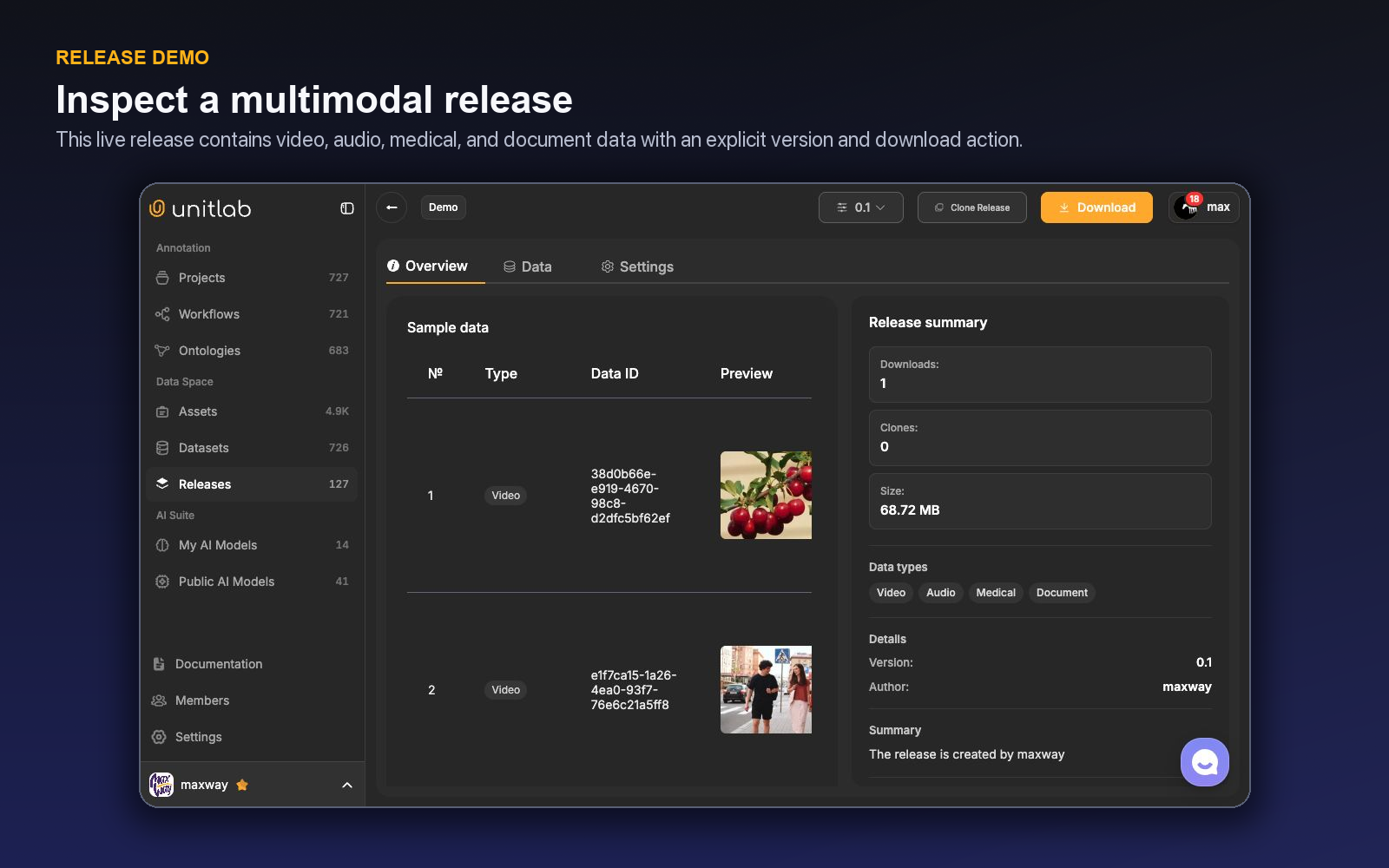
At the release level, Unitlab provides a version selector, Clone Release, Download, and Overview, Data, and Settings areas. Release cards communicate visibility, modality, creation date, previews, item count, and version.
These controls matter because a release should answer a precise question: Which exact data and annotations were approved for this downstream use?
Native PDF annotation flow
- Open the PDF inside the project Workbench. Use ←/→ for previous or next page and Shift + ←/→ for the previous or next document.
- Press D to enter Select PDF Text mode.
- Select embedded text and choose the needed outcome: copy it, populate a text property, or create a bounding box aligned to the selected region.
- For an embedded PDF image region exposed by the file, create a normal bounding box from the selected region.
- Use the standard object inspector to assign class, properties, attributes, relations, comments, and Item Properties.
- Save the annotation. History remains associated with the correct PDF page.
Native PDF text selection works with selectable embedded text. Scanned pages can use manual spatial annotation or an OCR/model workflow. The native layer does not automatically claim semantic tables, equations, generic figures, or reading order; define those outputs explicitly in the ontology and choose the appropriate human or model method.
Build the case with Auto-Grouping and Custom Layouts
Use filename-based Auto-Grouping when a report, voice note, photos, and video share a stable case identifier. The four-step builder—Configure, Rules, Layout, Review—can suggest filename keys, enforce required tiles, preview skipped or conflicting groups, and save a Grid, List, or free-form Custom Layout.
The layout follows the Data Group into the published dataset version and project. In the grouped Workbench, each tile keeps its native controls: PDF pages in one panel, audio waveform in another, video playback in a third. Only the selected panel is editable, but every panel remains visible as case context. The group receives one workflow state, assignee, priority, and release identity.
Datasets are working collections; releases are commitments
Unitlab datasets have lifecycle tabs for Active, Archived, and Trash. The live table displayed name, version, asset count, size, data type, projects using the dataset, last modified time, and creator. The create flow can attach folders or individual assets from the Data Space.
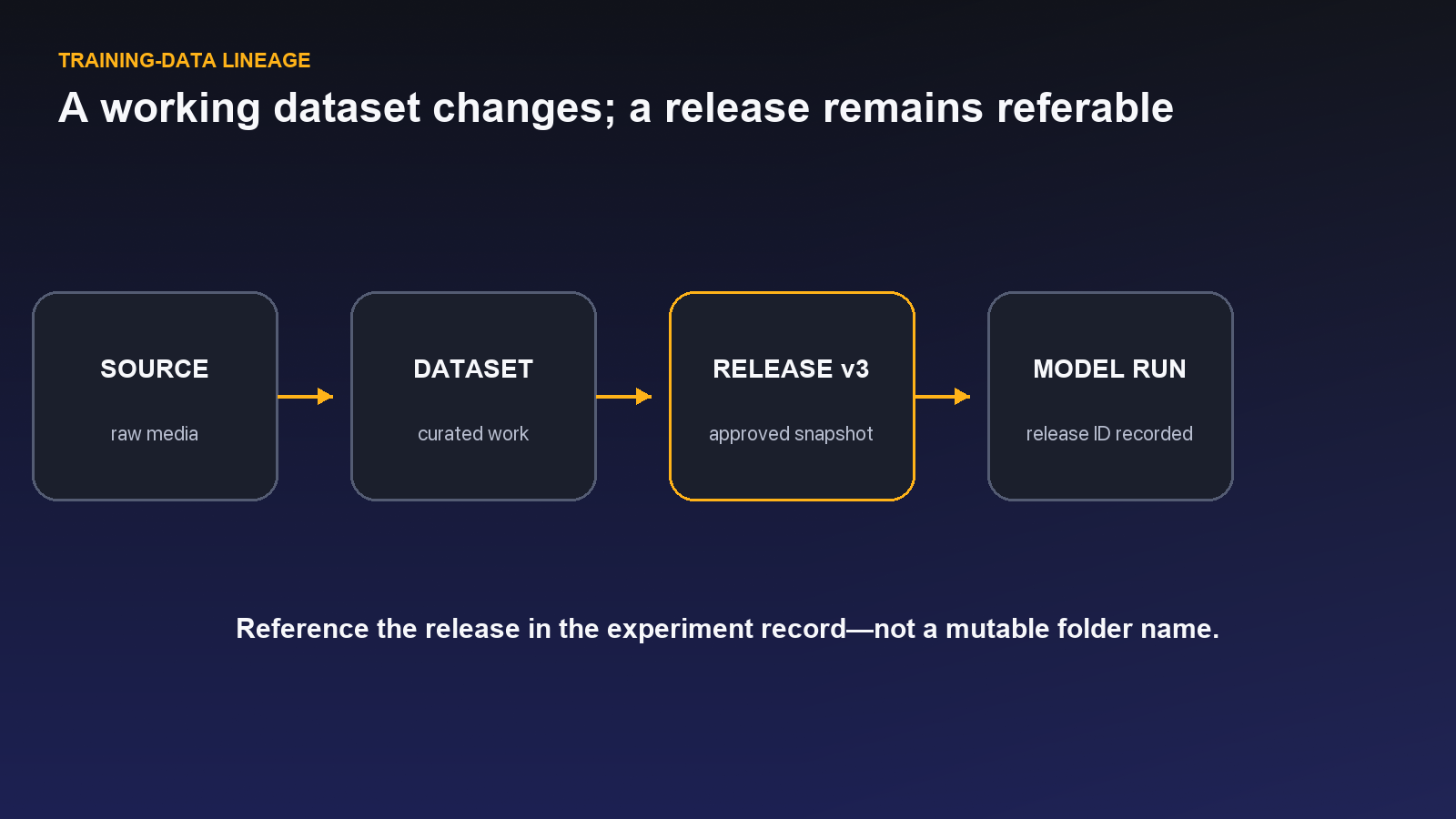
Releases present a different contract. They preserve a versioned package and expose delivery actions. A working dataset can continue to change as new documents or associated media arrive. A release should remain the stable reference for a training run, evaluation, external handoff, or audit.
| Lifecycle object | What may change | Recommended use |
|---|---|---|
| Folder | Membership and organization | Source-data management |
| Dataset | Selected assets and working version | Active curation and project attachment |
| Project | Annotation and review state | Production work |
| Release | New versions are created; prior reference remains distinct | Reproducible delivery |
Do not tell an ML team to train on “the dataset” without recording its version and release context. If annotations are corrected next week, the previous experiment must still be explainable.
Design a multimodal unit of meaning
Before collecting media, decide what joins the modalities. Is one unit a customer case, a device session, a patient encounter, a shipment, or a time-aligned event? File proximity in a folder is not a reliable relationship model.
Create a stable identifier at the business-unit level and preserve it as metadata or a controlled naming convention. Then define modality-specific IDs and ordering. For example:
- case ID: the cross-modal parent;
- document ID and page metadata;
- audio recording ID with start time;
- video clip ID with sequence or camera context; and
- annotation project and ontology versions for each derived result.
When time alignment matters, normalize timestamps and record clock assumptions. When order matters, preserve sequence explicitly rather than trusting filenames to sort naturally.
Curate each modality and the connections between them
A multimodal dataset can be individually clean yet collectively wrong. A document may belong to the wrong audio session; a video may be shifted by one case; metadata may use incompatible vocabularies.
Use Unitlab's asset views, folders, filters, tags, and search to inspect source material. The library supports filters for asset type, uploaded or cloud-storage source, tags, date, size, and dimensions for visual or medical assets. The embedding view provides visual cluster exploration for embeddable assets.
Then add cross-modal checks outside the purely visual review:
- Every child asset resolves to one valid parent unit.
- Required modalities are present or explicitly marked missing.
- Sequence and time alignment pass sanity checks.
- Duplicate or stale versions are removed from the working selection.
- Sensitive metadata follows the approved policy.
- The intended train, validation, and test boundaries keep related items together.
The last point is easy to miss. If pages from the same document or clips from the same session land in both training and validation, evaluation may overstate generalization.
Release anatomy for reproducibility
A strong release record includes more than a version number. Capture:
- purpose and intended downstream task;
- source folders, connections, and dataset version;
- inclusion and exclusion criteria;
- modality counts and missing-data policy;
- ontology and workflow versions;
- annotation and review status;
- known limitations;
- privacy or usage constraints;
- release owner and approval date; and
- the model experiments that consume it.
The Unitlab release UI provides the object and version controls; the organization should define the release note and approval standard.
Clone to experiment without erasing lineage
Clone Release is useful when a validated package becomes the starting point for another project or experiment. Cloning should create a documented branch, not an anonymous copy. Record why the clone exists, what is expected to change, and how results will be compared with the source release.
Examples include testing a new ontology, adding a modality, applying a different review strategy, or building a reduced benchmark. Keeping the source reference makes these experiments interpretable.
A worked document-plus-media case
Imagine an equipment-maintenance record containing a PDF report, an audio note, and a video of the failure. The parent ID represents the maintenance event. The PDF carries page metadata, the audio has a recording timestamp and event annotations, and the video has object tracks. Each modality is reviewed in the appropriate validated project path, then joined through parent metadata in a multimodal release.
The release manifest records which pages, clips, and audio intervals belong to the case. It also records the document ground truth source, audio-event ontology, video ontology, review status, and any missing component. If a corrected PDF arrives later, the team creates a new working dataset version and then a new release rather than replacing the evidence behind an existing model run.
This pattern lets a model team reproduce the case and decide whether to consume every modality or a subset.
Measure multimodal completeness
Create a case-level dashboard with expected modality, received modality, processable state, annotation state, review state, exclusion reason, and release inclusion. Aggregate file counts are insufficient: one case with five videos and another missing its document can still produce the expected total.
Define quality thresholds for parent-link integrity, missingness, timestamp alignment, ground-truth availability, and split leakage. Review rare combinations because the most incomplete cases may also represent important production conditions.
A worked field-inspection case
Return to the PDF report, photos, voice note, and short video from the opening. Their filenames share inspection ID INSP-2048 and role suffixes such as report, front, detail, voice, and walkaround. In Auto-Grouping, the team uses the inspection ID as the group key, makes the report and walkaround video required, and allows the voice note to be optional. The estimate reveals one case missing its required report before annotation begins.
The Custom Layout places the PDF on the left, video on the upper right, audio below it, and two images in a narrow evidence column. The group is published inside a dataset version and attached to a project as one work item. The annotator activates the PDF panel, uses D to select a reported defect phrase, and converts the region into a bounding box. The video panel then becomes active for temporal evidence; the PDF and images remain visible but read-only.
A reviewer receives the complete group—not five unrelated tasks—and checks whether the report, visual evidence, and audio note agree. One Item Property records the case outcome, while tile-specific annotations retain their native geometry and timing. The release preserves group identity and tile context in UUEF so a downstream consumer can reconstruct the inspection instead of guessing relationships from filenames.
If the optional voice note is absent, the group records that state instead of inventing an empty audio label.
Assemble one field-inspection case without losing its joins
Imagine a field inspection that produces a PDF report, six photographs, a 40-second video, a voice note, and a technician comment. The model team wants to predict defect category and severity, but the source system stores each file independently. A release that simply includes all files creates volume, not a trustworthy case.
Begin in Assets. Verify processing state, modality, source, and stable identifiers before grouping. The case key should come from durable metadata—inspection ID, asset ID, or another governed key—not from filename position unless that convention is guaranteed. Use Auto-Grouping rules to preview which resources will become one unit. Treat missing or duplicated members as visible curation outcomes instead of quietly filling or dropping them.
Design the Custom Layout around the decision. The PDF may be the anchor panel, photographs may occupy an image grid, the video may be active when temporal annotation is required, and the audio or comment may provide supporting context. Decide which panels are active annotation surfaces and which are passive evidence. The same case can support multimodal reasoning without asking annotators to label every resource in the same way.
Use Item Properties for facts that describe the inspection as a whole: inspection type, overall severity, completeness, or disposition. Use classes and Class Properties for localized evidence inside the photo, video, text, or document. Relations can connect a defect region to a component or a report statement to supporting media when that link is needed downstream. The ontology should express the output contract, while the grouping rules express the input contract.
The review path must test both. A reviewer can agree with every individual annotation and still reject the case because the video belongs to another inspection or a required document page is missing. Add multimodal completeness and join integrity to the QA rubric. Record a controlled missing-modality state when absence is allowed; route the case out of production when the required evidence is unavailable.
When the dataset is ready, create a version that freezes the selected grouped state. Build a Release from approved versions rather than from a moving folder. The release should communicate what it contains, which modalities were optional, which ontology and instructions governed the work, what exclusions were applied, and which limitations remain. A model training job should be able to reference that release without depending on today's state of Assets.
Now test lineage with one correction. Suppose the voice note was attached to the wrong inspection. Correct the grouping in the working data, create a new dataset version, and publish a new release. Do not rewrite the release already used by a model run. The two releases should make the difference understandable: same project, same model objective, one corrected case relationship.
This example exposes why documents belong inside multimodal data operations rather than in a separate export lane. The document often provides the identity and context that make media useful; the media often provides the evidence that makes a document field trustworthy. A governed case preserves both the content and the relationship between them.
A release acceptance gate for grouped documents
Sample grouped cases from the beginning, middle, and end of every source window. For each case, verify the stable key, the expected members, optional and required modalities, panel roles, and the annotations that cross resource boundaries. Open the document and at least one media resource; do not approve grouping from filenames alone.
Then simulate the consumer. Can a training job distinguish the PDF from the photo set, retain page and timestamp context, and resolve every relation endpoint? Can it identify a missing voice note as an allowed absence rather than a failed join? Can it reproduce the split without placing pages, frames, or duplicates from the same case on both sides?
The release notes should answer those questions in plain language. Include the grouping key, completeness rules, active versus passive layout behavior, dataset versions, ontology version, and known limitations. If the release contains a mix of complete and partial cases, publish the counts or selection logic rather than hiding the mixture in one total.
Finally, take one released case and trace it backward to Assets and forward to the exported consumer representation. This single lineage drill catches broken identifiers, dropped properties, and relations that looked correct in the Workbench but lost meaning in delivery.
Assign ownership for each layer of the case. Source operations own the stable identifier and arrival completeness. Data curation owns grouping and eligibility. Project owners own layout, ontology, and instructions. Annotators and reviewers own evidence-based decisions. Release owners approve the final consumer contract. Without these boundaries, a wrong join can be “fixed” as an annotation and an annotation ambiguity can be pushed back onto storage.
Use issues to capture failures that cross those layers, and resolve them before promotion when they affect meaning. A missing optional photo may be acceptable; a report tied to the wrong case is not. The release gate should make that difference explicit.
Preserve page, frame, timestamp, and source identifiers in captions or metadata whenever an annotation refers to evidence outside its own resource. A cross-modal link is useful only if the consumer can navigate back to the supporting evidence after export.
For the PDF portion of each case, use document annotation quality assurance to review fields, text regions, and layout labels before release.
A document-centered multimodal pilot
Select 40–60 cases containing native PDFs, scans, photographs, short videos, audio, and text notes in the combinations expected in production. Include missing pages, rotated scans, duplicate attachments, OCR-poor pages, mismatched case IDs, and documents that reference media not present in the source collection.
In Assets, verify processing state and stable metadata before Auto-Grouping. Preview rules against known complete and broken cases. Build a Custom Layout that makes the document readable while keeping supporting media close to the decision. Decide whether annotation occurs on document pages, media, both, or only through Item Properties and relations.
Calibrate extraction and classification separately. Test text selection, boxes around text or images, page navigation, document-level fields, entity or region properties, and links to supporting media. For a PDF invoice plus delivery photo, for example, the total may be extracted from the document, delivery condition from the image, and a relation or case-level property may connect the conclusions.
Review the joined case, not only each label. Check that the correct pages and media belong together, required members are present, optional absence is explicit, and cross-resource references resolve. Route grouping problems to curation and semantic problems to annotation or ontology owners.
Create a dataset version, then a Release, and test a consumer reconstruction. Can code identify the case, order pages, distinguish active evidence, retrieve annotations at their resource level, and preserve Item Properties at the case level? Can it tell a missing optional file from a failed import?
Measure join-error rate, document-processing failures, extraction correction, cross-modal relation errors, reviewer navigation time, and released-case completeness. The pilot demonstrates value when a connected case becomes easier to interpret and reproduce than a collection of individually correct but disconnected files.
Try the workflow in Unitlab
- In Assets, gather one case that includes a document and at least one other modality.
- Define a stable parent or case ID and record the relationship of every asset to it. Do not rely on filename similarity alone.
- Add the eligible assets to a dataset and inspect their metadata and processing state.
- Create or open a release, verify the version and sample rows, and confirm that document, audio, video, or image assets remain distinguishable.
- Download or clone the release in a controlled test and ask a downstream user to reconstruct the case.
Audit missing members, broken parent links, duplicate files, processing failures, and undocumented external joins. A release is successful when its context survives outside the interface.
The decision to make
Choose one real multimodal case and assemble a versioned release in Unitlab. Give it to someone outside the project and see whether they can reconstruct the evidence without assistance.
Continue with Unitlab’s cross-modal annotation workflows, a document annotation platform and multimodal data curation.
Continue in the Unitlab documentation: Document and PDF annotation.