A shelf image contains forty nearly identical bottles. One clean seed can save minutes—unless it represents the front-facing easy case while the missed bottles are tiny, occluded, or rotated. Similarity search amplifies the seed's visual assumptions.
Find Similar is best treated as a controlled search from a trusted object. The annotator chooses the seed, adjusts confidence, inspects candidates, and still performs an independent sweep for what similarity did not retrieve.
Many images contain repetition: products on a shelf, cells in a field, components on a board, trees in an aerial tile, or defects with a recurring appearance. Once an annotator has marked one trustworthy example, asking the system to find visually similar candidates can remove a large amount of repetitive search.
Find Similar is an object-level feature for selected boxes, polygons, and masks. The annotator selects an existing annotation, launches the search, reviews candidates at a configurable confidence threshold, and can clear or accept them. The seed object is therefore not just the first label—it is the query.
Reader takeaway: Find Similar is a search strategy, not a completeness guarantee. The seed controls what the system notices; an independent final sweep protects against what the seed could never represent.
What the live feature does
In the Unitlab demonstration, selecting an annotated cherry and launching Find similar produces 19 candidate objects at a 70% confidence threshold. The result interface exposes Clear and Accept all, allowing the annotator to reject the set or commit it after inspection. The number is an example from that scene—not a performance promise for every seed or source domain.
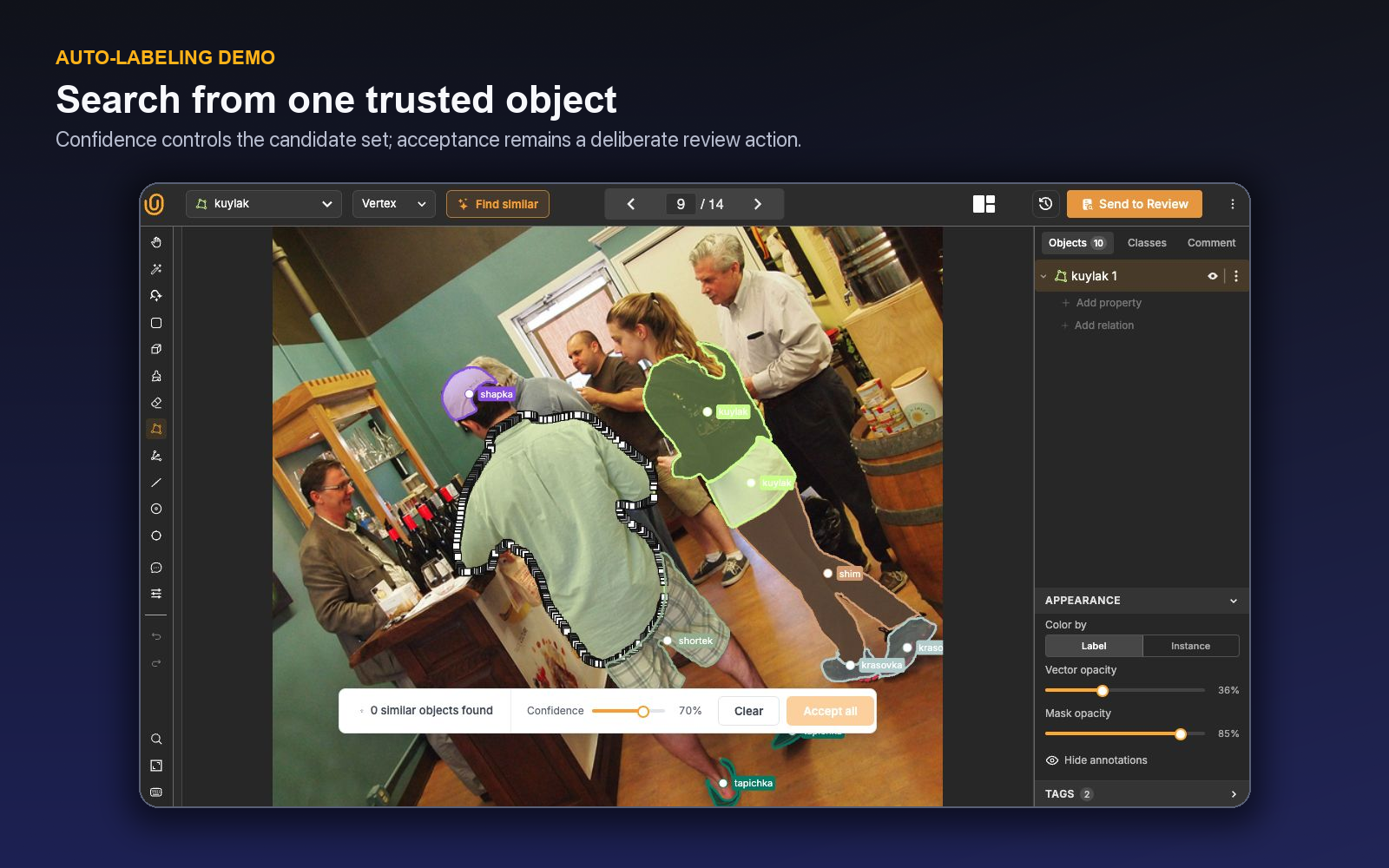
One trusted object becomes a visual query; the resulting candidates remain a review set, not automatic ground truth.
The positive demonstration is informative, but similarity is not guaranteed. A production procedure must also allow “no candidates” without encouraging a person to lower the threshold until unrelated objects appear.
The seed object defines the search
A useful seed should be correctly classified, tightly annotated according to policy, clearly visible, and representative of the instances the annotator hopes to find. A heavily occluded or unusual example may return a narrow or noisy candidate set.
Before searching, verify:
- class identity;
- geometry quality;
- visible content inside the region;
- absence of excessive background;
- whether the appearance represents the dominant subtype; and
- whether one search is expected to cover multiple visual subtypes.
For a class with varied appearance, use several deliberate seeds in separate passes. A vehicle class may require different seeds for cars, trucks, and motorcycles if one broad class is retained in the ontology. Record which seeds work well on which scene types.
Confidence is a review-control setting
The threshold balances candidate volume and likely relevance. Raising it usually narrows the set toward more confident matches; lowering it can expose harder candidates but increase false positives. The right value depends on the cost of missing an object, the cost of reviewing a false candidate, and the visual consistency of the class.
Do not choose the threshold by feel on one image. Use a benchmark and compare:
- candidates returned;
- true and false candidates;
- eligible objects missed;
- time to review candidates;
- time to add misses manually; and
- final reviewer corrections.
| Threshold behavior | When it may help | Main risk |
|---|---|---|
| Higher confidence | Repeated, visually consistent objects | Missing legitimate variation |
| Moderate confidence | Balanced candidate discovery | Requires disciplined review |
| Lower confidence | Rare objects where misses are costly | Review overload and false acceptance |
The threshold is not an annotation-quality score. It is a control over suggestions. Every accepted object still needs semantic and geometric review.
Review candidates in context
Similarity is visual, while class membership is semantic. A suggested region may look like the seed but belong to an excluded subtype, a reflection, an image on a poster, or a damaged object outside the definition.
Use the full image context when deciding. Then inspect geometry and instance separation. Candidate review should ask:
- Is this a real instance of the selected class?
- Does it satisfy inclusion and minimum-visibility rules?
- Is the geometry correct under the project policy?
- Is it already annotated?
- Does it need object properties or relations?
- Are there eligible objects outside the candidate set?
Accept all is efficient only when the complete candidate set has been inspected. If the results are mixed, clear or correct inappropriate suggestions rather than treating the action as a shortcut around judgment.
When Find Similar is likely to add value
The feature is well suited to scenes with repeated visual patterns and a moderate number of instances per item. It may be especially useful after a domain expert establishes one trusted annotation and a production annotator expands the set.
It may add less value when every instance looks different, when objects are extremely small, when context determines the class more than appearance, or when the image contains only one eligible instance. A zero-result search is a normal signal that manual work may be better for that item.
Find Similar searches the current image or current video frame, removes strong overlaps with existing annotations, and holds candidates for review before commitment. It is not a dataset-wide retrieval tool and does not consume AI-inference quota.
Compare it with Detect all objects
Prompt-based Detect all objects begins from a class and text prompt. Find Similar begins from a selected visual object. These approaches solve related but distinct discovery problems.
- Use a prompt when a class has a clear language description and the image needs an initial candidate pass.
- Use Find Similar when one trustworthy instance visually represents others in the same item.
- Use manual annotation when context or unusual geometry makes both candidate methods unreliable.
An annotator may combine them, but each pass should have a purpose. Multiple noisy candidate sources can increase deduplication work and create false confidence.
A worked repeated-object example
Consider a circuit-board project that labels one component class repeated across a board. The annotator chooses a clear, correctly oriented component away from glare as the seed. At the benchmarked threshold, Find Similar returns candidates covering most common orientations but misses partially occluded and unusually lit components.
The annotator reviews each candidate, removes one visually similar neighbor component, corrects boxes, and scans the board at high zoom for misses. A second pass uses a different seed orientation. Review checks for duplicates where the two result sets overlap.
The team records candidate precision, missed-instance rate, duplicate rate, correction time, and time per accepted component. It finds that two approved seed types outperform one low threshold. That becomes the documented operating pattern for the class.
Prevent candidate-set bias
Once suggestions appear, people naturally focus on them. Require a post-candidate scan using a fixed pattern: top-left to bottom-right, region by region, or another method suited to the scene. For dense images, temporarily hide accepted labels to reveal unlabeled gaps.
Measure recall on benchmark items even when candidate precision looks excellent. High precision can create overconfidence and lower final dataset coverage.
Decide when to stop searching
Set an operational stop rule. If a search returns zero candidates at the validated threshold, move to manual annotation or another approved seed. If candidate precision falls below a defined level, clear the suggestions rather than spending longer cleaning them than manual work would require.
The 70% value in the example is an interface setting, not a universal recommendation. Thresholds should be calibrated per class and source distribution.
From one seed to a complete item
Suppose an aerial image contains hundreds of solar panels, but glare, shadows, edge truncation, and maintenance vehicles create several visual subtypes. The annotator first draws one policy-correct panel box in a clear central row and launches Find Similar. At the calibrated threshold, the first pass returns the dominant front-facing panels.
Every candidate is checked in full-image context. Overlap suppression reduces duplicates with existing labels, but the annotator still verifies instance separation and geometry. Accept all is used only after the visible set is clean. A second seed from the glare region retrieves a different appearance; a third seed near the image boundary tests truncated panels. The passes are purposeful, and overlap is inspected where candidate sets meet.
The final step is independent of similarity. The annotator hides or dims accepted annotations, scans each row at high zoom, and manually adds eligible panels never represented by any seed. Properties are completed, and an uncertain object receives a comment. Because Find Similar does not consume AI-inference quota, its economics depend mainly on candidate-review and correction time, but “free inference” still does not make a noisy pass productive.
For video, Find Similar applies to the current frame only. It can discover repeated objects in that frame; tracking establishes identity across later or earlier frames. Dataset-level similarity is a separate Data Space operation using embeddings, filters, and clusters. Keeping these scopes distinct prevents a user from expecting one seed object to search the entire project.
Measure candidate coverage by visual subtype, false-candidate rate, duplicate overlap, manual misses after all passes, and accepted-object time. If the last independent scan finds many instances, improve seed diversity or return to a prompt/manual strategy. If two deliberate seeds cover most objects with little correction, Find Similar has earned a documented place in the workflow.
Choose assistance by the information available. Detect all objects starts from a class and language prompt; Find Similar starts from a selected visual instance; Data Space embedding search finds related assets or frames for curation; tracking propagates identity through video time. These operations can complement one another, but they are not interchangeable. A clear scope prevents duplicate work and unrealistic expectations.
For example, a curator may use embeddings to build a solar-farm dataset, an annotator may use Detect all objects for the first broad pass on a frame, Find Similar for a glare-specific subtype the prompt misses, and tracking for the accepted panel-cleaning vehicle across frames. Human review remains the layer that reconciles the outputs with one ontology.
Run the seed–search–verify loop on a crowded shelf
Imagine a shelf image with dozens of the same bottle, several similar bottles in another size, partial products at the border, glare, and a few empty gaps. The task requires every eligible bottle instance. This is a strong Find Similar case because repetition is high—but it is also a dangerous case for assuming that similarity equals completeness.
Create one trustworthy seed. Choose an instance that is clearly visible, tightly annotated, and representative of the class definition. A truncated or unusual seed can bias the candidate set toward the wrong appearance. Select the object and run Find Similar. The candidate panel exposes a confidence threshold, candidate count, Clear, and Accept all; treat the threshold as a review control, not a truth boundary.
Inspect high-confidence suggestions first. Reject duplicates, wrong sizes if the class excludes them, printed bottle images, reflections, and neighboring products with similar color. Correct geometry where the candidate is semantically right but spatially loose. Accept all only after the visible set has been checked; the action is a convenience for reviewed candidates, not permission to skip them.
Then lower the threshold deliberately and watch the error mix. If recall improves without overwhelming the reviewer, the lower setting may be operationally useful. If the list fills with look-alikes, return to the previous threshold and choose a second seed representing a missed appearance—perhaps a rotated or partly occluded bottle. One image may need several seeds because the class has several visual modes.
After every search pass, scan the shelf manually. Find Similar returns objects similar to the seed, not a certificate that every valid instance was found. Count eligible objects in a systematic pattern, check borders and occlusions, and compare against the accepted set. A zero-candidate result is also valid information: it can mean the seed is unusual, the remaining objects are visually different, or the item simply offers no useful reuse.
Keep instance identity and properties separate. Each accepted suggestion becomes its own object. Add bottle material, condition, or occlusion as Class Properties only after the instance is correct. Scene-level shelf quality belongs in Item Properties. This prevents one convenient seed from copying unsupported semantics across visually similar objects.
Reviewers should sample by candidate source. Compare seed objects, high-confidence suggestions, low-confidence accepted suggestions, and manually added misses. Track false acceptance, missed objects after the final scan, duplicate instances, and geometry corrections. If errors cluster in one suggestion band, the threshold policy or review sampling can change without abandoning the feature entirely.
The operational outcome is a stopping rule: search with one representative seed, inspect suggestions above the validated threshold, add a second seed only for a known appearance mode, then finish with an exhaustive visual scan. That story shows where the feature creates value—repeated discovery—while preserving human responsibility for class meaning and completeness.
Compare seed quality before comparing thresholds
Two seeds from the same class can produce very different candidate sets. Include a clear canonical object, a rotated object, a partial object, and a visually unusual subtype in calibration. Run the same threshold and record which appearances each seed retrieves. This separates threshold behavior from seed bias.
Prefer the smallest seed set that covers validated appearance modes. Too many searches can create duplicates and spend more review time than manual scanning. If two seeds return mostly the same objects, keep the one with better precision. If an important subtype is never retrieved, annotate it manually and decide whether a dedicated seed is justified in future items.
Review duplicate behavior explicitly. Similar-object search may surface a region already annotated manually or accepted from another seed. Use the Objects panel and canvas to confirm one instance per eligible object. A high candidate count is not a throughput metric if many suggestions represent duplicate work.
Finally, measure the whole item: time to create and validate the seed, suggestion review, duplicate cleanup, geometry correction, manual miss scan, and reviewer correction. Find Similar creates value when that total is lower at the required completeness—not when the suggestion panel alone feels fast.
Preserve a small log during calibration: seed appearance, threshold, candidates shown, accepted, rejected, duplicates, manual misses, and final reviewed time. After several items, the team can see whether success depends on one ideal seed or generalizes across the class.
Use that evidence to write a short operator rule. State what makes a good seed, the initial threshold, when a second seed is allowed, what must be checked before Accept all, and how the manual completeness pass is performed. Include a zero-result example so annotators do not feel pressure to manufacture suggestions.
Review the rule after source changes. New packaging, camera distance, lighting, or geography can alter visual similarity without changing the ontology. The feature should be revalidated on the new cohort just as any other model-assisted path would be.
If similarity search repeatedly returns another legitimate class, use the confusion as ontology evidence. Strengthen the class distinction and examples before tuning the threshold. The operator should not be asked to compensate indefinitely for a semantic boundary that the project has not defined.
A fair benchmark against manual discovery
Select images with repeated objects at several density levels: a few isolated instances, moderate repetition, crowded scenes, mixed subtypes, and no-target negatives. Include occlusion, scale change, rotation, and visually similar neighboring classes. Use the same images for manual annotation and Find Similar.
For the assisted path, choose a canonical seed under a written rule and run the validated threshold. Record candidate review, accepted and rejected suggestions, duplicates, geometry correction, second-seed use, manual misses, and final review. For the manual path, record systematic scan and object creation time under the same ontology and quality policy.
Measure complete reviewed time, missed-object rate, false acceptance, duplicate cleanup, and performance by density and appearance mode. Similarity search may dominate on shelves with repeated products and add little value in sparse, heterogeneous scenes. The production rule should preserve that distinction.
Test seed sensitivity by repeating a subset with a partial, rotated, or rare-subtype seed. If results vary sharply, instructions must define seed quality and a fallback. Test threshold sensitivity separately so the team does not attribute seed bias to confidence.
Launch with full review and a mandatory manual completeness pass. Sample accepted suggestions, manual additions, and target-free items. If live source changes reduce retrieval quality, return the cohort to calibration rather than encouraging annotators to lower confidence until suggestions appear.
The benchmark delivers a stopping rule and scope. Find Similar should be used when one or two trusted seeds reduce repeated discovery while human review still owns class meaning, instance separation, and exhaustive completion.
When similarity is the wrong organizing principle
Skip Find Similar when eligible objects are intentionally diverse, the class depends on behavior rather than appearance, or the best seed is itself ambiguous. A visual seed cannot express a temporal event, a relation, or a document-level intent. It may also retrieve a dominant subtype while systematically ignoring rare examples the dataset needs most.
Do not use repeated search as a substitute for curation. If an image contains extreme density, tiling, cropping, or a different task unit may make annotation and review more reliable. If two classes are visually indistinguishable without context, strengthen the layout, properties, or instructions instead of expecting a similarity threshold to solve the semantic decision.
The manual path remains a first-class outcome. Record the cohort where similarity adds no value and route it accordingly. A mature automation policy includes explicit exclusions; it does not force every item through the same assistance because the control exists.
Revisit the exclusion only when evidence changes: a new model behavior, a more stable seed, a revised ontology, or a different source distribution. This protects throughput comparisons from repeated experiments on a cohort that the method was never designed to handle.
Try the workflow in Unitlab
Scope the search to one visual concept at a time. A clean seed mask for one packaging style is a better query than a loose region containing product, shelf edge, and glare. After reviewing the candidates, switch seeds or classes deliberately; otherwise a convenient first example can narrow the discovered population and hide legitimate variants.
Find Similar also fits a combined-tool workflow. Use Magic Touch to create a precise seed, Find Similar to recover repeated instances, and manual tools to finish exceptional boundaries. Each step solves a different problem, so quality control should retain the origin of the proposal without lowering the acceptance standard.
- Create or select a high-quality seed whose class and geometry are already correct.
- Launch Find Similar and begin with a conservative confidence threshold.
- Inspect candidates individually before using Accept all; clear the set when the seed or threshold is wrong.
- Repeat with a difficult seed—smaller, rotated, partially occluded—and compare retrieval behavior.
- Finish with an independent visual sweep of the image.
Measure accepted candidates per seed, candidate precision, missed-instance recall, threshold sensitivity, duplicate rate, and total reviewed time. Zero candidates is a valid outcome and belongs in the benchmark.
The decision to make
Use one easy seed and one difficult seed on the same repeated-object scene. Run Find Similar in Unitlab and choose thresholds from accepted-label economics, not candidate volume.
Continue with Unitlab’s training-data curation workflows and AI training-data annotation.
Continue in the Unitlab documentation: Image annotation.