The endpoint returns HTTP 200 and a list of boxes. The demo is declared a success. In production, one source image times out, another returns coordinates in a different scale, and an empty response is mistaken for “no objects.” The integration works technically while the data operation fails semantically.
Bringing a model into annotation is a contract across transport, ontology mapping, failure states, human correction, and observability. Unitlab's staged wizard helps organize that contract; the serious work is proving each assumption on representative data.
An annotation model creates enterprise value only when it can enter a controlled operating loop. The endpoint must receive source data safely, return geometry that maps to the ontology, fail visibly, and hand its proposals to people who can correct them. A technically successful request is only the first step.
The live Unitlab model area separates My AI Models from Public AI Models and provides a four-stage wizard for external integrations: Registration, Validation, Integration, and Confirmation. It supports visual, audio, text, and medical inputs with modality-specific result structures.
The wizard keeps connection details, validation, class mapping, and final integration separate so an enterprise team can test a non-production endpoint before placing it in a workflow.
What the integration wizard supports
The registration flow accepts Image, Video, Audio, Text, and Medical as source types. For visual output, the live options included Bounding box, Polygon, Mask, Skeleton, Line, Point, and Cuboid. Audio can return an Event and optionally a speech-recognition transcript. Text can return an Entity.
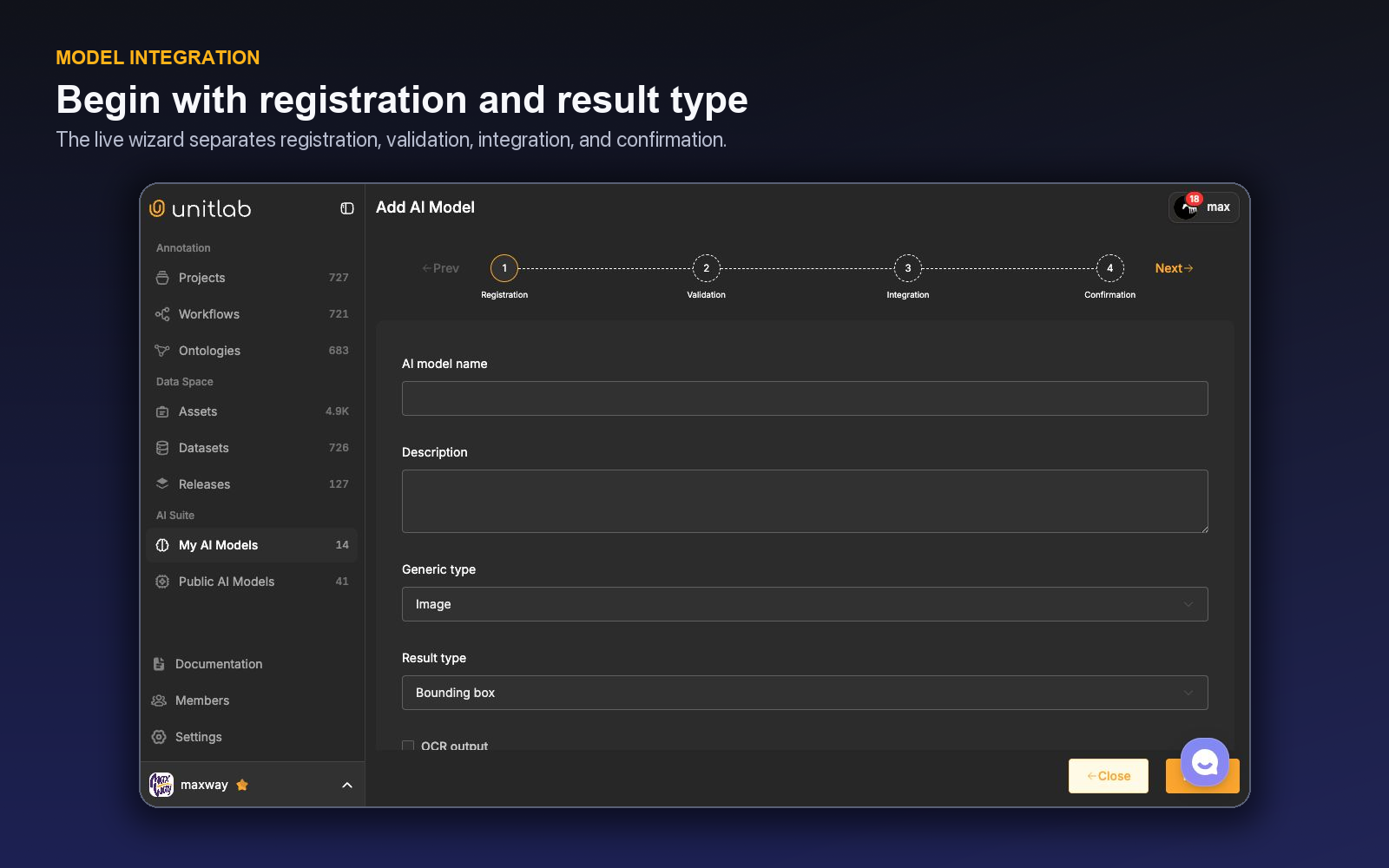
Configuration controls included model name, description, endpoint, request headers, request parameters, a required source-data parameter, an OCR-output option, validation, tags, class creation and mapping, integer class mapping, update, and delete. The expected default request shape included a field containing the source-data URL.
The platform's private model list showed lifecycle states such as Running, Stopped, and Integration unfinished. That visibility helps operations distinguish an available model from one that is registered but not ready.
Start with a formal input/output contract
Before using the wizard, write a versioned contract for the service. It should define authentication, timeouts, accepted media, maximum size, response schema, coordinate convention, class identifiers, confidence values, and error responses.
Visual geometry needs special care. Specify whether box coordinates are absolute pixels or normalized values, the point order for polygons, mask encoding, skeleton topology, cuboid conventions, and behavior at image boundaries. A valid JSON response can still create invalid annotations if coordinate assumptions differ.
For audio, define event units and transcript encoding. For text, define offsets and Unicode behavior. For video, document whether output is per frame, a track, or another representation supported by the integration path you validate.
Secure the endpoint boundary
Request headers and parameters make authenticated services possible, but credentials should be handled under the organization's secret-management policy. Use narrowly scoped credentials, rotate them, and avoid sharing them in documentation or test screenshots.
The source-data URL is a trust boundary. Determine how long the URL remains valid, whether the model runtime can reach it, what is logged, and whether data may leave the approved network or region. Sanitize operational logs so URLs, headers, and sensitive inference payloads are not exposed unnecessarily.
Apply least privilege to who can manage AI models. The live roles system includes a Manage AI models permission; reserve it for accountable integration owners.
Security checkpoint: “The endpoint works” is not equivalent to “the data path is approved.” Validate authentication, transport, logging, retention, network destination, and failure handling with the responsible security and governance teams.
Map model output to ontology meaning
Unitlab supports class creation and mapping, including integer class mapping. Treat mapping as a governed translation layer, not a convenience field. A model's class 0 may mean person in one version and something else in another; an ontology label may have narrower inclusion rules than the model's training class.
Maintain a mapping record with model version, source class, Unitlab class, geometry type, property defaults, known exclusions, and owner. Reject unmapped classes explicitly. Do not silently coerce unsupported results into the nearest label.
When a model returns confidence, use it as a routing signal only after calibration. Scores from different models are not directly comparable, and confidence is not proof that the output follows the annotation policy.
Validate with adversarial examples
The wizard includes a Validation stage. Prepare a representative set that includes normal cases, edge cases, malformed inputs, empty results, large files, unknown classes, boundary coordinates, and service failures.
Validation should cover four layers:
- Transport: requests authenticate and complete within the expected time.
- Schema: every response is well formed and mapped.
- Semantics: classes and geometry follow the ontology.
- Operations: timeouts, retries, partial failures, and unavailable models are visible.
Measure human correction after technical validation. A model that integrates perfectly may still add no value if reviewers redraw most results.
Put the model inside a human-in-the-loop workflow
Unitlab workflows can contain a Model stage alongside Annotate and Review. Its configuration includes the selected model, threshold, generic input type, queue scope, and class mappings. When an item enters the stage, model inference owns the work item and the Workbench remains read-only until automation completes or the configured route changes.
Successful output follows the stage’s forward route into annotation, review, or another configured stage. Failures remain visible as operational states instead of appearing as valid empty annotations. This makes model availability, mapping, and correction part of the same task history used for human work.
Start with model → annotate → review. Annotators correct proposals; reviewers identify systematic failure. Once quality is measured, route low-risk cases differently while preserving review for high-cost classes and out-of-distribution inputs.
A reference integration scenario
Suppose a private visual model returns bounding boxes for worker, forklift, and pallet. The service accepts an authenticated URL and returns absolute pixel coordinates, integer class IDs, and confidence. Unitlab's wizard registers Image input and Bounding box output, includes the source URL in the required request parameter, and maps integer IDs to ontology classes.
Before validation, the team confirms image orientation, width and height, coordinate order, and behavior for an empty scene. The endpoint is tested with an expired source URL, an unknown class ID, a box outside image bounds, a timeout, and a successful empty result. None of these cases may create silent or partially mapped annotations.
In the pilot workflow, model proposals move to annotation. People correct boxes and properties, then send work to review. The release manifest records model deployment, mapping, ontology, workflow, validation set, and correction metrics. A model update does not replace the old service invisibly; it enters a new test and release cycle.
Failure handling is part of the contract
Define distinct responses for authentication failure, invalid source, unsupported media, timeout, model unavailable, malformed output, and valid empty output. Operations should be able to tell the difference. A valid empty result means the model found nothing; a transport failure means no inference happened.
Choose retry behavior carefully. Retrying a transient failure can be safe; retrying a non-idempotent operation can duplicate work. Give every request a traceable identifier where the integration supports it and avoid logging credentials or sensitive URLs.
Set limits for response size and geometry count. An unexpected output with millions of points or objects should fail safely rather than overwhelm the workbench or reviewer.
Build an acceptance benchmark
Create strata for source domain, class, object size, occlusion, negative scenes, and known failure modes. Report technical success, semantic precision and recall, geometry correction, reviewer rejection, latency, and total accepted-item time.
Set a release gate per class. A model may be production-ready for common vehicles but remain manual for rare equipment. Route selectively rather than forcing one global integration status.
Keep a shadow period in which model output is compared with a manual or independently reviewed baseline without reducing existing controls. This exposes anchoring and missed-object risk.
Connect this benchmark to annotation quality assurance so the model is evaluated on reviewed labels and correction effort, not proposal volume alone.
A complete integration rehearsal
Assume the team has a private defect detector that accepts a presigned image URL and returns polygons for scratch, dent, and contamination. Before Registration, the owner writes the transport contract: authentication header, source parameter, request timeout, idempotency behavior, maximum image size, and a trace ID safe for logs. The response contract fixes polygon point order, coordinate units, confidence range, empty-result behavior, and error payloads.
In Registration, the owner names and describes the model, selects Image input and Polygon output, enters the endpoint, and adds only the headers and request parameters the service needs. Secrets remain in the protected configuration, never in shared instructions. The source-data parameter maps Unitlab’s asset URL into the field expected by the endpoint.
In Validation, the team sends a compact but hostile set: one normal image, one empty scene, one unusually large image, one rotated image, one case with an unknown returned class, a polygon outside bounds, an expired URL, and a simulated timeout. A valid empty result must be distinguishable from every technical failure. The team checks not only that JSON parses, but that polygons land on the correct pixels.
In Integration, returned class IDs map to Live ontology classes. contamination is not silently mapped to scratch merely because a consumer expects two classes; it is either mapped deliberately, excluded with a visible rule, or added through ontology governance. Thresholds are calibrated against reviewed outcomes, not copied from the model’s offline notebook.
Finally, the model enters a workflow as Model → Annotate → Review. Annotators correct proposals and independently scan for omissions; reviewers classify geometry, class, missing-object, and source-domain errors. The release records the model version, endpoint contract version, ontology mapping, workflow, validation set, and correction metrics. A new model deployment repeats the rehearsal instead of replacing production behavior invisibly.
Operational ownership continues after Confirmation. My AI Models distinguishes Running, Stopped, and unfinished integrations, so the workflow owner can tell whether a model is available before interpreting queue behavior. Define who may stop, update, remap, or delete an integration; who receives failure alerts; and which manual fallback applies when the service is unavailable.
Changing only a request header, endpoint version, threshold, or class map can alter production output as materially as replacing the model. Treat each as a controlled integration revision and validate it against the same acceptance set. The annotation platform can expose the state, but release discipline determines whether downstream teams know which state produced their data.
Rehearse the integration as an annotation operator would experience it
Assume a team has a private detector for industrial defects. The model accepts an image and returns boxes, class IDs, confidence scores, and an optional failure message. Connecting it to Unitlab is not complete when the endpoint responds once. It is complete when an annotator can request useful proposals, understand failures, correct the output, and send the item through the same governed review path as any other work.
Start with the contract. Define accepted media, maximum size, timeout behavior, authentication, request fields, response geometry, coordinate convention, class mapping, confidence handling, and error payloads. Map the model's class IDs to the Unitlab ontology explicitly. If the model produces scratch_minor and scratch_major while the ontology uses class scratch with a severity property, transform that distinction deliberately rather than creating accidental new classes.
Add the model through the supported AI-model area and connect it to a model-enabled project or workflow stage. Test a normal image, an image with no targets, an unsupported file, a timeout, a malformed response, a partially successful response, and a result containing an unknown class. The user should see a recoverable state. A failed invocation must not leave an item looking complete or hide the fact that proposals were never generated.
Inspect the operator path. Can the annotator tell which model or configuration produced the candidates? Do suggestions appear as editable Unitlab annotations under the correct classes? Are confidence values used only where the policy defines them? Can the operator continue manually when the model is unavailable? The model should reduce repetitive work without becoming a new source of invisible state.
Run a human-reviewed acceptance benchmark. Separate model precision and recall from operational value. Record candidate generation latency, proposals per item, accepted-without-change rate, correction time, missed-object search time, failure rate, and reviewer correction. Compare with a manual baseline on the same cohort. A technically strong model can still lose time if ontology mapping is awkward or failures interrupt the queue.
Design the workflow around risk. A Model stage can feed Annotate or Review; low-risk, mature predictions may receive targeted review, while new classes or high-severity defects receive full review. Rejected work should return to a correction stage with a clear reason. Keep a gold set outside the assisted production loop so model updates can be evaluated without feedback contamination.
Operational ownership matters. Someone must own credentials and availability, someone must own ontology mapping, and someone must decide whether a new model version is accepted. Record the version or configuration alongside the benchmark and release. When behavior changes, the team can then distinguish a model update from a new ontology or data cohort.
The best integration story ends with graceful fallback. If the private model times out during a shift, annotation continues manually, the failure is visible, and the item does not disappear from the queue. When service returns, the team can retry under a defined rule. That is what turns a model endpoint into an enterprise annotation capability: not only prediction, but a reliable human workflow around prediction.
Approve a model version with an operator-facing checklist
Before enabling a new version, confirm that supported media, request limits, authentication, response schema, geometry coordinates, class mapping, properties, confidence handling, and error states still match the integration contract. Run the fixed benchmark and compare both prediction quality and reviewed effort with the current production version.
Inspect at least one result from every class and every failure mode in the Unitlab Workbench. A response can be syntactically valid and still create unusable annotations—for example, coordinates in the wrong scale, duplicated instances, an unknown class, or a severity encoded as a class when the ontology expects a property. The operator view is the final integration surface.
Use a staged rollout. Start with a limited project or cohort, require full review, and monitor latency, invocation failures, accepted-without-change rate, missed-object corrections, and reviewer rejection. Expand only after the error distribution is understood. Keep the previous model or manual path available during the rollout.
Record the approval decision with model version, benchmark version, ontology version, responsible owner, and rollback condition. This makes subsequent model behavior comparable and prevents a silent service update from changing the meaning or cost of an annotation queue.
The release boundary should preserve assisted-label provenance where the project needs it, but downstream training data should still follow the approved ontology rather than the model's private schema. Transformations, confidence fields, and fallback values must be documented so consumers do not infer meaning from implementation details.
Security review belongs beside functional review. Use scoped credentials, a controlled endpoint, and an owner for rotation. Do not expose secrets in project instructions or screenshots. Confirm that model access does not broaden an annotator's visibility into unrelated workspace data.
When decommissioning an integration, keep the model-version record attached to historical releases and projects. Remove active credentials and routing without erasing which proposals contributed to earlier annotation production.
Notify operators before changing the active model. A different proposal distribution changes attention and correction habits even when the ontology is stable. Short recalibration and full review at cutover protect against treating the new version as equivalent by default.
A staged integration plan
In the contract stage, define the user-visible result before the endpoint. Write supported media, Unitlab geometry and class output, Class Properties, confidence use, error behavior, and manual fallback. Then specify authentication, request fields, coordinate system, timeout, response schema, and version identity that produce that experience.
In the validation stage, run known inputs through registration, validation, integration, and confirmation. Include positive, empty, unsupported, oversized, slow, malformed, unknown-class, and partial-response cases. Inspect the resulting annotations in the Workbench and verify that operators can edit, add misses, clear unusable output, and continue after failure.
In the benchmark stage, compare manual annotation with model-assisted production on the same cohort. Measure latency, invocation success, accepted-without-change proposals, correction, missed-object search, total annotator time, reviewer correction, and severe errors. Segment by class and source; an aggregate can hide an integration that helps one domain and harms another.
In the pilot stage, enable the model for a limited project or workflow cohort under full review. Monitor service health and operator behavior. Model success should create editable proposals under the governed ontology; failure should leave a visible, recoverable item. Keep a manual path and a rollback condition.
In the promotion stage, record the approved model version, mapping, benchmark, ontology, workflow, owner, credentials policy, and release boundary. Notify users, recalibrate on changed proposal behavior, and widen review only after live correction stabilizes.
In the maintenance stage, rotate secrets, retest after endpoint or schema changes, preserve historical model provenance, and decommission access without erasing the record. A private model becomes part of data operations only when its full lifecycle is as controlled as the labels it helps create.
Try the workflow in Unitlab
Write the operational contract alongside the endpoint contract. Define who owns timeouts, malformed responses, ontology mismatches, confidence changes, and model retirement. A connected model is production-ready only when a failed or ambiguous inference has a visible human route and does not strand an item in an automated stage.
When the model changes, repeat the acceptance slice under the same ontology and review rubric. Compare proposal coverage, correction time, rejection reasons, and downstream release quality. Version the evaluation record with the model identity so a faster endpoint cannot silently replace a more accurate one.
- In My AI Models, begin Registration with a non-production endpoint and select the exact source and result types.
- Write the request and response contract: authentication, timeouts, coordinate convention, class mapping, confidence, empty result, and error payload.
- Use Validation on normal, large, malformed, no-result, and timeout cases.
- Map outputs to a draft ontology and route proposals through annotator correction and review.
- Confirm monitoring, rate limits, rollback, secret rotation, and model-version recording before Integration.
Measure successful inference, latency distribution, mapping errors, empty-versus-failed distinction, human correction, and accepted-label cost. Never put credentials or sensitive payloads into screenshots or shared examples.
The decision to make
Build a twenty-item failure-oriented validation set before connecting production. Open Unitlab's model wizard and make transport, ontology, and human-review contracts explicit.
Explore related Unitlab capabilities: a data annotation platform for AI teams.
Continue in the Unitlab documentation: AI-assisted annotation.