damaged_package is renamed to package_damage to match a new model. The change looks harmless until an export script groups by the old display name, a dashboard loses a trend line, and historical releases no longer compare cleanly. The pixels did not change; the meaning contract did.
Schema drift is the distance between what a label meant when it was created and what downstream systems assume it means now. Safe change requires impact analysis, migration rules, a new version, and a preserved historical reference.
Annotation schemas always evolve. Teams split broad classes, retire unused properties, rename confusing labels, or add concepts discovered in production. The danger is not change itself. It is changing meaning without knowing which annotations, projects, releases, mappings, and models depend on the old definition.
The live Unitlab workbench includes a notable safeguard: when annotations reference ontology items that have been deleted, it can show a Restore deleted items dialog. The user can keep items deleted, restore selected items, or stop showing the warning. This turns an otherwise silent integrity problem into an explicit decision.
Change-control rule: Treat every ontology edit as an interface change. If an export, model mapping, dashboard, project, or historical release can interpret the label differently, the change needs a version and a migration decision.
What schema drift looks like
Schema drift occurs when the effective meaning or structure of labels changes over time. Examples include:
- renaming a class while downstream code uses its name;
- splitting one class into several subtypes;
- merging classes with different historical definitions;
- removing a property used by existing annotations;
- changing choice values or required status;
- altering relation direction or endpoints;
- changing geometry type; or
- revising inclusion rules without migrating old labels.
Even a wording change can be material if annotators apply the label differently afterward.
Understand the live protection
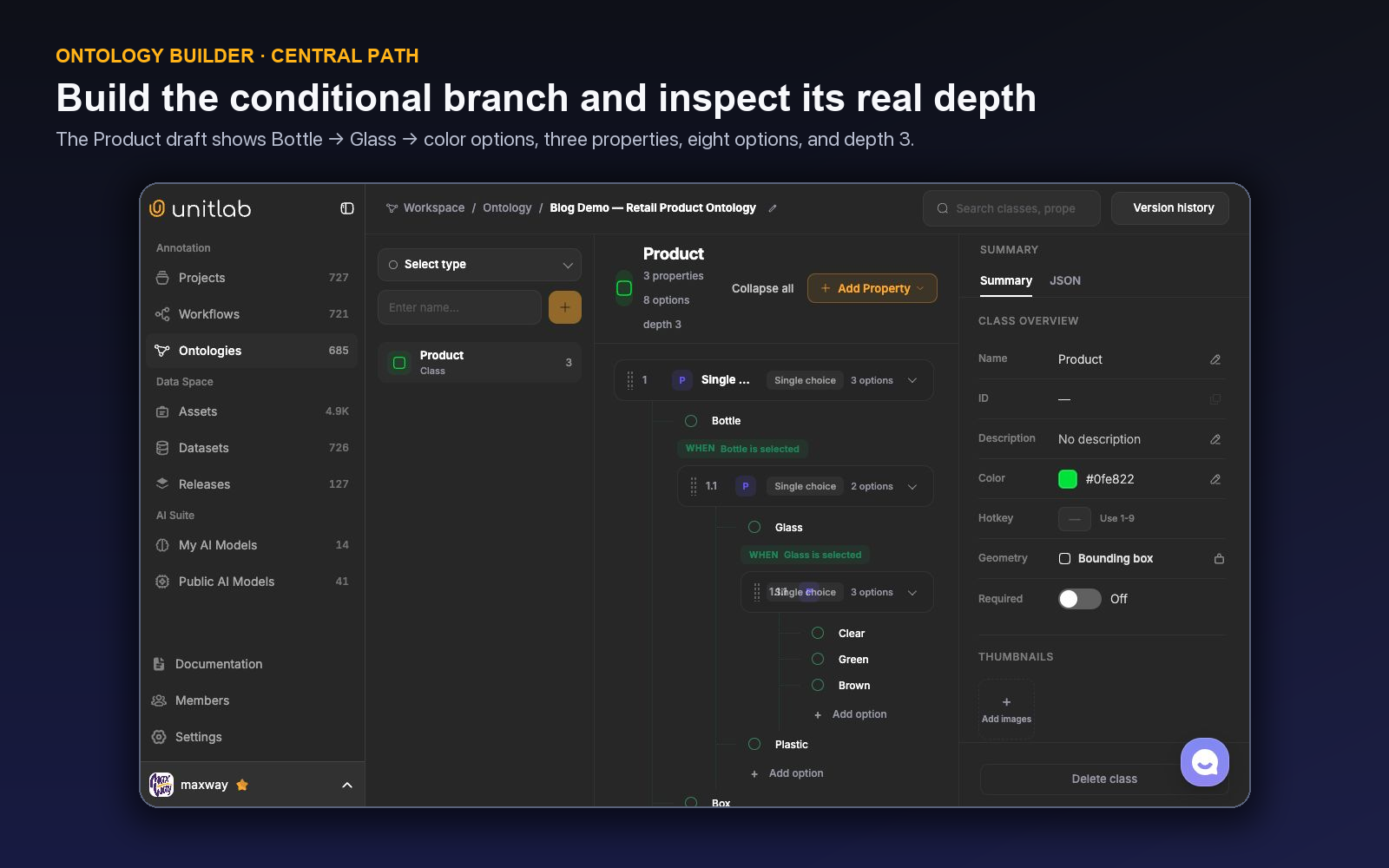
Unitlab uses explicit lifecycle language. One project ontology is Live and drives annotation. Publish draft turns unpublished edits into a visible version. Version history opens immutable snapshots, View snapshot enters read-only inspection, and Restore as draft brings an older snapshot back as unpublished changes. Archived ontologies remain read-only. JSON, stable IDs, search, and Logic Map make the structure inspectable.
The correct restore decision depends on intent. Restore when deletion was accidental or historical annotations must remain valid under the existing schema. Keep deleted when the change is intentional and an approved migration or exclusion plan exists. Do not suppress the warning simply to remove friction.
Classify the change before applying it
| Change | Compatibility | Required response |
|---|---|---|
| Description clarification with unchanged meaning | Potentially compatible | Calibrate and document |
| New optional property | Usually additive | Test UI and downstream handling |
| New required property | Breaking for existing labels | Backfill or version migration |
| Rename with stable ID | Technically may be compatible; semantically risky | Validate mappings and consumers |
| Delete class or value | Breaking | Impact analysis and restore/migrate decision |
| Split or merge classes | Breaking | Re-annotation or explicit transformation plan |
| Geometry change | Breaking | New schema and data migration |
| Relation endpoint change | Breaking | Validate every affected relation |
Compatibility is both technical and semantic. A response may parse successfully while representing a different concept.
Run an impact analysis
Before publishing a change, identify:
- projects using the ontology;
- annotations containing affected items;
- workflow stages currently in progress;
- AI model class mappings and prompts;
- datasets and releases containing the labels;
- downstream loaders, metrics, and reports;
- benchmarks and gold sets; and
- owners who approve the migration.
The live dataset view shows projects using a dataset, while ontology IDs and exports support technical inventory. Maintain an external dependency register if the platform view does not cover every downstream consumer.
Choose a migration strategy
Preserve
Keep the old entity and clarify guidance. Suitable when meaning remains necessary and migration cost exceeds benefit.
Restore
Use Unitlab's restore path when an entity was removed unintentionally or active historical annotations must resolve again.
Transform
Apply a deterministic mapping only when old information is sufficient. Renaming a value may be transformable; splitting vehicle into car and truck is not, unless another property already preserves subtype.
Re-annotate
Route affected data through annotation and review when the new distinction requires human evidence.
Freeze and branch
Keep the old ontology for historical or stable projects and create a new schema for future work. This is often safer for major semantic changes.
Calibrate the new meaning
Use a benchmark containing affected classes and difficult neighbors. Ask annotators to apply the new schema without seeing previous answers, then compare. Update instructions and model mappings before switching production.
If an AI integration maps integer or string classes, test every mapping. Prompt-based Detect all objects may also need a revised default prompt. A model trained on the old label cannot be assumed to produce the new one.
Release rather than overwrite
Create a new data release after migration and record the ontology version, strategy, affected counts, unresolved items, quality result, and downstream compatibility. Keep previous releases available for experiment reconstruction.
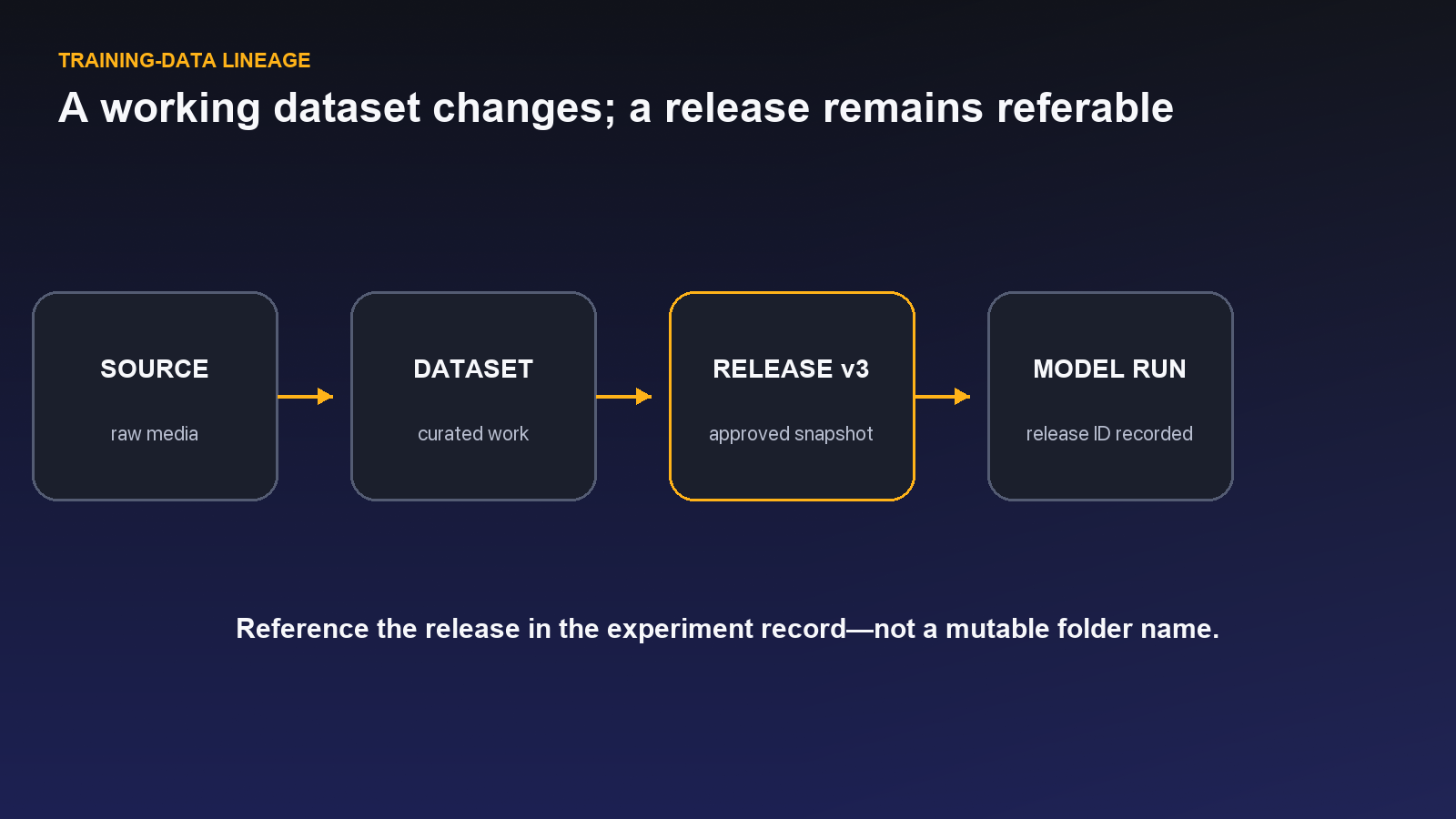
Reevaluate models against a stable benchmark. If the evaluation schema changed, create a new evaluation release and rerun baselines rather than comparing incompatible scores.
Before promoting a migrated release, use an annotation quality assurance workflow to check labels against the updated ontology.
A worked class-split migration
Suppose a live ontology contains vehicle, but a new model requires car, truck, bus, and motorcycle. Historical annotations contain only vehicle geometry and no subtype property. A deterministic split is impossible because the lost detail is not present.
The team freezes the old ontology for historical releases, drafts the new classes, remaps integrated model outputs, and creates instructions with difficult subtype examples. A representative affected sample is re-annotated and reviewed. Production data migrates in controlled batches. A new major release records the new ontology and cannot be compared with the old class distribution without an explicit aggregation map.
If a historical vehicle class was accidentally deleted during drafting, the restore warning should be resolved before continuing. Restoring preserves old annotation references; it does not perform the semantic split.
A worked property retirement
An obsolete free-text property may be removable if no downstream consumer uses it. Impact analysis checks projects, releases, exports, and reports. Existing values are archived in prior releases. The new ontology removes the field, instructions are updated, and a release note states that new data no longer contains it.
If the property was required, in-flight items need a transition plan. Do not leave annotators blocked by a schema requirement that changed mid-batch.
Downstream validation
Test loaders with both old and new releases. Confirm IDs, names, types, values, required fields, geometry, and relations. Run model mappings and prompt defaults. Compare class distributions and a visual or semantic sample.
If reports aggregate new classes into an old category, validate totals and document information loss. If old models remain in service, state which ontology they expect and prevent accidental use of incompatible data.
Demo: split a class without rewriting history
Use the package-damage example to rehearse the change in Unitlab. Begin from the current live ontology and identify the exact concept being split: damaged_package will become structural_damage and surface_damage. Write observable definitions and difficult examples before opening the editor. A dent affecting shape may be structural; a scuff that changes appearance but not shape may be surface; an occluded region may be not assessable.
Open Ontologies and inspect the current structure in both visual and JSON views. Record the ontology version, stable identifiers, projects using it, and any model-output mapping that emits the old class. This is the impact baseline. Do not rename the live display label and assume the meaning migrated with it.
Create the new structure as unpublished changes. Add descriptions and any properties needed to represent uncertainty. Use Version history and the Publish draft boundary to keep the proposed meaning separate while it is tested.
Prepare a migration set containing clear examples of each new subtype, borderline examples, old annotations, and model predictions that still use damaged_package. Ask annotators and reviewers to apply the draft independently. Record cases that cannot be mapped without looking at the source; those items require reannotation, not a confident automated rename.
| Old value | New result | Treatment |
|---|---|---|
damaged_package with clear deformation |
structural_damage |
Reclassify after source verification |
damaged_package with clear scuff |
surface_damage |
Reclassify after source verification |
| Occluded or ambiguous damage | Uncertain/hold state | Send to review; do not guess |
| New model output using old label | Mapped only during transition | Update model integration before cutover |
Publish the new ontology version only after the migration examples, project instructions, reviewer policy, model mapping, and downstream consumer all agree. Migrate production data in controlled batches and create a new release. Preserve the previous ontology and release so historical model results remain reproducible.
The safe outcome is not a perfectly smooth trend line. It is an honest boundary: models trained before the split reference the old release; models trained after the split reference the new release; any comparison across them uses a documented aggregation rule.
Rehearse lifecycle recovery before a production migration
Before changing a high-use ontology, publish a known-good version and open it through Version history → View snapshot. Confirm that Snapshot mode is read-only while Summary, JSON, history, and Logic Map remain available for inspection. This becomes the semantic reference for the migration.
Make the proposed changes as unpublished edits and test them on a calibration slice. If the branch fails review, use Restore as draft from the known-good snapshot. Restoration creates unpublished changes; it does not publish automatically and does not silently make another ontology Live. Review the restored structure, then choose Publish draft only after the recovery is validated.
When an annotation opens with references to deleted schema items, the restore dialog is a second, annotation-aware checkpoint. Restoring a deleted class makes it usable in the current Live ontology without moving or rewriting the historical source ontology. Keeping it deleted is appropriate only when migration, exclusion, or re-annotation has an approved owner and downstream plan.
This rehearsal separates three decisions that teams often collapse: recover the schema definition, publish a new ontology version, and release migrated annotations. Each produces different evidence and should have its own approval.
If another ontology is already Live, publishing the new version is an explicit switch of the workspace's active semantic contract. Before that switch, identify every attached project, model mapping, workflow, export consumer, and saved dataset that depends on the current meaning. Prepare the rollback snapshot and the consumer cutover together.
The Live switch does not by itself migrate historical annotations or create a release. Open representative existing items after publication and handle any deleted-item warning according to the approved migration policy. Then create a separately versioned release for migrated output. This preserves the distinction between schema availability, annotation repair, and model-ready publication.
Record the switch time and approver.
Migrate a live label without breaking historical meaning
Suppose an existing ontology has class vehicle, while a new model requires car, truck, and motorcycle. Renaming vehicle to car would silently reinterpret every historical annotation. Keeping one class forever would block the new task. The safe path treats this as a semantic migration.
Open a Draft from the current ontology state and define the new classes or property structure. Decide whether the distinction belongs in separate classes or under a required vehicle_type property. If the model still needs one general object geometry, a property may preserve stability better; if localization or downstream behavior differs materially by type, separate classes may be appropriate.
Write the mapping before publishing. Historical vehicle cannot always be converted automatically because old evidence may not support the subtype. Map unambiguous items where possible and preserve an honest unresolved state for the rest. Record which projects and releases continue to use the older version and which begin with the new one.
Use the ontology builder's Draft, Live, version history, snapshots, change comparison, JSON view, and restore capabilities to rehearse the change. Search for affected entities and inspect nested dependencies, required fields, relations, and Item Properties. A class change may break a relation endpoint or make an instruction example obsolete even when the new class list looks correct.
Calibrate the new Draft on a mixed cohort: common vehicles, edge cases, occlusion, ambiguous subtypes, and negatives. Build the same distinction from the Annotation Workbench only when discovering or testing it in context, then reconcile the result with the governed central schema. Publish after the classification rule, properties, instructions, and review path agree.
Create a new dataset version and release for migrated work. Do not overwrite the release used by the existing model. Downstream consumers should receive the version identifier and mapping notes so they can interpret both schemas. If a model comparison spans the change, evaluate whether performance differences reflect better learning or simply a different label definition.
Run a recovery drill before production migration. Restore the Draft to a known snapshot, compare changes, and confirm that historical versions remain available. The goal is not to fear change; it is to make change explicit, testable, and reversible where it has not yet been published.
Schema drift becomes dangerous when wording changes faster than lineage. With versioned ontologies, calibrated mappings, dataset versions, and releases, the organization can evolve label meaning while preserving what earlier training data meant at the time it was produced.
Classify ontology changes by compatibility
Not every edit carries the same migration risk. Adding an optional property may be backward-compatible for existing annotations, although consumers must tolerate its absence. Adding a Required property is not backward-compatible because historical items do not contain a valid answer. Renaming an option may be cosmetic in the UI but semantic in exports if the stored value changes. Splitting or merging classes changes the target itself.
For each Draft change, record affected entities, historical-data treatment, consumer mapping, instruction update, calibration cohort, and release boundary. Inspect nested children: deleting a parent option can remove the conditions that make deeper properties reachable. Inspect relations as well, because class changes may invalidate allowed endpoints.
Use JSON view or a structured comparison to detect changes that are easy to miss visually, then use the builder to understand how annotators will experience them. Publish only when both representations agree with the intended migration.
Do not force automatic backfill when evidence is absent. Historical vehicle labels cannot become car or truck through confidence alone. Keep the old value, route a relabeling cohort, or map to an explicit unresolved state. Honest incompatibility is safer than fabricated precision.
After launch, monitor Invalid items, unexpected use of fallback options, reviewer disagreement, and downstream mapping failures. A technically successful publish can still expose a confusing schema. Correct forward with a new Draft and preserve the release that used the prior meaning.
Coordinate project instructions with the migration boundary. Every renamed class, new required field, nested condition, or relation rule should have a positive example, a hard negative, and an uncertainty case. Remove obsolete screenshots or mark them as historical so annotators do not see two definitions of the same concept.
Calibrate reviewers as well as annotators. A reviewer applying the old rule can reject correct new work and create apparent quality decline. Use the same mixed cohort, compare decisions, and record when the new ontology becomes authoritative for each project.
At export, include the ontology version or schema identifier with the data. Consumer mappings should fail visibly on unknown values rather than silently dropping them. Run a small downstream validation before promoting a full release, including nested properties, Required values, Dynamic ranges, Item Properties, and relations affected by the change.
Document option retirement explicitly. Removing an option because it is rare can make historical records impossible to interpret; replacing it with other can erase a meaningful distinction. Preserve the old version, define how old values map—or do not map—and explain the change in release notes.
Watch for schema divergence between projects. A convenience property added from one Annotation Workbench may solve a local need but conflict with the central ontology used elsewhere. Reconcile local discoveries into a governed Draft before they become competing definitions.
The migration is complete only when annotation, review, export, and the downstream consumer all use the intended meaning. Publishing the ontology is the midpoint, not the finish line.
An ontology change review board in one hour
Begin with the requested change and evidence: recurring annotation confusion, new model objective, new domain, consumer mapping failure, or required temporal state. Identify affected classes, properties, Item Properties, relations, conditions, Required rules, Dynamic behavior, projects, datasets, and releases.
Classify compatibility. Optional additive fields may preserve old data; Required fields, option removal, class split or merge, relation changes, and semantic renames require migration decisions. Write how historical values map, remain unresolved, or need relabeling. Never infer detail absent from the old evidence.
Inspect the Draft in the builder, Summary, JSON, and Logic Map. Search dependencies and nested children. Compare with the Live version and snapshots. Update instructions with positive, negative, uncertain, and transition examples. Prepare a mixed calibration cohort.
Have annotators and reviewers apply the Draft, including the Annotation Workbench path for contextual discovery. Compare class choice, nested branches, required completion, Dynamic keyframes, Item Properties, and relations. Reconcile any local additions into the governed ontology.
Approve the publish and migration boundary together: which projects adopt the new version, what happens to active work, which dataset version begins the new meaning, and which Release preserves the old one. Validate downstream export and mapping before scaling.
After launch, monitor Invalid items, fallback-option use, disagreement, issue volume, and consumer errors. Keep a recovery path through version history and Restore as draft. The review board succeeds when change is explicit enough to move quickly without making historical labels ambiguous.
Try the workflow in Unitlab
- Start with a written change proposal: reason, affected entities, observable examples, owner, consumers, and target release.
- Inspect the ontology's visual and JSON forms, stable IDs, projects, model mappings, and recent releases before editing.
- Test the unpublished change on a migration set containing old labels, removed items, and edge cases. Exercise Unitlab's deleted-item warning deliberately.
- Publish a new version only after annotator, reviewer, and consumer mappings pass.
- Release migrated data separately and preserve the prior ontology and release for reproducibility.
Track unmapped labels, restored deleted items, disagreement after change, consumer failures, historical comparability, and reannotation cost. Never rewrite an old release to make a new schema appear consistent.
The decision to make
Select one pending ontology change and trace every affected project, mapping, export, and release. Test it as a draft in Unitlab before touching live meaning.
See how Unitlab supports a data curation platform and a data annotation platform for AI teams.
Continue in the Unitlab documentation: Ontologies overview.