Reviewers reject the same track-ending error for a third week. Every item has a helpful comment, yet the instruction still explains only when a track begins. The team is doing quality control repeatedly without improving quality assurance.
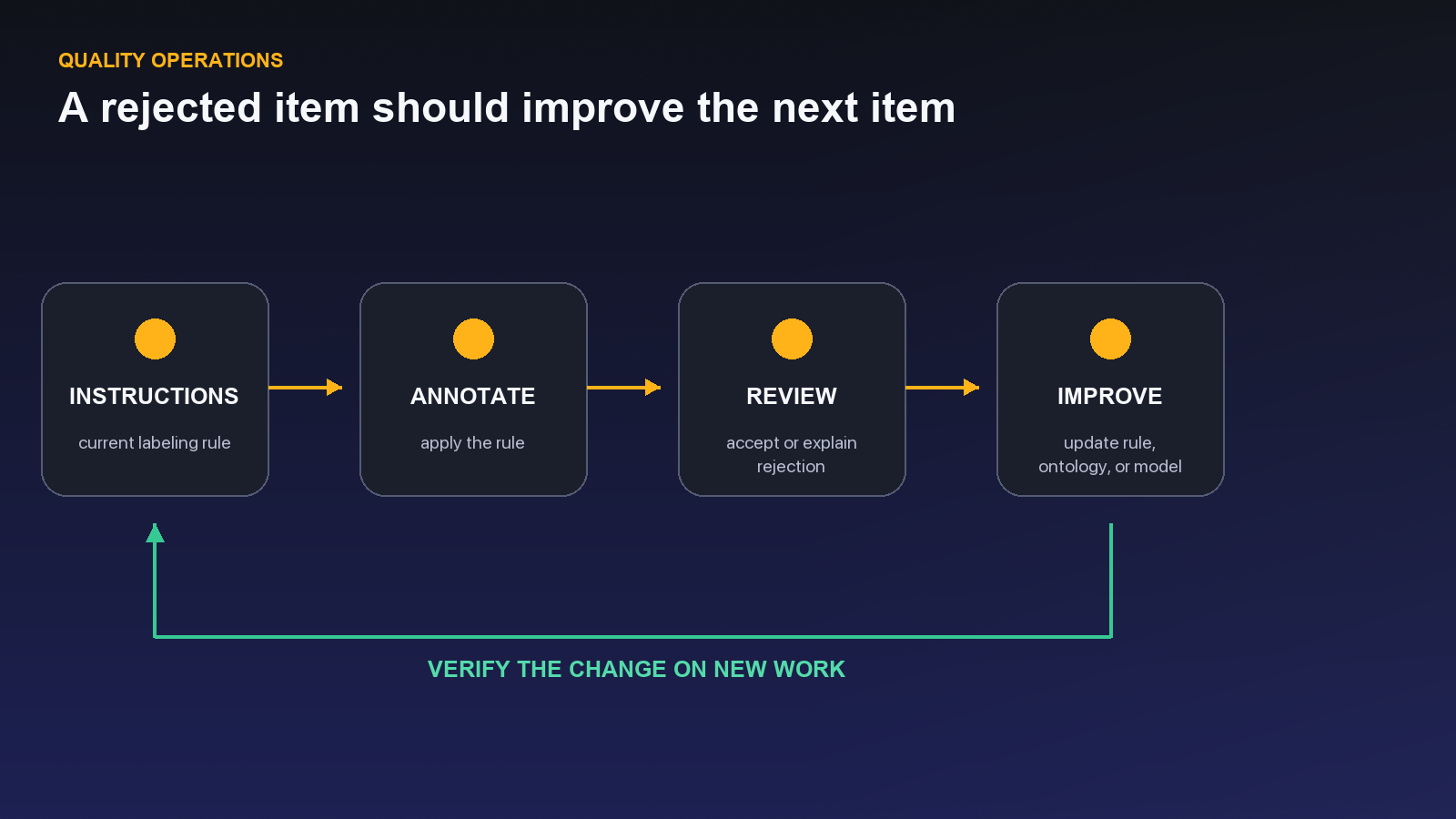
A quality operation closes the loop. Item comments capture the case, project issues assign recurring causes, instructions change the operating standard, review verifies the result, and a release records the evidence. If correction never changes the next batch, review is only an expensive filter.
Annotation quality is not a final inspection step. It is a daily operating system that defines expectations, captures uncertainty at the item, assigns recurring problems, routes correction, and changes the next batch. Without that system, reviewers become human filters and the same errors return indefinitely.
The live Unitlab project environment provides four complementary controls: project instructions, annotation comments, project issues, and workflow review with accepted and rejected paths. Used together, they connect policy, evidence, ownership, and decision.
Quality principle: A correction becomes quality assurance only when it changes the next instruction, assignment, workflow rule, or release gate. Otherwise review is merely filtering defects after they recur.
Instructions: the current standard
Project instructions can include rich text or description, an external URL, file attachment, PDF upload, and PPT upload. This lets teams keep the active guideline, visual examples, domain references, and training material close to the work.
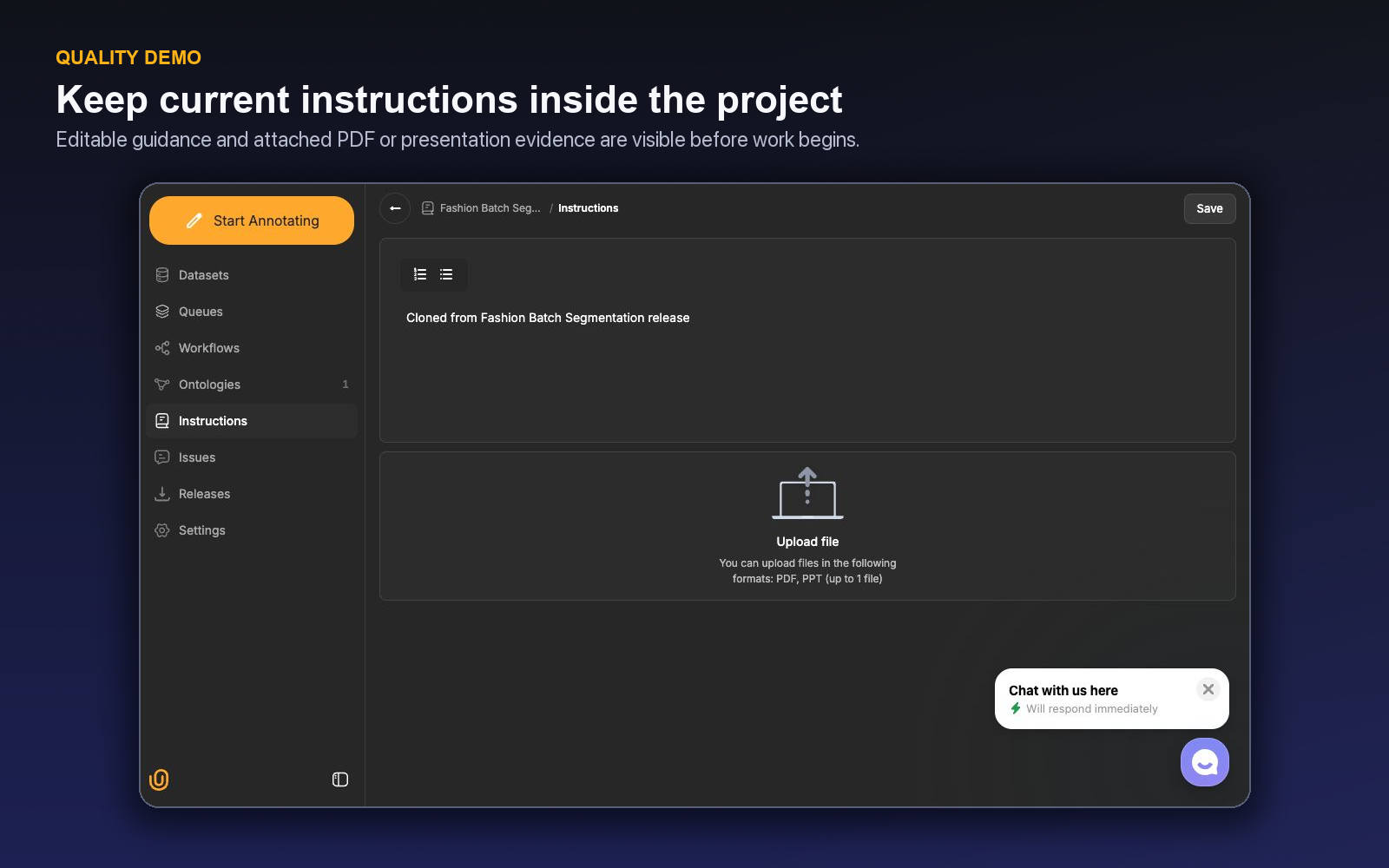
Write instructions around decisions, not feature tours. For each class or property, include positive examples, confusing negatives, boundary rules, unknown states, and escalation conditions. Add version and effective date. Archive outdated material so annotators do not choose between conflicting documents.
Every guideline change should answer: Which error triggered it? Which examples were added? Which active batch is affected? Does completed work need migration or re-review?
Comments: context at the annotation
Comments are available inside the image, video, audio, and text workbenches. Use them for item-specific ambiguity, reviewer feedback, and a short explanation that helps the next person decide.
Good comments are concrete: “Object is fully occluded after frame 318; track ended under policy 4.2.” Weak comments say “please check” without naming the problem.
Comments should not become a hidden policy archive. If the same clarification appears repeatedly, promote it into instructions and calibration examples.
Issues: ownership for operational problems
Project issues track content, status, responsible member, creator, and created date. Use an issue when a problem needs investigation, a decision, or work beyond one item: corrupted media, uncertain class definition, repeated model error, missing source metadata, or a blocked workflow.
Define issue severity and response expectations. A blocker stops affected work; a policy question may route items to a hold set; a low-impact enhancement can wait for the next guideline release. Close issues with a resolution and affected scope, not merely a status change.
Review: an explicit decision
The workflow builder supports Review with Accepted and Rejected outcomes. A reviewer should evaluate against written acceptance criteria and classify rejected work. The rejected route must return to a responsible correction stage.
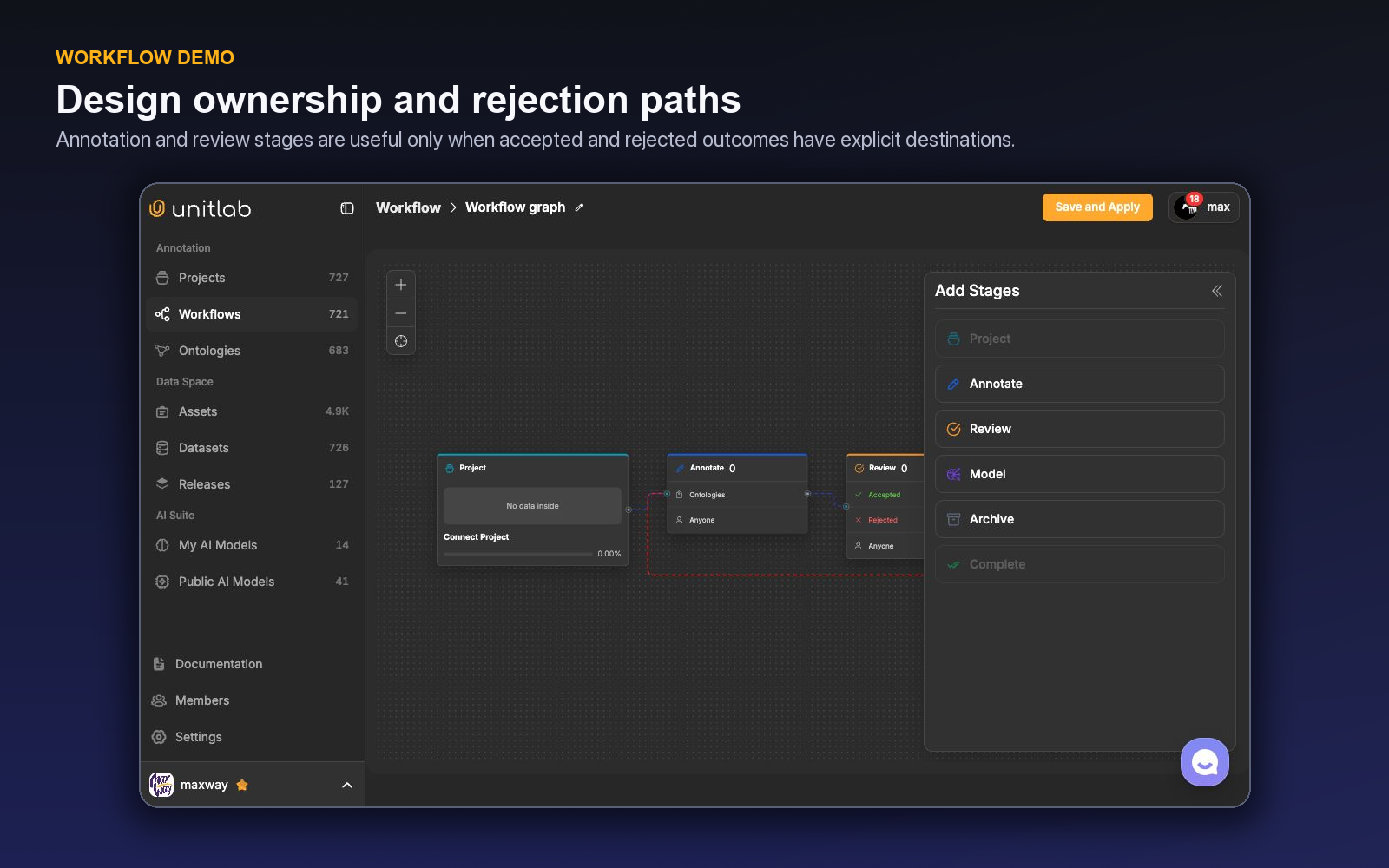
Separate error categories:
- missing or extra annotation;
- wrong class;
- geometry or boundary;
- property or relation;
- track identity or temporal boundary;
- required-field completeness;
- instruction ambiguity;
- source problem; and
- AI-assistance error.
This taxonomy turns rejection counts into actionable data.
Build the closed quality loop
- Instructions define the current rule.
- Annotators apply it and comment on exceptional items.
- Review accepts or rejects against the same standard.
- Recurring or blocking problems become owned issues.
- Resolutions update the ontology, instructions, workflow, model, or curation policy.
- A calibration set verifies the change.
- A versioned release records the resulting approved state.
If step five does not happen, the loop is open. The organization is measuring error without improving the cause.
Calibrate people and process
At project launch, have multiple annotators label the same representative set independently. Review disagreements together. Repeat calibration for new members, major ontology changes, new data sources, and model-assistance changes.
Measure agreement by error type and class. A single average obscures where risk lives. Monitor annotator and reviewer drift over time using periodic shared items whose answers are adjudicated and versioned.
Do not use quality metrics punitively without task context. Dense scenes, specialist cases, and poor source material take longer and create more legitimate uncertainty. Compare like with like.
A worked improvement cycle
A new video project launches under full review. During week one, reviewers reject many tracks for ending too late after objects leave the frame. Comments explain individual corrections; an issue records the recurring pattern and assigns the project owner.
The team discovers that instructions define track birth but not track death. It adds positive and negative frame-sequence examples, recalibrates a small shared set, and updates the effective instruction version. The next batch shows a lower track-end error without increasing fragmentation. The issue closes with evidence and the next release note records the change.
This is the quality loop in practice: correction becomes an issue, the issue changes the standard, and the standard is verified on new work.
Coding agents make the same loop observable at a finer resolution: tool traces, test results, reviewer corrections, and accepted patches can become structured evaluation data. Meta Enters the Coding-Agent Race With Muse Code applies this quality pattern to frontier coding-agent datasets.
Separate quality assurance from quality control
Quality assurance designs the system: ontology, instructions, training, workflow, roles, calibration, and release gate. Quality control inspects actual output through review and audits. Both are needed.
If control detects recurring errors, assurance changes the system. If assurance changes a rule, control verifies that behavior actually improved. Keeping the distinction prevents reviewers from carrying every quality problem indefinitely.
Build a quality dashboard
Show queue volume and age, accepted throughput, review coverage, rejection and rework, error by class and source, comments requiring follow-up, issues by severity and age, invalid or unavailable media, uncertainty use, ontology warnings, and release readiness. Allow drill-down to examples.
Add the instruction, ontology, workflow, and assistance version for each period. Otherwise, a metric change cannot be connected to an operating change.
Inspect a cohort before opening one item
The project Datasets page supports cohort-level visual QA. First narrow the result set with workflow status, assignment, classes, properties, Item Properties, issues, tags, search, or a saved Advanced Filter preset. Then choose Grid for visual scanning, List for operational comparison, or Embedding for distribution and outlier inspection. The card-size slider trades coverage for detail.
Open Display View to control how annotations render across the visible cards:
- show object names;
- color by object ID;
- crop to the annotated region and add inspection zoom;
- adjust boundary thickness;
- tune border, vector, and mask opacity; and
- search classes, hide unrelated classes, or expand class Properties and Attributes.
These controls do not change labels or source media. Advanced Filters choose the cohort; Display View changes how the cohort is inspected. When a pattern looks wrong, open the item in the Workbench, attach a comment to the exact context, create an owned issue for a recurring cause, or use the Review action to return it for correction.
Demo: turn one repeated correction into a system change
Take the recurring video track-ending error from the opening story and follow it through the four controls available in the project.
Start in Instructions. Add the missing operational rule: a track ends on the last frame where the object's identity is still supported; temporary occlusion follows the project's reappearance policy; permanent exit ends the track. Attach one positive sequence, one late-ending negative sequence, and one ambiguous occlusion sequence. Give the instruction an effective date so an audit can distinguish work completed before and after the change.
On the next ambiguous item, the annotator uses a Comment to identify the exact evidence: “Vehicle is fully occluded after frame 318; reappearance cannot be matched confidently.” The comment belongs to the item because it explains this sequence. If five items expose the same missing rule, the evidence no longer belongs only in comments.
Create or update a project Issue for the recurring cause. Give it an owner, status, affected scope, and resolution test. The issue is not “Annotators make track errors.” It is “Track-death rule does not define prolonged occlusion; update instruction and calibration set before batch B14.” That wording makes the problem actionable and separates a system gap from individual correction.
Route the item through Review. Rejection returns to the responsible correction stage with a category such as temporal boundary. Acceptance means the corrected track meets the new rule. The reviewer also performs a short independent sweep around exits and occlusions so the test does not only confirm the annotator's selected frames.
Finally, compare a calibration slice from before and after the change. Track late-ending errors, fragmentation, repeat rejection, reviewer scrubbing time, and cases sent to uncertainty. Close the issue only when the new batch shows the expected behavior without creating a worse neighboring error, such as prematurely ending every partially occluded track.
This is the difference between inspection and operations. Inspection fixes the current track. Operations changes the rule, routes the evidence, verifies the effect, and records the improved state in the next release.
A worked cohort-level QA pass
Suppose reviewers report masks that bleed into the background in one camera batch. The QA lead opens the affected project dataset, filters by source tag, completed or in-review status, the mask class, and the responsible date window, then saves the combination as a private preset. Grid view and a smaller card size expose the pattern across many items quickly.
In Display View, the lead enables object names, colors by object ID, increases boundary thickness, lowers mask opacity, and hides unrelated classes. Crop view with additional zoom makes edge leakage visible without opening every item. The controls change only rendering, so the lead can compare the cohort safely.
Three items reveal the same error. The lead opens one in the Workbench, leaves an exact comment, and creates a project issue for the recurring camera-specific boundary rule. Review returns affected items to correction. Instructions gain a positive and negative example; the next batch is inspected with the same saved cohort filter and Display View settings.
The improvement is measured as recurrence rate, not merely closure of the three examples. Cohort-first inspection discovered the pattern; comments preserved item evidence; the issue created ownership; instructions changed behavior; review verified corrections; and the next release recorded the resolved source-specific risk.
The saved filter is a personal inspection aid, so the lead records the actual cohort definition—source tag, workflow status, class, issue state, and date boundary—in the issue or QA runbook. Display View settings are recorded there as well because they control how evidence was inspected, not the annotations themselves. Another reviewer can then reconstruct the method even though private presets are user-scoped.
Repeat the same cohort pass after correction and on the next incoming batch. Compare the denominator as well as the error count: three failures in thirty items and three failures in three thousand describe very different operations. Release approval should cite the sampled population, inspection method, remaining exclusions, and owner of any accepted residual risk.
Turn a recurring review failure into a measurable system change
Assume reviewers repeatedly reject masks around reflective product packaging. The immediate correction is easy: redraw the boundary and approve the item. The operational question is why the same error keeps returning.
Start from the project-level QA view. Filter the dataset or queue by class, review outcome, source, annotator cohort, model-assistance path, and relevant metadata. Use Grid or List view to understand the cohort, then open representative items. Appearance controls—class visibility, object names, instance coloring, boundary thickness, opacity, and zoom—help reviewers isolate whether the error is missing extent, neighbor spill, holes, or inconsistent policy.
Classify the failures. If every operator includes glare, the instruction may define the object poorly. If only assisted masks spill into reflections, the Magic Touch or model policy needs a narrower operating range. If errors cluster in one camera source, curation may need a domain-specific cohort. If reviewers disagree with each other, calibration must precede enforcement.
Use comments for item-specific correction and create a project issue for the repeated pattern. Assign an owner and track the resolution: new instruction example, ontology option, curation filter, model benchmark, or workflow change. A rejected item should return through the workflow; the issue should remain visible until the system-level remedy is applied.
Create a before-and-after benchmark. Select a fixed set containing reflective, matte, occluded, and negative examples. Measure boundary corrections, rejected masks, accepted-mask time, reviewer correction, and escape rate before the change. Update the relevant instruction, property, or tool policy, recalibrate annotators, then rerun the same cohort.
Publish the resulting correction cohort into a new dataset version and release when it is intended for training. Keep the evaluation cohort protected. The next model or annotation batch should reference the new version so the improvement is traceable rather than absorbed into a mutable folder.
Monitor whether the error returns. A lower rejection rate can mean better work, weaker review, or an easier cohort, so compare source and difficulty distributions. Pair throughput with targeted quality metrics. When the same issue appears in a new modality or class, reuse the operating pattern—cohort, cause, owner, remedy, benchmark—rather than copying the original rule without validation.
Quality operations mature when corrections have two destinations: the item is fixed now, and the production system is changed for later. Unitlab's instructions, comments, issues, workflows, filters, ontology versions, and releases provide the record that connects those two outcomes.
Build a balanced quality scorecard
Use several measures because each one can be gamed or misunderstood alone. Track completeness errors, semantic disagreement, geometry or boundary corrections, property and relation errors, Invalid items, reviewer rejection, escapes found after approval, and accepted units per hour. Segment them by class, source, modality, annotator cohort, reviewer, assistance path, and ontology version where the sample is large enough.
Pair lagging and leading indicators. Escapes and model failures are lagging evidence. Rising use of unknown, longer time in Review, repeated comments, stale issues, and a growing rejected queue can warn earlier that the system is under strain. Do not punish honest uncertainty; investigate whether the source, schema, or instructions changed.
Audit reviewer consistency. If one reviewer rejects a pattern another routinely accepts, the quality system is producing conflicting supervision. Run shared calibration, compare the same cohort, and revise the rule before using reviewer outcome as unquestioned ground truth.
Close every dashboard review with a decision: accept current performance, increase review, revise instructions, change ontology, adjust assistance, curate a cohort, or publish a corrected version. A dashboard that produces no owned action becomes reporting overhead.
Finally, measure recurrence. The strongest signal of learning is that an error category falls after its issue is resolved and stays low on comparable data. That connects operational evidence to durable improvement rather than celebrating one clean batch.
Sample accepted work as well as rejected work. A rejection queue shows detected problems; it cannot reveal errors that passed through. Risk-based audits of approved items estimate escape rate and test whether review sampling remains sufficient.
Keep cohort definitions stable for trend comparisons. If the source, class mix, ontology, assistance, or reviewer policy changes, annotate the chart or start a new comparison window. Otherwise an easier batch can look like process improvement and a harder batch can look like decline.
Use quality findings to update capacity planning. A new class may require more review time; a successful assistance policy may reduce annotation time but increase concentrated reviewer work; a curation change may lower volume while increasing value per item. Operating decisions should follow the reviewed cost of accepted data, not raw task counts.
Publish important corrections through dataset versions and releases so model teams can consume them deliberately. The scorecard, issue history, and release notes together explain what changed, why it changed, and whether the change worked.
Assign every metric an owner and decision threshold. Without ownership, a rising rejection rate becomes an observation rather than an intervention. Without a threshold or trend rule, teams can explain away deterioration indefinitely.
Review metrics with examples. Open representative accepted, rejected, invalid, and escaped items from the same cohort. Quantitative change says where to look; the annotation evidence explains what to change.
Retire measures that no longer influence decisions and add new ones when the task changes. A new Dynamic property may require temporal correction metrics; a new grouping rule may require join-quality checks. The scorecard should follow the real failure surface of the data operation.
A monthly quality review that closes with action
Prepare a cohort-level view before the meeting. Segment accepted, rejected, Invalid, and escaped work by class, source, modality, project, reviewer, assistance path, ontology version, and relevant Item Properties. Include queue age, stage time, and issue status so quality and operational pressure are visible together.
Select representative examples from rising errors and high-cost corrections. Use project-level display controls and the Workbench to inspect geometry, boundaries, properties, relations, grouping, Dynamic ranges, comments, and review history. Compare accepted work with rejected work; otherwise the meeting sees only detected failures.
For each material pattern, assign one cause category and owner: source or curation, grouping, ontology, instructions, annotation, reviewer calibration, model assistance, workflow, permission, or downstream mapping. Choose a remedy and a fixed benchmark that can test it.
Decide whether production control changes immediately. Increase review for a high-risk new error, pause an assisted path, route a source cohort out, or add a controlled uncertainty state. Avoid global restrictions when evidence supports a narrower class or source policy.
Publish approved corrections through instructions, ontology versions, workflow changes, dataset versions, and releases. Keep the issue open until the system change is validated, not merely until the original items are fixed.
At the next review, compare recurrence on a matched cohort. Report both quality and reviewed cost. Close the action if the error remains low without unacceptable tradeoffs; reopen the diagnosis if it moved elsewhere. This cadence makes the quality program a production feedback system rather than a monthly presentation.
Try the workflow in Unitlab
- Put the current rule in project Instructions with positive, negative, and uncertain examples.
- Use an annotation comment for item-specific evidence; promote a recurring ambiguity into a project issue with owner and status.
- Route items through Review with explicit accepted and rejected outcomes and correction reasons.
- Update the ontology, instructions, curation, model, or workflow in response to the root cause.
- Verify the change on the next calibration batch and include the quality summary in the release decision.
Track reviewer agreement, rejection by reason, repeat-error rate, issue age, instruction questions, invalid media, and release exclusions. The primary signal is how quickly recurring errors decline without hiding them through looser review.
The decision to make
Choose the most common correction from the last batch. Use Unitlab to turn it into an owned instruction, schema, curation, model, or workflow change—and verify the result on new work.
Continue with Unitlab’s a data annotation platform for AI teams.
Continue in the Unitlab documentation: Review, rework, and escalation.