A reviewer rejects an item and leaves a clear comment. The annotator never sees it because the item remains in the review queue and no stage owns correction. Everyone followed the interface; the workflow failed to define a return path.
Enterprise workflows are valuable when they make ownership and exception handling visible. A neat linear canvas is not enough. Rejection, invalid media, model failure, reassignment, and release readiness need explicit states and people.
An annotation workflow is the operating contract for a data project. It defines who acts, what evidence is required, where automation enters, how rejection is corrected, and when an item is genuinely complete. Without that contract, “in review” and “done” become subjective status labels.
The live Unitlab builder provides a visual canvas with Project, Annotate, Review, Model, Archive, and Complete stages. A default flow began as Project → Annotate → Review → Complete. Teams can connect stages, attach a project, select ontologies, assign a person or allow anyone, and configure accepted and rejected review paths.
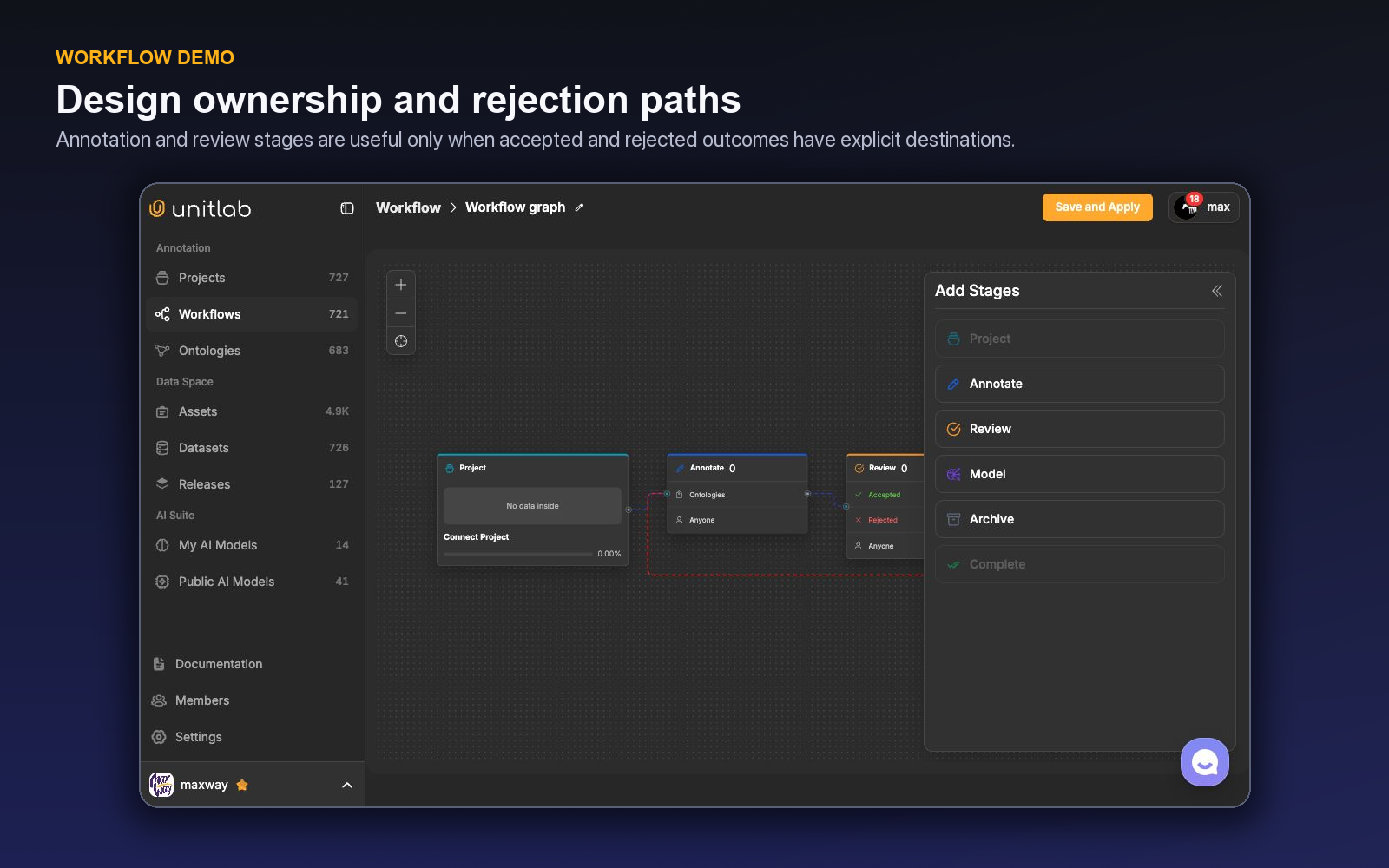
The short demo shows the workflow canvas as an editable operating contract, not a static diagram.
Workflow test: Every rejection, failure, and exception needs a next owner and a visible return path. A diagram is not operational until the difficult branches are defined.
Start from risk, not the happy path
Map failure before success. What happens if media cannot process? If an annotator is unsure? If a reviewer rejects a label? If a model is stopped? If an ontology changes mid-project? The workflow and operating procedure should give each state an owner.
Project states include New, Processing, In annotation, In Review, Complete, Invalid, and Archived. Use these states to distinguish technical readiness from active work.
The core stages
Project
The project establishes the modality, data, ontology, members, instructions, and operational context. Validate these inputs before sending work forward.
Annotate
Annotators create or correct labels and complete properties, relations, comments, and tags. Assignment can identify a responsible person or make tasks available to eligible members.
Review
Review is a decision stage with Accepted and Rejected outcomes. Define acceptance criteria and the exact correction route. A rejection should carry enough context to prevent repeated interpretation.
Model
Model represents external or catalog inference in the topology. Its configuration connects the selected model to eligible project work; production rollout should validate triggering, failure handling, proposal visibility, and output routing on a controlled batch.
Archive and Complete
Complete signals accepted work. Archive handles an inactive or excluded endpoint where the process requires one. Do not use either to hide unresolved failures.
Build rejection as a first-class route
A simple linear diagram looks clean but ignores reality. Connect rejection back to the responsible correction stage and classify the reason. Use comments for item context and project issues when the problem needs status and ownership.
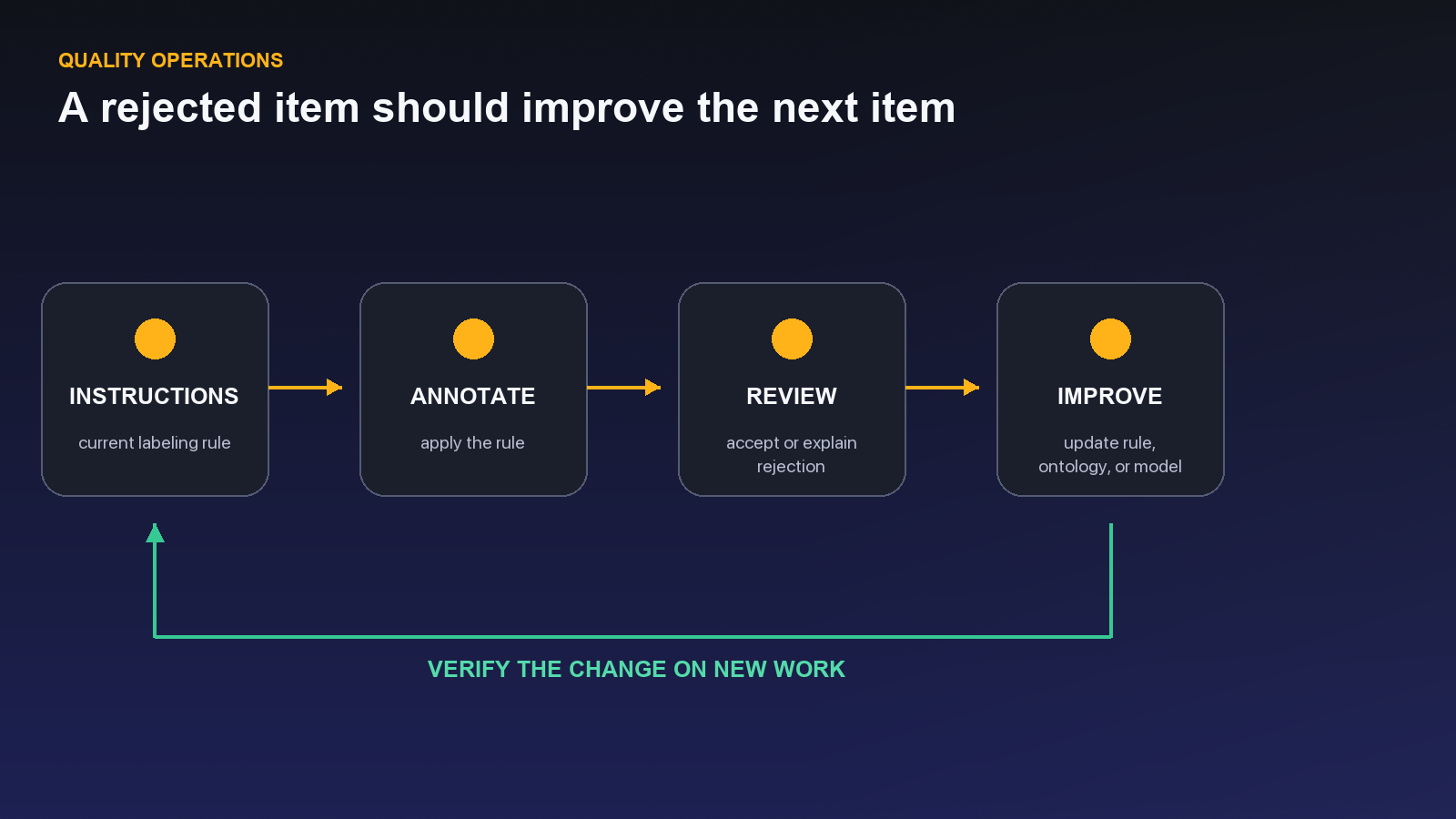
Track rejection by class, annotator, reviewer, source, and assistance method. If the same ontology ambiguity drives rework, update the schema or instructions. Do not optimize queue speed while leaving the rejection cause untouched.
Assignment strategy
Named assignment provides accountability for specialist or sensitive work. An open “anyone” model can improve utilization for standardized tasks. Hybrid designs route high-risk items to specialists while placing routine work in a shared queue.
Each human stage can define eligible annotators or reviewers, allow or prevent self-assignment, allow manager override, hide unassigned work, and permit or forbid skipping. Workspace role provides broad authority; project position and stage eligibility decide who can actually work in that queue.
Use role permissions to ensure only qualified members can annotate or review. Built-in roles include Owner, Manager, Member, Annotator, and Reviewer, with custom roles available. Assignment should not grant broader administration than the work requires.
Queues and batches
The Task Queue is organized by workflow stage. Selecting Annotate, Review, or another human stage shows that stage’s live count and tasks with priority, media identity, derived status, assignee, and Open. Managers can select several tasks and change Priority, Move them to another stage, Assign, or Unassign. The default order puts the highest priority first.
The Batch Queue answers a different question: what happened to an upload or import action? Each row shows source name, import date, data types, item count, progress, status, aggregated assignees, and running automation. A batch can finish processing while still containing failed items, so operators inspect both the overall state and individual rows.
Data Groups remain one task in the stage queue, with tile count, aggregate status, assignee, and priority. Their member tiles never appear as duplicate work. This keeps a multimodal case under one owner and one route.
Define service levels for waiting, active, review, and rejected work. Long queue age may reveal capacity or assignment problems even when individual annotation time is fast.
Quality gates by maturity
Use full review during calibration, after schema changes, for new team members, and for high-risk classes. Move to targeted or sampled review only when measured agreement and correction remain stable.
Possible gates include required item properties, completed object attributes, zero unresolved blockers, accepted review, and inclusion in an approved release. Required fields should support an honest unknown value where the source cannot answer.
A worked two-tier workflow
Consider an image project with routine package boxes and high-risk hazard_label masks. All items begin in Project and move to Annotate. If an approved model is available, a Model stage provides initial package boxes; annotators correct them and create hazard-label masks manually or with validated assistance.
Review samples routine packages but fully reviews every hazard label. Rejected geometry returns to Annotate with a reason. Source corruption becomes an issue and moves the item to an invalid or hold process rather than completion. Accepted work reaches Complete and enters the release gate.
The workflow metric distinguishes routine and high-risk paths. If hazard rework rises after a new source batch, review coverage remains full while curation and instructions are investigated.
Design for model unavailability
A model stage needs an explicit unavailable state. Decide whether work falls back to manual annotation, waits for recovery, or moves to a separate batch. Limit retry volume and surface status to managers.
Do not allow annotators to infer that an empty workbench means a model found no objects. Technical failure and valid empty inference must remain distinct.
Control work in progress
Large batches can hide bottlenecks and increase the cost of a bad instruction. Release work in manageable waves, review early output, and stop the next wave when error patterns exceed thresholds. Task Queue and Batch Queue provide operational surfaces for this discipline.
Set maximum queue age and work-in-progress expectations by stage. A reviewer bottleneck should slow new annotation intake before it creates a large correction inventory.
Demo: build a correction path before production starts
Use a small image project to test the workflow as an operating contract. Open Workflows, create a draft, and start with the minimum visible stages: the project source, Annotate, Review, and Complete. Attach the intended project and responsible people before adding more branches. A stage with no accountable person is only a diagram.
Connect the normal path from annotation to review. From Review, send Accepted work toward completion and Rejected work back to the stage that can correct it. If rejection returns to a generic queue, define who receives it and what evidence accompanies the item. The correction route should preserve the reviewer comment or reason so the annotator is not forced to infer what failed.
Now test four items rather than admiring the canvas:
- a correct, ordinary item that should pass once;
- an item with a missing object that should be rejected and corrected;
- an invalid or unreadable source that should not be disguised as annotation failure; and
- an item whose model proposal is absent or unavailable.
For each item, record its stage, owner, allowed next actions, and the evidence a downstream person sees. A rejected item should arrive at correction with enough context to act. An invalid source should have an operational destination that does not pollute annotator quality. A model failure should not strand an otherwise labelable item.
Finally, run five to ten items concurrently. Observe queue age, reassignment, and whether reviewers receive work faster than they can evaluate it. This small rehearsal often reveals that a workflow's problem is not missing stages but ambiguous ownership between stages.
Publish or apply the workflow only after every transition has a business meaning. “Accepted” should mean it passed the defined review gate. “Complete” should mean no further operational action is required for that workflow—not merely that someone clicked the last available button.
Saving work is different from routing work
Inside the Workbench, Save records annotation history in the current stage. It does not approve the item or hand responsibility to someone else. The available stage action—such as Send to Review, Mark as Complete, or Reject—comes from the item’s current workflow position and performs the route change.
That separation protects partially completed work. An annotator can save progress without accidentally placing it in a reviewer’s queue. When the stage action is selected, Unitlab saves dirty changes first, advances to the next eligible task in the current queue context, and reports completion when no work remains. Automated-stage items remain read-only while the model owns them.
Workflow edits deserve the same care. Save & Apply validates the graph and its impact on active items. Replacing an active workflow can reveal how many items would reset to Project, and the unsaved-changes guard protects accidental navigation away. The designer should rehearse accepted, rejected, invalid, skipped, model-failed, and complete paths before applying the graph to production work.
This is why a workflow is more than a status diagram. It controls who can act, which action is legal, where history is saved, how correction returns, and what happens to in-flight work when the operating model changes.
The Task Queue is a workflow surface, not an ingestion log. Each row is a work item waiting in a stage and exposes stage, assignee, priority, status, and available action. By contrast, a Batch Queue represents one upload or import action and reports processing progress. Keeping these queues distinct prevents teams from confusing “file finished processing” with “annotation passed its quality route.”
Operational reporting follows the same separation. Track processing failures in Batch Queues; track waiting time, claims, completion, approval, rejection, and rework in Task Queues. When both indicators are visible, managers can tell whether throughput is constrained by media readiness or human-stage capacity.
Name dashboards and alerts after the queue they measure.
Stress-test the workflow before a production queue depends on it
Build a small workflow for a high-value image project: Project entry, optional Model assistance, Annotate, Review, and Complete. Add the rejected branch from Review back to a correction stage before any real queue opens. A workflow without a return path describes the happy case but does not operate the work that quality control actually creates.
Run five representative items. The first should pass normally. The second should be rejected for a geometry error. The third should expose an ontology or instruction ambiguity. The fourth should simulate model unavailability. The fifth should be intentionally invalid because a required property is missing. Follow each item through the UI and record where it appears, who owns it, and which action changes its state.
The exercise reveals the difference between saving annotation content and routing work. Autosave or a saved draft protects edits; Send to Review changes responsibility and queue state. A reviewer correction that is saved but never routed can remain operationally invisible. Project instructions should say which action marks the handoff, and dashboards should measure the routed states rather than assume that edited content is complete.
Define rejection reasons that point to remedies: missing object, class error, geometry, property, relation, invalid value, source problem, and instruction ambiguity. The rejected branch returns correctable work to annotation. A source problem may need a curation or archive path. An instruction ambiguity should create an issue so the project changes for everyone, not only for the item that revealed it.
Test ownership. Annotators should see the items assigned to their stage; reviewers should not need administrator access to make review decisions; managers should be able to inspect progress and bottlenecks. If external contributors participate, ensure that their queue and data visibility match the intended project boundary.
Then test failure pressure. What happens when the Model stage times out? Can an operator continue manually? What happens when Review capacity drops for a day? Does work in progress grow visibly, or do annotators continue producing an unreviewable backlog? Set WIP expectations and sampling rules based on risk, maturity, and reviewer capacity.
The acceptance test ends only when every path has an observable terminal or recovery state. Measure time in stage, rejection and rework rates, repeated rejection causes, invalid items, model-failure fallback, and queue age. A workflow is enterprise-grade when it makes responsibility and exceptions legible—not when its diagram has the most nodes.
Change the workflow without stranding active work
Before editing a production flow, inspect which items occupy each stage and why the change is needed. Decide whether active items finish under the current path, migrate to a new path, or require a controlled pause. A renamed stage is cosmetic; a changed owner, rejection branch, or completion rule can alter operational meaning.
Test the revised flow on a small project or clone with the same roles, ontology, and representative failure cases. Confirm queue visibility, assignment, saved-versus-routed behavior, accepted and rejected transitions, invalid-state handling, and model fallback. Update instructions at the same time so the UI path and written process do not contradict each other.
Communicate the cutover boundary: which items and release versions used the old workflow, and which use the new one. Monitor stage age and rejection immediately after launch. A sudden drop in rejections may indicate improvement, or it may mean review is no longer receiving the intended work.
Keep the workflow as simple as the responsibility model allows. Add a stage when ownership, control, or a measurable decision changes. Do not add one merely to draw an organizational chart. Every node should answer who acts, what constitutes completion, and where exceptions go.
Document service expectations beside the flow: target queue age, review capacity, escalation timing, and who responds when a stage stalls. A diagram can show the path but not whether work is healthy. Stage-time and WIP metrics turn the design into an operated system.
Use issues for systemic blockers and comments for item context. If a queue repeatedly stops because one class is ambiguous, the resolution is an ontology or instruction change, not a private note on every item. If one source file is corrupt, the item can follow a curation or archive path without changing the global policy.
Review the workflow after major ontology, model, role, or release changes. New required properties can increase Invalid items; a model stage can shift reviewer workload; an external team can change assignment needs. The workflow should evolve with those realities while preserving the release boundary that records which process produced approved data.
Keep an operational playbook for common exceptions: source failure, missing required evidence, model timeout, reviewer disagreement, blocked issue, and urgent correction after release. Each entry should name the route, owner, and completion condition. Annotators should not need administrator intervention for predictable exceptions.
Run one tabletop exercise with managers, annotators, reviewers, and data owners. Follow a failed item through queues, comments, issues, correction, approval, and release. Any step that depends on a private message or an unnamed owner is a workflow gap.
This exercise also tests handoffs across time zones or vendors. The interface can show state, but the organization must define response expectations and escalation. Together they prevent work from being technically routed and practically abandoned.
A workflow launch checklist
Define the unit of work, entry condition, stage owners, valid actions, acceptance criteria, rejection reasons, failure routes, and completion condition. Map Project, Model, Annotate, Review, Archive, and Complete only where those responsibilities actually exist. Draw accepted and rejected branches before production.
Assign roles and positions to test members. Walk an item through every normal action: open, annotate, save, send, review, reject, correct, accept, and complete. Then test Invalid content, missing source, model timeout, reviewer disagreement, and an issue that blocks policy. Observe which queue owns the item at every step.
Write instructions that distinguish saving from routing and comments from issues. Define response expectations and WIP limits. A queue should not grow invisibly because annotators continue producing after review capacity is exhausted.
Launch with a small cohort under full visibility. Monitor stage age, WIP, acceptance, rejection, rework, invalid items, model failures, and repeated causes. Inspect real examples rather than using counts alone. A falling rejection rate may reflect better work—or a broken review route.
Resolve systemic findings in ontology, instructions, roles, curation, or model policy, then retest the affected path. Record the workflow boundary in the resulting release so consumers know which control process produced the approved data.
Review the workflow after source, schema, model, team, or risk changes. Remove stages that no longer change ownership or control, and add paths only when a new exception or decision needs a visible owner. The launch checklist keeps the flow both simple and complete.
Try the workflow in Unitlab
- Map one real item from source arrival to accepted release, including processing and invalid states outside the happy path.
- Build the stages in Unitlab and attach the relevant project, ontology, and assignments.
- Connect Rejected back to a named correction stage with a reason; keep Accepted and Complete semantically distinct where needed.
- Exercise model unavailability, annotator uncertainty, reviewer rejection, and an unresolved blocker on a small batch.
- Apply the workflow only after every transition has an owner and a measurable service level.
Track queue age, active time, rejection, repeat rejection, invalid media, reassignment, and release-ready backlog. A workflow improves operations when nobody needs a side channel to learn what happens next.
The decision to make
Build the rejected path first. Create a Unitlab workflow, send one item through every exception, and apply it only when ownership remains unambiguous.
Continue with Unitlab’s enterprise data annotation workflows.
Continue in the Unitlab documentation: Review, rework, and escalation.