A retail vision team asks annotators to label every product on a shelf. The first thousand images look fine. Then the model team opens the export and discovers three incompatible ideas hiding behind the same Product class.
One annotator labeled every package. Another excluded damaged products. A third labeled multipacks as one object in some images and several objects in others. When the team later asks for packaging material and product condition, it has only two choices: relabel the dataset or keep adding increasingly specific class names.
The problem did not begin with the bounding boxes. It began before the first box was drawn, when the team failed to turn its domain rules into a shared data contract.
That contract is an annotation ontology. It defines what can be labeled, how each concept is represented, which additional questions belong to an object or an entire item, when those questions appear, and what a complete answer looks like. It gives annotators a usable decision system and gives downstream teams a stable structure they can train, evaluate, and export.
This guide develops one ontology from first principles, builds it through both paths available in Unitlab, and shows how the same property system extends from a shelf image to documents, speech, video, medical data, multimodal evaluation, and LLM feedback.
The useful definition: an ontology is the contract between source evidence, human judgment, quality review, and the structure a downstream system consumes.
The simplest useful ontology is more than a class list
A class answers an identity question: What is this annotation? For example, a bounding box may be a Product, a text span may be a Party, and an audio interval may be an Alarm.
Real training data usually needs more than identity. It also needs controlled descriptions and context:
- Class properties describe one annotation object, such as the material of one bottle or the severity of one medical finding.
- Item Properties describe the complete work item, such as image quality, document language, call outcome, or overall model-response helpfulness.
- Relations connect annotations, such as a price tag
describesa product or a personusesa tool. - Conditions reveal a follow-up question only when a previous answer makes it relevant.
- Required settings and validation define what must be complete and what values are valid.
- Dynamic settings record a value that changes across video frames or medical slices.
Geometry is also part of the contract. A visual class can use a bounding box, cuboid, polygon, mask, keypoint, line, or skeleton. Text uses entities; audio uses events. The representation is not cosmetic: it determines what the annotation communicates and how expensive it is to create and review.
Why nested properties matter: one retail example
Suppose the downstream task needs to detect products and understand packaging. A flat approach often produces classes such as glass_bottle, plastic_bottle, green_glass_bottle, can, and box. As more questions arrive—condition, cap type, fill level, brand—the number of classes grows combinatorially.
A conditional ontology keeps identity stable and asks for detail only where it belongs:
Product
└── Product type
    ├── Box
    ├── Can
    └── Bottle
        └── Bottle material
            ├── Plastic
            └── Glass
                └── Glass color
                    ├── Clear
                    ├── Green
                    └── Brown
Every product receives Product type. Only a bottle receives Bottle material. Only a glass bottle receives Glass color. An annotator labeling a can never has to skip bottle-only questions, and a consumer can still reconstruct the full path for every annotated product.
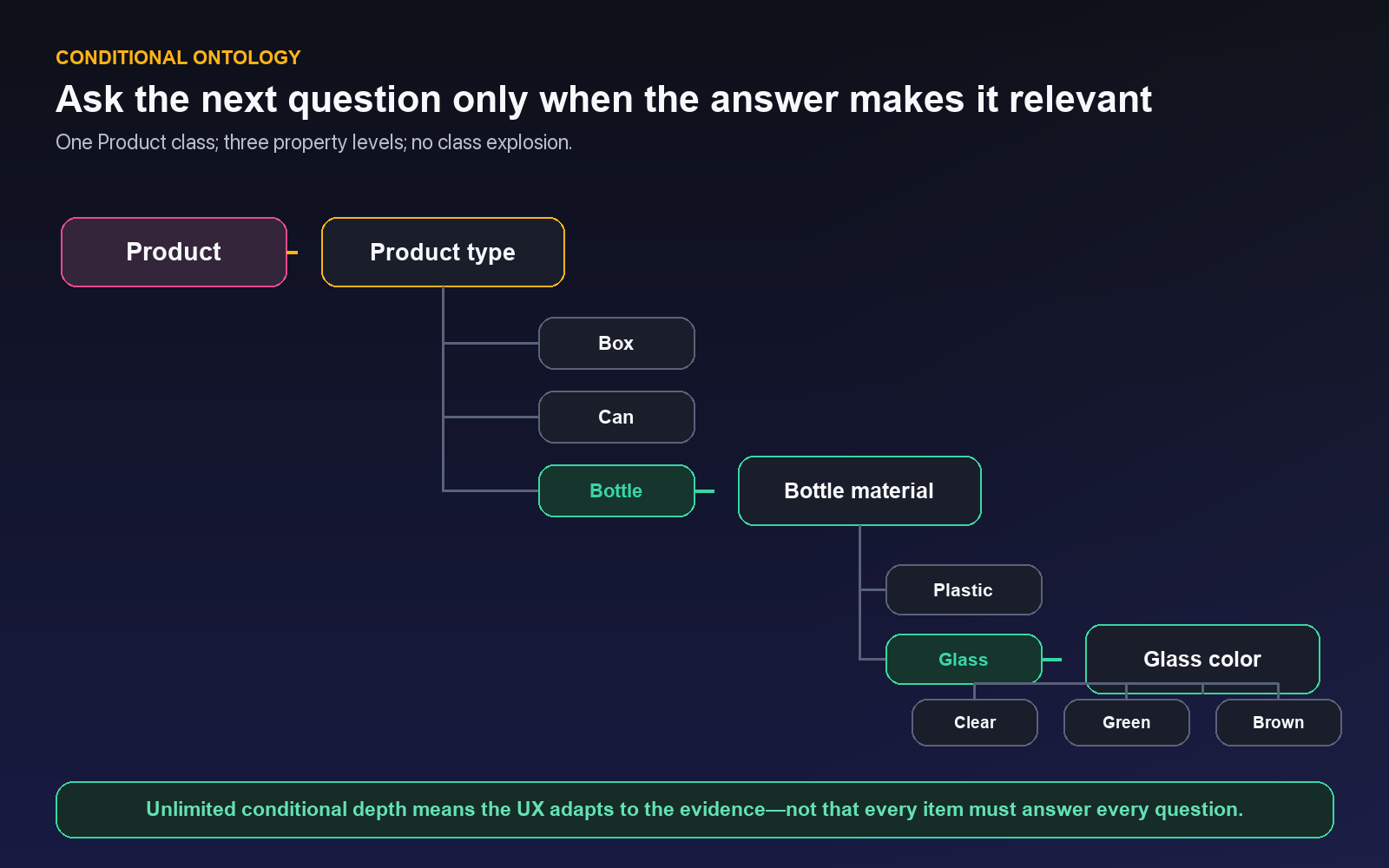
This is what unlimited conditional depth is for. It does not mean every ontology should be deep. It means a domain is not forced into a fixed two-level template. The branch can continue as long as each level represents an observable, useful question.
The practical value is not “more fields.” It is less irrelevant work, fewer contradictory combinations, and a schema that can evolve without turning every descriptive difference into another class.
One property system, many AI tasks
The same ontology building blocks cover very different data modalities because most annotation tasks reduce to a small number of output shapes: locate something, classify the whole item, extract structured fields, connect two things, score an answer, or describe how a state changes over time.
Text and documents
Entities and relations locate and connect text spans. Item Properties and nested properties express document-level or structured outputs. This supports OCR and handwriting recognition workflows, document classification, language detection and translation, summarization, named entity recognition, key-information extraction, question answering, sentiment and intent classification, topic and keyword labeling, quality scoring, table and form extraction, document-structure recognition, and PII detection.
For a purchase order, for example, Vendor, Invoice number, and Total can be entities or extracted fields. Document type can be an Item Property. Selecting Invoice can reveal invoice-specific nested fields while a receipt follows a different branch.
Audio and speech
Audio events locate spans in time; properties describe each event; Item Properties describe the recording or conversation. The same structure can represent speech transcription, speaker identification and diarization, language identification, speech translation, emotion and accent classification, intent recognition, audio-event classification, sound captioning, call summarization, conversation topics, speech-quality evaluation, and noise or distortion classes.
A Speaker turn event might have Speaker ID, Emotion, and Intent. The complete call might have Language, Outcome, and Audio quality as Item Properties. A nested escalation branch can appear only when the outcome is Unresolved.
Images and video
Spatial classes locate objects or regions; Item Properties describe the scene; Dynamic properties record changing state. This supports image and video captioning, scene description, visual question answering, scene classification, activity and event recognition, image-quality assessment, safety and compliance classification, content moderation, anomaly classification, medical findings, product condition, damage severity, and temporal event summarization.
The retail example uses a bounding-box class plus nested properties. A construction video might track a Person while a Dynamic property records Helmet status as the evidence changes across frames.
Multimodal annotation and evaluation
A grouped item can combine images, video, audio, text, documents, or medical data in one annotation context. Item Properties, relations, and nested branches can express image-to-text, video-to-text, audio-to-text, document-to-structured-data extraction, image–text consistency, video–audio alignment, caption quality, translation quality, model-response evaluation, human preference ranking, grounded question answering, multimodal summarization, instruction-following evaluation, and hallucination detection.
For a caption-quality task, the image and candidate text provide the evidence. An Item Property can record Overall consistency; selecting Inconsistent can reveal Error type, then a more specific branch such as Object, Attribute, Count, or Relation.
For connected assets, Unitlab's multimodal annotation workspace applies a shared ontology across the case.
Generative AI and LLM evaluation
The same pattern also represents response correctness, relevance, helpfulness, safety, factuality, hallucination, reasoning quality, writing style, prompt category, response preference, error type, tool-usage quality, citation quality, and conversation outcome.
This is not a claim that one schema should contain every task. The point is that Unitlab uses the same consistent UX—choice and text properties, Item Properties, requirements, validation, nesting, relations, and temporal behavior—to express the output contract that each task actually needs.
Class Properties, Item Properties, Required, and Dynamic
These concepts are easy to mix together because they can use the same value types. The difference is where the value belongs and how it behaves.
| Concept | What it describes | Example | Timeline behavior |
|---|---|---|---|
| Class property | One annotation object |
Bottle material on Product 12
|
Static by default; Dynamic can store frame-aware values under the object track |
| Item Property | The complete datasource or work item |
Image quality, Document language, Call outcome
|
Static across the item by default; Dynamic creates its own temporal row |
| Required | A completion rule on a property | every completed product needs Product type
|
Missing or invalid values surface through validation and the Invalid status path |
| Dynamic | A temporal setting on a class or Item Property |
Helmet status, Weather, Procedure phase
|
Creates keyframes or ranges so the value can change over frames or slices |
Class Properties
A Class Property belongs to one specific annotation. If an image contains twelve products, each product can have a different Product type, Condition, or Occlusion value. Properties can be single choice, multiple choice, or text. Text fields can carry typed values and validation for strings, numbers, booleans, dates, date-times, URLs, emails, and object identifiers.
Use a Class Property when the answer would be wrong or ambiguous without knowing which annotation it belongs to.
Item Properties
An Item Property belongs to the datasource as a whole. Shelf image quality should be answered once for the image, not copied onto every product. Document language belongs to the document. Call outcome belongs to the conversation. Response helpfulness belongs to the evaluated response pair.
Item Properties support the same single-choice, multiple-choice, and text types as class properties. They can be required, validated, defaulted, documented with help text, and nested under selected options with unlimited conditional depth.
Required Properties
Required is a separate completion rule. Enable it only when a valid answer should exist for every completed annotation. If the evidence may genuinely be unavailable, include an honest controlled state such as Not visible, Not applicable, or Cannot assess rather than forcing a guess.
Unitlab preserves invalid values and surfaces validation clearly instead of silently discarding work. Required and type-aware validation feed the Invalid status path so the item can be corrected.
Dynamic Properties
Dynamic does not mean “conditionally visible.” It means the value can change over a sequence.
Imagine one tracked person from frame 1 to frame 180. The object identity remains person 7, but Helmet status changes from Not visible to Present, then to Absent. A Dynamic class property stores those state ranges beneath the person’s track. The team does not need to split one person into three identities.
A Dynamic Item Property describes a changing scene-level state instead. Weather, Camera state, Traffic density, Procedure phase, or Overall quality appears on an independent timeline row because it is not attached to one object.
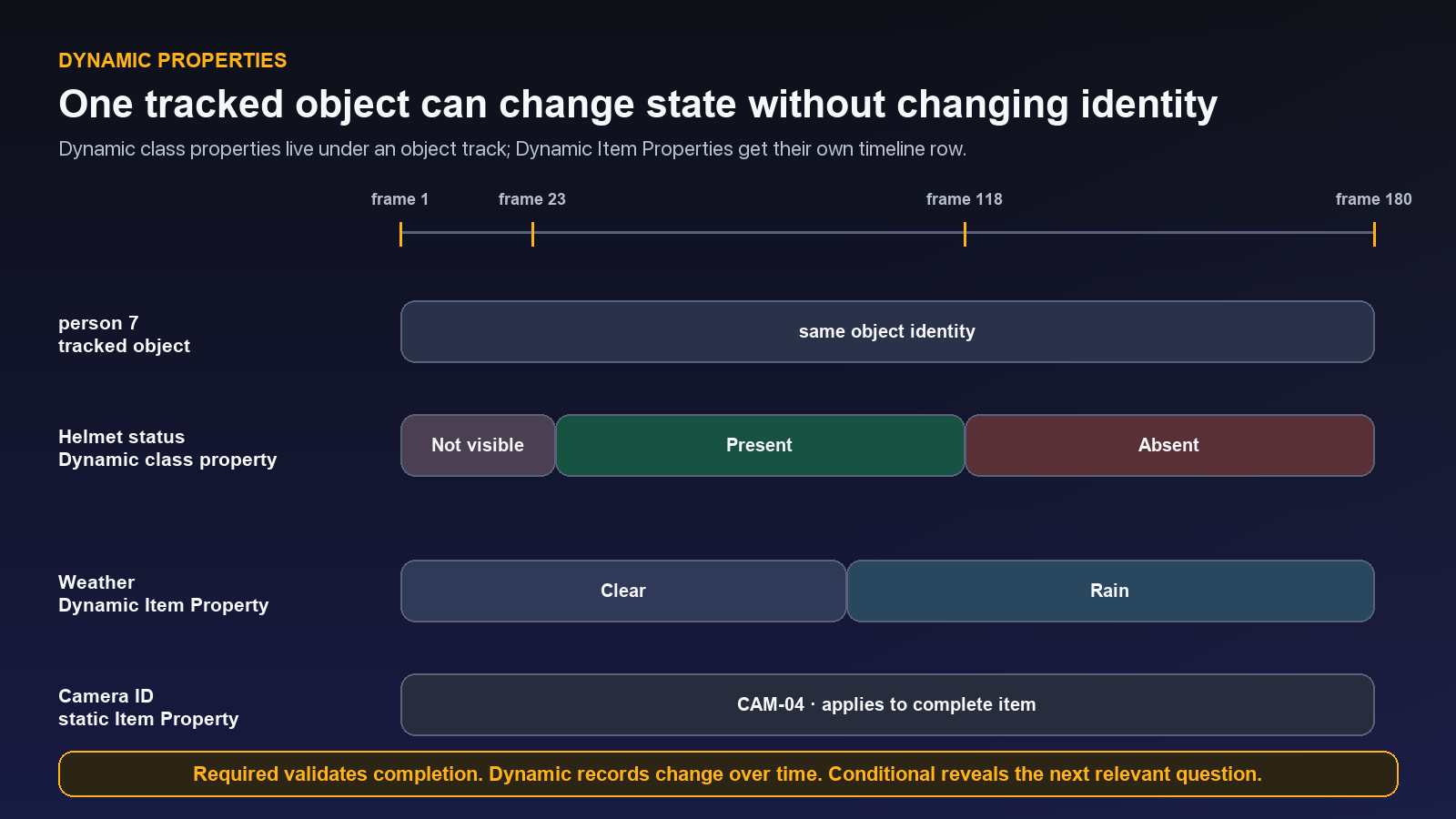
In the Workbench, moving the playhead updates the active value for that frame. A new value creates a temporal keyframe or range. Nested Dynamic properties can be expanded on the timeline, allowing a conditionally revealed child value to change over time as well.
Build the retail ontology from the Ontologies page
The central Ontologies page is the complete schema-design route. It is the right place for a reusable ontology, a complex conditional structure, or any change that needs deliberate review before annotation begins.
1. Create a Draft
Open Ontologies and choose New Ontology. Use a name that communicates purpose and scope, such as Retail Product Ontology, rather than test or final.
Keep the ontology in Draft while the team is designing and calibrating it. Publishing is a governance decision, not a save button.
2. Create the Product class
Choose the visual geometry that matches the downstream task. For this example, create Product as a Bounding box class. Add a concise description: the full sellable package; exclude shelf fixtures and unattached price tags. Choose a distinguishable color and, once class ordering is stable, an optional numeric hotkey.
Unitlab locks geometry after class creation. That protects existing annotations from a semantic change that would make old and new geometry incompatible.
3. Add Product type
With Product selected, choose Add Property → Single choice. Name it Product type and add Box, Can, and Bottle.
Make the property Required if every valid product must receive one of those states. If another observable package type can occur, either add it deliberately or provide a controlled Other state with a review policy. Do not let annotators improvise class names.
4. Add the Bottle branch
Select the Bottle option. From that option, add a nested Single-choice property named Bottle material, with Plastic and Glass.
The builder displays the condition—WHEN Bottle is selected—inside the tree. Non-bottle products do not receive the material question.
5. Add the Glass branch
Select Glass and add another nested Single-choice property named Glass color, with Clear, Green, and Brown.
The builder reports the current property count, option count, and depth. In the live demo below, the Product branch contains three properties, eight options, and depth 3.
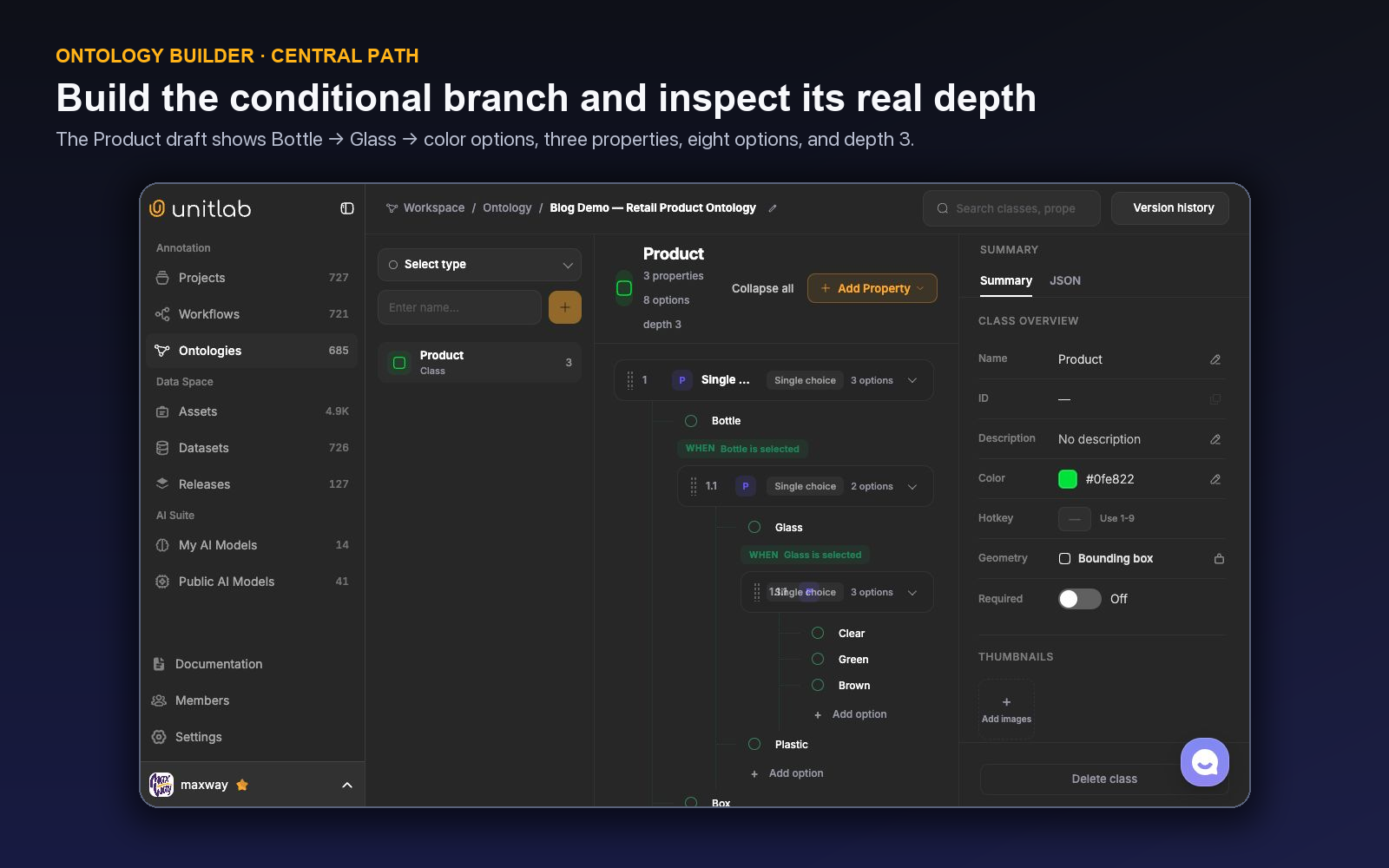
The central canvas uses three working areas: the class and type selector on the left, the nested structure in the center, and the selected class or property configuration on the right. The Summary and JSON views let schema owners inspect the resulting contract from both a human and integration perspective.
6. Add Item Properties and relations
Add Shelf image quality as an Item Property with values such as Acceptable, Blurred, Low light, and Obstructed. It should be answered once per image.
If the task also labels price tags, create Price tag as another spatial class and add a directed relation such as described_by from Product to Price tag. Define valid endpoints so reviewers can distinguish a missing relation from an incorrect one.
7. Inspect, calibrate, and publish
Use View logic map to inspect conditions and relationships as a connected schema. Review Summary and JSON, then test the Draft on representative data with at least two annotators and a reviewer.
Publish only when the team can answer the hard neighboring cases consistently. Publish draft creates the visible version. One ontology can be Live for the project at a time. Version history exposes immutable published snapshots, semantic change events, search, View snapshot, and Restore as draft. Restoring creates editable unpublished changes; it does not silently replace the Live schema.
Build ontology content from the Annotation Workbench
The Workbench is the contextual route. It is useful when a schema gap becomes visible while a real item and object are on screen.
Select an annotation in the Objects inspector and choose + Add property. The form opens for that object’s class. Enter the property name and optional description, choose Single-choice, Multi-choice, or Text, add options, and set Required when completion depends on a valid value. In video and medical annotation, enable Dynamic when the value must change across frames or slices.
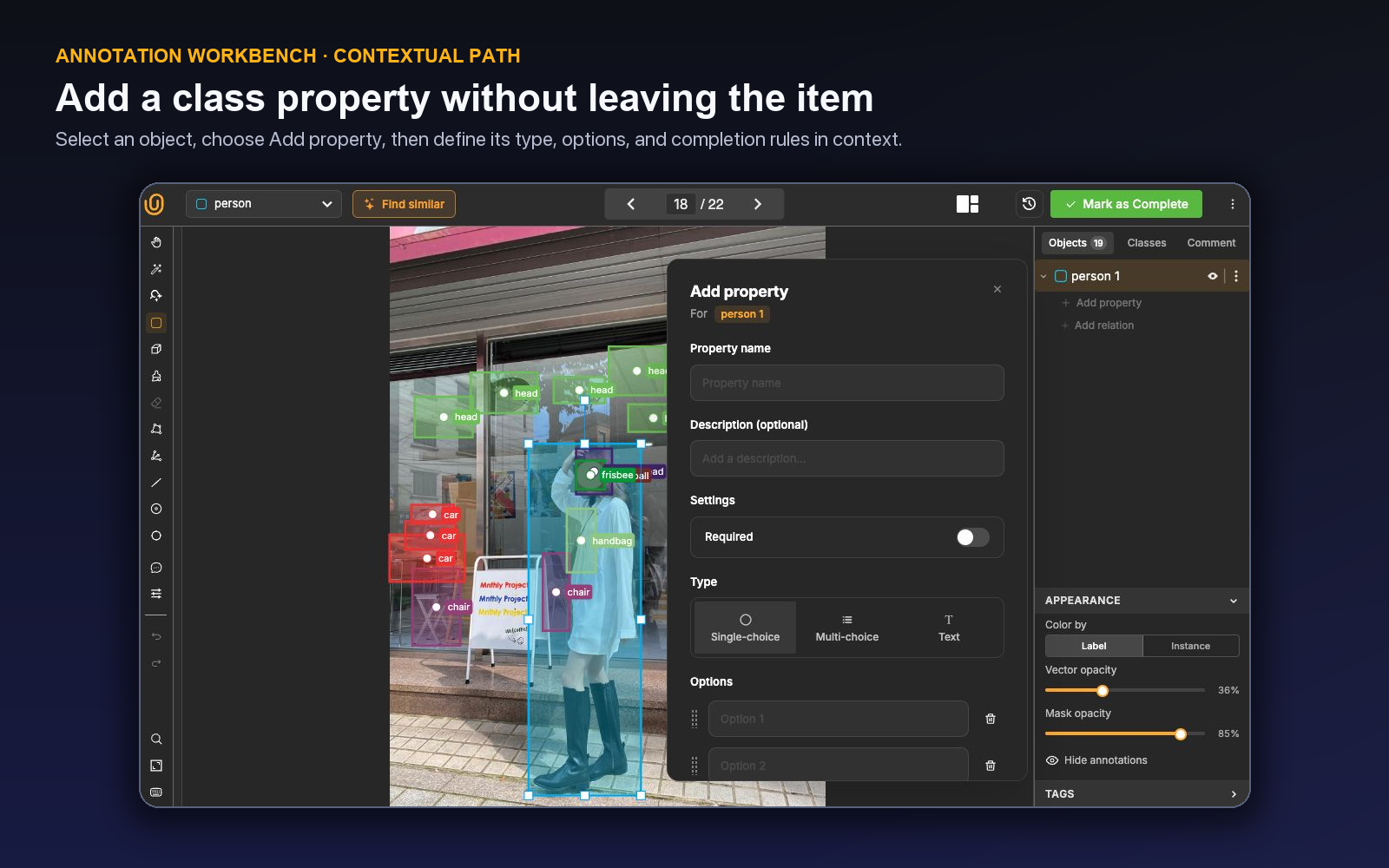
This is not limited to one object-property modal. The annotation-side schema flow includes:
- Quick class creation when the active annotation tool needs a compatible class.
- Manage Classes to create or edit class definitions, properties, attributes, and relations.
- + Add property from a selected object, including a nested Add property action under a selected choice option.
- + Add relation from a selected object to connect it to a target annotation.
- Item properties → Add item properties to create a datasource-level question; a nested Item Property can be added beneath the option that should reveal it.
- Manage Ontologies to open the complete Live ontology in a new tab without discarding the active annotation task.
The resulting definition belongs to the ontology, not only to the current annotation. It appears in the Ontology Builder, follows ontology versioning, and becomes part of subsequent work and supported exports.
The contextual route is fastest when the missing concept is understood and small. A semantic change that affects several projects, historical exports, or downstream mappings belongs in the central design and calibration process.
How to decide where a field belongs
Ask four questions in order:
Does it locate a different identity? Create a class. Product and Price tag are different objects. Glass is normally not a different located identity from Product; it is a property value.
Does it describe one annotation or the complete item? Put Occlusion on a product object. Put Image quality on the image as an Item Property.
Does it depend on another annotation? Use a relation. A price value can describe the tag; the fact that a particular tag belongs to a particular product is a connection between two annotations.
Does it change over time? Enable Dynamic. Keep static values static; unnecessary temporal fields add keyframes and review burden without adding information.
Conditional depth comes after those choices. Nest a question when its parent answer changes whether the child is meaningful. Do not use nesting merely to make a tree look comprehensive.
Calibrate the ontology before scaling it
A schema is not ready because every field has a name. Select 30–50 items containing obvious cases, difficult neighbors, occlusion, poor quality, and honest uncertainty. Ask annotators to apply the Draft independently, then review the disagreement.
Classify each disagreement:
- identity or geometry ambiguity;
- class-versus-property confusion;
- object-versus-item scope confusion;
- option wording or missing option;
- conditional branch ambiguity;
- required value that is not observable;
- temporal boundary disagreement;
- relation direction or endpoint error; or
- genuinely insufficient source evidence.
Change the ontology when the structure is wrong. Change instructions when the structure is sound but an operational example is missing. Change data-curation rules when the answer cannot be observed from the source.
Measure more than agreement. Watch missing Required values, Invalid items, use of unknown states, unused classes and options, time spent in conditional branches, relation errors, temporal correction rates, reviewer comments, and downstream mapping failures.
Use the calibration results to define annotation quality assurance criteria for the production queue.
Common ontology mistakes
Class explosion. Identity, subtype, state, color, and severity are combined into one class name. Keep identity in the class and move descriptive dimensions into properties.
Scene context copied onto every object. Image or document context is repeated across annotations. Use an Item Property once.
Required without an honest unknown. Annotators are forced to invent certainty. Add a controlled unobservable state or do not require the field.
Dynamic used as a synonym for conditional. A temporal state and an option-triggered branch solve different problems. Use Dynamic for change across frames; use nesting for relevance based on a selected option.
Unlimited depth treated as a target. Deep branches are valuable only when each level removes irrelevant questions and improves the downstream structure.
Workbench convenience without governance. A concept discovered in context becomes a permanent class without calibration. Capture the example, decide where the field belongs, and review the Draft.
Silent semantic change. A renamed or split class is treated as cosmetic. Use published versions, snapshots, change history, Draft restoration, and release boundaries so historical meaning remains traceable.
The ontology should make the hard case easier
The quality of an ontology is not measured by how much domain knowledge it contains. It is measured by whether it helps a qualified person turn evidence into the same structured decision, repeatedly, while preserving the distinctions a downstream system needs.
The retail tree is intentionally simple, but it demonstrates the full pattern: a stable class, controlled choices, conditional depth, item-level context, optional relations, completion rules, and temporal behavior when the source is a sequence. The same UX can structure a medical finding, a speaker turn, an invoice, a video event, or an LLM evaluation without forcing every domain into a flat label list.
Open Unitlab and start with one real decision. Build the schema centrally, test it from the Workbench, run the difficult examples, and publish only when the ontology, instructions, review behavior, and export contract tell the same story.
See how Unitlab supports enterprise data annotation workflows.
Continue in the Unitlab documentation: Ontologies overview.