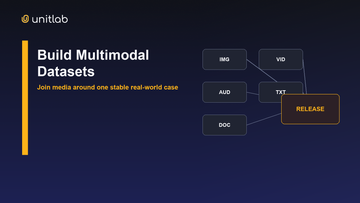
A researcher trains from “retail-v4,” then a curator removes duplicates and fixes labels inside the same collection. A week later, nobody can reproduce the run even though the dataset name has not changed. The team had a working dataset; it never created a delivery contract.
Datasets and releases solve different problems. One is allowed to evolve as people curate and annotate. The other freezes a usable state so experiments, audits, and consumers can refer to the same evidence.
“Which data did this model use?” should have a short, exact answer. Yet many teams point to a folder that has changed, a table someone filtered manually, or a dataset name with final in it three times. The underlying mistake is treating a working collection and an approved delivery as the same object.
Unitlab distinguishes them. A dataset is an organized, version-aware collection used during active data operations. A release is a versioned snapshot intended for distribution, download, cloning, and reproducible downstream reference.
Decision rule: Use a dataset for work that is allowed to change. Use a release when another team, model run, or audit must be able to refer to the same approved state later.
The lifecycle from asset to release
The live platform separates five concepts:
- Assets are source media in Data Space.
- Folders organize assets and source connections.
- Datasets select assets into working collections.
- Projects produce and review annotations under an ontology and workflow.
- Releases package a defined data, annotation, and metadata state.
This separation keeps source organization from becoming model lineage. A folder can be rearranged without pretending a training snapshot changed. A dataset can receive new assets while an earlier release remains a stable experimental reference.
What a live Unitlab dataset contains
The dataset library has Active, Archived, and Trash states. Its table shows name, version, asset count, size, data type, projects using the dataset, modification time, and creator. Datasets can contain image, video, or multimodal data.
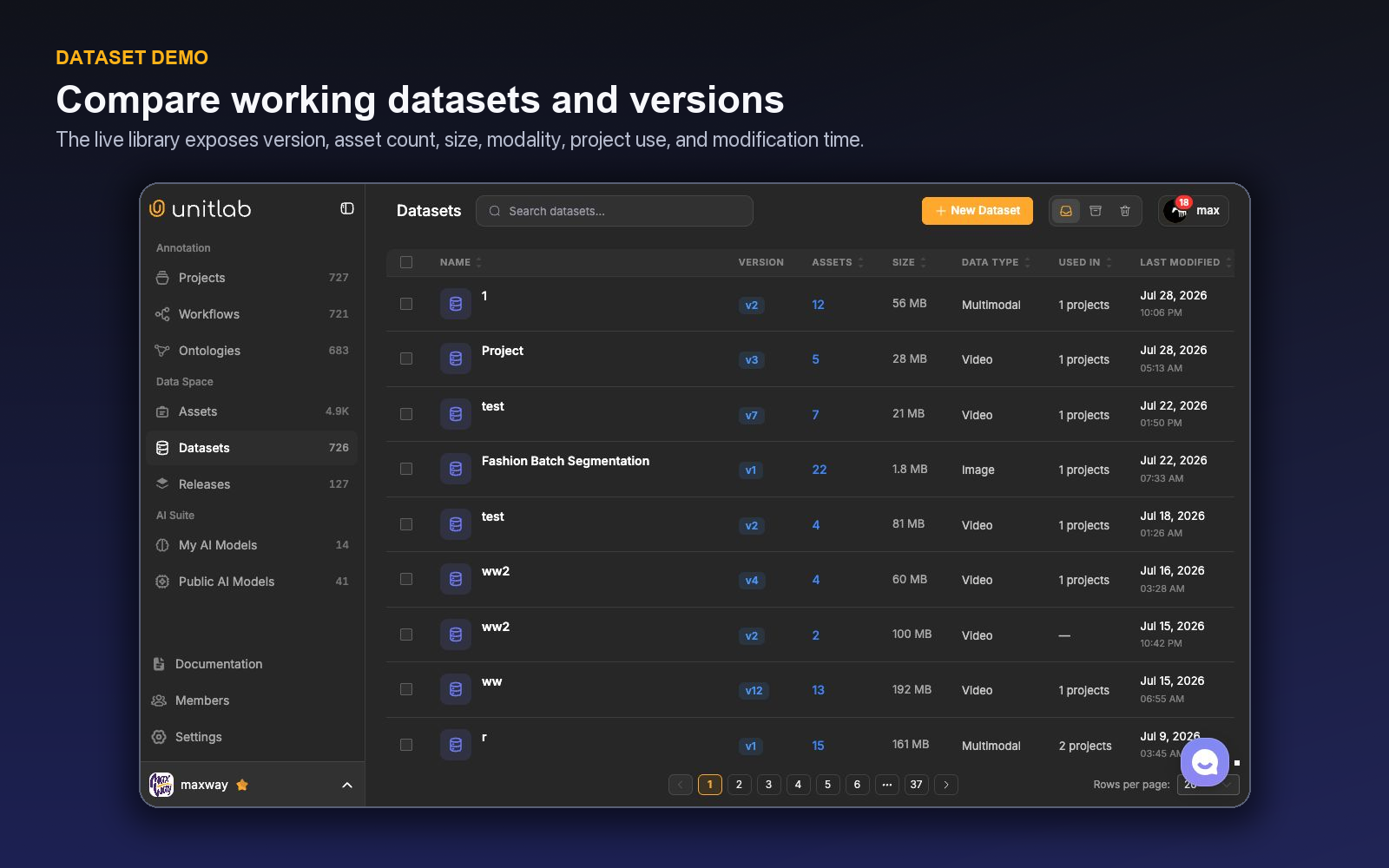
The New Dataset flow accepts a name, description, and one or more folders or assets. It creates a mutable working draft. Changes remain unpublished until the user selects Publish version, creating an immutable snapshot such as v1 or v2. Only a published version can be attached to a project.
The detail page opens on the working draft. Selecting an older version switches to a read-only snapshot with Back to current. Version history can restore a snapshot into the working draft or duplicate it as a new dataset; restoration still requires a later Publish version action.
Use a dataset when the team is curating, adding or removing source assets, preparing a project, or tracking a working collection's usage.
What a live release adds
Release cards show visibility, modality, date, previews, item count, and version. A detail page exposes a version selector, Clone Release, Download, and Overview, Data, and Settings sections. Release items include type, data ID, preview, ground truth, and metadata.
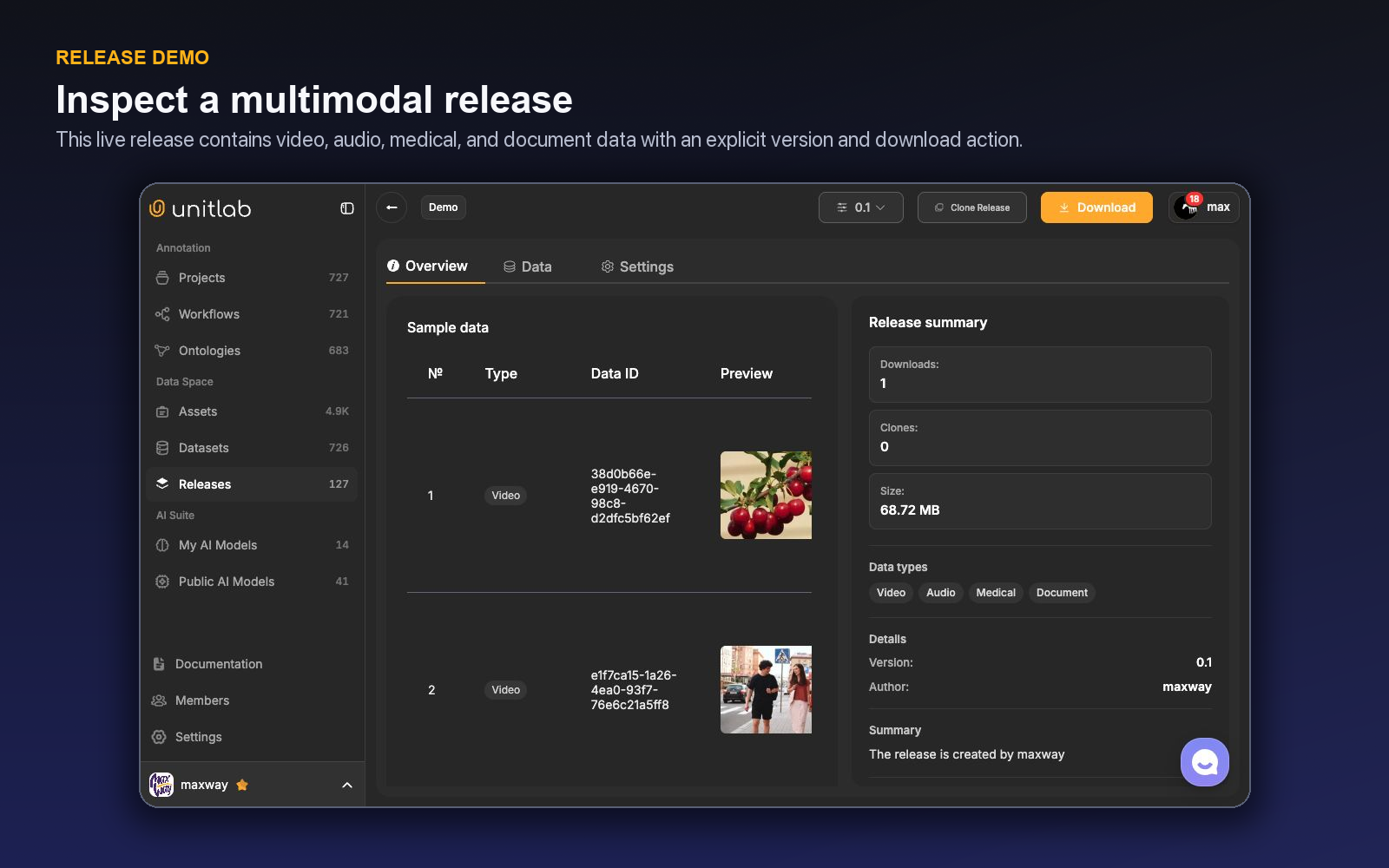
Use a release when the selected state is approved for model training, evaluation, sharing, auditing, or a new controlled branch. Release downloads support UUEF and Standard Bundle packaging plus compatible family-specific formats, with split-aware source and annotation delivery.
Unitlab's dataset management and versioning connects these working collections to traceable releases for downstream teams.
The decision table
| Need | Dataset | Release |
|---|---|---|
| Add or remove working assets | Yes | Create another version or release instead |
| Attach a collection to a project | Yes | Clone may seed another path |
| See projects using the collection | Yes | Not the primary purpose |
| Preserve a model-training reference | Not by itself | Yes |
| Package ground truth and metadata | Active inputs may be present | Yes, as the delivery object |
| Clone an approved package | Duplicate a version into a new working dataset | Clone a release into a controlled downstream branch |
| Download for downstream use | Not the defining behavior | Visible on release |
| Track experimentation lineage | Supporting context | Primary checkpoint |
A useful shorthand is: datasets are where the selection evolves; releases are where a decision becomes referenceable.
Version numbers do not replace release notes
Both datasets and releases display versions, but a number cannot explain intent. For every material version, document what changed and why.
A dataset change note should cover added or removed sources, curation rules, split logic, and project impact. A release note should add ontology version, workflow, review coverage, annotation corrections, known limitations, and intended use.
Avoid overwriting the meaning of an existing name. If road-scenes-v2 changes from a detection corpus into a segmentation corpus, the version lineage is misleading. Create a distinct dataset or release purpose.
A scenario: improving a vehicle model
Suppose a team curates street images into a vehicle-detection dataset and attaches it to a project. After calibration, annotators and reviewers complete the first batch. The team creates release v1 and trains a model.
Evaluation reveals weak performance on motorcycles at night. Data operations add an approved source folder and use filters plus embedding exploration to select more relevant assets. These join the working dataset, are annotated under the controlled ontology, and pass review. The team creates release v2 with a note describing the new source slice and correction policy.
The model team can now compare runs against release v1 and v2. Without releases, “we added nighttime motorcycles” is an anecdote. With them, it is a reproducible data change.
Avoid split leakage
Dataset operations should preserve grouping keys before a release is made. Assets from the same video, document, session, subject, or near-duplicate cluster should not cross train and evaluation boundaries unless the study design allows it.
Record split membership and the grouping policy. When a dataset version adds new assets, rerun leakage checks. A new file can be a duplicate of an old evaluation example even if its filename is different.
Handle an urgent correction
Suppose a reviewer discovers that one source batch used the wrong inclusion rule after release v2. First, identify affected assets and model consumers. Correct and re-review the working project; do not replace the released reference silently. Create v3 with an impact note and compare model behavior. If v2 trained a production model, decide whether risk requires retraining or rollback.
This process may feel slower than editing in place, but it preserves the evidence needed to manage the incident responsibly.
Consumer contract
The model team should validate counts, IDs, label schema, split membership, metadata, and download or loader behavior before training. Treat the selected release format and consumer adapter as versioned components.
When a release is unsuitable, do not modify it to fit one experiment. Create a documented derived branch, transformation, or new release. Preserve the source contract and make adaptation explicit.
Demo: move one correction from dataset to release
Return to the vehicle-model example and trace a correction through the current Unitlab navigation.
First open Assets and locate the approved source folder containing the new night-time motorcycle images. Check processing state and metadata before selection; a file that exists in storage but cannot be rendered or identified correctly is not ready simply because its name appears in a list.
Next open Datasets and choose the working vehicle collection. The live table shows version, asset count, size, data type, projects using the dataset, last modification, and creator. Those fields answer two immediate questions: are you editing the intended collection, and which active projects may be affected? Add the approved assets and record the selection reason outside the filename—for example, night / motorcycle / wet road / approved source.
Attach the dataset to the annotation project. The project is where the new images receive labels under the current ontology, instructions, workflow, and review policy. Completion here means the operational work is done; it does not yet mean a model should train from a mutable collection.
After review, open Releases and create the next approved delivery. Inspect the release detail rather than relying on the card alone. Confirm the version selector, sample rows, data types, metadata, ground truth, item count, and known exclusions. Use Download to test the consumer path. Use Clone Release only when you intend to create a controlled branch—not as a substitute for recording why the branch exists.
The release note should explain the change in plain language: “Adds 1,240 reviewed motorcycle examples captured at night; preserves the previous split grouping; no ontology change.” Link the model experiment to this release version. If the experiment improves motorcycle recall but hurts another slice, the team can compare against the preceding release without guessing which working files changed.
This walkthrough exposes the central distinction. The dataset absorbed new evidence and annotation work. The release made one approved state referable to another team.
Attach an exact version—and detach without deleting the source
After publishing dataset v2, the project manager opens Attach Data. The modal offers Folders and Datasets; it does not treat loose assets as a third attachment type. The manager selects v2, reviews the preview and deduplication counts, and commits. Unitlab clones that frozen version into the project as Unassigned work and immediately opens assignment. Publishing v3 later does not mutate the project copy.
The project Datasets page shows the attached version as a source card. View Source opens the underlying frozen dataset version without changing it. If the source must leave the project, Detach removes only that project relationship. The default preserves annotations and archives project copies; Clear annotations requires the stronger explicit choice. The Data Space dataset and other projects remain untouched.
Reattaching the same preserved source restores archived project rows and their histories rather than manufacturing duplicates. This distinction is operationally important: deletion, detachment, archive, and release are separate actions with different consequences.
The release follows only after annotation and review establish an approved state. The consumer receives the release ID and format, while the project retains the exact dataset-version provenance that entered the workflow. A newer source version or corrected annotation therefore becomes a deliberate new attachment or release—not an invisible change behind the same name.
Dataset lifecycle actions do not delete underlying source assets. Archiving or trashing a dataset changes the collection and its versions; the folders and files remain governed in Data Space. Permanent deletion is available from Trash and should follow impact review. This prevents a curator from mistaking “remove this working selection” for “erase the source corpus.”
Project uploads follow a separate convenience path: one upload action creates a Batch Queue and updates the project’s own dataset, publishing one new version for that completed batch. Uploading into a normal workspace folder creates unpublished dataset changes that still require an explicit Publish version.
Follow one urgent correction without rewriting model history
Assume Release 1.3 trained a vehicle-damage model. A reviewer later discovers that 120 images labeled scratch actually contain crack, and several near-duplicates crossed into evaluation. The working dataset must change, but the release already referenced by a model run must remain understandable.
Open the working dataset and identify the affected items through class, review status, metadata, source, or saved cohort criteria. Correct the annotations through the project workflow rather than editing an export in isolation. Resolve duplicate placement, preserve the original source records, and document why the correction cohort exists.
Create a new dataset version. The old version remains the state consumed by Release 1.3; the new version contains the corrected labels and split decisions. If the fix requires a changed ontology—perhaps splitting one class—publish or attach the appropriate ontology version and record the mapping. Do not let a semantic migration masquerade as a simple data refresh.
Build Release 1.4 from the corrected dataset version and any other approved components. Its notes should identify the changed cohort, duplicate policy, ontology or instruction change, and expected effect. The model team can then retrain or reevaluate while still reproducing Release 1.3 exactly enough to explain the difference.
This separation also protects rollback. If the correction introduced an unintended regression, the team can compare releases, detach the new dependency from an experiment, or return to the previous approved state without deleting current work. A dataset is where investigation and improvement continue; a release is the named consumer contract.
Close the loop by linking model results to the release identifier, not to a folder called latest. Compare performance overall and on the corrected cohort. If the evaluation change came mostly from removing leakage, say so; if the class correction changed the task definition, evaluate the new semantics rather than claiming a direct apples-to-apples gain.
The practical governance rule is simple: correct forward, never silently backward. Working data can evolve quickly, while releases preserve what a model, customer, or audit decision actually used.
Define promotion criteria before a release is requested
A dataset version should not become a release merely because annotation reached 100%. Define the gate in advance: processing complete, required properties valid, workflow review satisfied, unresolved issues classified, duplicates handled, split leakage checked, ontology and instructions identified, and source or modality completeness measured.
Review a cohort from every important class, source, and difficulty band. Confirm that corrections have been routed and saved, not merely discussed in comments. For multimodal data, sample the relationships between resources. For temporal data, inspect track and Dynamic-property boundaries. The promotion gate should reflect the data's actual risks.
Name the release for a consumer decision, not just a date. Include the model objective, component dataset versions, ontology, split policy, exclusions, and change from the previous release. A release called March-final-final shifts interpretation back to tribal knowledge; a structured description keeps the contract usable.
After promotion, restrict changes to a new version and release. If a consumer finds a defect, log it against the affected release, correct the working dataset, and state whether the next release is backward-compatible. This discipline allows rapid iteration without making historical model results ambiguous.
Finally, practice detaching or replacing a release component in a safe experiment. The source dataset should remain intact, and the old release should remain discoverable. That exercise confirms that the team understands the difference between changing a model dependency and deleting the data it once referenced.
Keep naming and status language consistent. “Working,” “candidate,” and “approved” should refer to operational maturity, while numeric or date versions identify the artifact. Avoid using final as a permanent state; a released artifact can remain immutable even when a newer one supersedes it.
When several datasets form one training package, the Release is where their compatibility becomes explicit. Verify ontology mapping, class coverage, split interaction, duplicate risk, and modality assumptions across components. Two individually valid datasets can still create leakage or contradictory labels when combined.
Consumers should receive the Release and change notes, not unrestricted permission to assemble ad hoc versions. That boundary keeps experimentation possible while protecting the approved reference used for reproducibility, customer delivery, or model promotion.
Audit usage periodically. If a release is no longer supported, mark that status without deleting the record. Historical model results still depend on knowing what the release contained and why it was replaced.
Treat release creation as approval to consume, not proof that every future use is valid. A release built for object detection may contain the same images as a classification experiment but lack the Item Properties, split design, or class policy that the second task needs. Consumers should check fitness for purpose before reuse.
When reuse is appropriate, reference the existing release instead of copying files into a new untracked folder. If adaptation is needed, clone or build a new dataset version and describe the transformation. This keeps reuse connected to lineage rather than creating a parallel history.
A promotion meeting that produces a decision
Bring the dataset owner, project or annotation owner, reviewer, model consumer, and release owner together around one candidate version. The dataset owner explains membership, filters, grouping, duplicates, and splits. The project owner explains ontology and instructions. The reviewer explains remaining errors and uncertainty. The model consumer explains the expected use.
Inspect sample Assets and annotations from every important cohort. Review Invalid items, rejected work, unresolved issues, source failures, required properties, multimodal joins, and temporal boundaries where relevant. Confirm that the candidate version, not a changing folder, contains the reviewed membership.
Compare with the prior release. State added and removed cohorts, corrected labels, ontology change, source shift, leakage repair, and known limitations. Decide whether the release is compatible with existing consumers or starts a new evaluation line.
Apply explicit gates: processing complete, review requirement met, split leakage checked, ontology identified, instructions current, export validated, and change notes written. If a gate fails, return ownership to the correct working layer rather than modifying the historical release.
After approval, create the Release, attach exact versions, and give the identifier to the model run or customer delivery. Store the decision and intended use. Test one example backward to Assets and forward to the consumer representation.
If the release is rejected, record why and keep working in the dataset. This meeting preserves speed because it separates investigation from the immutable contract. The dataset can change the next day; the approved release remains the stable answer to what was consumed.
Try the workflow in Unitlab
Include the negative path in the rehearsal. Restore an earlier dataset snapshot, confirm that the working dataset changes without rewriting an existing release, and then return to the intended version. This proves that recovery and publication are separate controls.
Next, detach the dataset from a test project and confirm that neither the source dataset nor its versions are deleted. Reattach the exact required version before creating a release. These small exercises prevent teams from treating project membership, dataset history, and released output as the same lifecycle.
- In Assets, identify the source pool and its eligibility rules.
- In Datasets, assemble the working collection, inspect its version context, and record why items enter or leave.
- Complete annotation and review in projects without treating project completion as the downstream delivery itself.
- Create a release only after schema, quality, counts, splits, metadata, and known limitations pass a gate.
- Give the release identifier—not a live folder name—to the model or consumer and test clone or download.
Reconcile counts across source assets, dataset selection, project processing, accepted annotations, and released items. Every gap needs a reason. That lineage is the answer to “which data did this model use?”
The decision to make
Pick one recent experiment and try to reproduce its exact data. If the answer is a mutable folder, build a versioned Unitlab release and make it the model dependency.
Continue with Unitlab’s a data curation platform and AI training-data annotation.
Continue in the Unitlab documentation: Dataset versions and history.