A robotics run produces three cameras, one audio stream, telemetry, and a technician note. Filtering by filename selects four of the five sources because one camera clock was reset. The dataset is large, multimodal, and missing the view that explains the failure.
The first design question for a multimodal dataset is not “which file types?” It is “what real-world unit joins them?” Once the parent unit is stable, modality-specific timing, missingness, review, and release rules can be made explicit.
Multimodal AI depends on relationships, not file counts. A video and transcript become valuable together only when the team knows they belong to the same event and remain aligned. A document and image need a shared business context. An audio clip and medical image may require different review expertise while still joining one governed release.
Unitlab supports Image, Video, Audio, Text, Medical, and Document resources inside typeless projects. Related sources can become one Data Group with one workflow identity and a saved multiview layout, so governance is not merely connective tissue around separate projects—the case itself can remain intact during annotation.
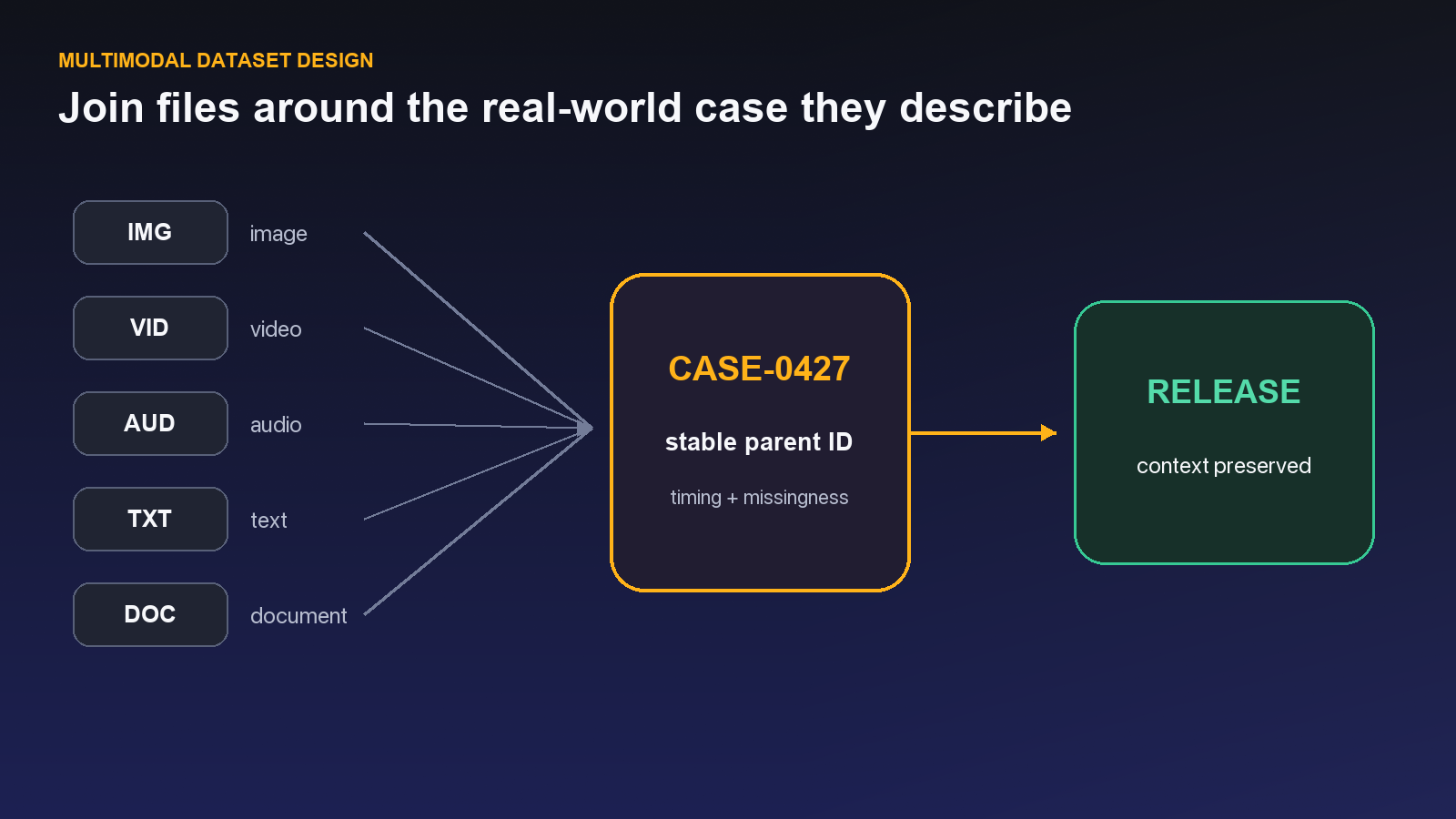
Design principle: Define the real-world parent unit before organizing modalities. File type tells you how to process an asset; the parent unit tells you which evidence belongs together.
See the Unitlab AI multimodal data platform in action
Unitlab helps AI teams curate, annotate, manage, version, and prepare multimodal training data at enterprise scale. This walkthrough shows video, documents, audio, images, synchronized layouts, workflow automation, review, and versioned datasets in one enterprise platform.
Explore Unitlab’s multimodal data annotation platform.
Define the unit before selecting files
Choose the parent concept that joins modalities: case, encounter, trip, machine cycle, customer interaction, inspection, or event. Assign it a stable ID. Every asset should link to one parent and carry its modality-specific identity.
Define whether assets are synchronized, ordered, or merely associated. A transcript synchronized to audio needs timestamps; a manual associated with a product image may need only a shared product ID; a series of frames needs ordering and capture context.
Write the completeness rule. Does every case require all modalities? If not, distinguish “not collected,” “not applicable,” “corrupted,” and “excluded by policy.” Missingness can itself correlate with the target and introduce bias.
Ingest while preserving source context
Data Space accepts uploads and connected cloud-storage sources. The live provider dialog includes Amazon S3, GCS, Azure Blob, MinIO, DigitalOcean Spaces, Cloudflare R2, Wasabi, Backblaze B2, and custom S3-compatible storage.
Preserve source system, acquisition time, owner, license or approval state, and parent ID. Use folders for stable source organization and tags for cross-cutting operational attributes. Avoid relying on filenames as the only relationship key.
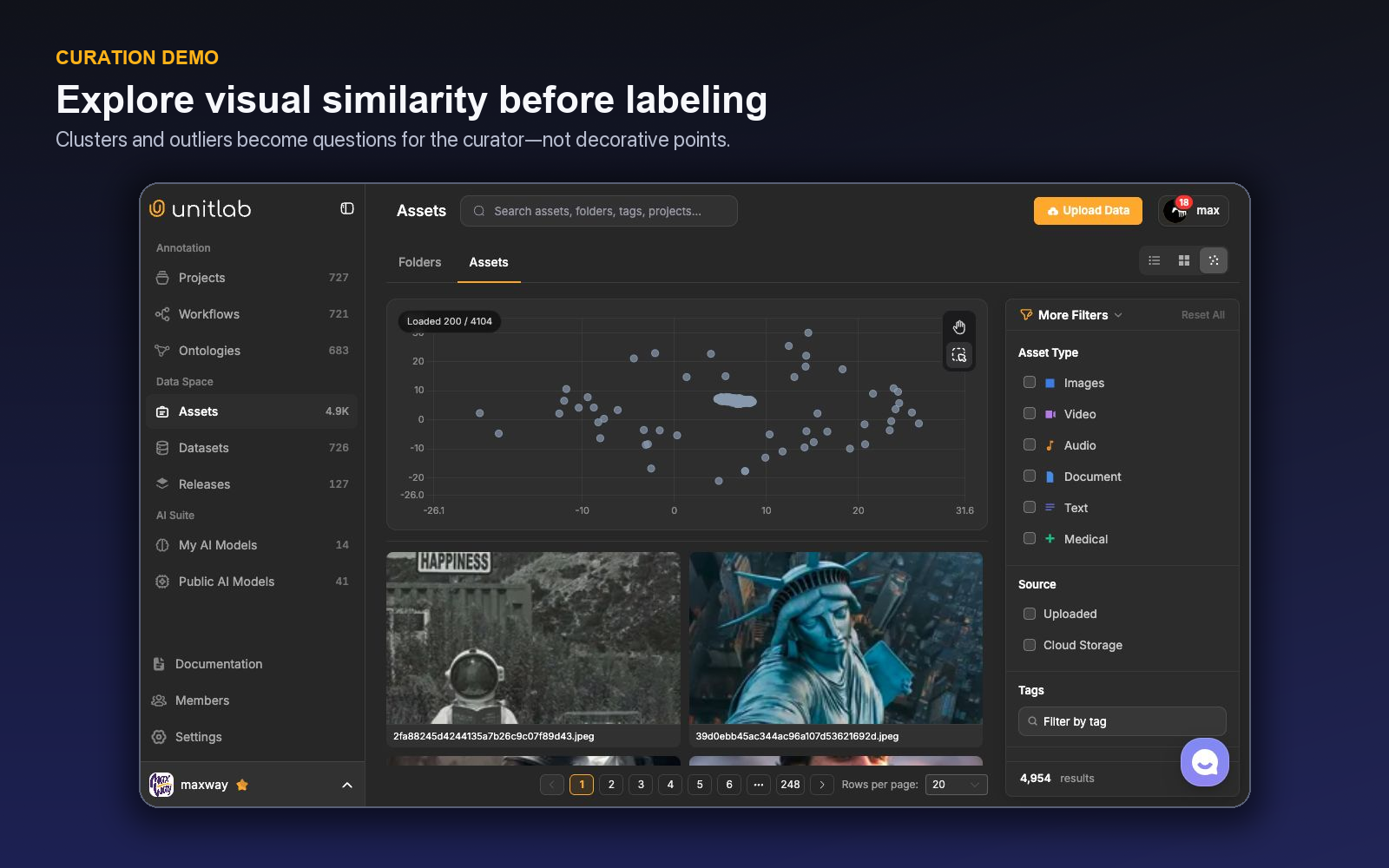
Use the Asset Type and Source filters to audit the expected modality mix. Size and dimension filters can identify unsuitable visual media; date filters can expose acquisition shifts.
For records that arrive as related groups, Auto-Grouping provides four steps: Configure, Rules, Layout, and Review. Unitlab can suggest filename keys and tile roles, estimate valid/skipped/conflicting groups, enforce required tiles, and save Grid, List, or free-form Custom arrangements with draggable and resizable panels. Every run creates a new grouped sibling folder and leaves the raw source folder unchanged. Treat the rule as a data contract: group by a stable case, study, session, or capture key, then review membership before publishing the grouped folder as a dataset version.
Curate within and across modalities
Each modality has its own quality checks:
- images and medical assets: dimensions, blur, visual coverage, acquisition artifacts;
- video: duration, frame quality, shot structure, audio presence where needed;
- audio: duration, clipping, noise, channel behavior, intelligibility;
- text: encoding, truncation, language, formatting, duplication;
- documents: page and format integrity, metadata, relationship to the parent case.
Cross-modal checks verify parent IDs, sequence, time alignment, completeness, and split grouping. The Unitlab embedding view helps visually explore clusters and outliers among embeddable assets, but it does not replace relational validation.
Annotate the connected case in one typeless project
Project creation asks for a name rather than a fixed modality. Each resource chooses its native editor: spatial geometry for image and document, tracks and timelines for video, events and waveform controls for audio, entities and relations for text, and synchronized medical views for volumetric data.
When a published dataset version contains Data Groups, each group opens in its saved layout as one Workbench item. A video, PDF, and audio recording can remain visible together; only the selected panel is editable, while the other panels provide read-only context. The group receives one workflow state, assignee, priority, comment history, and release identity.
Do not force all labels into one universal primitive. Instead, harmonize controlled concepts across ontologies. Severity, quality, location vocabulary, or case status can share definitions even when an image uses a mask, audio uses an event, and text uses an entity.
Maintain a schema registry containing modality, ontology ID and version, shared vocabulary references, required properties, review owner, and effective release. This prevents superficially identical labels from drifting apart.
Prevent multimodal leakage
All assets linked to one parent—or close variants of them—should usually stay in the same train, validation, or test split. Otherwise, the model may see one modality from a case in training and another from the same case in evaluation.
Group by the strongest leakage unit, which may be subject, device, site, session, document family, or near-duplicate cluster rather than file. Run split checks again when a dataset version changes.
Package a model-ready release
The release system exposes version, visibility, preview, annotation preview, item counts, cloning, download, and structured ground truth and metadata. One release can contain video, document, and audio together while preserving their shared delivery context.
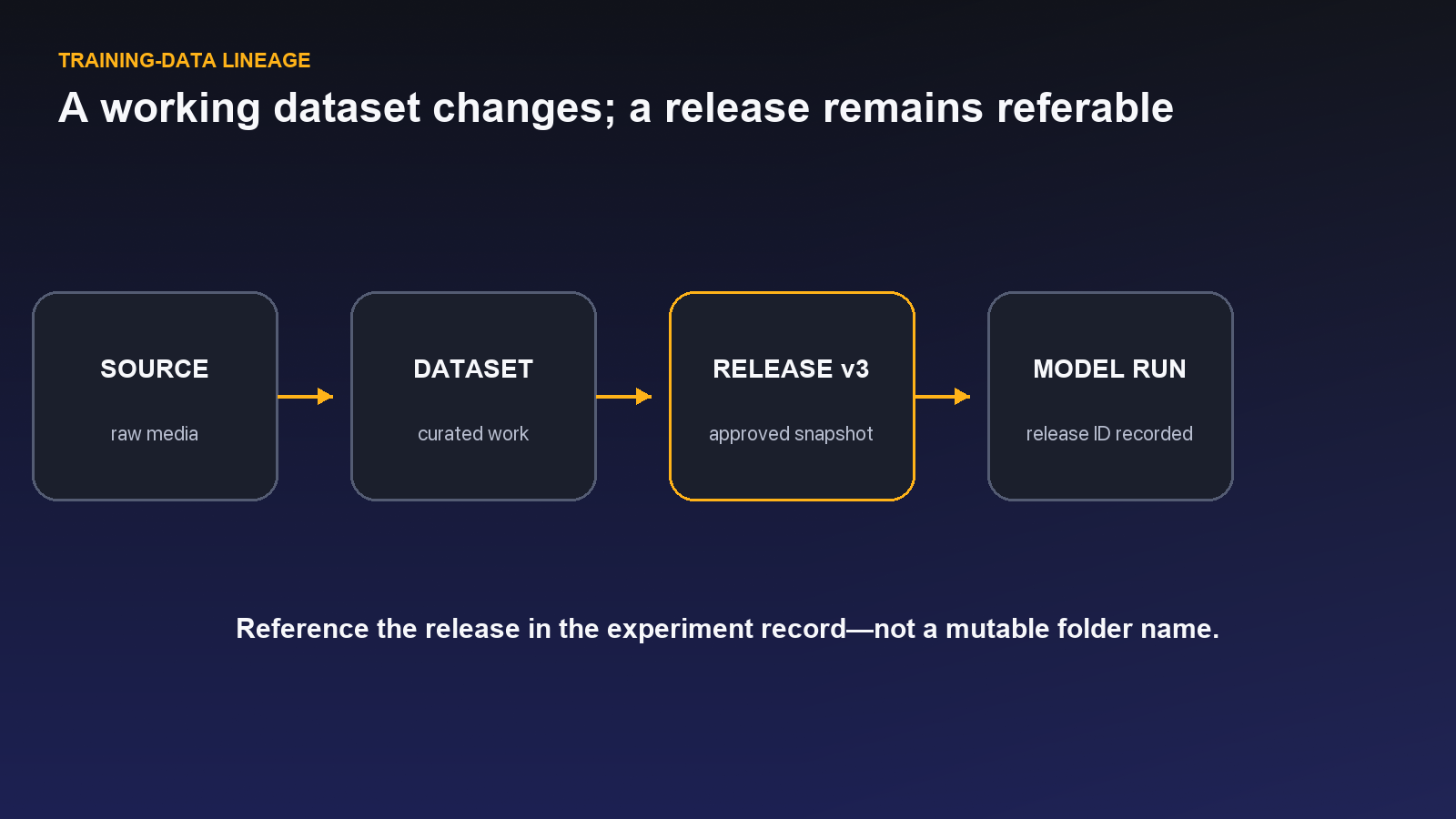
A release note should state parent-unit definition, modality requirements, source versions, curation criteria, split policy, ontology versions, workflow and review coverage, missingness, known limitations, and intended use.
Validate the actual downstream package. Releases support UUEF and Standard Bundle packaging plus compatible family-specific formats. Test file layout, group and tile identifiers, annotations, metadata, splits, and consumer checks with the intended training or evaluation pipeline.
A worked customer-interaction example
Consider a customer case containing chat text, a recorded support call, screenshots, and a PDF receipt. The parent case ID links every asset. Text entities capture products and reported symptoms, audio events mark speaker turns or escalation moments, images locate visible errors, and the document carries page metadata and verified ground truth where available.
An item-level outcome vocabulary is shared across modality ontologies, but each project uses its native annotation type. A case-completeness table distinguishes missing consent, unavailable audio, and not-applicable document. The split groups by customer or case—not file—so a receipt cannot enter evaluation while its call transcript is in training.
The release manifest states which modalities are present, which projects and ontologies created labels, and how timestamps and IDs align.
Validate cross-modal semantics
Shared property names can still carry different meanings. severity in an audio event may refer to acoustic intensity while the same name in a support document refers to business impact. Give shared vocabularies a definition and owner or keep them separate.
Run case-level review on a sample. Ask whether the annotations across modalities describe a coherent event and whether any source contradicts another. This is a distinct check from modality-level label accuracy.
Evaluate model behavior by availability pattern
Report performance for complete cases and each important missing-modality combination. A model that works only when every source is present may not fit production. Conversely, training with arbitrary modality dropout may obscure meaningful missingness.
Use released metadata to construct these slices consistently. Keep the evaluation parent groups distinct from training across every modality.
Coding-agent evaluation makes this design concrete: one task may join repository state, screenshots, video, logs, tests, and reviewer decisions. Meta Enters the Coding-Agent Race With Muse Code examines how that evidence should remain connected for agent training and expert review.
A worked robotics Auto-Grouping design
Return to the robotics run from the opening. Files follow {run_id}_{role} for front, left, right, audio, and note. The clock reset does not matter because the stable run ID—not capture timestamp—is the grouping key. In Configure, the team selects the source folder, accepts the proposed key as a starting point, and names the group {run_id}.
In Rules, front video and technician note are required because the failure cannot be interpreted without them. Side cameras and audio are optional but must be distinguished as missing, not applicable, or failed. The estimate shows complete groups, incomplete groups, duplicate tile matches, and conflicts. The problematic run is skipped instead of quietly becoming a four-file “complete” case.
In Layout, front video receives the largest panel. Left and right cameras sit beside it, audio spans the bottom, and the note occupies a narrow reference panel. Overlap is blocked, and the percentage-based layout scales when replayed in the Workbench. Review confirms membership and layout before Create produces a new grouped sibling folder. The raw source folder stays unchanged.
The grouped folder enters a dataset working draft and is published as v1. Attaching v1 to the project creates one workflow item per robotics run. During annotation, the active camera panel can be edited while audio and note remain visible for context. Previous/next navigation moves to the next run, not the next tile. If one tile is optional and missing, that panel has its own state without breaking the entire task.
The ontology separates camera-specific objects from Item Properties such as Run outcome or Failure phase. A Dynamic Item Property can change the phase across a video sequence, while object properties track the state of one component. Review evaluates both each panel’s labels and cross-panel consistency.
The release preserves group and tile identity in UUEF. The downstream loader can reconstruct which five sources formed a run, which were missing, and which annotation history belongs to the group. The design no longer depends on a spreadsheet or a timestamp that failed in the first place.
The same pattern scales beyond robotics. Four camera roles can represent one factory inspection; mammography views can share a study key; a customer case can combine transcript, audio, screenshot, and receipt. What changes is the group key, required-tile policy, layout, and ontology—not the operating lifecycle.
Do not use Auto-Grouping to hide weak identifiers. If two files match the same tile or one filename can belong to two cases, the estimate should surface the conflict and the source process should be corrected. A visually attractive layout cannot repair ambiguous membership. Group accuracy is upstream label quality because every annotation and split decision inherits the group.
For very large folders, grouping may run asynchronously. Treat the job as processing work: wait for completion, inspect created and skipped counts, sample memberships, and publish only after the result is trustworthy. A thousand incorrect groups merely automate the wrong unit faster.
Design Auto-Grouping around a robotics episode
Consider a warehouse robot episode with a front-camera video, depth frames, microphone audio, a telemetry document, and an operator note. The model objective is to understand failed pick attempts. The files arrive through different pipelines and do not share a perfectly formatted filename, but they do share episode_id and bounded timestamps.
Define the case before defining the layout. One grouped item represents one robot episode. Auto-Grouping should join resources on the stable episode identifier and use time only where necessary to associate subresources. Preview the rule on known complete episodes, missing-audio episodes, duplicated telemetry, and timestamps near episode boundaries. A confident grouping rule must explain both matches and non-matches.
Choose an anchor resource. The front video may drive the timeline, while depth, telemetry, and audio support interpretation. Build a Custom Layout with the video active, the operator note visible, and supporting panels arranged where the annotator can compare evidence without repeatedly changing tools. A second panel becomes active only when the task truly requires annotation on that modality; context does not need to become another labeling obligation.
Use the ontology to separate levels. A failed_pick event may be localized on the video timeline. failure_reason, object_type, and confidence can belong to that event. Episode-level outcome, environmental condition, or sensor-completeness belongs in Item Properties. A relation can connect the failed attempt to an object or note span when that structure is necessary downstream.
Represent missing modalities honestly. If audio is optional, add a controlled completeness state instead of discarding the episode. If telemetry is required, route the incomplete group out of production. Models trained for partial availability need explicit missingness; models that assume complete context need curation that enforces it.
Protect splits at the real-world unit. Every resource from one episode—and often every episode from one robot run or facility window—should remain in the same split when leakage is possible. Duplicate visual frames or repeated operator notes can otherwise make evaluation look stronger than deployment.
Publish the grouped folder into a dataset version only after join QA. Sample cases from every source, completeness pattern, and edge condition. Then annotate, review, and build a Release that records grouping logic, layout version, ontology, missing-modality policy, and split unit. A consumer should be able to reconstruct the multimodal example without reverse-engineering filenames.
Evaluate by availability pattern. Report performance for complete episodes, missing-audio episodes, low-quality video, and other valid configurations. A single aggregate score can hide a model that works only when every sensor is present. Multimodal dataset design is therefore not file aggregation; it is explicit modeling of which evidence belongs together and what the system should do when some of it is absent.
Review grouping errors as their own quality category
Annotation QA cannot repair a wrongly assembled case. Add grouping review before semantic review and classify failures separately: missing member, extra member, wrong case, duplicate resource, timestamp collision, stale metadata, and unsupported modality. These errors belong to curation and grouping rules, not to the annotator who sees the resulting layout.
Sample complete and incomplete groups, plus cases at identifier or time-window boundaries. Open the actual media and document content to confirm the join. A matching filename or metadata value can still be wrong if the upstream system reused an identifier or wrote it late.
Track join quality over time by source. When one pipeline changes metadata conventions, Auto-Grouping should be recalibrated before new data is published into dataset versions. Preserve the old version so existing releases remain reproducible even if the grouping rule evolves.
For downstream export, verify that grouped resources retain one case identifier, distinct modality roles, per-resource metadata, and annotations at the correct level. Item Properties should remain attached to the case; object or event annotations should remain attached to their source resource; relations should resolve across the exported representation where supported.
A multimodal release is credible when a consumer can distinguish “modality absent,” “modality failed,” and “modality not required.” Those states often determine model behavior and should never be collapsed into an empty folder.
Calibrate the Custom Layout with the people who will annotate and review it. Verify that the anchor resource is obvious, synchronized views move as expected, passive evidence cannot be edited accidentally, and required properties remain visible at the moment of decision. A technically correct layout can still create unnecessary switching or hide context below the fold.
Measure navigation effort during the pilot: panel changes, timeline scrubbing, time spent locating companion evidence, and corrections caused by looking at the wrong resource. Layout is part of data quality because it determines which evidence a person can compare before labeling.
Version layout and grouping changes with the project record. If a new panel or rule alters available context, annotate a fresh cohort and compare agreement rather than assuming labels produced under different evidence are identical.
Include a context-availability property when model evaluation needs to distinguish which modalities the human saw. An annotation made with video, audio, and a report is not automatically comparable with one made from a single image. Recording that evidence state supports honest analysis later.
A grouping and layout acceptance test
Prepare a test pack with complete groups, allowed missing modalities, required missing modalities, duplicate resources, wrong identifiers, near-boundary timestamps, and unsupported files. Include several real cases that only a domain expert can distinguish. This prevents the grouping test from becoming a filename exercise.
Run Auto-Grouping and inspect the preview. For every match, identify the rule that joined it; for every non-match, identify the rule that excluded it. Count wrong-case joins, missing members, duplicate members, and uncertain matches. Change the rule or upstream metadata until the error pattern is acceptable.
Open grouped cases in the Custom Layout. Verify anchor, panel order, active and passive roles, synchronized behavior, Item Properties, source identifiers, and missing-modality states. Ask an annotator to complete a decision and a reviewer to challenge it. Measure navigation effort and mistakes caused by viewing the wrong resource.
Annotate a calibration cohort across completeness patterns. Confirm that class annotations remain attached to the correct source, Item Properties remain attached to the case, Dynamic values align with the anchor timeline, and cross-resource relations remain meaningful. Review grouping before semantic labels.
Publish the groups into a dataset version and export a sample. The consumer should recover one case identifier, modality roles, resource-level metadata, case-level properties, and annotations. Split at the case or higher leakage unit, not at the file level.
Create a Release with grouping-rule version, layout, ontology, completeness policy, split rule, and known limitations. Report performance and annotation quality by modality availability. The acceptance test passes when data remains connected and interpretable through every stage—not simply when the layout renders.
Try the workflow in Unitlab
Inspect missing-modality cases before release. A Data Group may be valid with an absent sensor stream, transcript, or document, but the absence must be intentional and represented consistently. Test the model-facing package against complete cases, partial cases, and wrongly grouped cases so grouping convenience does not become silent leakage.
Keep the parent identifier in the released metadata so consumers can verify the join.
- Define the parent unit—case, encounter, trip, inspection, machine cycle, or conversation—and assign a stable ID.
- In Assets, attach modality, source, time, processing state, and parent metadata; make “expected but missing” distinguishable from “not applicable.”
- Curate each modality with its own quality rules while protecting the parent grouping during splits.
- Publish the grouped folder into a dataset version, attach it to a typeless project, and annotate each Data Group in its saved Custom Layout.
- Assemble and test a multimodal release with the exact joining, tile, and alignment contract.
Measure complete-case rate, missing modality by cause, alignment error, broken parent links, processing failure, and downstream join success. File count is not a multimodal quality metric.
The decision to make
Define one parent unit and trace five representative cases across every modality. Build the connected dataset in Unitlab before scaling ingestion.
Explore related Unitlab capabilities: a multimodal annotation platform, PDF and document annotation and training-data curation workflows.
Continue in the Unitlab documentation: Audio annotation.