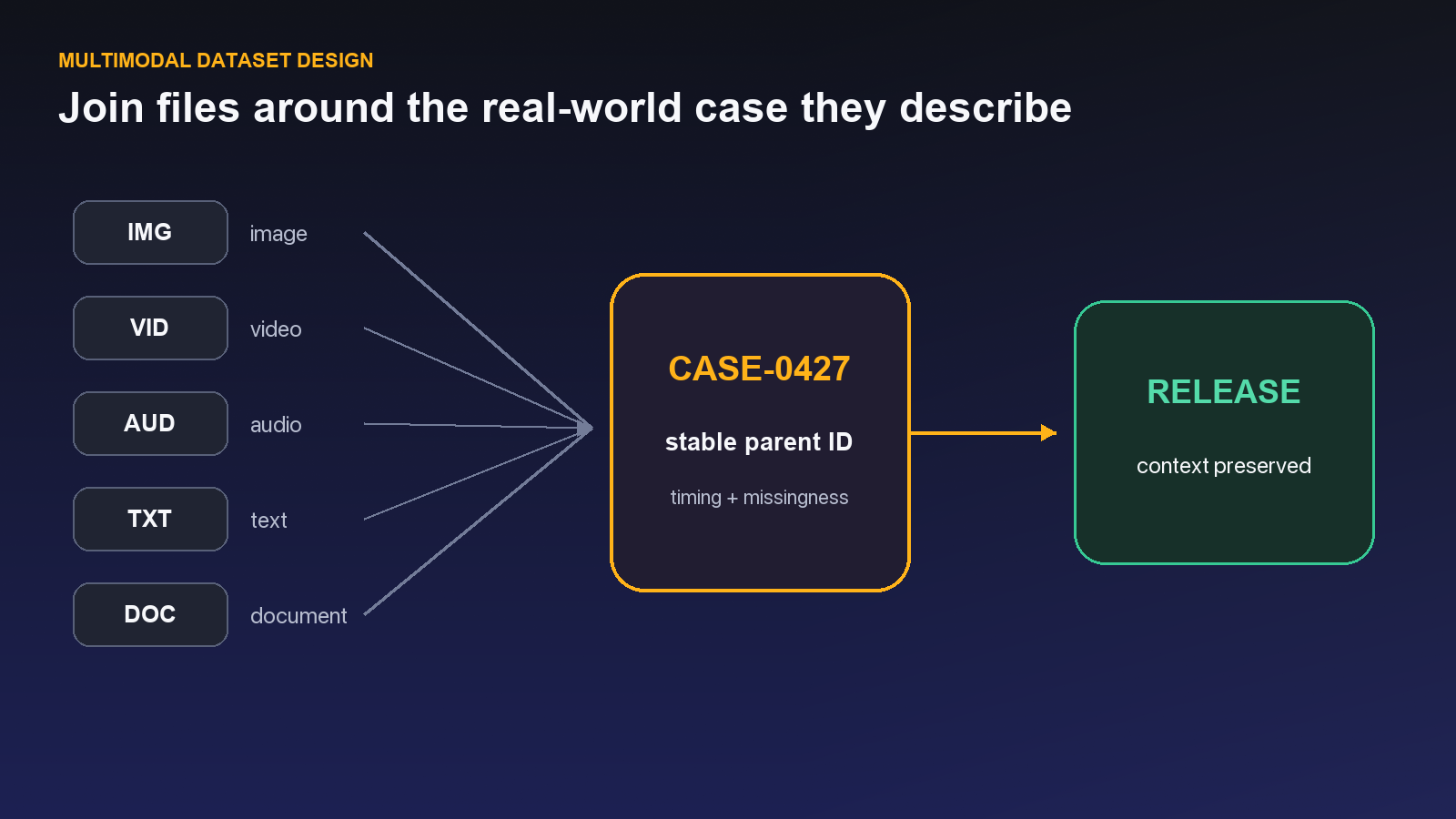
At a support-automation company, the first dataset looked tidy: chat transcripts in one folder, call recordings in another, screenshots in a third. Then the model team asked a simple question: which screenshot belonged to the customer complaint heard at 02:14 in the call? Nobody could answer without opening three systems and a spreadsheet maintained by one operations lead. The labeling tools were not the bottleneck. The missing unit of work was.
That is the real multimodal problem. Images, video, audio, text, documents, and medical files need different annotation surfaces, but they still need one identity, one quality policy, and one release history. This tour follows that lifecycle instead of treating modality support as a feature checklist.
Most AI teams do not have a single “data problem.” They have an image problem, a video problem, a growing audio archive, unstructured text, specialist data such as medical imagery, and a release process held together by spreadsheets and institutional memory. The difficulty is not merely labeling each modality. It is keeping the operating rules consistent as data moves from collection to annotation, review, and model-ready delivery.
Unitlab approaches this as one connected system. In the current product, Annotation, Data Space, and AI Suite are separate areas of the interface, but they participate in the same lifecycle: assets are curated, projects apply a schema and workflow, people and models produce annotations, and releases preserve a usable result. That continuity matters more than a long checklist of drawing tools. It gives an enterprise team a way to govern training data as an evolving product.
This tour is based on the live Unitlab workspace—not legacy documentation. It explains what is available now, where modality-specific work differs, and how to design a multimodal operation that remains understandable after the first pilot.
See the Unitlab AI multimodal data platform in action
Unitlab helps AI teams curate, annotate, manage, version, and prepare multimodal training data at enterprise scale. This walkthrough shows video, documents, audio, images, synchronized layouts, workflow automation, review, and versioned datasets in one enterprise platform.
Explore Unitlab’s multimodal data annotation platform.
The platform in one operating loop
The most useful way to understand Unitlab is not by its navigation. Think of it as an eight-part loop:
- Bring assets into Data Space through uploads or connected cloud storage.
- Organize raw material with folders, filters, tags, and dataset membership.
- Create a typeless project and attach the image, video, audio, text, medical, document, or grouped multimodal data the work requires.
- Attach a reusable ontology that defines objects, properties, events, entities, and relations.
- Apply a workflow containing the human, model, review, archive, and completion stages the project requires.
- Annotate and review items in the appropriate workbench.
- Package data, annotations, and metadata into a versioned release.
- Use the release downstream or clone it into another project.
The boundaries are deliberate. A folder is not a dataset, a dataset is not a project, and an actively changing dataset is not the same thing as a released snapshot. This separation lets each object answer a different operational question:
| Unitlab object | The question it answers | Typical owner |
|---|---|---|
| Asset or folder | Where is the source material and how is it organized? | Data operations |
| Dataset | Which assets belong to this working collection? | Data lead |
| Ontology | What can be labeled, and what structure is required? | Domain or ML lead |
| Project | Where does annotation work happen? | Project manager |
| Workflow | Who or what acts next, and what happens after review? | Operations lead |
| Release | Which exact data and annotation state is approved for use? | ML or release owner |
This object model prevents a common failure mode: a team starts with a convenient bucket of files and gradually treats that bucket as source, project, quality record, and model handoff at once. It works until someone needs to reproduce a model run, change the schema, or explain why two teams have different label counts.
Unitlab field note: The live workspace separates Annotation into Projects, Workflows, and Ontologies; Data Space into Assets, Datasets, and Releases; and AI Suite into Private and Public AI Models. That structure is the clearest mental map for designing an implementation.
One platform, six data realities
“Multimodal” should not imply that every data type is forced into the same interface. Unitlab keeps the shared governance layer while changing the workbench to match the media.
Image: spatial precision and multiple geometry types
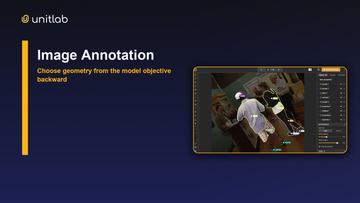
The image workbench supports bounding boxes, cuboids, polygons, masks, skeletons, lines, and keypoints, alongside brush and eraser controls. Annotators can change annotation visibility, vector and mask opacity, and whether color follows the label or the instance. The inspector exposes objects, classes, comments, item properties, tags, and appearance controls.
That combination covers both rapid localization and fine-grained geometry. A retail team may use boxes for package detection, for example, while an industrial inspection team uses masks to isolate surface defects. They can still share review stages, instructions, and release practices.
Video: spatial annotation over time
Video adds a frame timeline, track rows, playback, frame navigation, loop controls, and timeline zoom. Its most important design decision is how an object should move between frames. The live UI presents two distinct options: Auto-Tracking, described as predicting later frames with machine learning, and Interpolation, described as tweening between keyframes.
Those are not interchangeable. Interpolation is appropriate when a reviewer wants deterministic motion between explicitly chosen keyframes. Auto-tracking is useful when the model can propose later positions and a person remains responsible for correction. A production guideline should tell annotators when to choose each one.
Audio: time becomes the annotation surface
The audio workspace replaces the image canvas with a waveform and timeline. It includes play and pause, ten-second skip controls, current time and duration, volume, playback speed, zoom, event or class selection, comments, properties, and tags. The same workbench supports event-segmentation and transcription-oriented projects.
Audio quality depends heavily on boundary conventions. “Label the alarm” is insufficient if one annotator includes the entire reverberation and another marks only the first impulse. Unitlab can hold the event and transcript structures, but the team must define temporal rules in project instructions and reinforce them through review.
Text: meaning, relationships, and context
Text annotation supports entities and relations, as well as item properties, tags, comments, font size, and line-height controls. This makes it possible to represent more than isolated spans. A team can connect an organization to a location, a product to a reported issue, or an event to the people involved.
The ontology is especially important here. Entity names that appear intuitive to one group can be ambiguous to another. Define whether an entity includes punctuation, how nested concepts are handled, and which relations are allowed before scaling the queue.
Medical: familiar spatial tools plus clinical structure
Medical resources open a native medical workbench inside the same typeless project model used by other modalities. The workbench presents a DICOM study in synchronized axial, sagittal, coronal, and 3D views. A contextual document can remain alongside the study, so the annotator can consult case information without breaking the workspace. The familiar spatial tools and structured clinical properties remain part of the same review flow.
This is a useful pattern: geometry says where, a property says what the finding means, and synchronized views help the specialist check that decision in context. A demonstration is still not a clinical validation. Teams should test representative studies, viewing fidelity, privacy controls, expert-review authority, export semantics, and performance before approving a production workflow.
Documents: native pages, selectable text, and spatial labels
Documents are a supported resource family. PDF items open with native multipage navigation and page-aware annotation history. Select PDF Text can copy embedded text, populate a text property, or create a normal bounding box anchored to the selected region. Embedded PDF image regions can also become bounding boxes. Scanned documents remain available for manual spatial annotation or OCR/model-assisted workflows.
Documents can be combined with video, audio, images, or medical context in one Data Group and carried into a multimodal release. The project does not need a fixed “document project” type: the resource chooses the correct editor when it opens.
Data Groups preserve the real unit of work
Related files become useful together through Auto-Grouping. A team can define filename keys and expected tiles, preview valid and incomplete groups, and arrange those tiles in a Grid, List, or free-form Custom Layout. Every grouping run is non-destructive: Unitlab creates a new grouped folder while leaving the source folder unchanged.
The saved layout follows the group through dataset publication, project attachment, annotation, and release. One case can therefore open as video, PDF, and audio panels—or several synchronized camera views—inside one grouped Workbench. Only the active panel is editable; the others remain visible as context. Previous/next navigation treats the complete group as one workflow item instead of exposing its member files as unrelated tasks.
This is the practical answer to the support-team problem at the beginning of the article: define the customer interaction as the parent unit, group its transcript, call, and screenshot, then keep that relationship intact through review and delivery.
The shared annotation experience
Across modalities, Unitlab maintains a common operating language. Projects expose item counters and navigation, workflow history, item properties, object or class inspection where relevant, comments, tags, and completion actions. Depending on the workflow, an annotator may send work to review or mark it complete.
Project states include New, Processing, In annotation, In Review, Complete, Invalid, and Archived. These states help managers distinguish media-processing delays from active human work and completed output.
The shared experience also makes cross-training more realistic. An image annotator moving to video still recognizes the ontology, object inspector, comments, and review loop. The new concepts are temporal: tracks, frames, and propagation. Operations teams can teach the platform once and then focus training on modality-specific judgment.
Ontologies make multimodal work governable
Unitlab ontologies are reusable, versioned schemas. The current ontology builder exposes:
- item properties: single-choice, multi-choice, and text;
- object types: bounding box, cuboid, polygon, mask, keypoint, line, and skeleton;
- text entities;
- audio events; and
- relations between supported concepts.
Classes can carry names, descriptions, colors, hotkeys, attributes, and property definitions. The builder also provides draft and live states, version history, entity search, a visual summary, a JSON representation and export, a copyable ontology ID, and a relationship map.
For a multimodal program, resist the urge to build one enormous ontology. Share concepts where consistency is valuable—perhaps a common severity scale or location vocabulary—but keep modality-specific geometry and instructions understandable. A smaller schema that reviewers can explain will usually outperform a universal schema that nobody can remember.
Unitlab also surfaces an important schema-integrity safeguard. If annotations refer to ontology items that were later deleted, the workbench can present a Restore deleted items decision. The team may keep those items deleted or restore selected items. That warning makes schema drift visible instead of silently orphaning historical labels.
Workflows turn tools into an operating model
The live workflow builder begins with a straightforward path: Project → Annotate → Review → Complete. Teams can add Model and Archive stages, connect nodes on a canvas, select ontologies, assign a person or leave work open to anyone, and configure accepted and rejected review paths.
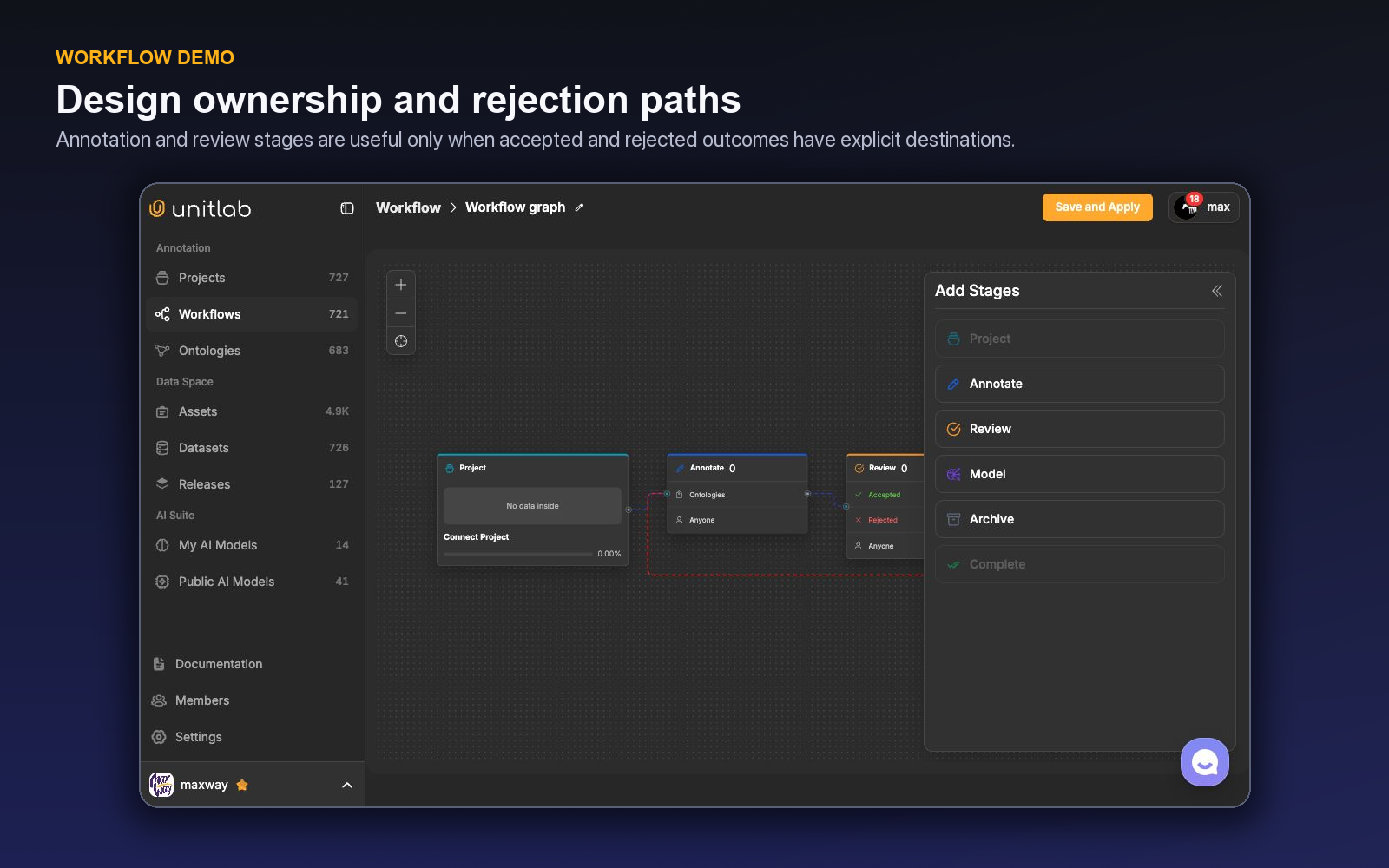
The rejected branch is as important as the accepted branch. It turns review into a correction mechanism rather than a decorative approval step. For high-risk classes, a team can require review before completion. For a mature, low-ambiguity project, sampling strategies may reduce review cost—but the workflow should still make exceptions and escalation visible.
Model stages can be inserted into the pipeline, allowing inference to become a controlled stage instead of an ad hoc action. Unitlab also exposes AI assistance in the workbench, including Magic Touch, prompt-based “Detect all objects,” Find Similar, and video tracking. Model output should be treated as a proposal until its error patterns are understood.
Curation before annotation
Expensive annotation projects often fail upstream. Duplicates dominate a dataset, rare scenarios are underrepresented, or the team labels thousands of assets before discovering that capture quality is inconsistent.
Unitlab's asset library provides list, grid, and embedding views; folder lifecycle states; search across assets, folders, tags, and projects; and filters for asset type, source, tags, date, file size, and dimensions where applicable. Assets can originate from uploads or connected cloud storage.
The embedding view is particularly useful for visual exploration. It displays a two-dimensional space with selection tools for loaded embeddable assets. Teams can inspect clusters, find duplicates or outliers, build diverse samples, run similarity search, and use natural-language search where embedding support is available. The plot remains a navigation aid: the actual assets should be reviewed before a selected region becomes training data.
A practical curation pass should answer four questions before annotation begins:
- Do the assets reflect the production distribution?
- Are important edge cases visible and sufficiently represented?
- Which low-quality or irrelevant items should be excluded?
- Can the intended train, validation, and test boundaries be reproduced later?
Releases create an accountable handoff
Datasets are active collections. Releases are the model-ready checkpoints. In the live product, releases include a version selector, data and settings views, sample-data tables, download, and clone actions. Release cards communicate visibility, modality, creation date, preview information, item count, and version.
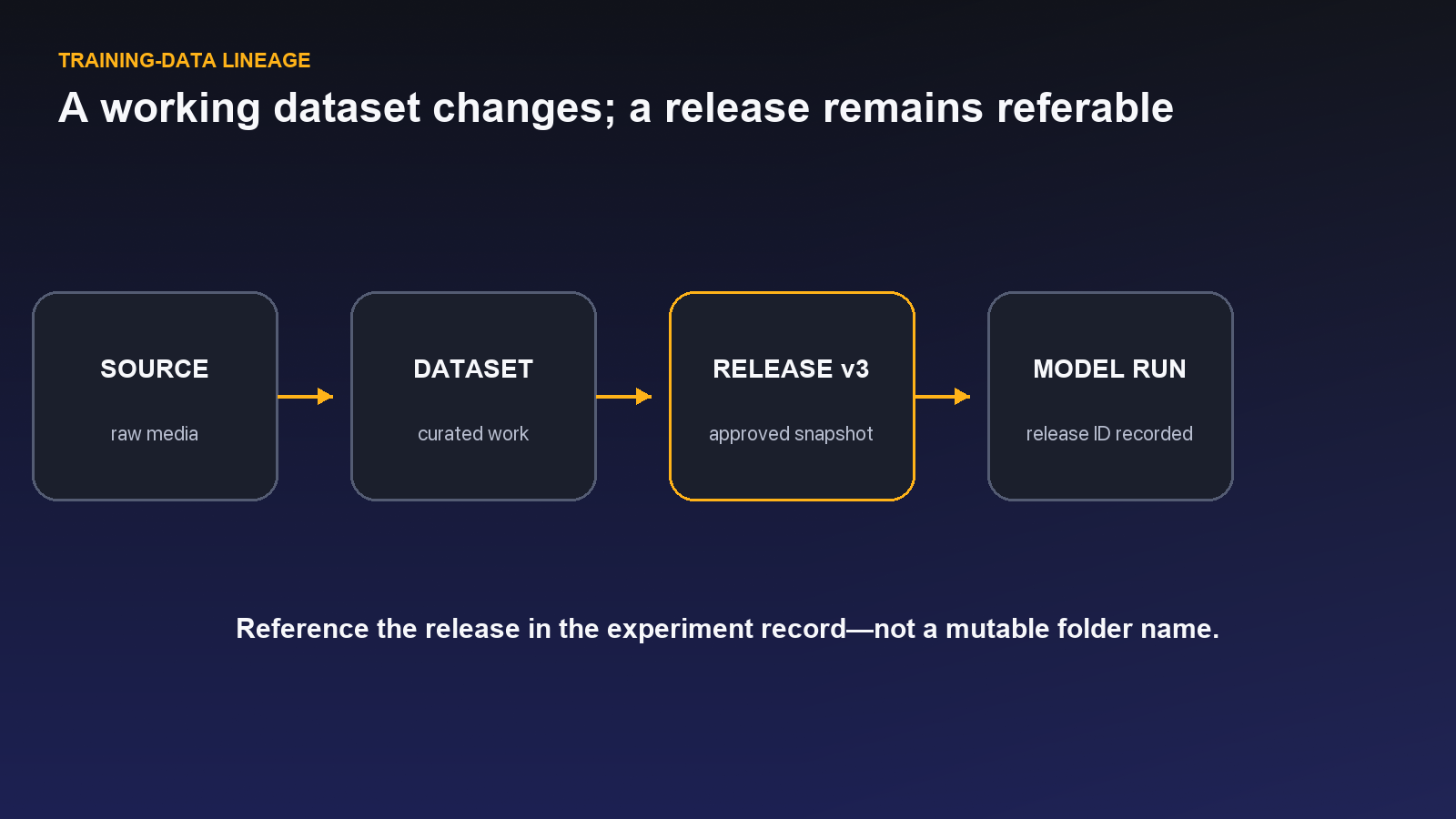
For ML teams, this is where data work becomes reproducible. A training run should be linked to a particular release rather than “the current dataset.” When corrections arrive, create a new release and record the change. That gives model evaluation a stable reference and allows an incident review to reconstruct what the system learned from.
A rollout pattern that scales
Start with one representative slice, not the easiest slice. Include common cases, difficult cases, and at least one edge case from every target modality. Build the ontology with domain experts, attach instructions, and run a short calibration round in which multiple annotators label the same items.
Then review disagreements by category. Are errors caused by unclear definitions, an inefficient tool choice, poor source data, or a genuine expert judgment call? Fix the operating rule before increasing throughput. Introduce model assistance only after the team can measure whether it reduces total correction effort.
For the first production release, record:
- the source folders and dataset version;
- ontology version;
- workflow and reviewer assignments;
- known exclusions and unresolved ambiguities;
- release version used by the model team; and
- quality findings that should change the next iteration.
This record converts annotation from a one-time service into a learning system.
The strategic value of one multimodal workspace
The advantage of a unified platform is not that every task looks identical. It is that every task can be operated with the same governance principles: curated source assets, explicit schemas, visible responsibility, reviewable output, and versioned delivery.
That matters when an AI product expands. The team adding video should not need to reinvent access control. The group introducing audio should not create an unrelated quality vocabulary. A medical pilot should be able to use the same release discipline while adding stricter domain review. Shared infrastructure lets specialists focus on the judgment that is unique to their data.
A connected-case test before you scale
Before committing a large backlog, choose one case that contains the awkward realities of production: a missing file, two plausible timestamps, a low-quality recording, and a document whose identifier does not exactly match the media filename. Put the material through the complete path—Assets, grouping, project, review, and release—and ask a person outside the project to reconstruct what happened.
The test should answer four questions. Can the consumer tell which resources belong together? Can an annotator see the necessary context without opening unrelated tools? Can a reviewer identify which decision failed and return it to the correct owner? Can the model team retrieve the same approved version later? If any answer depends on a private spreadsheet or a teammate's memory, the operating contract is incomplete.
This small rehearsal is more revealing than a feature checklist. It exposes whether the grouping key is stable, whether optional modalities are represented honestly, whether Item Properties carry case-level context, and whether the release describes exclusions. Fix those seams on fifty cases; scaling them to fifty thousand then becomes an operational problem rather than a semantic rescue project.
Review the connected case through multimodal annotation quality assurance, checking both individual labels and consistency across the grouped evidence.
A five-day multimodal pilot
On day one, define the real-world unit and collect 30–50 cases across at least two modalities. Include complete cases, allowed missing modalities, broken joins, low-quality resources, and a few hard negatives. Write the stable key and the decision the model must make before configuring the platform.
On day two, connect or upload the sources into Assets, inspect processing state, and build Auto-Grouping rules. Preview every edge case. Create a Custom Layout with an explicit anchor resource and mark panels active or passive according to the annotation task. Ask an operator to find the evidence without verbal help; revise the layout if context is easy to miss.
On day three, build the smallest ontology that expresses the output: classes for located evidence, Class Properties for object detail, Item Properties for the case, Dynamic values for temporal change, and relations only where connections matter. Annotate a shared calibration set and classify disagreement by source, grouping, schema, or instruction.
On day four, send work through the actual workflow. Test accepted, rejected, invalid, missing-source, and model-failure paths. Review both individual labels and cross-resource integrity. Resolve systemic problems in instructions, grouping, ontology, or curation rather than hiding them in item comments.
On day five, create a dataset version and Release. Document case definition, grouping rules, modality completeness, ontology and workflow, exclusions, and known limitations. Give the release to a consumer who did not join the pilot and ask them to reconstruct several examples and their provenance.
The pilot succeeds when the case remains coherent from source to release, not when every modality has an annotation. Record time spent locating context, join-error rate, invalid items, reviewer corrections, and downstream reconstruction failures. Those measures identify whether the unified workspace reduces operational friction or merely places disconnected files on one screen.
Try the workflow in Unitlab
- Open Assets and inspect the same source collection in Grid, List, and Embedding views. Confirm that modality, processing state, tags, folder, and source can be used to describe what is eligible.
- Create or open one typeless project, attach two resource families, and note how the native editor changes while ontology, workflow, instructions, and review remain shared.
- In Assets, use Auto-Grouping to bind related files around a stable case or event identifier. Preview the rules and arrange a Custom Layout before publishing the grouped folder into a dataset version.
- Open Releases and verify that the delivery records the selected data, version, metadata, and limitations rather than merely pointing to a live folder.
After the first hundred connected examples, audit broken pairings, missing modalities, processing failures, reviewer effort, and downstream joins. A multimodal platform earns its place when another team can reconstruct an example without asking the person who assembled it.
The decision to make
Choose one real case that spans at least two modalities. Open Unitlab, build the smallest connected dataset that can answer a model question, and release it with an explicit relationship contract.
See how Unitlab supports multimodal data annotation and multimodal data curation.
Continue in the Unitlab documentation: Multimodal annotation overview.