A defect model posts excellent validation results and fails on the first new factory. The training split contained near-duplicate frames from the same production run, while an entire lighting condition appeared only in deployment. Annotation was accurate; selection was not.
Data curation is the work of shaping evidence before labels make it expensive. Search, filters, folders, tags, and embedding views are useful because they help a team discover duplication, imbalance, outliers, and coverage gaps—not because they make an asset browser look organized.
Annotation quality cannot rescue the wrong data. If a dataset is dominated by duplicates, missing rare situations, contaminated by poor captures, or split in a way that leaks related items into evaluation, perfect labels only make the mistake more expensive.
Unitlab's Data Space gives teams a dedicated curation layer before project work begins. The live asset library includes folders, list and grid views, visual embedding exploration, search, tags, sorting, lifecycle states, detailed filters, uploads, and connected cloud-storage sources.
Reader takeaway: Curation is model design performed on source data. Duplicate removal, coverage analysis, and split integrity can change downstream performance before a single annotation is added.
What is available in the asset library
Folders have Active, Archived, and Trash states. Assets can be viewed in List, Grid, or Embedding layouts and organized with folders. Search spans Assets, Folders, Tags, and Projects. Sorting includes name, size, modification date, and creator.
The fixed More Filters sections cover:
- asset type: Images, Video, Audio, Document, Text, and Medical;
- source: Uploaded or Cloud Storage;
- tags and date;
- minimum and maximum file size; and
- minimum width and height for image, video, and medical assets.
This supports both operational housekeeping and sampling. A team can isolate oversized video, recent medical images, externally sourced documents, or small visual assets that may be unsuitable for a target model.
Additional filters extend curation across file identity and dates; width, height, resolution, aspect ratio, and size; video duration, frames, and FPS; medical modality, series, studies, and slices; folder, collection, dataset, sequence, group, storage, ownership, and tags; image-quality metrics such as brightness, contrast, saturation, sharpness, entropy, texture, and edge density; duplicate, outlier, blur, low-resolution, corruption, and metadata-quality signals; and embedding similarity, clusters, diversity, and natural-language search. Filters marked Preview can be configured but do not yet narrow results.
The panel reports a live matching count and shows Updating while results refresh. The badge counts active filter groups, making a complex curation slice easier to inspect and reproduce.
Use folders for source organization, not label truth
Folders are useful for ownership, acquisition batch, region, customer, or source connection. Avoid encoding every analytic attribute into deep folder paths. Tags, metadata, dataset membership, and annotation properties are more flexible for many-to-many structure.
Choose a folder policy with stable business meaning. A folder called final_v2_revised is a warning that version and approval state are being managed through names. Use datasets and releases for those lifecycle concepts.
Archive inactive source groupings rather than deleting them when lineage is important. Define who can move, archive, or remove assets and how a downstream project is checked before source changes.
Filter as a question, not a cleanup ritual
Every curation pass should start with a hypothesis. Examples:
- Are low-resolution images overrepresented?
- Did the new cloud source introduce a different media profile?
- Are recent assets missing a required tag?
- Does one acquisition period dominate the dataset?
- Are document and audio items linked to the expected multimodal cases?
Record the filter and the decision. A curated dataset should be reproducible from selection criteria, not only preserved as a mysterious result.
| Curation question | Useful live controls | Follow-up |
|---|---|---|
| Find unsuitable dimensions | Type, width, height | Review and exclude or route separately |
| Compare source domains | Uploaded vs Cloud Storage, folders, tags | Measure distribution and label quality |
| Isolate recent changes | Date and modification sorting | Validate new acquisition batch |
| Inspect heavy media | File-size bounds | Confirm processing and cost fit |
| Explore visual clusters | Embedding view and region selection | Sample dense and sparse areas |
Explore the embedding space visually
The Embedding view presents assets in a two-dimensional visual space with drag and crop modes, asset selection, pagination, loaded-item progress, and a total count of embeddable assets.
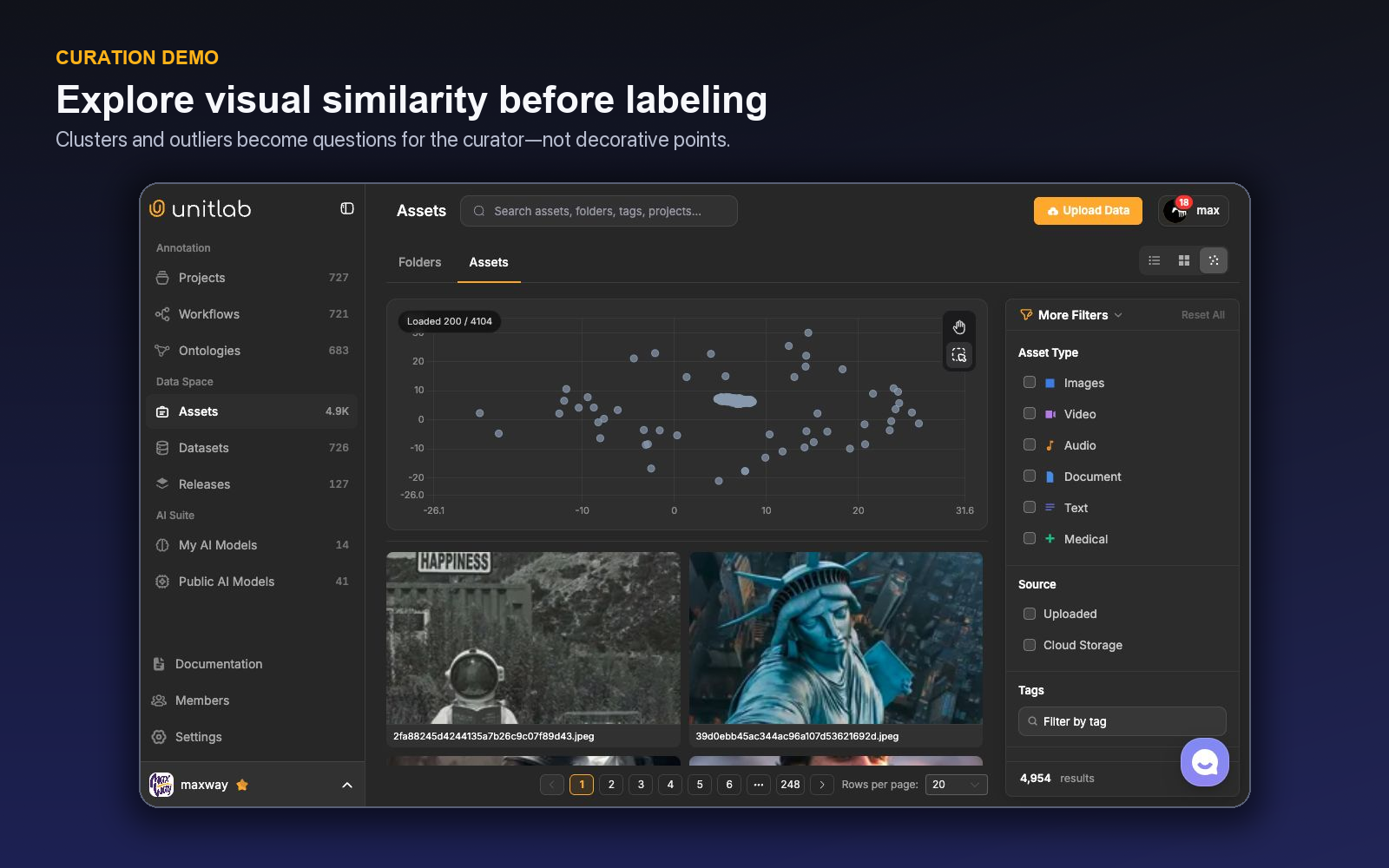
Embedding selection turns a visual neighborhood into an inspectable candidate set for curation.
Use dense clusters to inspect redundancy and sparse regions to inspect unusual examples. Select across multiple regions rather than only the largest cluster. Compare cluster membership with source folders or tags to discover capture artifacts and domain shifts.
Embedding spaces also support similarity and natural-language retrieval for image and video data, while the two-dimensional view helps users inspect clusters, representative samples, duplicates, and outliers. Search results and plot distance remain candidate signals; users should review the actual assets before changing dataset membership.
Curate video at file and frame granularity
Inside a video folder, Video shows one entry per source file. Frames expands videos with extracted-frame metadata into a paginated frame-card sequence and reports frame count in the breadcrumb; a video without extracted frames appears as one poster entry. Selecting a frame selects its parent video, so collection, dataset, download, and bulk actions continue to operate on complete source files.
Folder Collections preserve named static subsets without deleting or moving their files. A collection can be reopened in Explore, added to a dataset, or downloaded. Search and More Filters continue to apply inside the collection scope.
Turn related files into Data Groups
Auto-Grouping turns filename patterns into multiview or multimodal work items. The Configure, Rules, Layout, and Review steps identify grouping keys and tile roles, preview valid/skipped/conflicting groups, require minimum or mandatory tiles, and save Grid, List, or free-form Custom layouts. Every run creates a new grouped sibling folder and leaves the source unchanged. After dataset publication and project attachment, one group opens as one Workbench task with its saved layout.
Build a curation funnel
An effective sequence is:
- Ingest: preserve source and acquisition context.
- Validate: check readable media, format, size, and dimensions.
- Exclude: remove irrelevant, corrupted, or policy-ineligible material from the working selection.
- Deduplicate and cluster: inspect repeated content and near-duplicates.
- Balance: sample common, rare, difficult, and target production scenarios.
- Split: keep related items and leakage risks under control.
- Attach: create a working dataset and connect it to the project.
- Release: preserve the approved output as a versioned snapshot.
Do not discard every outlier. Some are data errors; others are the exact edge cases that make a model robust. Domain review determines which is which.
Design datasets around experiments
The live dataset table shows version, asset count, size, type, project usage, modification, and creator. The create flow can attach folders and individual assets. Build datasets with a clear purpose—baseline training, rare-case enrichment, evaluation, or a modality-specific slice—and put that purpose in the description.
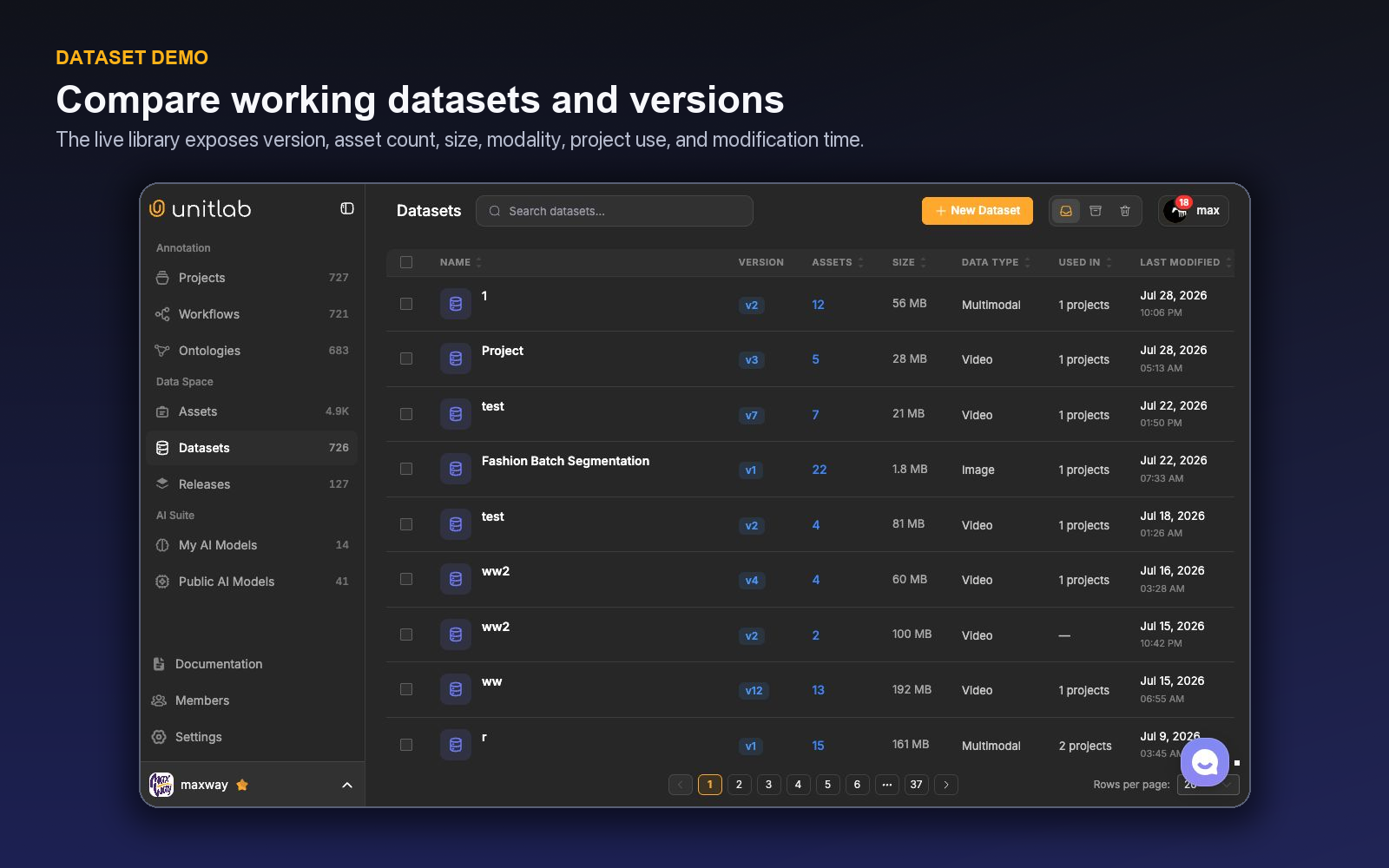
Avoid changing an evaluation dataset casually. A working dataset may evolve, but a model comparison should reference a stable release. Related items from one session, document, subject, or near-duplicate group should remain in the same split.
Keep each selected cohort traceable through dataset management and versioning before downstream experiments consume it.
A worked curation example
Suppose a team has 100,000 street images from several cameras and wants a robust vehicle detector. It begins with source folders by camera and acquisition period, then filters by dimensions to identify thumbnails and corrupted transfers. Date and source filters reveal that one camera contributed most of the collection.
The team samples the embedding space and discovers dense clusters of nearly identical daytime frames plus sparse clusters containing rain, night, and construction scenes. Instead of selecting uniformly by file, it caps redundant clusters, increases rare-condition sampling, and preserves hard negatives without vehicles. Related frames from one sequence receive a grouping ID for split control.
The first annotation batch reports high disagreement on very small vehicles. Data operations can now choose: exclude below a justified size, create a separate small-object slice, or improve instructions and review. Curation and annotation evidence inform each other.
Duplicate management needs context
Exact duplicates waste annotation and can leak across splits. Near-duplicates may still have value when small changes represent production behavior. Define duplicate groups and choose a representative or keep the group together in one split.
Visual embedding clusters are a useful inspection surface, not proof of duplication. Validate selected clusters at full resolution and use content hashes or other technical checks where the data pipeline supports them.
Record why material was removed. A later team may need to reconstruct a full acquisition or understand a bias introduced by exclusions.
Curate negative data intentionally
Teams often oversample positive examples because they are easy to justify. A detector also needs confusing negatives: scenes that resemble the target context but contain no eligible object, and visual neighbors excluded by the ontology.
Use tags or dataset purpose to preserve negative slices. Review their source and difficulty distribution. A random empty image is less informative than a hard negative containing the patterns that trigger false detection.
Measure curation value downstream
Track the effect of curation on annotation and model outcomes. Useful signals include rejected-source rate, annotation time by cluster, class distribution, duplicate rate, unreadable-media rate, reviewer disagreement, model error by source, and performance on rare slices.
If a curated rare-case slice improves model performance but doubles annotation disagreement, the ontology or instructions may need additional examples. Curation changes the difficulty distribution; operations must adapt.
A reproducible advanced-filter recipe
Suppose a driving team needs a pilot slice of nighttime video from one cloud source, longer than 20 seconds, with acceptable sharpness and representation across several embedding clusters. In More Filters, it selects Video, Cloud Storage, the approved source folder, acquisition date, minimum duration, and a sharpness range. The live count shows whether the intersection is useful before the team commits it.
The curator switches the folder to Frames to inspect scene diversity without detaching individual frames from their parent videos. Representative frames are reviewed across clusters, near-duplicate runs are kept together, and selected parent videos enter a named Collection. The collection is reopened in Explore with the same filters and then added to a dataset working draft.
The curation note records every active group, any Preview-only condition that was evaluated manually, the collection name, grouping/leakage rule, and excluded failure modes. Another curator can reproduce the slice and understand where judgment entered the process.
Publish the resulting dataset version before project attachment so the pilot input cannot drift during annotation.
Curate one video cohort before anyone labels a frame
Suppose a vehicle project receives 8,000 videos from several cameras. Some clips are still processing, many contain long empty intervals, several are near-duplicates from repeated uploads, and night scenes are rare. Sending everything to annotation maximizes activity while weakening the dataset.
Start in Assets with the display that matches the question. Grid view is useful for visual inspection. List view makes filenames, paths, source metadata, and processing states easier to compare. For video, switch between datasource-level and frame-level views when the decision concerns an entire clip versus moments inside it. Embedding view helps surface visually similar clusters, outliers, and repeated content that metadata alone may miss.
Build an eligibility filter first. Exclude failed or incomplete processing states, unsupported media, and known bad sources. Then use advanced filter groups to express the cohort: modality, folder, upload source, tags, metadata fields, annotation or project status, and other available criteria. Use AND for requirements that must all hold; use OR for acceptable alternatives. Save or record the recipe so another operator can reproduce the same selection.
Now inspect distributions. Compare day and night, camera location, weather, scene density, target-class presence, and empty scenes. Keep intentional negatives: a model that never sees a clear road may learn that every frame contains a vehicle. Curate hard negatives such as reflections, signs, and shadows that resemble the target. Sample enough rare night clips to evaluate them without allowing duplicated sequences to dominate the split.
Use embedding neighborhoods as a question generator, not an automatic delete list. A dense cluster may be genuine repetition, a burst sequence, or an important rare mode. Preview the media and metadata before deciding. Exact duplicates can be removed or grouped under the project's policy; near-duplicates may be kept in training but must not leak across train and evaluation releases.
For long videos, frame-level inspection can identify where objects or events occur and where useful diversity changes. Do not silently replace the original clip unless the downstream contract expects extracted frames. Record whether the dataset contains videos, frame selections, or grouped resources so annotation and export preserve the intended unit.
Create the dataset version from the curated selection and attach a readable description: inclusion rules, exclusions, source balance, negative-data policy, duplicate handling, and known gaps. After annotation, run another curation pass using annotation status, class, property, review outcome, or error cohorts. Curation is not only an intake step; it is how the team turns production evidence into the next training set.
Measure downstream effect. Compare annotation hours saved, processing-failure rate, duplicate rate, class and source distribution, evaluation leakage checks, reviewer rejection, and model performance by cohort. The value of a filter is not that it reduces the item count. It is that the remaining data has a clearer role in training, evaluation, or diagnosis.
Turn the filter into a reproducible curation record
For every promoted dataset version, save the human-readable logic behind the selection: source scope, processing-state requirement, modality or frame rules, metadata conditions, duplicate handling, negative-data quota, rare-cohort targets, and split unit. A screenshot of a filter panel is not enough; a future operator must understand why each condition exists.
Sample results at both ends. Inspect included items that barely satisfy the rule and excluded items that almost qualify. These boundary cases reveal incorrect AND/OR grouping, missing metadata, and assumptions hidden in a tag. Check a random sample as well so the process does not only validate examples selected to prove the rule.
After annotation, connect QA outcomes back to curation. If one camera or document source produces high invalid or rejection rates, decide whether it needs better processing, separate instructions, or exclusion. If a rare cohort produces disproportionate model value, expand it intentionally in the next source window.
This record makes data selection reviewable like annotation. It also prevents an apparently identical dataset from changing because a folder, tag, or metadata convention evolved between runs.
For video and medical sequences, document whether filtering applies to the entire datasource, selected frames, slices, or derived resources. A frame can meet a visual condition while its parent video should remain grouped for temporal labeling. The curation unit must match the model and leakage policy.
Use folders and tags for operational organization, but rely on stable metadata and versioned selection logic for reproducibility. A tag can be edited; a dataset version should preserve the promoted membership. When a saved cohort changes because new Assets arrive, create a new version rather than assuming the old result still describes it.
Before release, ask a person who did not build the filter to reproduce the cohort and explain the exclusions. If they cannot, the recipe needs more context. Curation becomes enterprise data work when selection is understandable, repeatable, and connected to downstream evidence.
Keep a small rejected-data sample with reasons. It helps future teams distinguish intentional exclusion from accidental loss and supports later experiments that revisit quality thresholds or rare cohorts without rebuilding the intake decision from scratch.
A curation sprint before annotation procurement
Day one establishes the inventory. Inspect source, modality, processing state, metadata completeness, folder structure, and upload window in List and Grid views. For temporal media, compare datasource and frame views. Quantify failed processing, unsupported files, empty media, and obvious duplication before estimating annotation volume.
Day two establishes the model objective and cohort dimensions. Identify target classes, intentional negatives, rare conditions, source domains, temporal units, grouping keys, and leakage boundaries. Build advanced filter groups that express eligibility, then sample inclusions and exclusions at the edge of every condition.
Day three uses Embedding view and metadata together. Investigate dense clusters, visual near-duplicates, outliers, and underrepresented modes. Preview media before acting. Create collections or recorded cohorts for duplicate review, hard negatives, rare examples, and quality failures.
Day four builds dataset versions. Keep train, validation, and evaluation split at the correct real-world unit. Ensure grouped resources and near-duplicates do not cross boundaries. Document inclusion rules, source balance, missingness, duplicate handling, frame-versus-video decisions, and known gaps.
Day five hands the candidate dataset to annotation and model stakeholders. Label a small calibration sample, inspect Invalid or reviewer-rejected cases, and ask whether data selection created unnecessary ambiguity. Revise the filter or source contract before purchasing the full annotation effort.
The sprint should report Assets excluded before labeling, expected hours saved, source and class distribution, negative-data coverage, duplicate and leakage checks, and unresolved data gaps. The objective is not the smallest dataset. It is a dataset in which every included cohort has a reason to exist.
Try the workflow in Unitlab
Save the final Advanced Filters as a private preset when the cohort will be revisited. A preset preserves the analyst's selection logic without altering project content; document shared production rules separately when the same cohort definition must be reproducible by the whole team.
- Open Assets and define eligibility with observable filters: modality, processing state, size, duration, source, creator, time, tags, or folder.
- Switch to the Embedding view to inspect dense clusters and isolated points; open real examples before interpreting distance.
- Sample likely duplicates, rare clusters, low-quality sources, and unprocessed assets.
- Build a dataset with explicit inclusion and exclusion reasons, then split by the unit that could leak—case, device, location, session, or subject.
- Compare the selected distribution with expected deployment slices.
Measure duplicate rate, invalid media, coverage by risk slice, source balance, embedding-cluster representation, and leakage checks. Curation success appears in downstream robustness and review efficiency, not in the number of filters used.
The decision to make
Take one dataset that underperforms in a known slice. Explore its assets in Unitlab, find the missing or overrepresented neighborhood, and rebuild the selection with documented evidence.
Continue with Unitlab’s training-data curation workflows and enterprise data annotation workflows.
Continue in the Unitlab documentation: Data curation.