Machine learning (ML) and computer vision teams face a bottleneck when preparing large ground-truth video datasets for training their models.
Because a single hour of video footage can generate over 100,000 frames, each requiring precise, temporally consistent labeling.
So the choice of video annotation tools can make or break the efficiency, cost, and quality of your vision projects.
In this article, we will provide an in-depth view of top video data annotation tools, plus a decision list to help you decide which vision platform is the best fit for your team’s needs.
If you are building computer vision systems and need production-ready training data, Unitlab AI supports video annotation with Auto-Tracking, keyframe interpolation, dynamic object and item properties, frame-level review, and versioned releases.
Explore Unitlab’s multimodal annotation platform, then review the video annotation workflow in the product documentation.
See Unitlab AI’s video annotation workflow in action
Unitlab AI is an enterprise multimodal data platform for AI teams to curate, annotate, manage, version, and prepare training data at scale. This walkthrough shows frame-accurate annotation, AI-assisted segmentation and tracking, timeline operations, review, and production dataset workflows for enterprise video data.
Explore Unitlab’s multimodal data annotation platform.
What Is a Video Annotation?
Video annotation is the process of labeling objects, actions, and events in video frames to create training data for machine learning models.
Unlike image annotation, which works with static frames, video annotation keeps temporal information like how objects move, change, and interact over time.
Key Features:
- Forward, backward, and full-sequence Auto-Tracking, including multi-object tracking
- Keyframe and mask interpolation to reduce repeated manual work between frames
- Dynamic object and item properties for state that changes over time
- Timeline navigation, comments, issues, review, and rework workflows
- Dataset versioning and releases for reproducible downstream use
- Cloud and on-premises deployment options
Considerations:
- Validate automation quality with representative clips, object density, occlusion, camera motion, and target label types before rollout.
- Confirm the deployment, access-control, auditability, retention, and data-residency requirements needed by your organization during procurement.
Pricing: See the current Unitlab pricing page or request an enterprise quote.
Best For: AI teams that want video annotation connected to curation, quality workflows, dataset management, and versioned releases in one platform.
Explore the video annotation workflow in the product documentation.
CVAT (Computer Vision Annotation Tool)
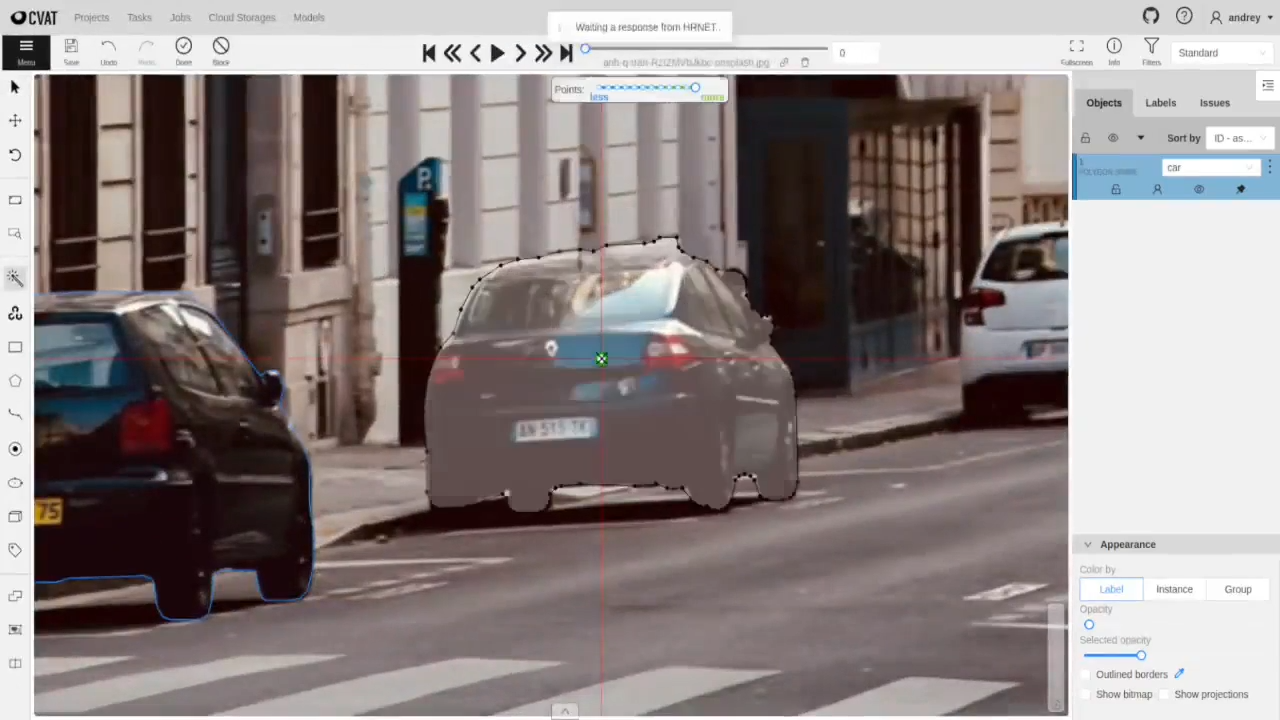
CVAT is open open-source data annotation tool for computer vision. It supports video formats including .mp4, .avi, and .mov, with native features for bounding boxes, polygons, skeletons, and keyframe interpolation.
CVAT excels at persistent object ID tracking across long video sequences, and that is ideal for autonomous driving and surveillance datasets.
It also includes manual and automatic QA workflows, ground truth jobs, honey pot tasks for quality validation, and integrations with AI models for model-assisted labeling.
Key Features:
- Open-source with self-hosted control
- Native video support with interpolation and persistent IDs
- Ground truth jobs and honey pot QA
- Hugging Face and Roboflow integrations
- Task management and annotation versioning
Pros:
- Free tier for small teams (1-2 users)
- Full control over data and infrastructure (self-hosted)
- Strong community support on GitHub and Discord
- Stable performance on long videos
Cons:
- Requires DevOps and MLOps expertise for enterprise deployment
- UI is less polished than commercial tools
- Free: 1-2 members, community support
- Solo: $23/month (annual) or $33/month (monthly)
- Team: $23-33/user/month, depending on billing
- Enterprise (self-hosted): Starting at $12,000/year
Best For: Technical teams needing customizable pipelines, projects with privacy or infrastructure constraints, and teams with in-house DevOps support.
Encord
Encord is a data annotation platform optimized for computer vision teams working with temporal data. It uses native video rendering that preserves temporal context and reduces storage requirements.
Encord's keyframe interpolation system uses the Meta SAM for automatic object tracking across frames, even during occlusions.
It supports bounding boxes, polygons, rotatable boxes, keypoints, semantic segmentation, panoptic segmentation, and audio annotation.
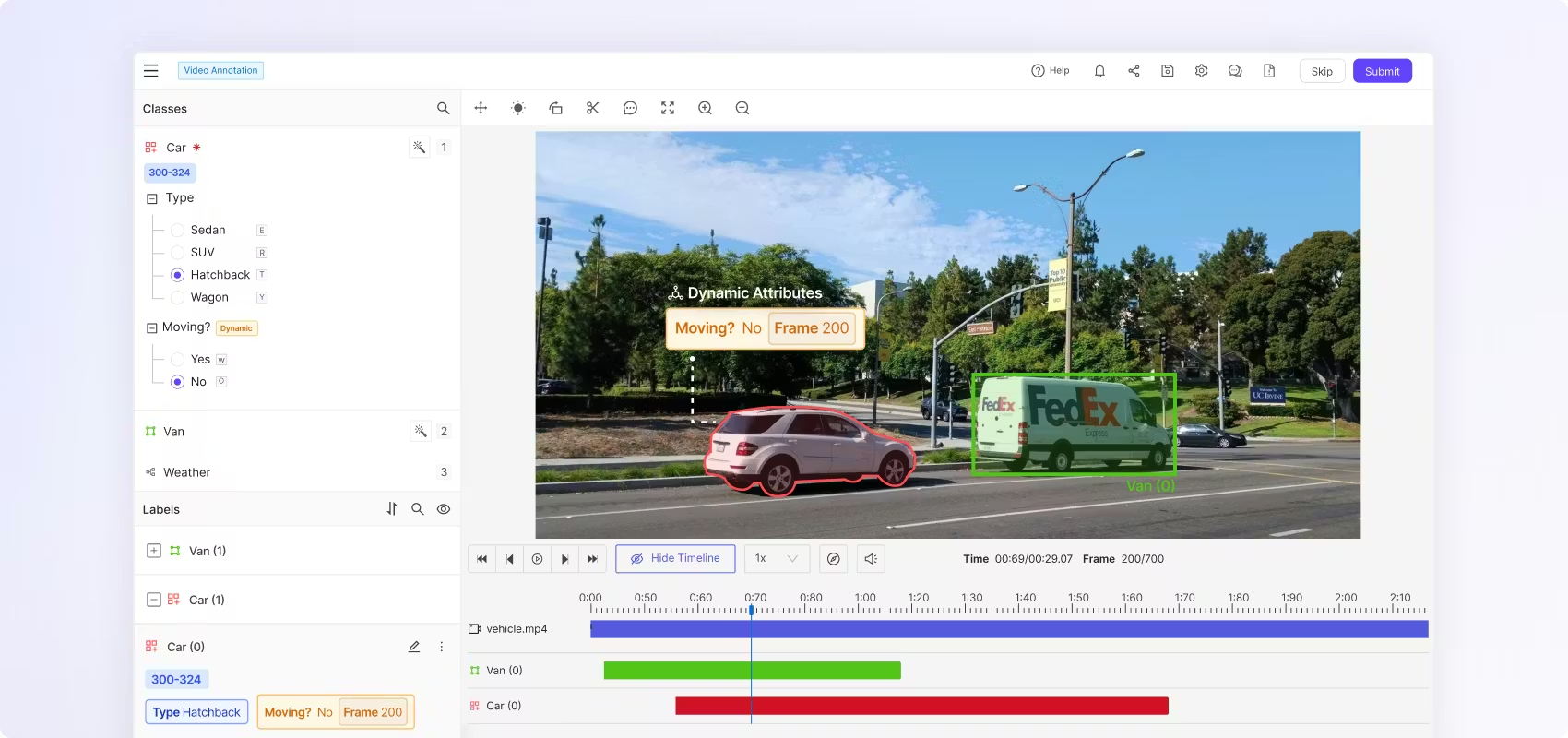
Encord's timeline interface provides granular control over video sequences with frame-by-frame navigation, multi-view annotation, and temporal context visualization.
Key Features:
- Native video rendering (not frame-based)
- Active learning for intelligent frame selection
- Temporal context visualization
- Multi-view and related object annotation
- Private cloud and on-premises deployment
Pros:
- 6x faster annotation speed (claim)
- Handles long sequences without performance lag
- Strong security and compliance (SOC 2, HIPAA, GDPR)
- Purpose-built for video (native rendering)
Cons:
- Premium pricing (enterprise-focused)
- Less suitable for occasional and small projects
Pricing: Custom pricing based on team size, data volume, and support level. Contact Encord sales for quotes.
Best For: Computer vision teams working on applications requiring native video support, temporal context preservation, and enterprise-grade compliance.
V7 (Darwin)
V7 (Darwin) combines a highly responsive, modern interface with powerful Auto-Annotate features that help with complex segmentation tasks.
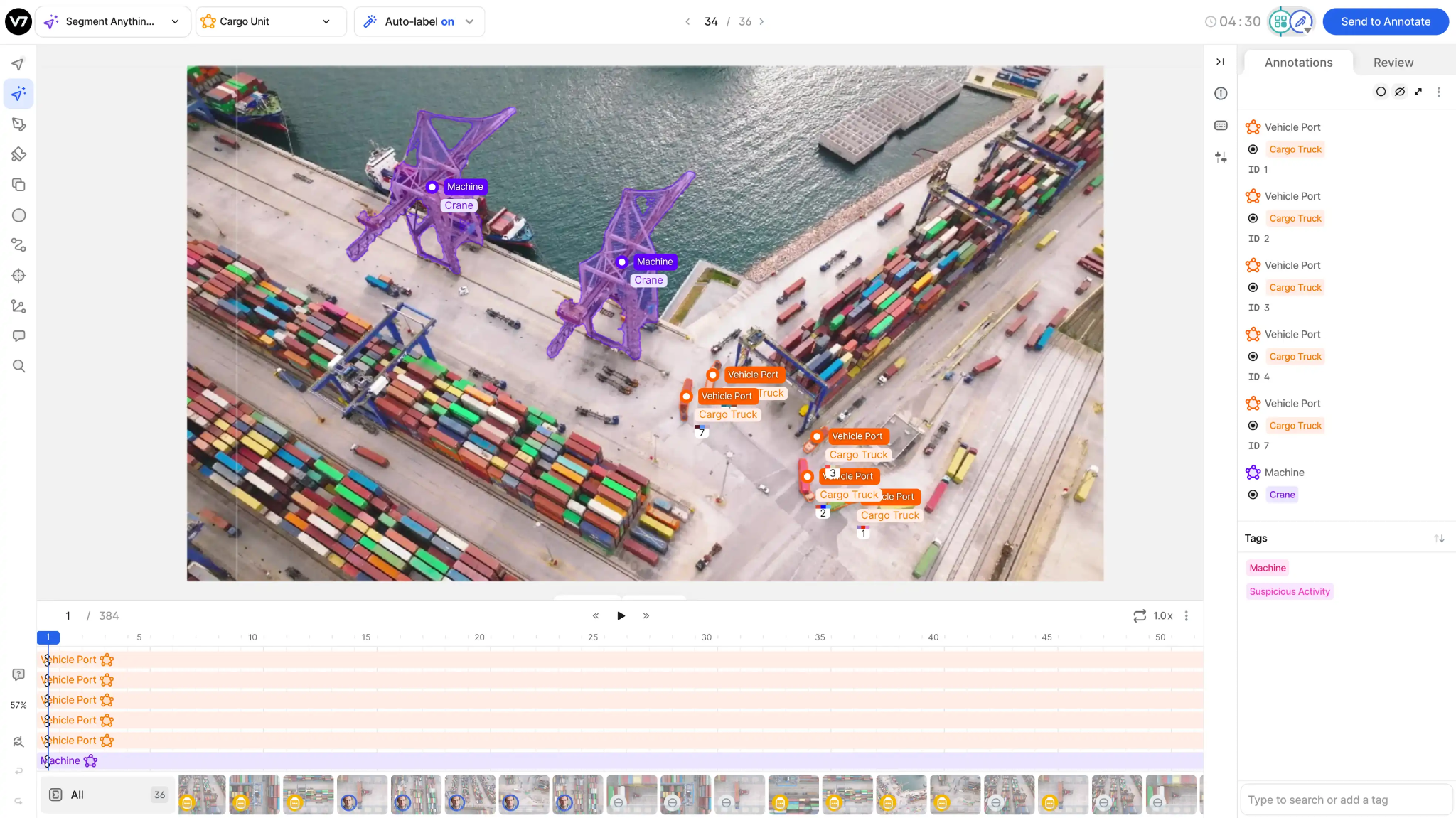
Auto-annotate tool segments objects across video frames with minimal interaction, automatically handling tracking and deformation.
V7 supports complex workflows where data is routed through multiple stages of annotation and review. It is strong in scientific and industrial use cases that support formats from standard video to microscopy and multi-spectral imaging.
Its dataset management acts as a visual database that lets teams query and filter data visually.
Key Features:
- Native video rendering with custom frame rates
- Auto-Track with SAM for object tracking
- Interpolation and AI-assisted labeling
- All video formats and resolutions are supported
- Comprehensive API for automation
Pros:
- Transparent, usage-based pricing
- Strong automation features
- Flexible workflows and customization
- API-first design for ML pipelines
Cons:
- Premium pricing structure
- Limited customization vs open-source tools
Pricing: Custom pricing = Platform fee + User licenses + Data processing volume. The Starter plan is about $9,000/year (50K files, 3 seats, 1 workspace). Contact V7 for tailored quotes.
Best For: AI teams building custom annotation workflows, organizations needing API-first platforms for automation, and projects requiring managed annotation services alongside tool access.
SuperAnnotate
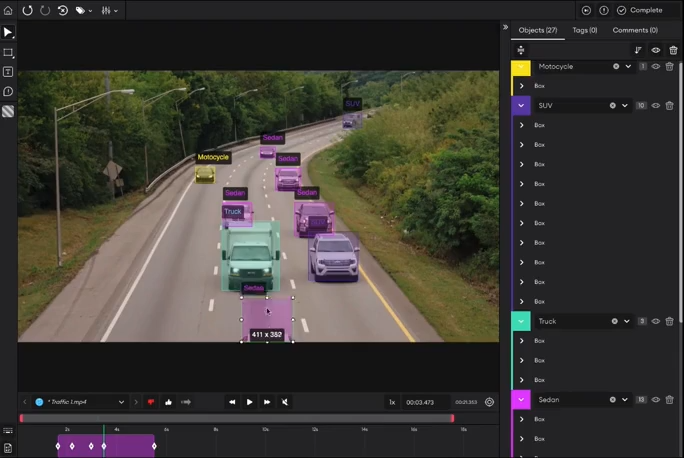
SuperAnnotate video annotation tool handles formats including MP4, AVI, MOV, FLV, MPEG, and WEBM with features like auto-track, frame interpolation, and frame-by-frame labeling.
It integrates Meta's SAM for pixel-perfect segmentation and offers model-assisted annotation to accelerate workflows.
SuperAnnotate supports both tool-only purchases for internal teams and all-in-one services, including managed annotation, project management, and MLOps support.
Key Features:
- Auto-track and interpolation for video
- Workforce marketplace (400+ annotation teams)
- Model-assisted labeling
- Python SDK and API access
Pros:
- Access to managed annotation workforce (WForce)
- Multi-modal capabilities in a single platform
- Flexible pricing (tool-only or full-service)
Cons:
- Smaller open-source community than CVAT
- Custom pricing can be expensive for small teams
Pricing: Custom pricing based on users, data volume, and service level.
Best For: Organizations needing multi-modal annotation (video + text + audio), teams requiring access to managed annotation workforces, and enterprises with complex MLOps needs.
Labelbox
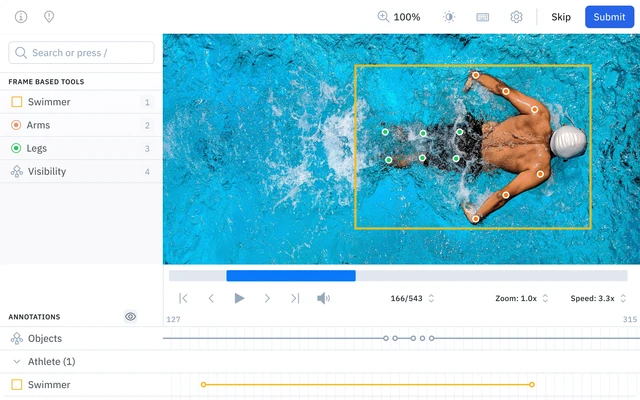
Labelbox is another data annotation platform with native video support designed for high-volume labeling workflows.
It uses a timeline-based editor that preserves video context and lets annotators create per-frame and global classifications, bounding boxes, polygons, keypoints, and segmentation masks.
Model-assisted labeling integrates foundation models and custom AI to pre-label frames, considerably reducing manual effort. It supports multi-stage review workflows with consensus labeling, benchmark datasets, and automated quality checks.
Key Features:
- Native video timeline with playback controls
- Object tracking with scene switching
- Multi-stage review workflows and consensus labeling
- API/SDK for pipeline integration
- Catalog, Annotate, and Model Foundry products
Pros:
- Enterprise-ready with HIPAA and SOC 2 compliance
- Strong collaboration and project management
- Comprehensive quality control features
Cons:
- Higher cost for dense frame labeling
- Enterprise features require a sales contact
- Free: 500 LBU/month
- Starter: $0.10/LBU (decreases with volume)
- Enterprise: Custom pricing, volume discounts
Best For: Organizations requiring compliance (HIPAA, SOC 2), and projects needing model-assisted workflows with flexible consumption-based pricing.
Kili Technology
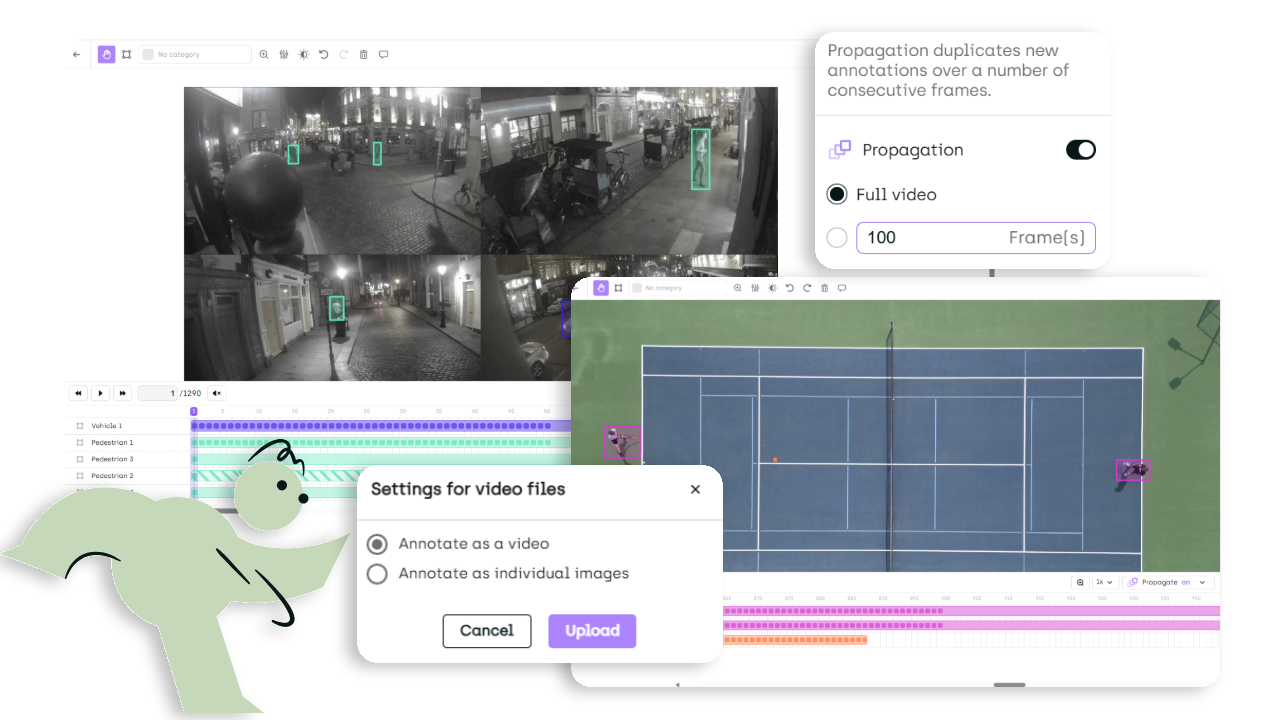
Kili Technology is a data labeling platform focused on helping teams build high-quality datasets with collaboration, quality-first workflows, and secure deployment options. It supports bounding boxes and classification with intuitive playback controls for videos.
Kili adds workflow helpers like adjustable propagation settings (to control how labels extend across frames), flexible controls to expand and contract the span of annotated frames, and “smart tracking” when you edit an annotation across frames.
Key Features:
- Video Timeline with playback controls
- Smart tracking + keyframe interpolation
- Propagation tools
- Long video support (100K+ frames)
- Collaboration with activity logging
Pros:
- Modern timeline built for production video workflows
- Strong automation reduces repetitive frame labeling
- Quality-focused with clear audit trails
- Free trial for easy evaluation
Cons:
- Best automation requires consistent keyframing practices
- Paid plans sized for production-scale volumes
- Free Trial: 2 seats, 200 assets, basic features
- Grow: Up to 20 seats, 50K assets, API/SDK
- Enterprise: Custom pricing, professional services
Best For: ML teams that need a collaboration-first labeling platform with a tooling to speed up long-video annotation, and quality-focused workflows that scale across annotators and reviewers.
How To Choose The Best Video Annotation Tool
Selecting the right video annotation tool depends on your specific project requirements, team structure, and technical constraints.
Use the following decision framework to narrow your options.
- Start with Your Primary Use Case: If you need native video support with temporal context preservation (autonomous vehicles, surveillance, medical imaging), prioritize tools like Encord, Labelbox, and V7. For timeline-based work, validate playback, exact-frame navigation, tracking, interpolation, identity handling, dynamic properties, and reviewer control on your own representative files. Unitlab AI provides these controls in its video Workbench.
- Team Expertise: Open-source annotation platforms like CVAT and Label Studio offer customization but require MLOps support. Commercial managed services, Unitlab AI, Labelbox, Encord, and Scale AI, provide out-of-the-box infrastructure and support.
- Volume and Budget: Free tiers suit small projects (<10k frames). Mid-sized (10k-100k) benefit from consumption-based models (Labelbox, Roboflow). Large enterprises (>100k) should evaluate Unitlab AI, Scale AI, or Encord for volume discounts or for a monthly subscription.
- Automation: For predictable object motion, choose platforms with tracking and interpolation assistance, then validate the human correction workflow. For custom models, evaluate API/SDK and bring-your-own-model support.
- Quality Control: Enterprise projects need multi-stage review and automated QA, features offered by Unitlab AI, Labelbox, Encord, SuperAnnotate, and Scale AI. Smaller teams can use manual review (CVAT, Label Studio).
- Compliance and Security: Regulated teams should request current vendor evidence for security, privacy, access control, auditability, data residency, and deployment. Unitlab supports cloud and on-premises deployment options; validate the controls required by your organization during procurement. Self-hosted open-source tools require independent compliance management.
- Test Before Committing: Run a small pilot (100-500 frames) using free tiers on platforms like Unitlab AI, Labelbox, SuperAnnotate, CVAT, and Roboflow to evaluate speed, QA, and user experience before committing to a full rollout.
Key Takeaways
Video annotation transforms raw footage into structured training data and helps build vision models for real-world applications.
Video annotation captures temporal information, such as tracking objects across frames, maintaining persistent IDs, and understanding motion and context.
The best video annotation tools combine native video support, AI-assisted labeling, and robust quality control to accelerate workflows while maintaining accuracy.
Choosing the right video annotation tool depends on your specific requirements. Native video support for temporal context, AI-assisted automation for speed, compliance certifications for regulated industries, or API-first architectures for ML pipeline integration.
Most platforms offer free tiers or trials, so use these to pilot your workflow before committing to enterprise contracts.
References
- Data Annotation Tool Guide 2026 [The Best 10 + Comparison] - Unitlab
- 10 Best Video Labeling Tools - Dagshub
- Top 9 Data Labeling Tools & Software - Averroes
- Guide to Video Annotation - Kili
- Top 8 Video Annotation Tools for Computer Vision - Medium
See how Unitlab supports a video annotation platform.