Databases store information in text format, yet a large portion of that text does not originate as digital data. In business settings, information often arrives as scanned PDFs, photographed documents, printed forms, or handwritten notes. Before these documents can be indexed, searched, analyzed, or automated, their text must first be extracted from images and converted into structured data.
Enter Optical Character Recognition (OCR); OCR extracts text from RGB pixels, allowing systems to operate on language rather than raw images. While OCR does not provide semantic meaning or business logic on its own, it forms the foundation on which modern document AI systems are built.
In this article, we examine how OCR is applied across industries, how it fits into real production systems, and why OCR is almost never used in isolation.
What is OCR?
At its core, Optical Character Recognition is the process of converting text that appears in images into machine-readable characters. The input may be a scanned document, a mobile phone photo, a screenshot, or even a live camera feed. The output is typically plain text, often accompanied by positional information such as bounding boxes or polygons.
OCR answers a simple but critical question: what text appears in this image, and where? To do this, OCR systems combine two tasks: text detection (finding where text exists) and text recognition (determining what that text says).
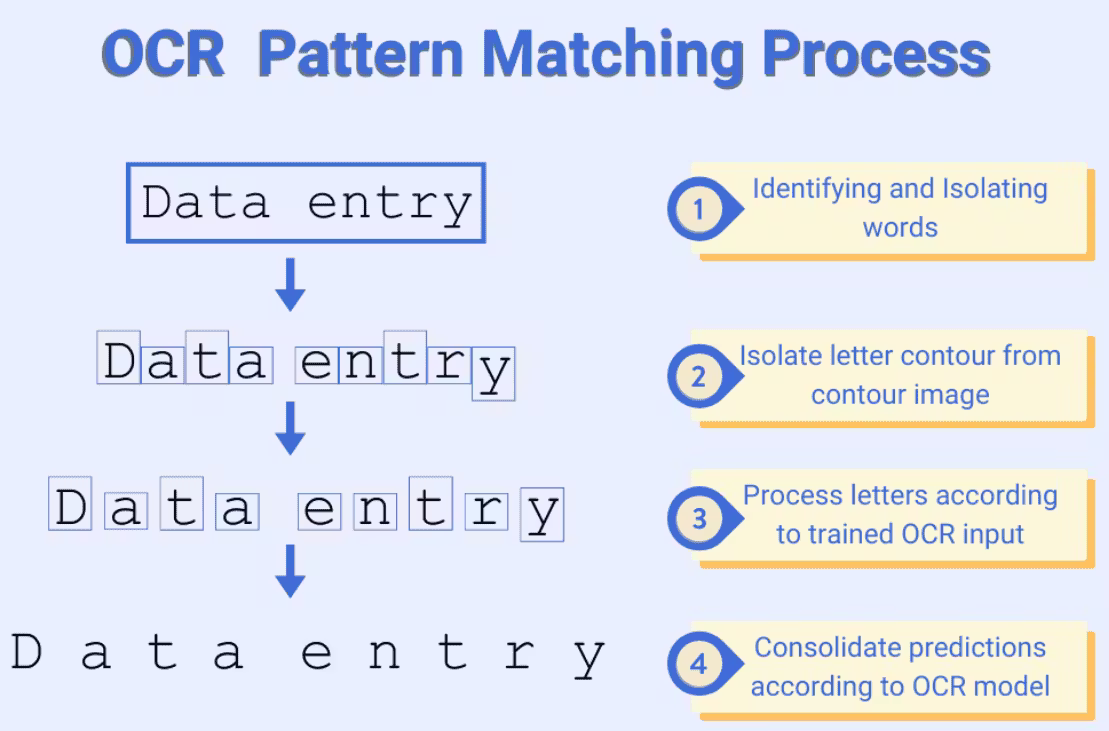
However, OCR is not NLP. It does not decide which fields matter, how values relate to one another, or what actions should be taken. OCR only detects and extracts text. Nothing more.
Those responsibilities belong to downstream components such as layout analysis, named entity recognition (NER), validation logic, and business rules. For this reason, OCR is best understood as supporting infrastructure rather than a complete computer vision solution on its own.
How OCR Is Used in Real Systems
In production environments, OCR is rarely deployed as a standalone model. Instead, it sits inside a broader pipeline that transforms raw visual documents into structured, actionable data. Even when modern deep learning multimodal AI models bundle multiple steps together, a typical system still follows this logical flow:
- Document ingestion from scanners, cameras, or PDFs
- OCR to extract text and coordinates
- Layout analysis to identify sections, tables, and headers
- NLP models to extract entities or classify content
- Post-processing to validate, normalize, and store results
 Asad Iqbal
Multimodal AI Guide
The Garbage in, Garbage out principle applies strongly here. Errors introduced during OCR propagate through the entire pipeline. A single misread character in an invoice can break downstream validation. A missed line in an identity document can halt verification.
Because of this, OCR quality often has a greater impact on system reliability than later NLP components. With this in mind, we can now examine how OCR is applied across different industries.
Industry-Specific OCR Applications
OCR is used anywhere text must be extracted from visual documents. Below are ten industry-specific applications where OCR plays a central role.
| Name | Use Case | Domains | OCR Type |
|---|---|---|---|
| Invoice OCR | Extract totals, dates, vendor info from invoices and receipts | Finance, Accounting, ERP | OCR, Layout-Aware OCR |
| Identity Document OCR | Read names, IDs, dates from passports and licenses | Government, Compliance | OCR, ICR, Layout-Aware OCR |
| Medical Document OCR | Digitize prescriptions, reports, and clinical notes | Healthcare, Pharma | OCR, ICR |
| Legal Document OCR | Convert contracts and filings into searchable text | Legal, Compliance | OCR, Layout-Aware OCR |
| Logistics Document OCR | Read shipping labels, customs forms, tracking IDs | Logistics, Supply Chain | OCR, Scene Text OCR |
| Government Records OCR | Digitize census data, tax records, public archives | Public Sector, Administration | OCR, ICR |
| Exam and Form OCR | Process answer sheets and academic forms | Education, Assessment | OCR, OMR |
| Insurance Claims OCR | Extract claim numbers, dates, amounts from submissions | Insurance | OCR, Layout-Aware OCR |
| Retail and Receipt OCR | Read receipts, price tags, product labels | Retail, E-commerce | OCR, Scene Text OCR |
| Historical Archive OCR | Digitize books, manuscripts, and newspapers | Libraries, Research | OCR, ICR |
1. Invoice and Financial Document Processing
Financial operations rely heavily on structured data embedded inside semi-structured documents. Invoices, receipts, purchase orders, and bank statements typically arrive as PDFs or scanned images attached to emails or uploaded via portals.
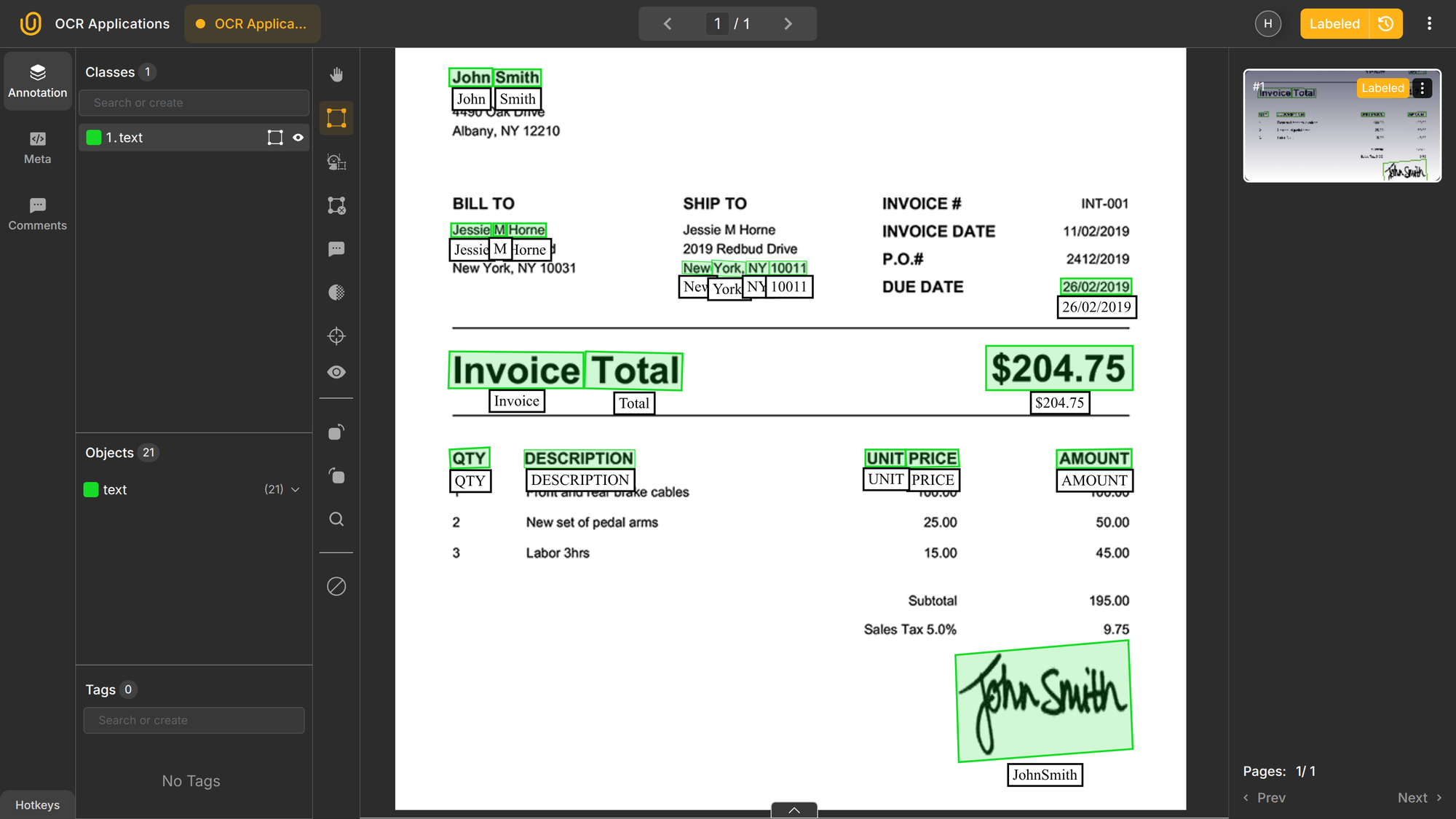
OCR extracts the raw text, while layout-aware NLP models identify fields such as vendor name, invoice number, totals, tax amounts, and due dates. For example:
Invoice No: INV-20391
Total: €4,250.00
Due: 15 March 2026
This text is then passed to NER models and validation rules to ensure values are well-formed and consistent. In more advanced systems, multimodal AI combines OCR, layout-aware NLP, and validation into a single pipeline.
Because OCR errors directly affect accounting records (i.e. money), strict post-processing and cross-checks are essential. Invoice automation is one of the most mature and widely deployed OCR applications in industry.
2. Identity Verification
Identity verification systems process passports, national IDs, driver licenses, and residency permits. These documents contain structured fields embedded in visually complex layouts, which is why physical damage to IDs can disrupt automated checks.
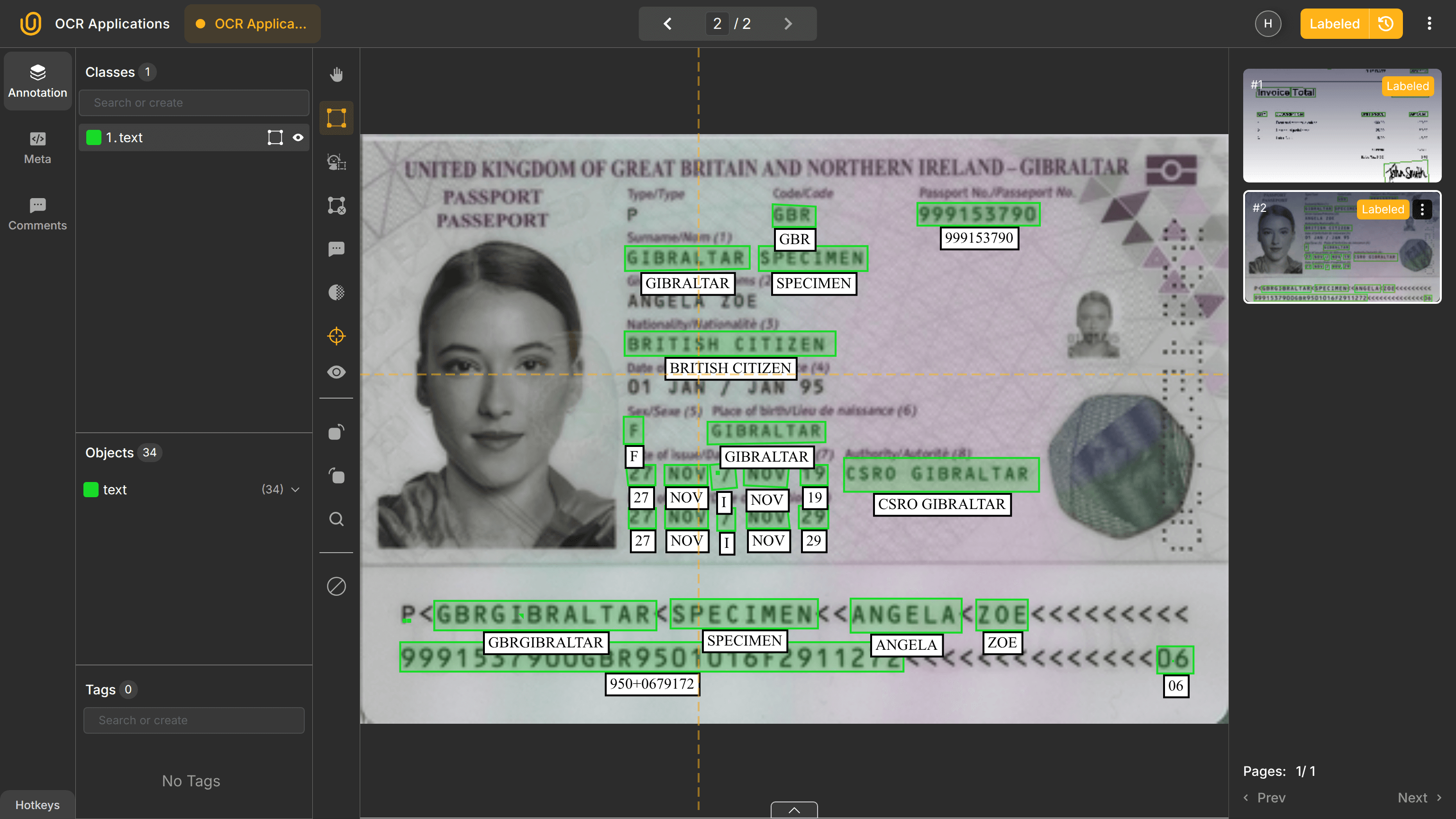
Specialized OCR extracts names, document numbers, dates of birth, and expiration dates. This text is then validated in milliseconds against compliance rules and databases. For example:
Name: John Michael Doe
Passport No: P12345678
Date of Birth: 14-08-1994
OCR is often combined with computer vision for face matching, MRZ parsing, and fraud detection. Needless to say, accuracy is critical, as OCR output feeds compliance workflows and legal checks. Poor OCR performance increases manual review rates and operational costs.
3. Healthcare and Medical Records
Healthcare systems generate large volumes of scanned documents, including prescriptions, lab reports, discharge summaries, and referral letters. Handwritten records still exist in many hospitals.
Traditional rule-based OCR struggles here due to inconsistent structure and handwriting. Variants such as ICR and IWR are better suited. Even for humans, interpreting handwritten prescriptions can be difficult. I could not figure out the drug and its dose in the image below; a general-purpose OCR would surely fail as well:
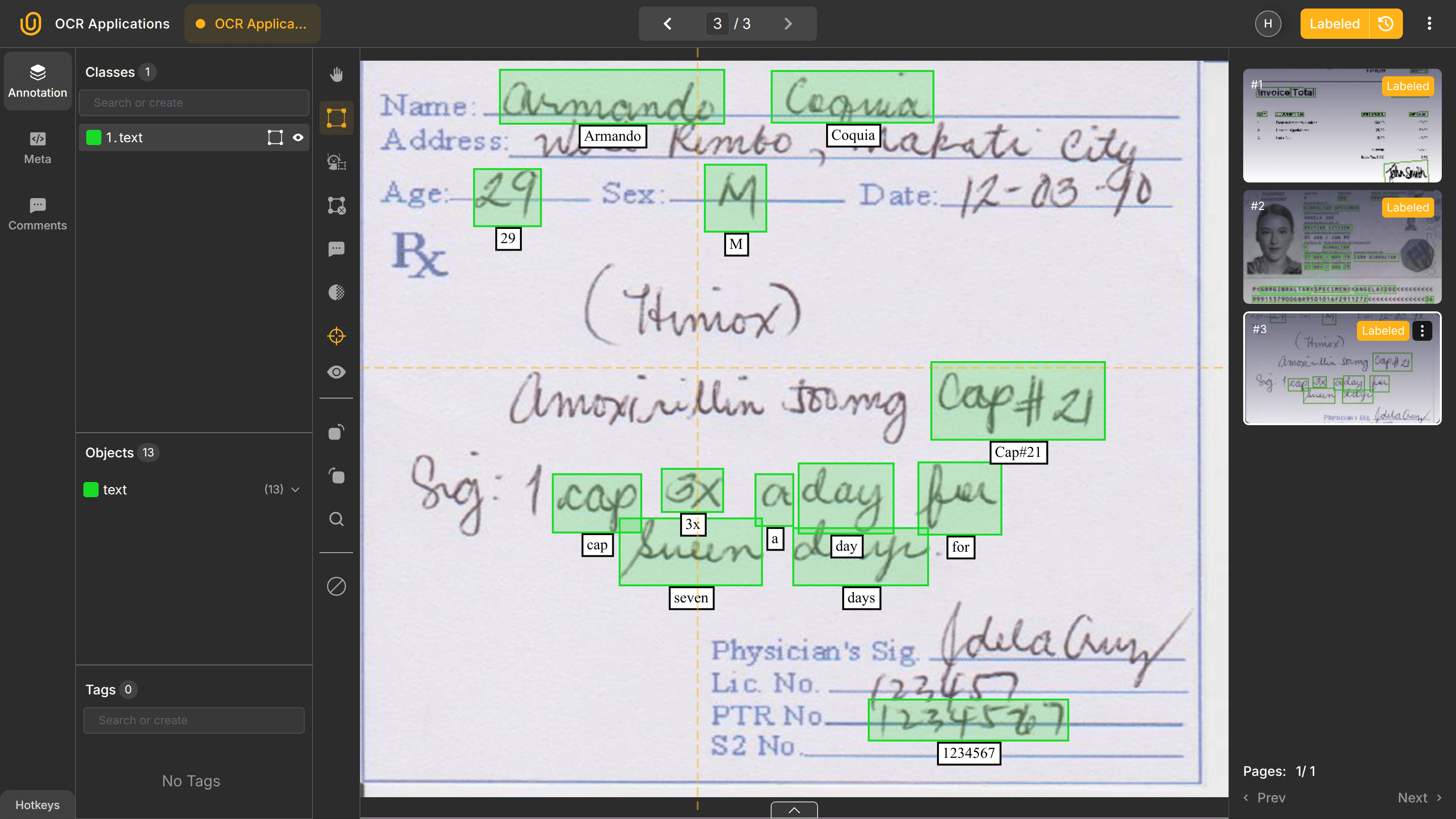
OCR extracts clinical text that medical NLP models process further:
Patient prescribed Metformin 500 mg twice daily
Because errors have serious consequences, medical OCR systems prioritize recall, F1 score, and validation over raw speed.
 Hojiakbar Barotov
Medical Image Annotation
4. Legal and Compliance Documents
Legal workflows involve contracts, court filings, and regulatory documents. These documents are text-heavy, rigidly structured, and often scanned or digitally signed for archival and legal databases.
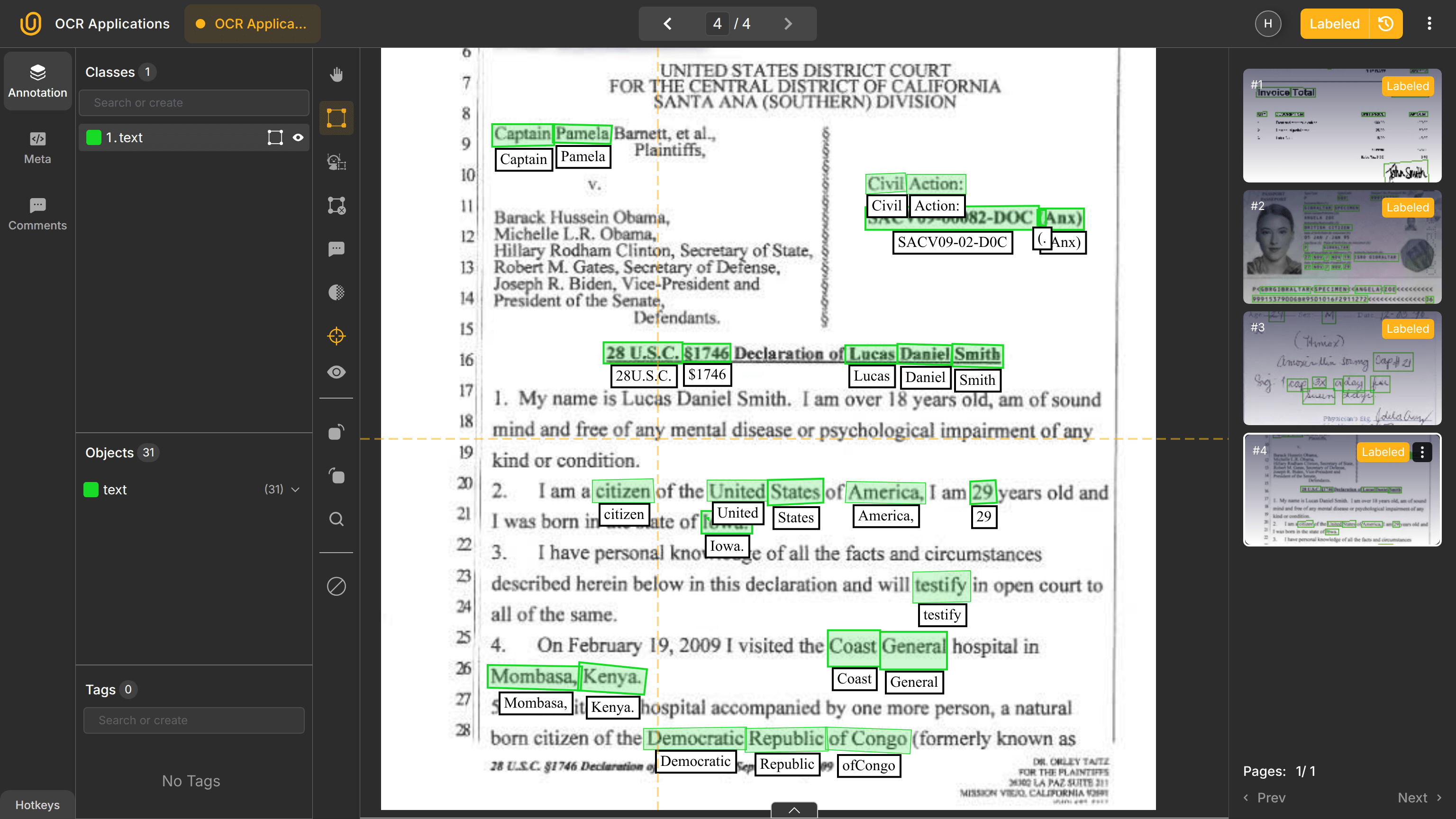
OCR enables clause extraction, entity identification, and document comparison at scale. Layout preservation is especially important, as formatting and section boundaries carry legal meaning. As a result, OCR is typically paired with layout-aware models.
5. Logistics, Shipping, and Supply Chain
Supply chain operations in any industry process lots of shipping labels, bills of lading, customs declarations, and delivery receipts, which are especially relevant in international trade, logistics, and shipping. Documents are often photographed with an ordinary mobile camera in uncontrolled environments such as warehouses, ports, or ships.
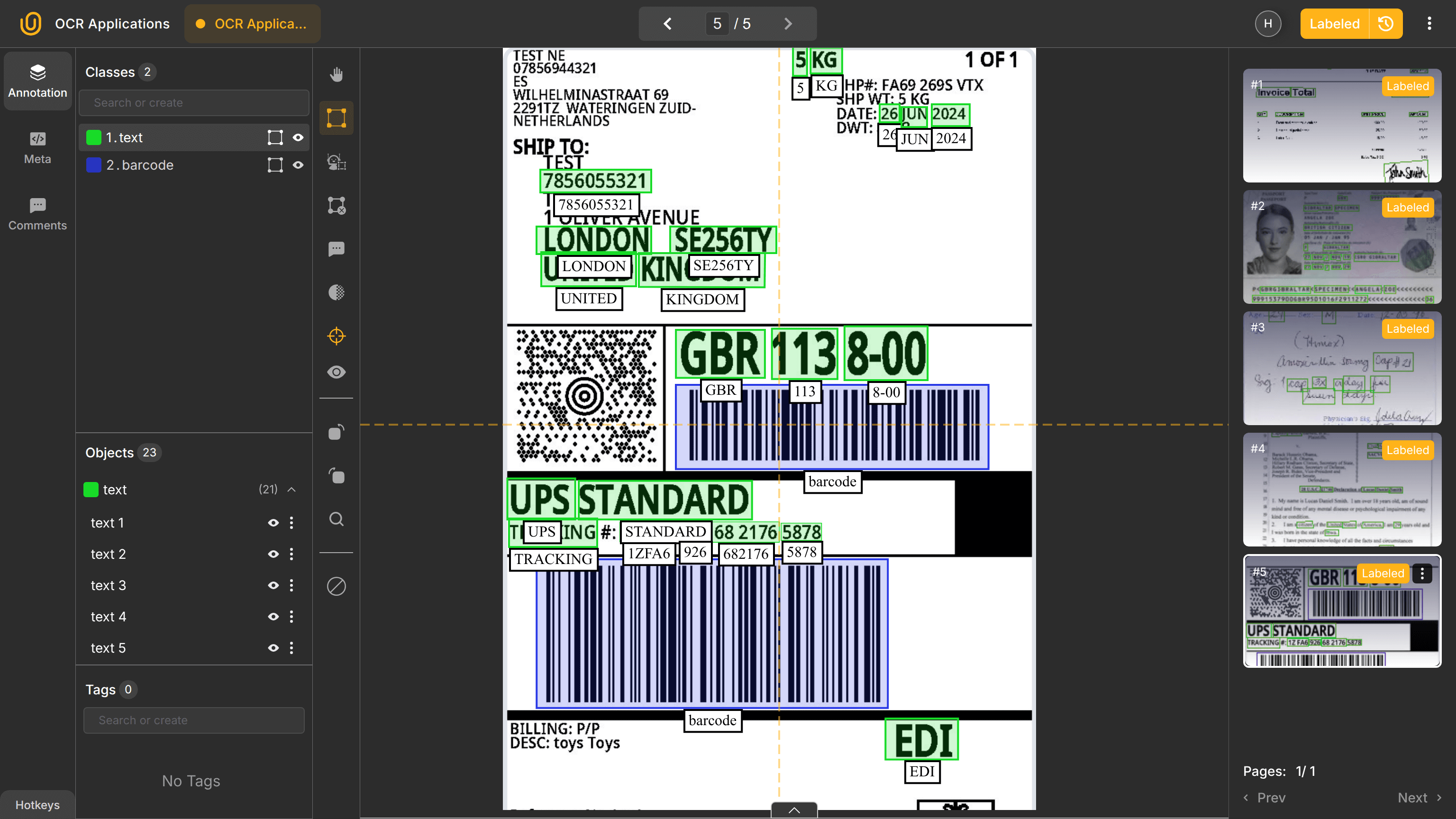
OCR extracts tracking numbers, addresses, container IDs, and dates, often alongside barcode detection. For example:
Container ID: MSKU1234567
Destination: Rotterdam
Robust OCR is required to handle blur, poor lighting, and damaged documents because input images or scans can be of any quality, both low and high.
6. Government and Public Sector Digitization
Governments digitize census data, tax records, land registries, and historical archives, which often exist only on paper form. Projects like the Project Gutenberg rely heavily on OCR.
Because many records are handwritten or degraded, OCR is combined with Intelligent Character Recognition (ICR) and Intelligent Word Recognition (IWR). At this scale, small accuracy improvements translate into large cost savings. Throughput and consistency often matter more than perfect accuracy.
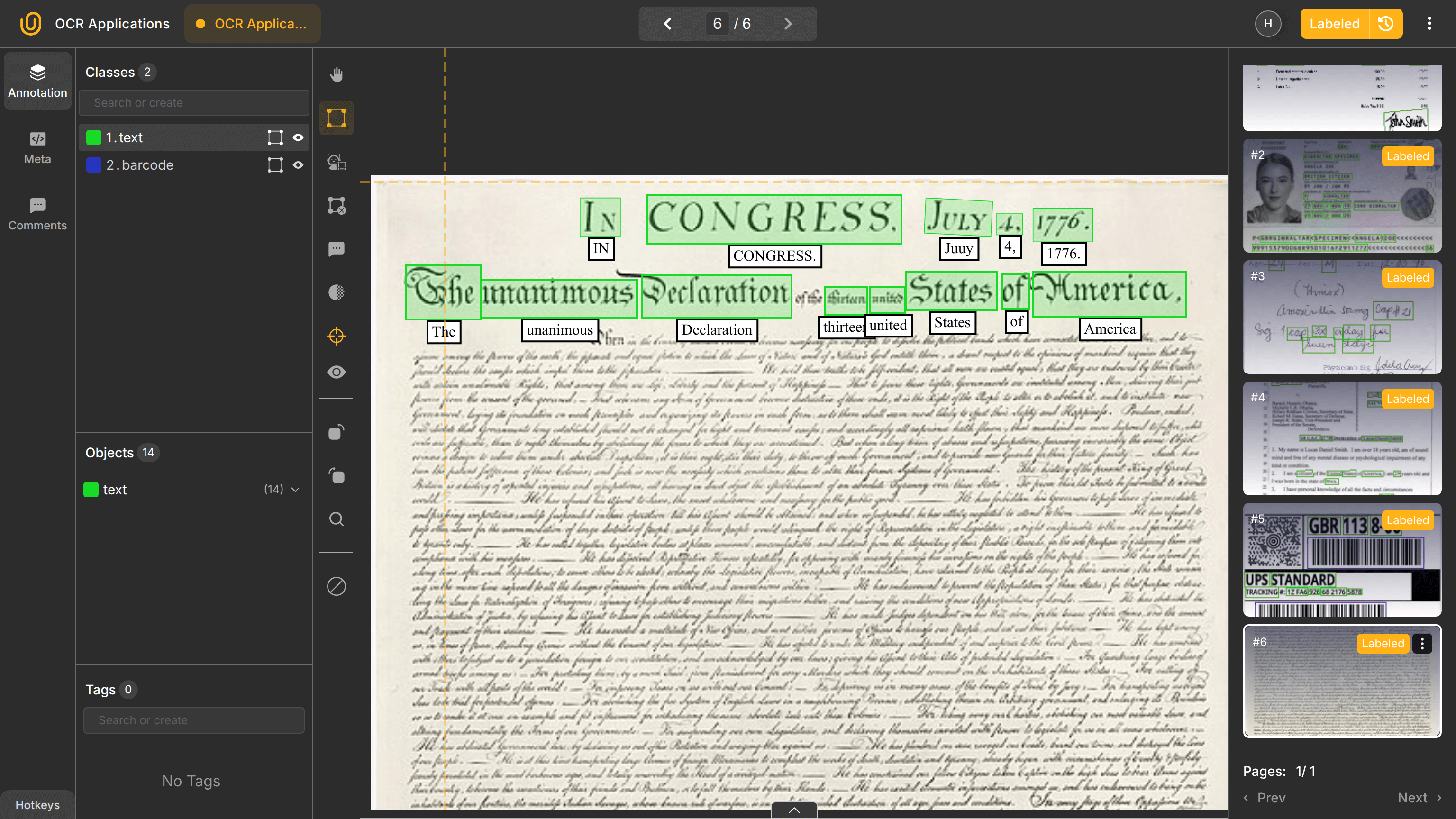
Therefore, public sector OCR systems often prioritize throughput and consistency over perfect accuracy, relying on human review for edge cases.
7. Education and Examination Systems
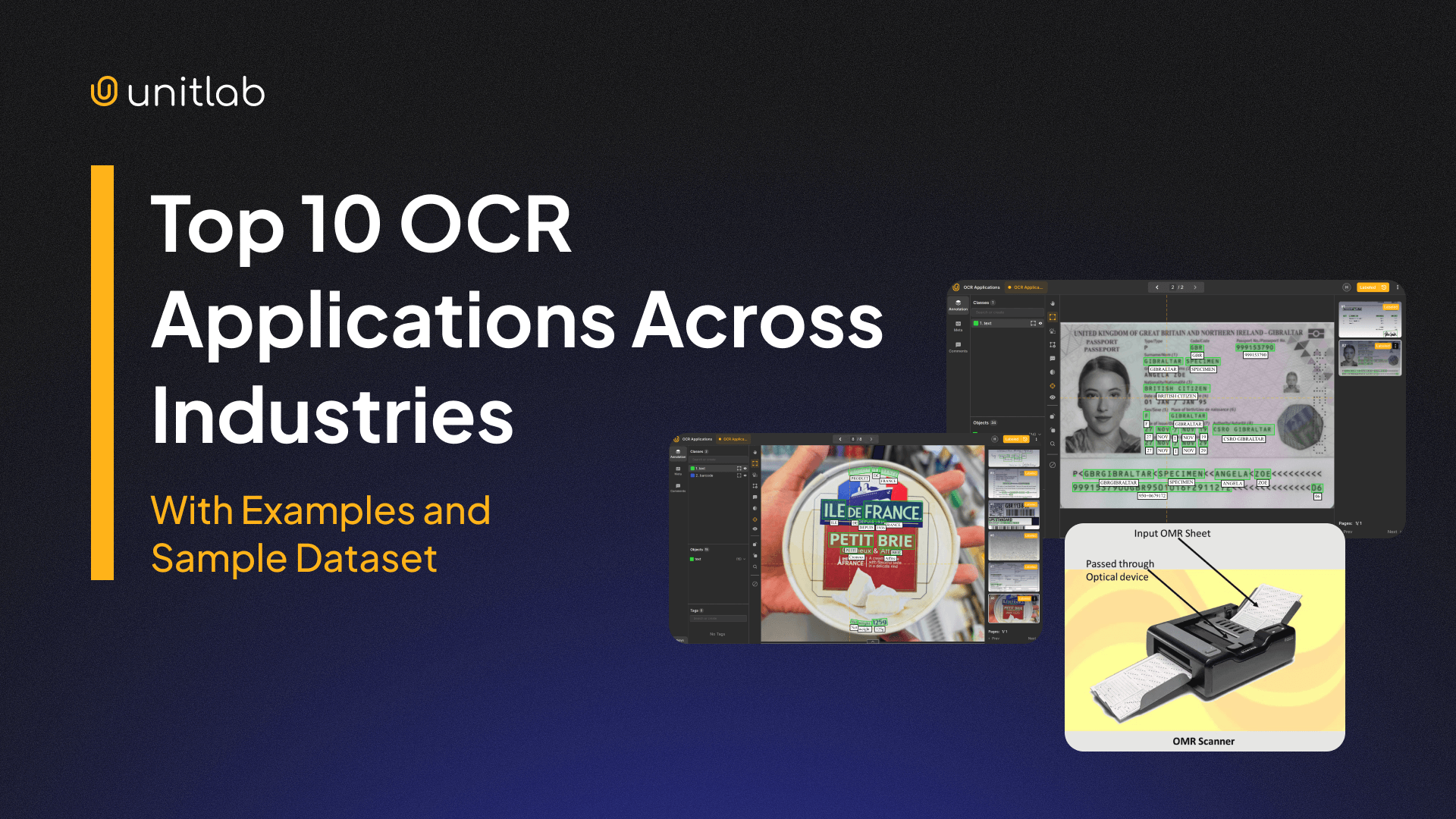
One of the earliest OCR applications was Optical Mark Recognition (OMR) for exams and surveys in education and research to process highly structured forms. Most paper exams have pre-defined multiple-choice questions with 4 or 5 options or bubble-like answer sheets in the case of paper SAT until 2022.
OCR extracts student identifiers, while OMR detects filled bubbles in multiple-choice tests. There exist standard software applications that can automate this process which most governments still use for checking national entrance and language exam results.
8. Insurance Claims Processing
As you can see, wherever there is a scanned document or an image in a business setting, you can use OCR + some specialized OCR + NLP + AI to automate some of your operations. Modern applications employ multimodal AI to combine them inside one pipeline.
Insurance is no different. Insurance workflows involve claim forms, damage reports, and supporting documents. OCR extracts claim numbers, dates, and amounts, which NLP systems interpret further.
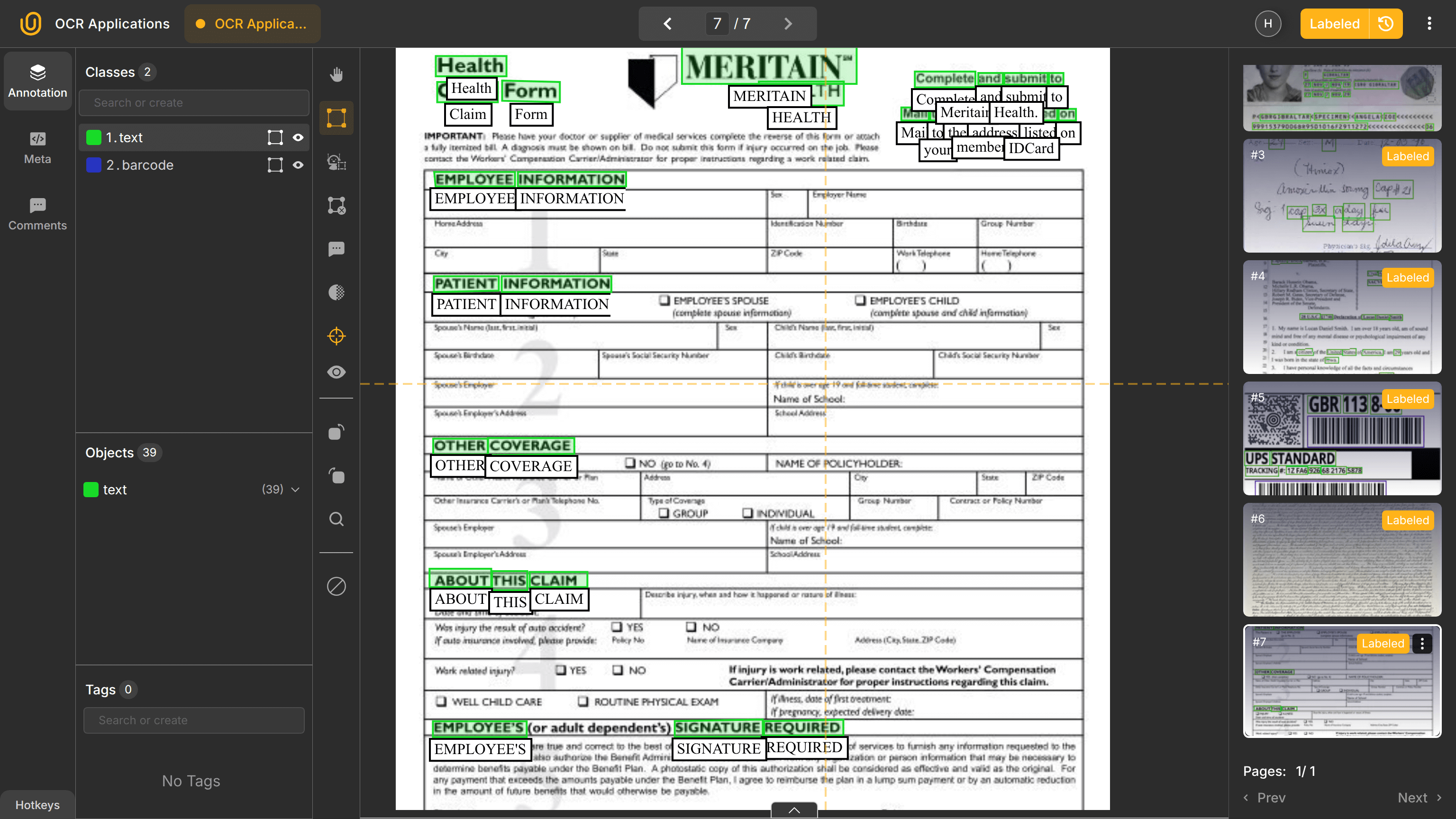
These systems balance speed and accuracy. Faster OCR reduces processing time, while errors increase fraud risk and manual review. OCR output is typically validated against policy databases and historical claims.
9. Retail and E-commerce
Retailers use OCR to process receipts, invoices, labels, and user-submitted images. Mobile receipt scanning is a common example.
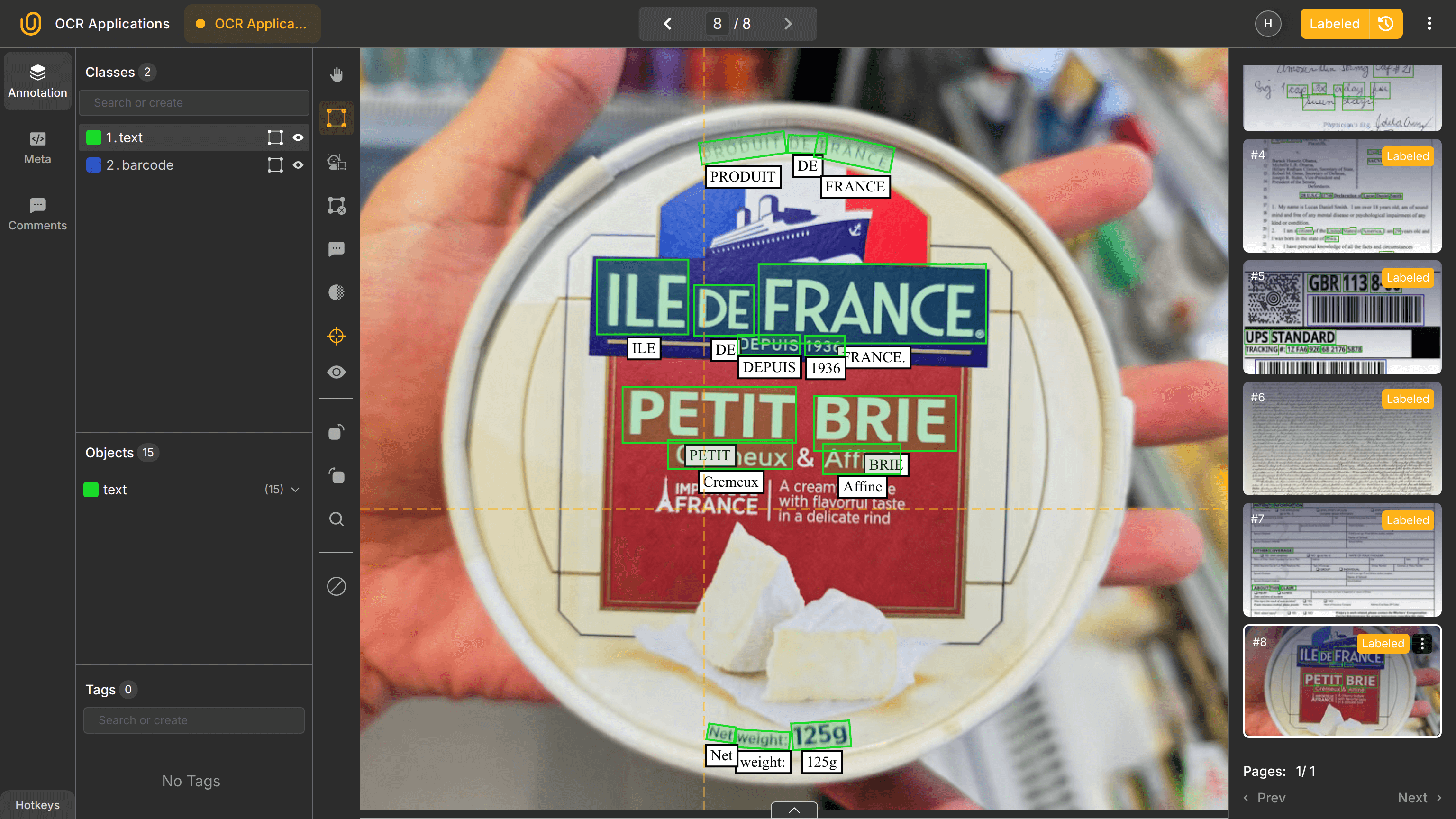
OCR outputs feed NLP models for product categorization and analytics:
Milk 1L – €1.20
Bread – €0.80
Because retails should handle a wide category of products in different languages, sizes, and visuals, the e-commerce domain is noisy and multilingual. Thus, it favors deep learning-based multimodal OCR systems over rule-based approaches.
10. Historical Archives and Digital Libraries
Very closely related to the application number 6, OCR is widely used for digitizing libraries and archives. Libraries digitize books, newspapers, and manuscripts to preserve and make them searchable.
In this setting, perfect accuracy is often less important than coverage. Older documents may use obsolete fonts or degraded paper, making OCR challenging. The goal is preservation and discoverability rather than automation.
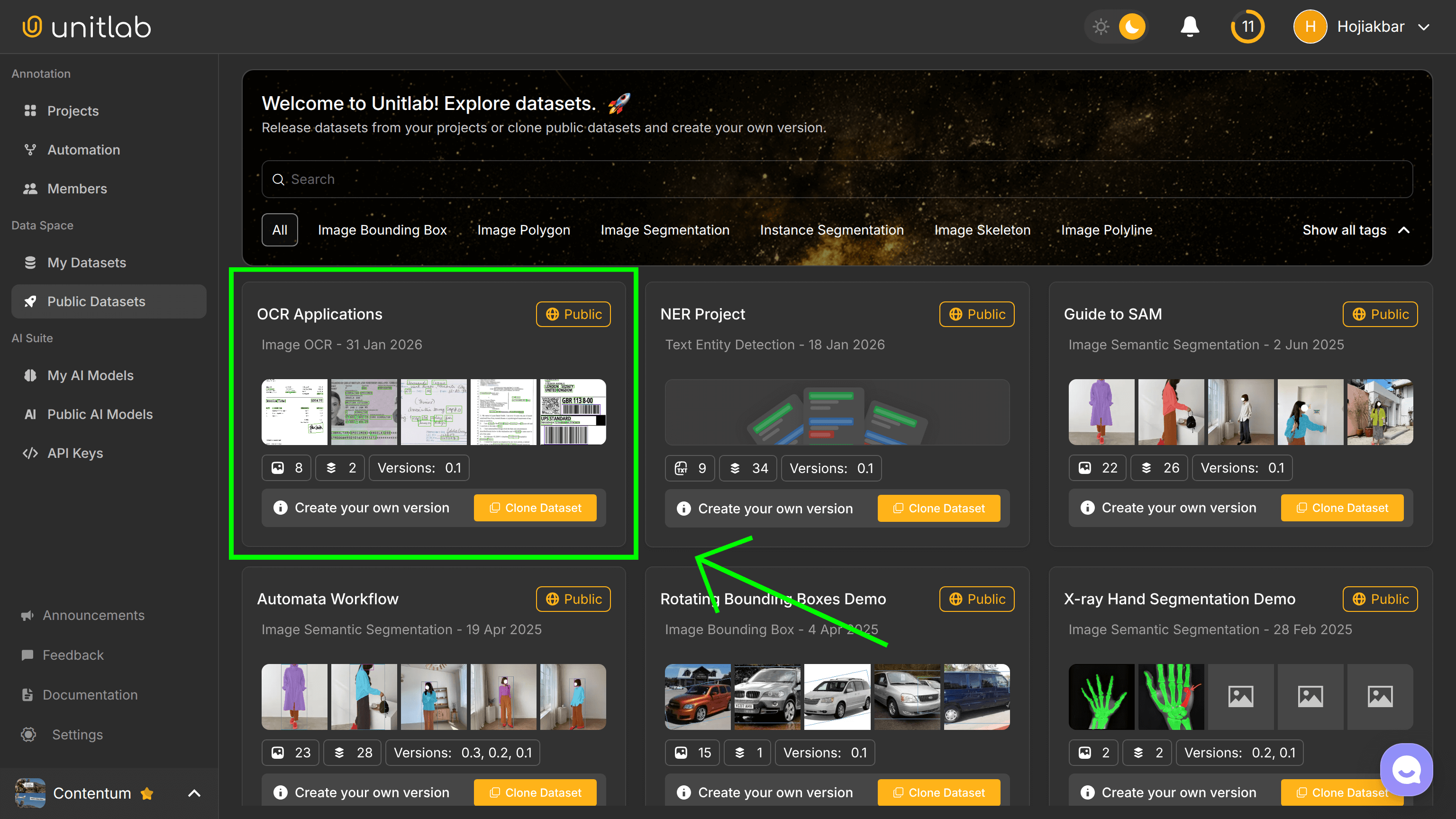
We made a public dataset of the examples used in OCR on our platform, Unitlab AI. It is a fully automated data platform that handles AI-powered multimodal annotation, dataset curation and versioning, and model validation. Access the public dataset by creating a free account in under 5 minutes:
Cross-Industry Patterns
Put simply, OCR is used to detect, recognize, and extract text from visual data like images and scanned documents. Because its use is fairly standardized, across industries, OCR follows consistent patterns:
- OCR is usually the first step in pipelines
- Layout and post-processing often require more engineering than recognition
- Domain-specific data outperforms generic models, especially in medical
- Validation logic matters more than raw OCR accuracy
Organizations that treat OCR as infrastructure rather than a standalone model achieve better results.
Common OCR Challenges
Despite major advances in deep learning, OCR still faces practical challenges in real-world deployments. These challenges are not isolated edge cases, but often appear together and compound each other, especially outside controlled environments:
- Poor image quality: Low resolution, motion blur, uneven lighting, shadows, and glare reduce character clarity, confusing both text detectors and recognizers. Mobile-captured documents are particularly problematic, for obvious reasons.
- Visual ambiguity: Characters such as O and 0, I and l, or B and 8 are visually similar, especially in certain fonts, degraded prints, or handwritten text.
- Multilingual documents: Documents may contain multiple languages, numerals, or writing systems on the same page. Spacing rules, character shapes, and reading order differ across scripts.
- Handwritten text: Writing styles vary widely, characters may connect or overlap, and spacing is inconsistent. Even modern ICR systems struggle with messy or rushed handwriting, especially when context is limited.
- Domain shift: Models trained on scanned documents may fail on photographs. Models trained on synthetic data may struggle with real-world noise. Without continuous evaluation and dataset updates, OCR accuracy degrades over time as capture conditions and document styles evolve.
When OCR Alone Is Not Enough
OCR extracts text but does not understand it. Meaning comes from combining OCR with layout analysis, NER, entity linking, and business rules.
For example, extracting text from an invoice is not enough to automate accounting. The system must know which number is the total, which date is the due date, and whether values match expectations. OCR is necessary, but never sufficient, for document intelligence.
Future of OCR Applications
Although it is almost impossible to predict the course of a particular technology, we can make one strong prediction: tighter integration with multimodal AI models that jointly reason over text, layout, and visual cues. End-to-end document AI systems are already reducing the gap between text extraction and understanding.
However, OCR will remain a foundational layer, though as an entrypoint that happens in the background. As long as documents exist as images, OCR will be required to bridge the gap between pixels and language.
Conclusion
OCR enables machines to read the physical world. It converts scanned and photographed documents into digital text that downstream systems can analyze, validate, and act upon.
Across industries, OCR supports automation, compliance, analytics, and large-scale digitization. Its real value comes not from recognition alone, but from how well it integrates into broader document processing pipelines.
Successful OCR deployments treat text extraction as infrastructure. They invest in domain-specific data, continuous evaluation, and robust post-processing. When combined with layout analysis and NLP, OCR becomes the entry point to full document understanding.
Explore More
- OCR: Essentials, Workings, Types, Challenges
- Image OCR Annotation with Unitlab AI with Examples [2026]
- Invoice OCR Annotation with Unitlab AI [2026]
References
- Antony Bellingall (Feb 21, 2025). OCR Applications in Automating Data Entry and Processing. Idenfo: Source
- Anyparser (Nov 3, 2024). A Comprehensive Guide to OCR Technology and Its Applications. Anyparser: Source
- EasyOCR (Nov 11, 2025). OCR Technology Applications Across Industries: Real Cases and Best Practices. EasyOCR: Source
- Hojiakbar Barotov (Jan 28, 2026). OCR: Essentials, Workings, Types, Challenges. Unitlab: Source
- Rannsolve (Feb 25, 2025). OCR Use Cases Across Industries: Applications for Data Management. Rannsolve: Source
- Reedr (no date). 9 industries that benefit from OCR: use cases and applications for automated data capture. Reedr: Source