


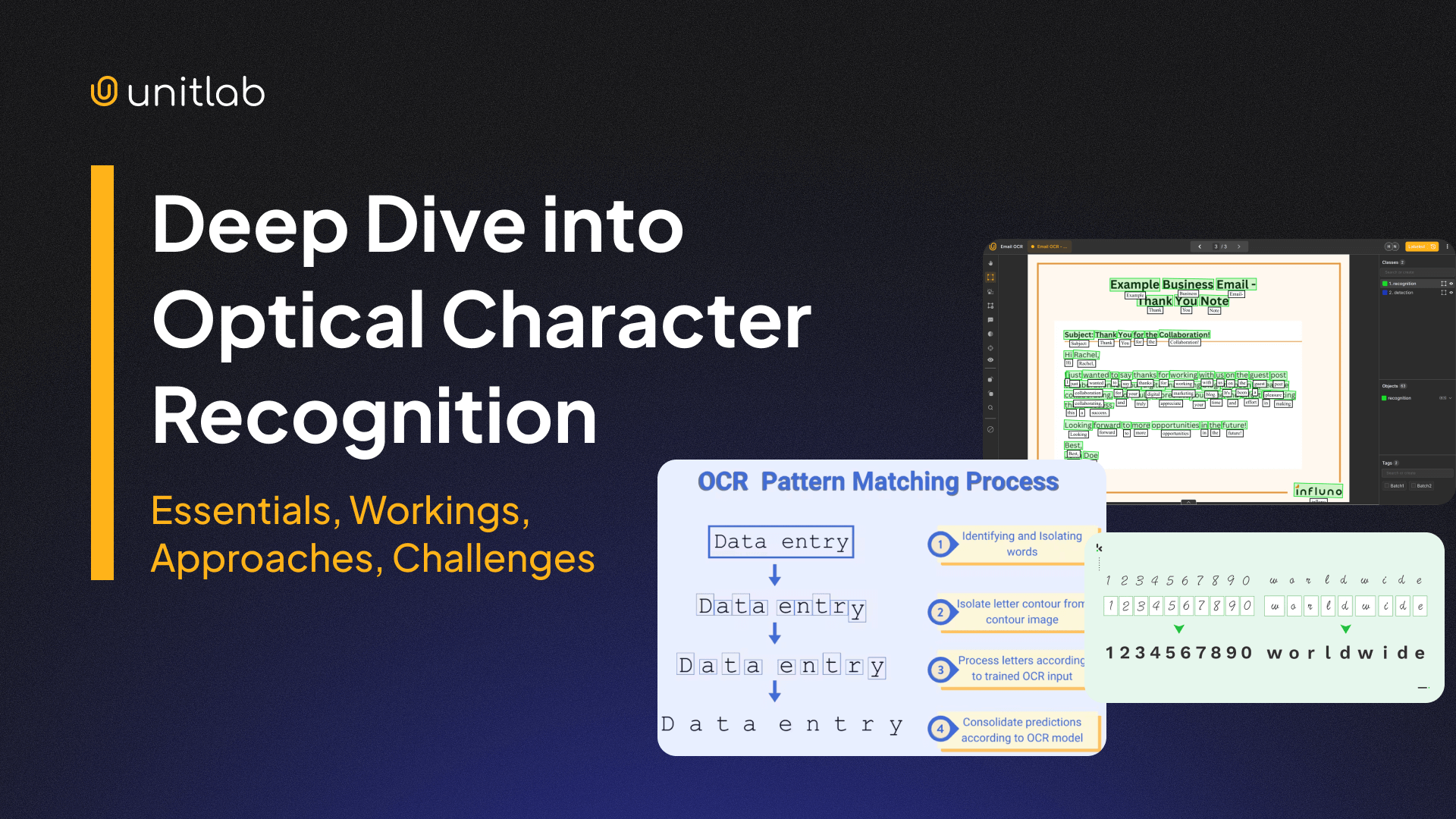
A large share of business data still lives inside paper documents and scanned images. Invoices arrive as PDFs, IDs are captured by phone cameras, shipping labels are printed, and contracts are often signed on paper. For a computer, all of this is just pixels. Before any search, analytics, or automation can happen, the text inside those pixels has to be extracted.
This is where Optical Character Recognition, or OCR, becomes essential. OCR converts visible text in images into machine-readable characters that systems can store, search, and analyze. In modern multi-modal AI pipelines, OCR is usually the first step before layout analysis, named entity recognition (NER), and structured information extraction.
OCR is not new. Early commercial systems appeared in the 1970s, with major contributions from Ray Kurzweil and his team. What has changed is not the goal, but the methods. Deep learning and multimodal models have made OCR far more robust in messy, real-world conditions.
In this article, we look at:
- What Is Optical Character Recognition (OCR)?
- Where OCR Fits in Modern AI Pipelines
- How OCR Works
- Types of OCR
- OCR Model Architectures
- Common OCR Challenges
What Is Optical Character Recognition (OCR)?
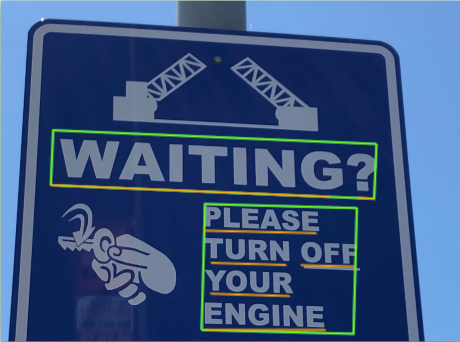
Optical character recognition (OCR) or optical character reader is the electronic or mechanical conversion of images of typed, handwritten or printed text into machine-encoded text, whether from a scanned document, a photo of a document, a scene photo or from subtitle text superimposed on an image.
— Wikipedia
At its core, OCR is the task of detecting and converting visible text in images into digital characters. The input is usually an image or scanned document, and the output may include:
- raw text strings
- word-level or line-level bounding boxes
- character-level coordinates in some systems
OCR Example | Wikipedia
At a basic level, OCR answers one question: what characters appear in this image, and where are they located?
OCR is different from document understanding. OCR only extracts text. It does not know which parts are important or how values relate to each other. For example, OCR may read:
Invoice No: INV-20391 Total: €4,250.00 Due: 15 March 2026
But it does not know that INV-20391 is an invoice ID or that €4,250.00 is a payable amount. That understanding comes from downstream NLP models such as NER and document parsers.
Because of this, OCR acts as the bridge between visual data and language processing in modern document AI systems.
Where OCR Fits in Modern AI Pipelines
OCR rarely runs alone. It usually sits inside a larger pipeline:
- Image or PDF ingestion
- OCR for text and coordinates
- Layout analysis to detect structure
- NLP models for entity extraction or classification
- Post-processing and database integration
For example, in invoice automation, OCR extracts raw text, layout models identify tables and headers, NER finds invoice numbers and totals, and validation rules ensure values follow accounting constraints.
The GIGO principle applies strongly here. If OCR makes mistakes, every downstream component receives corrupted inputs. Many errors that appear to be NLP failures are actually caused by incorrect OCR output earlier in the pipeline.
Because of this, improving OCR quality often leads to larger system-level gains than tweaking later models. This is even more important in multimodal AI applications where errors stack and debugging is more difficult. Here is our guide to multimodality in AI:
 Asad Iqbal
Multimodality in AI
OCR Model Architectures
According to its approach to locating and extracting text, OCR systems can be grouped into three broad categories: rule-based, ML-based, and multi-modal deep learning models:
| Architecture Type | What It Is | Typical Use Cases | Model Families |
|---|---|---|---|
| Rule-based OCR | Rule-based image processing with character classifiers. | Clean scans, printed books, simple forms | Tesseract-style OCR, template matching |
| ML-based OCR | Separate models for finding text and reading it. | Scene text, mobile scans, mixed layouts | Text detectors (EAST, CRAFT, DBNet) + CNN/RNN or Transformer recognizers |
| Multi-modal Deep Learning Models | Jointly learn text, layout, and visual context. | Invoices, IDs, structured business documents | Multimodal Transformers (LayoutLM, TrOCR, Donut) |
Rule-based OCR Engines
Tools like Tesseract use traditional image processing combined with trained character classifiers. They work well on clean, printed text but struggle with complex layouts and images. They are lightweight to run and easy to deploy but limited in flexibility.
The most common type is Optical Mark Recognition, which has been used for checking bulletins, exams, and surveys, all of which have rigid structures. Where there is a structure or rule, this type of OCR method works perfectly at low computational costs and complexities.
ML-based OCR
Modern ML-based OCR often uses two separate neural networks:
- one for text detection
- one for text recognition
This modular approach allows each stage to be improved independently and supports many real-world OCR applications. Due to their balance between flexibility and simplicity and computational costs, these modular deep learning OCR pipelines are common in production OCR APIs and open-source systems.
Multimodal Deep Learning Models
Newer models such as LayoutLM, TrOCR, and Donut process entire documents and directly predict structured outputs. They combine visual features, text embeddings, and spatial information.
They do not need pre-processing or post-processing because end-to-end models are included in this approach by default. You only input an image, deep learning models do their magic, and you get the extracted text, structure, and existing layout of the document.
These models blur the line between OCR and document understanding and are increasingly used in document AI workflows. The trade-off is higher computational cost and more complex training pipelines.
How OCR Works
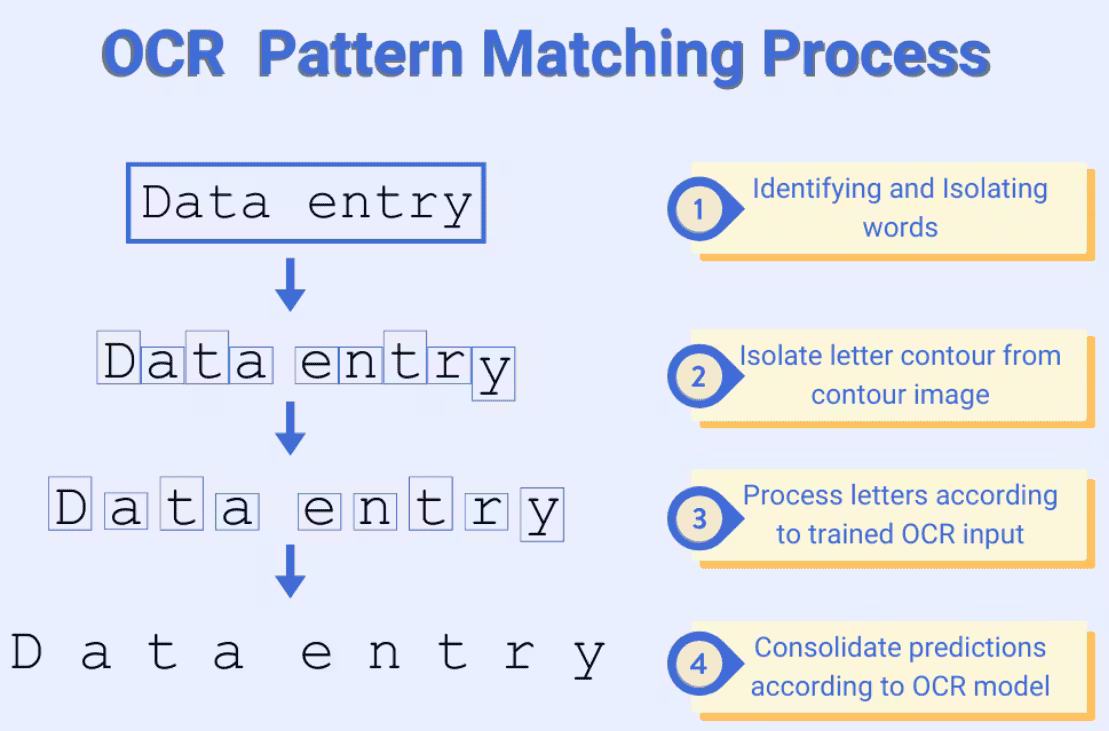
Modern OCR systems do not need pre- and post-processing steps because they are multi-modal systems that combine image processing and NLP. However, to illustrate how OCR works under the hood, we explain the workings of rule-based, classical OCR:
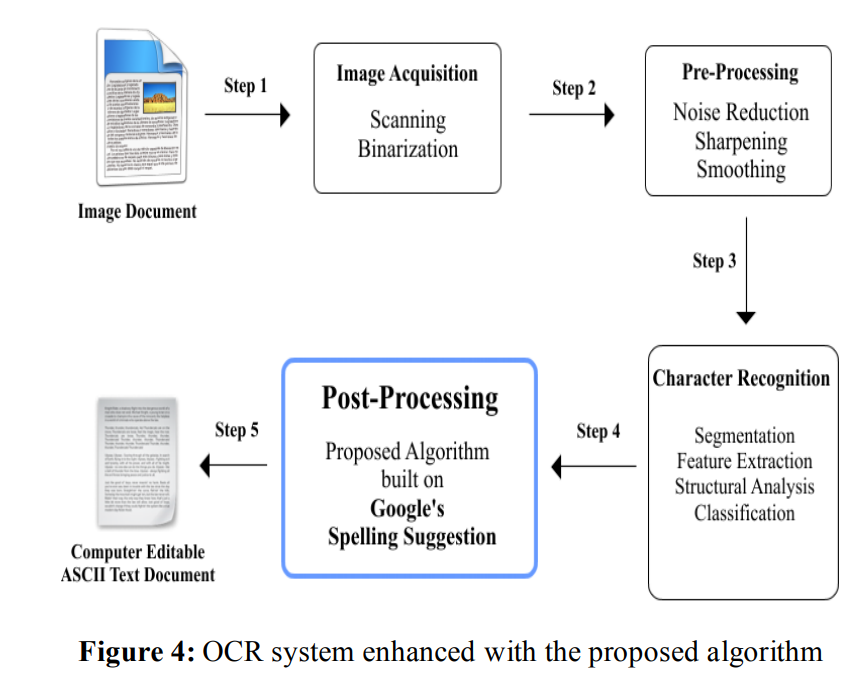
Step #1: Image Preprocessing
Before recognition, images are cleaned to improve readability. This step may include:
- noise removal
- contrast normalization
- binarization
- rotation and skew correction
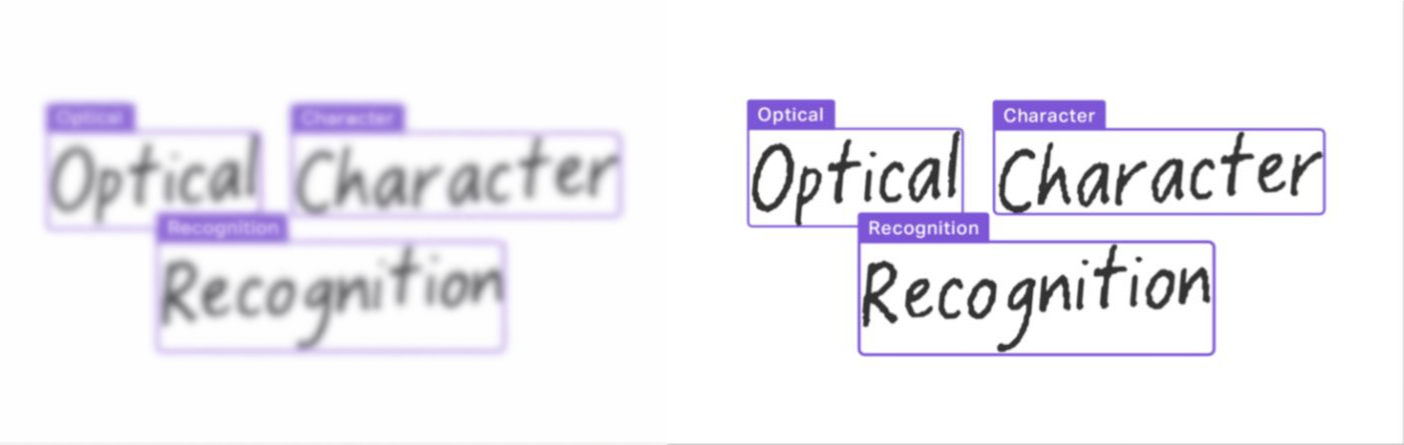
Camera-captured images often suffer from blur, uneven lighting, and perspective distortion. Preprocessing reduces visual noise and stabilizes the input before text detection.
Step #2: Text Detection
The system must first locate where text exists in the image. This step outputs bounding boxes or polygons around text regions with a generic text class.
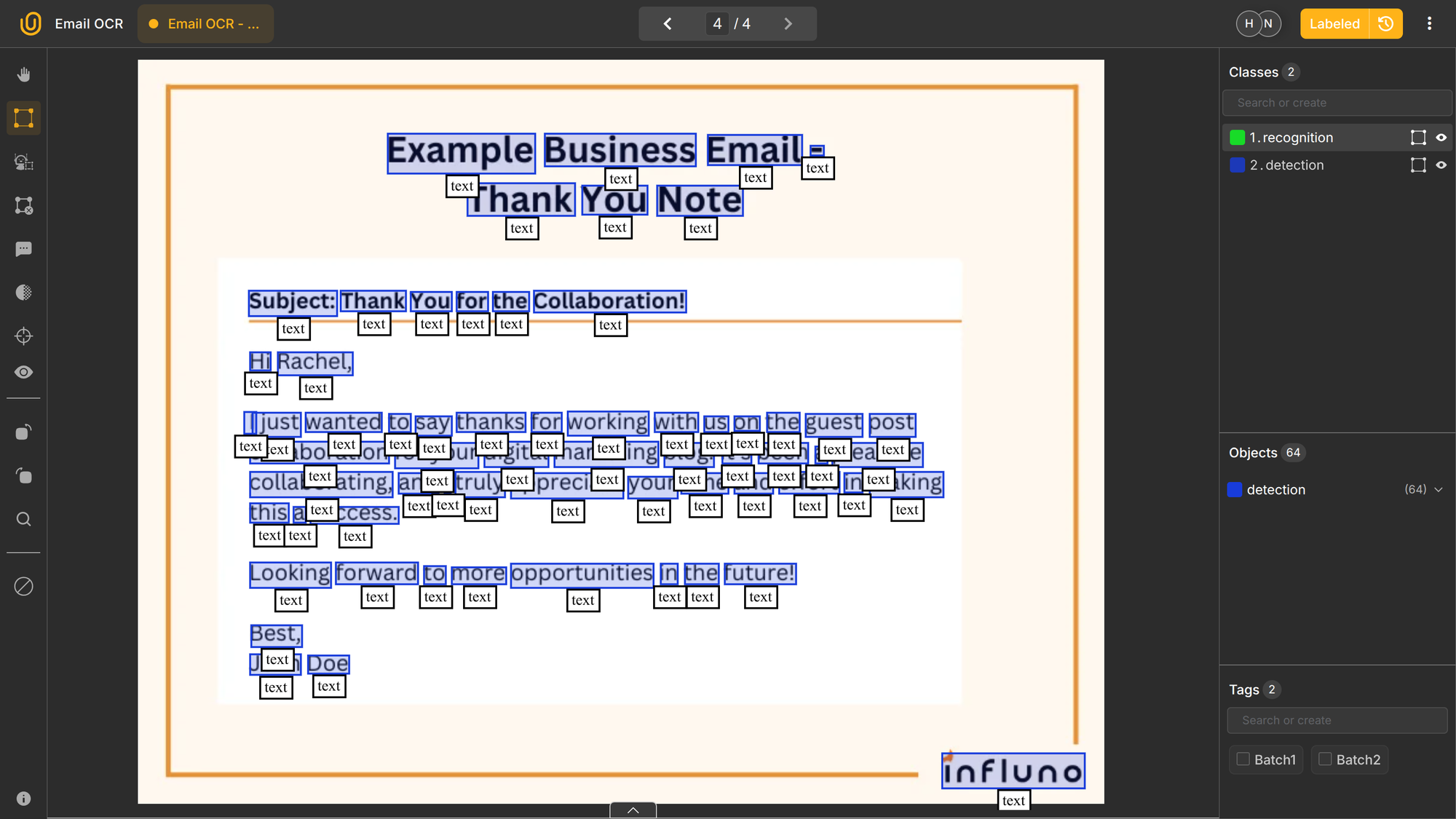
Earlier methods relied on edge detection and connected components. Modern systems use CNN-based detectors trained specifically for text, such as EAST, CRAFT, or DBNet-style detectors.
Detection answers where text is, not what it says. It produces a generic bounding box with a class text. Text recognition happens next.
Step #3: Text Recognition
Each detected region is passed to a recognizer that predicts the sequence of characters.
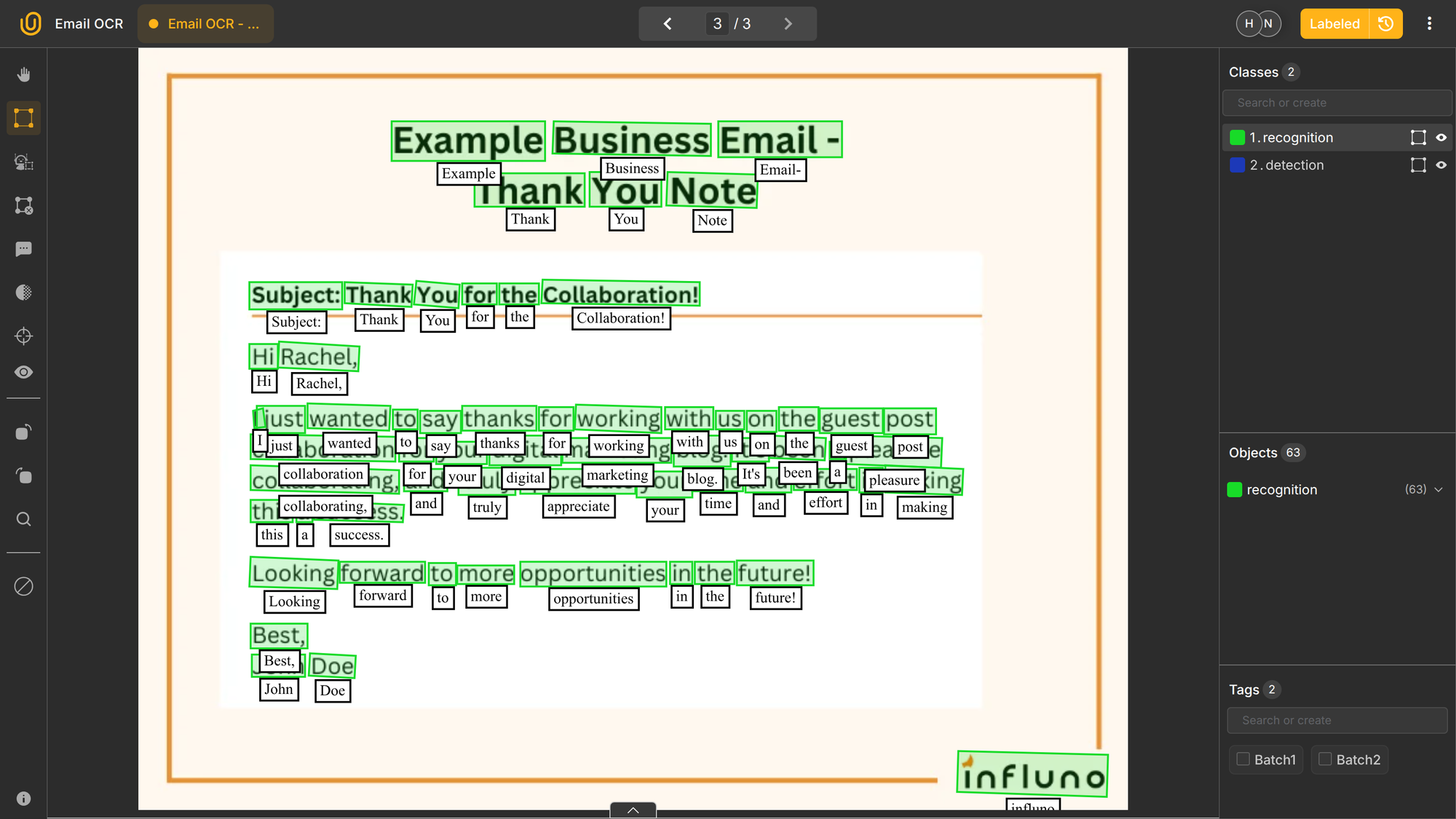
Older OCR systems segmented characters explicitly. Modern models treat text as a sequence and recognize entire words or lines at once using:
- CNN + RNN + CTC pipelines
- transformer-based sequence recognizers
These approaches handle variable spacing and cursive handwriting better than character-by-character segmentation.
Are you curious about training your own custom OCR models, but do not know where to start? Check out our AI-powered automated data platform that provides auto-annotation, dataset management, and project management. Check out our post on Image OCR with Unitlab AI:
 Hojiakbar Barotov
Image OCR Annotation with Unitlab AI
Step #4: Post-processing
Recognition results are often corrected using:
- dictionary matching
- spell checking
- format validation for dates, IDs, and numbers
In structured documents, simple rules can significantly improve accuracy. In free-form text (emails, PDFs), ML-based correction is more effective.
Types of OCR
Different OCR systems exist because not all text looks the same. These categories reflect both historical naming and real technical differences in training data and model design:
| Name | What It Is | Typical Use Cases | Model Families |
|---|---|---|---|
| OMR | Detects filled marks in fixed positions. | Exams, surveys, ballots | Image thresholding, CNN classifiers |
| OCR | Reads printed characters in clean documents | Invoices, contracts, books | CNN + RNN + CTC, Transformer OCR |
| ICR | Reads handwritten or highly variable characters | Forms, notes, historical texts | CNN + RNN, Transformer sequence models |
| IWR | Recognizes whole words | Cursive handwriting, fixed-vocabulary forms | CNN word classifiers, sequence models |
| Scene Text Recognition | Reads text in natural photos | Signs, packaging, license plates | CNN detectors + Transformer recognizers |
| Layout-Aware Document OCR | Reads text with spatial structure | Invoices, IDs, onboarding docs | Multimodal Transformers (LayoutLM, Donut) |
Optical Mark Recognition (OMR)
OMR is not focused on reading characters, but on detecting the presence or absence of marks in predefined locations. It is used to process checkboxes, bubbles, and tick marks in standardized forms. It is considered the oldest use case of rule-based OCR systems.
Typical applications include exam grading (Old SAT), surveys, ballots, and questionnaires. Instead of recognizing text, OMR detects whether a region is marked and sometimes how strongly it is filled.
Because layouts are fixed, OMR can be extremely accurate and computationally efficient. It is often combined with OCR and ICR in full document processing systems where both text fields and checkboxes appear on the same form.
Printed Text OCR
This is what most people mean by OCR. Printed text OCR focuses on recognizing machine-printed characters in scanned documents and digital PDFs, such as invoices, contracts, reports, and books.
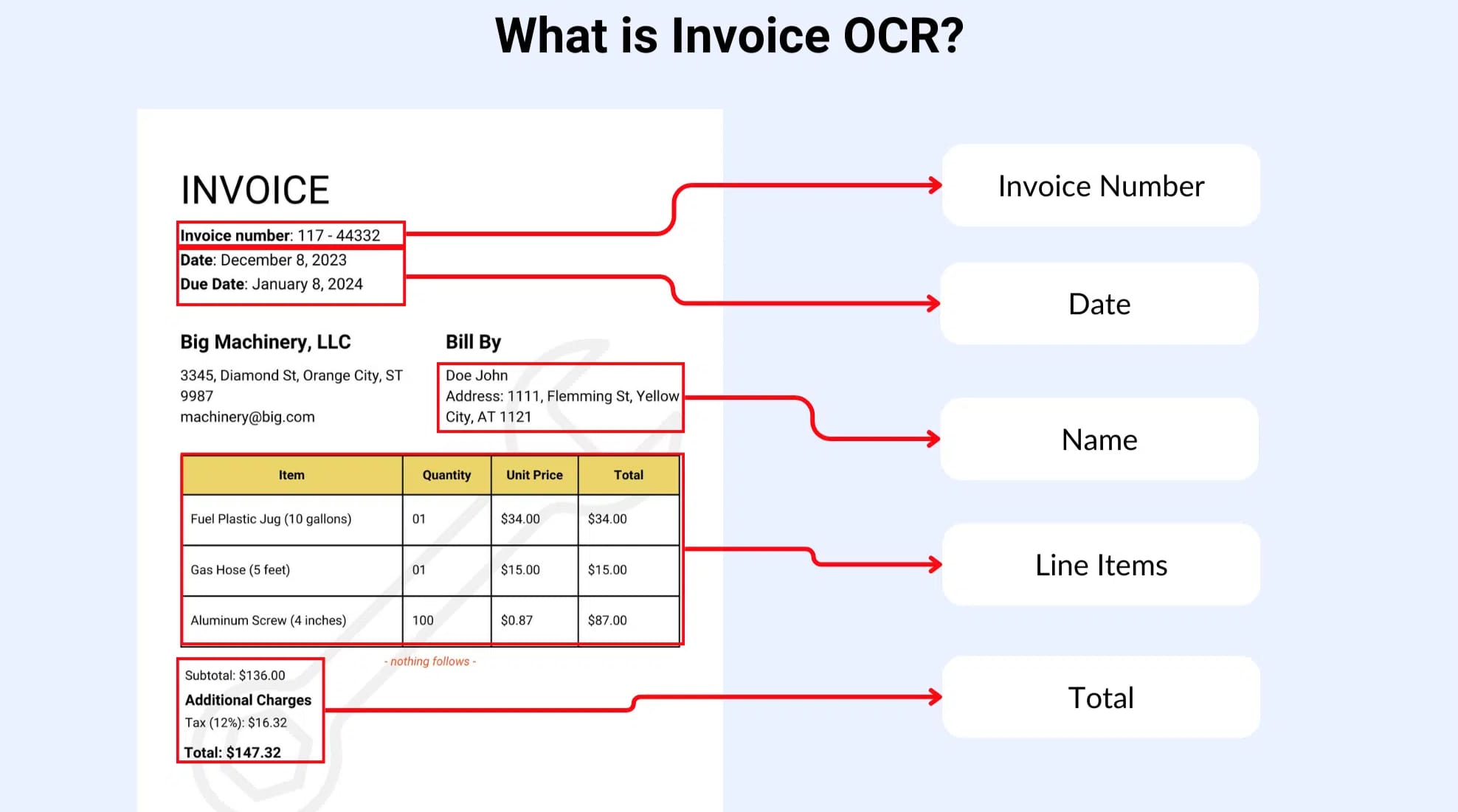
Fonts are usually consistent, spacing is regular, and characters are well separated. Consequently, printed text OCR can reach very high accuracy when scans are clean. Traditional engines like Tesseract were originally designed for this setting, and modern deep learning recognizers perform even better under stable conditions.
This type of OCR is widely used in document digitization and business process automation.
Intelligent Character Recognition (ICR)
ICR is used for recognizing handwritten or highly variable characters, such as filled-in form fields, signatures, and cursive writing. Unlike printed text, handwriting varies significantly between individuals, and characters may be connected or incomplete.
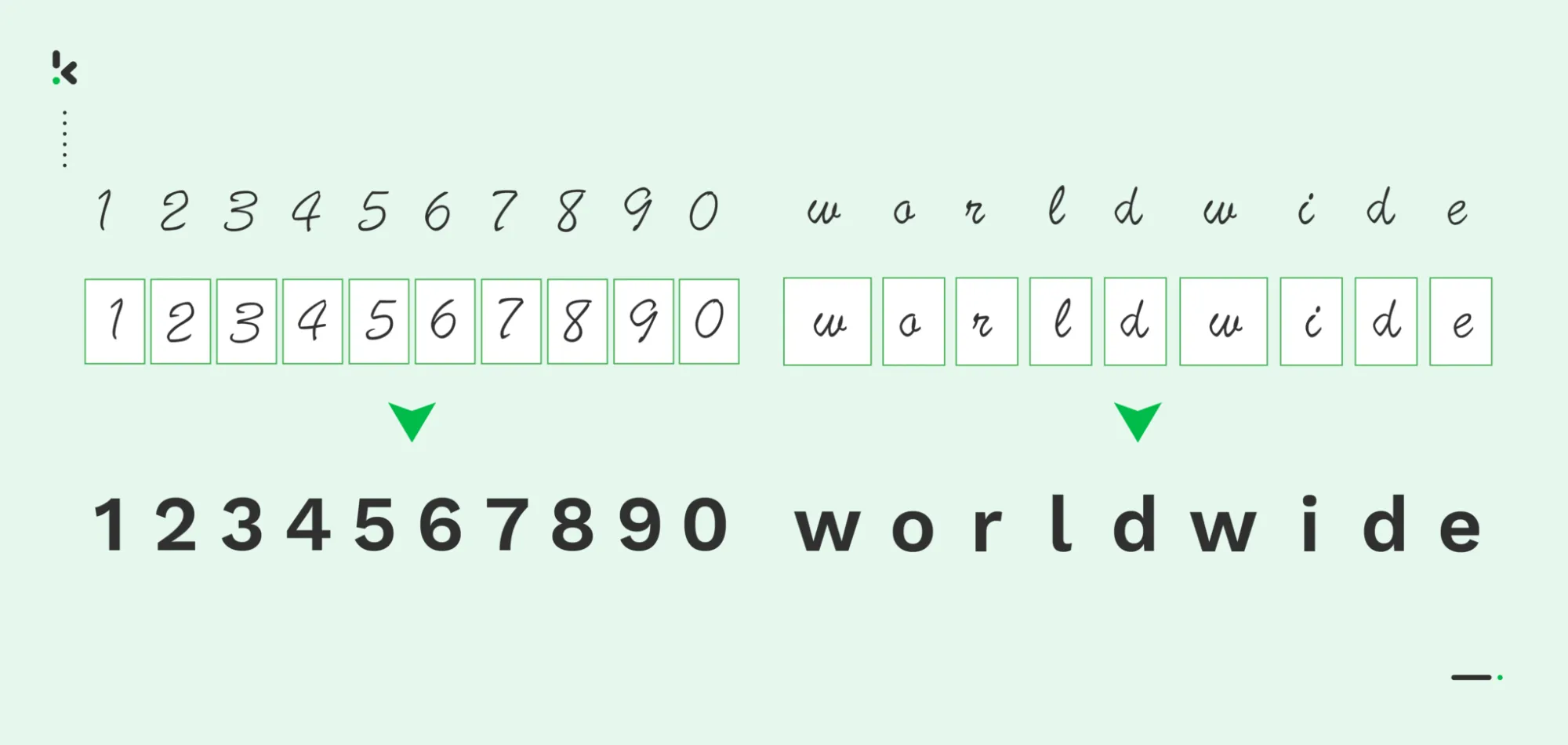
ICR systems rely heavily on Transformer sequence models trained on large handwriting datasets. Error rates are higher than printed OCR, especially with messy handwriting. It is used in form digitization, mail sorting, and historical archives.
Intelligent Word Recognition (IWR)
While OCR and ICR operate at the character level, IWR operates at the word level. Instead of recognizing individual letters, the model predicts entire words based on shape and context.
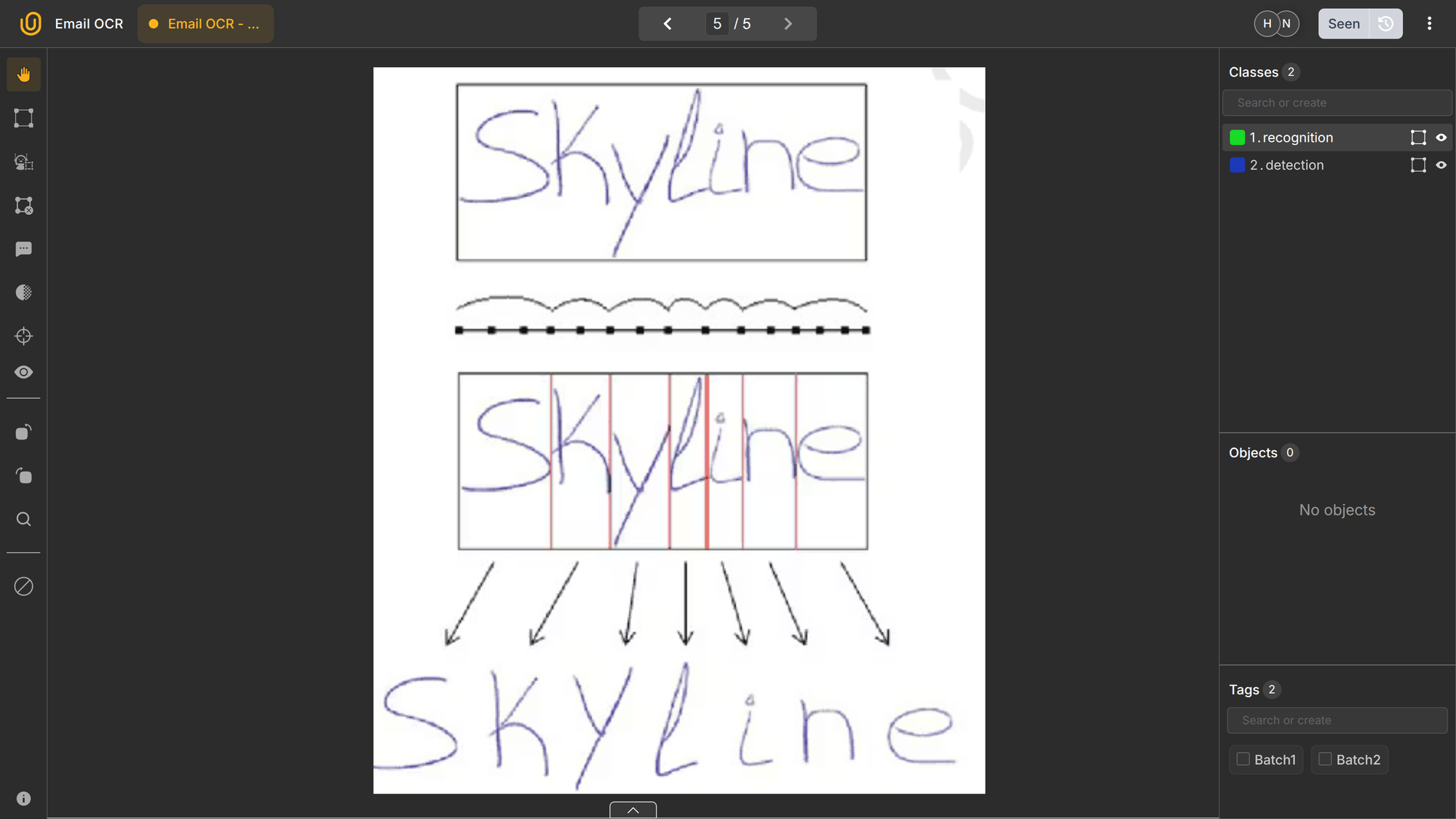
This approach is useful when handwriting is cursive or when character segmentation is unreliable. IWR systems are often used in constrained vocabularies, such as recognizing common responses on surveys or known form entries.
However, IWR does not scale well to open vocabulary settings and is less flexible than character-based recognition. For that reason, modern systems often combine word-level and character-level modeling rather than relying on pure IWR.
Scene Text Recognition
Scene text recognition deals with text captured in natural images, such as street signs, product packaging, storefronts, and license plates. Text may be rotated, curved, partially occluded, represented with different objects, or blended into complex backgrounds.
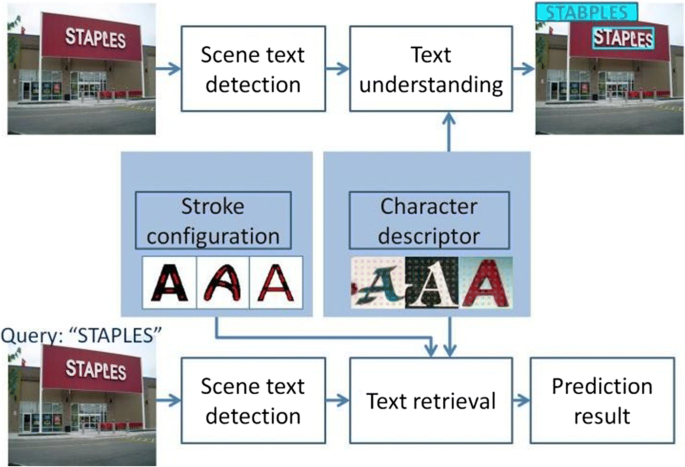
This category requires strong text detection models and robust recognizers trained on visually diverse datasets. It is commonly used in mobile apps, retail analytics, and autonomous driving systems.
Document OCR with Layout Understanding
Many business documents contain tables, multi-column layouts, headers, and forms. In these cases, recognizing text is not enough. The system must also understand how text blocks relate to each other spatially. Enter multi-modal AI with NLP.
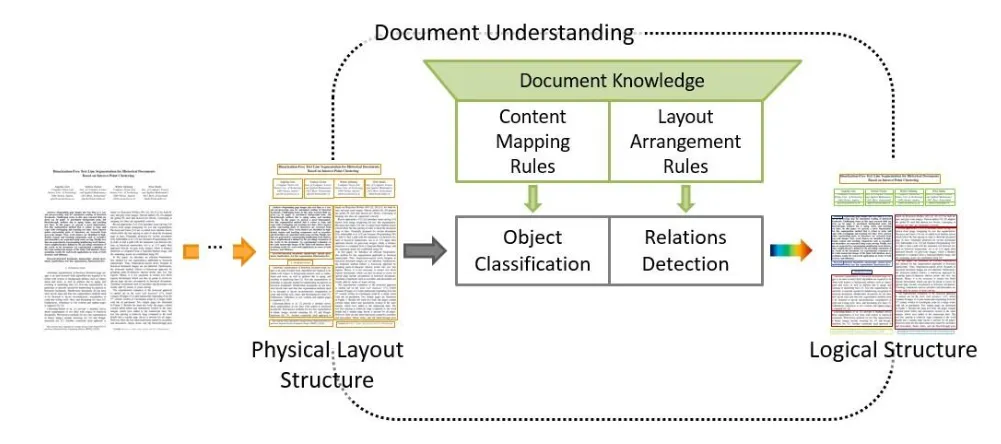
Modern document OCR systems combine text recognition with layout analysis and multimodal transformers that process visual, textual, and positional information together. This enables extraction of structured fields rather than just raw text.
This category is the foundation of most document AI platforms used for invoice processing, onboarding workflows, and logistics automation, where each block of text is semantically related to another block in the document.
OCR Evaluation Metrics
OCR quality is not measured with standard classification accuracy, such as the confusion matrix. OCR has its own evaluation metrics specifically tailored for text, in a similar way IoU (Intersection over Union) is for image ML models.
The most common metrics are: Character Error Rate (CER) and Word Error Rate (WER). Let's use this invoice as our ground-truth to illustrate these metrics:
Invoice No: INV-20391 Total: €4,250.00 Due: 15 March 2026
Imagine our hypothetical OCR system extracted the text below from the invoice:
Invoice No: INV-2039I Total: €4,250.00 Due: 15 Marh 2026X
You see the errors in our result? Here are they:
- Substitution:
1→IinINV-20391→INV-2039I - Deletion: removed
cinMarch→Marh - Insertion: added
Xat the end:2026→2026X
Character Error Rate (CER)
CER measures how many characters are inserted (I), deleted (D), or substituted (S) compared to the ground truth, normalized by total characters:
\[CER = \frac{I+D+S}{N}\]
It is sensitive to small spelling errors. In our example, we have 57 characters in total, and 3 errors. Our CER would be 3/57, or 5.26%.
The lower the CER, the better. 0% means our OCR is working perfectly, while a score over 10% means the system needs further training and optimization.
Generally, a "good" CER generally falls between 1% and 5% for high-quality OCR or speech-to-text systems. While 0% is perfect, a CER under 10% is typically considered useful, with 0.5%–2% being excellent for printed text and 2%–8% for handwritten text.
Word Error Rate (WER)
WER measures errors at the word level. It is more meaningful when words, rather than characters, matter for downstream tasks. Its formula is the same as WER, but measures errors at the word-level rather than at the character level:
\[WER = \frac{I+D+S}{N}\]
Therefore, our WER score becomes 3/9 or 33.3% because we have 3 substitutions and 9 words. Because errors are at the word-level, WER is bound to be higher than CER most of the time because we have a much lower word count.
A good (WER) for speech-to-text technology is generally considered to be below 10%, with top-tier, human-level performance reaching under 5%. A 10–15% WER is acceptable for standard applications, while a WER over 30% indicates poor performance requiring, usually more training.
Lower percentages are always better, as they signify fewer errors in transcription.
Detection Metrics
For text detection, precision and recall of bounding boxes are measured separately from recognition accuracy as they refer more to bounding boxes than to OCR.
In business systems, however, raw OCR scores or evaluation metrics are often less important than task success. For example, if invoice totals are correctly extracted even when some header text is misread, the system may still meet operational goals. As ever, the success metrics depend on the task.
Common OCR Challenges
Even with modern deep learning, OCR still faces practical limitations. The following issues often appear together in real production data, not in clean benchmark datasets.
- Low-resolution images reduce character clarity.
- Motion blur from mobile cameras degrades edges.
- Complex backgrounds confuse detectors.
- Similar characters such as O and 0 or I and l cause substitutions.
- Multilingual documents mix scripts with different shapes and spacing.
- New document templates introduce unseen layouts.
Another challenge is domain shift. Models trained on synthetic or scanned documents may fail on photos taken in poor lighting or with angled perspectives. Because of this, OCR datasets must reflect real capture conditions, not just ideal samples.
Conclusion
OCR remains a foundational technology for turning visual documents into usable data. It converts pixels into text that downstream NLP and analytics systems can process, making it a critical part of document automation pipelines.
While modern deep learning has greatly improved recognition accuracy, OCR quality still depends on image conditions, layout complexity, and domain-specific characteristics. Errors at this stage propagate through the entire pipeline, making OCR optimization one of the highest-impact improvements in document AI systems.
Successful OCR deployments treat text extraction as infrastructure, not a one-time model. They invest in domain-specific data, continuous evaluation, and pipeline integration. When combined with layout analysis and NLP models, OCR becomes the entry point to full document understanding and automation.
Explore More
- Invoice OCR Annotation with Unitlab AI [2026]
- Image OCR Annotation with Unitlab AI with Examples [2026]
- The Ultimate Guide to Multimodal AI [Technical Explanation & Use Cases]
References
- DrMax (Sep 18, 2022). How Does Optical Character Recognition Work. Baeldung: Source
- Haziqa Sajid (Dec 20, 2024). PDF OCR: Converting PDFs into Searchable Text. Encord: Source
- Jim Holdsworth (no date). What is OCR? IBM Think: Source
- Klippa (Sep 30, 2022). What is ICR, and Why Do You Need It? Klippa: Source
- Petru P (Nov 21, 2023). What Is Optical Character Recognition (OCR)? Roboflow: Source

![Multimodal AI in Robotics [+ Examples]](/content/images/size/w360/2026/01/Robotics--12-.png)