


In our previous post, we wrote an introductory guide to an advanced remote-sensing technology, LiDAR. We explored how this technology works, its main types, and its core applications in the modern world.
 Hojiakbar Barotov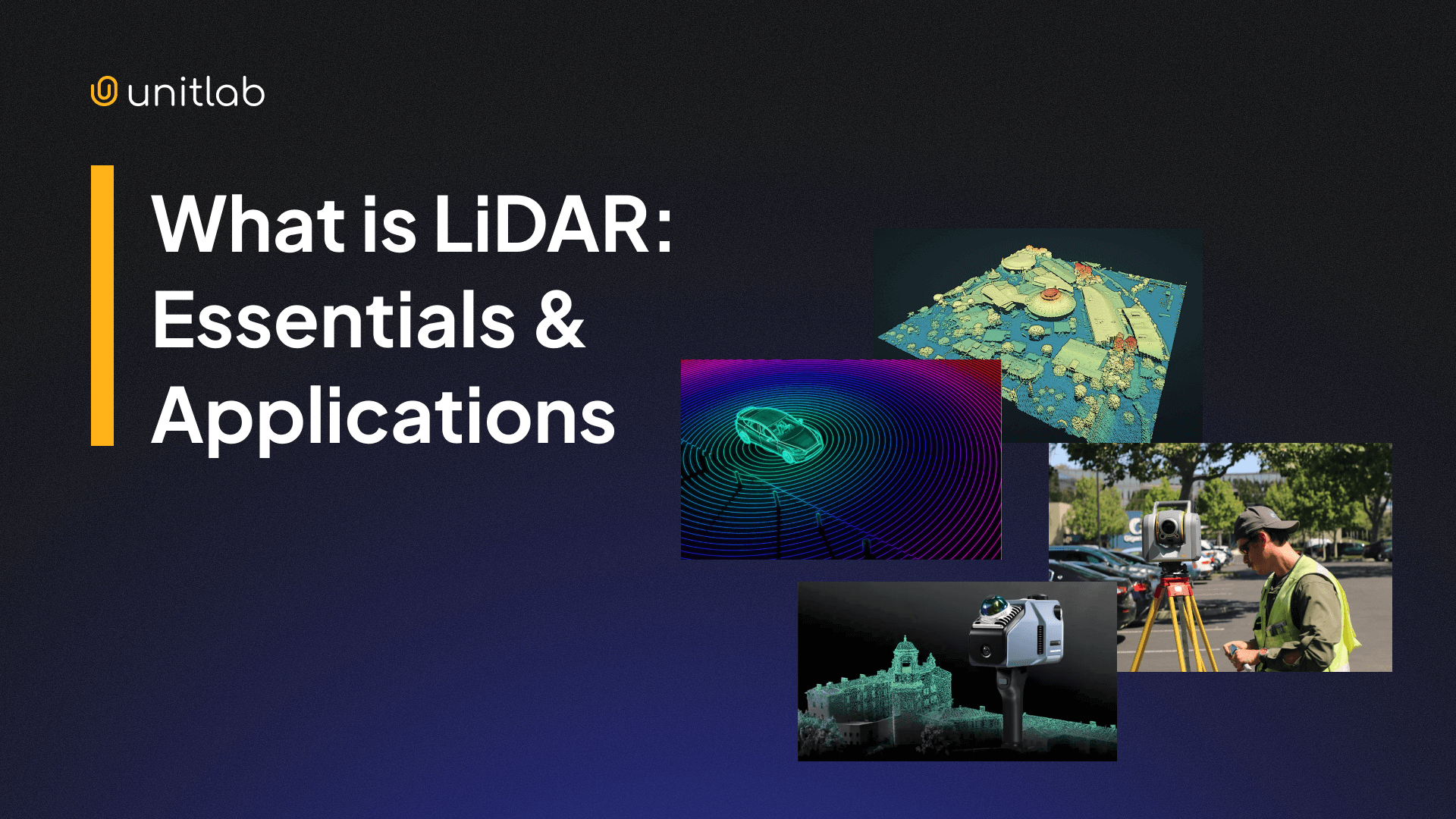
What is LiDAR? | Complete Guide for AI Applications
LiDAR (Light Detection and Ranging) is a type of technology that uses laser beams and reflections to measure precise distances, movements, and 3D structures in real time. Its applications include many domains that need precise, detailed 3D topology and models of objects. The most notable examples are autonomous vehicles, drones, construction, and mapping.
In this post, we will dive one step further and focus on how LiDAR works under the hood. Namely, we will explore two concepts that enable many applications to benefit from LiDAR: LiDAR datasets and LiDAR annotation.
Today, we will see:
- LiDAR datasets and common dataset formats
- LiDAR annotation and its types
- LiDAR annotation workflow and tools
- LiDAR annotation challenges and best practices for LiDAR datasets
- The future of LiDAR annotation and dataset
Let's dive in.
What is LiDAR?
LiDAR stands for Light Detection and Ranging. It measures distance by emitting laser pulses and timing how long the reflected light takes to return. It works on a similar principle to RADAR (Radio Detection and Ranging) and SONIC (Sonic Navigation and Ranging). While RADAR uses electromagnetic waves, SONIC emits sound waves.
In the case of LiDAR, each laser return produces a spatial 3D point with the help of GPS systems. That point usually contains X, Y, Z coordinates, distance, intensity, and a timestamp. These coordinates are far superior to 2D RGB images for depth estimation.
With up to 500K laser beams per second in modern LiDAR systems, when millions and billions of these 3D points are combined, you get a raw, unstructured 3D point cloud. Unlike RGB images or techniques used to estimate depth from 2D images, this cloud data directly encodes depth and geometry.
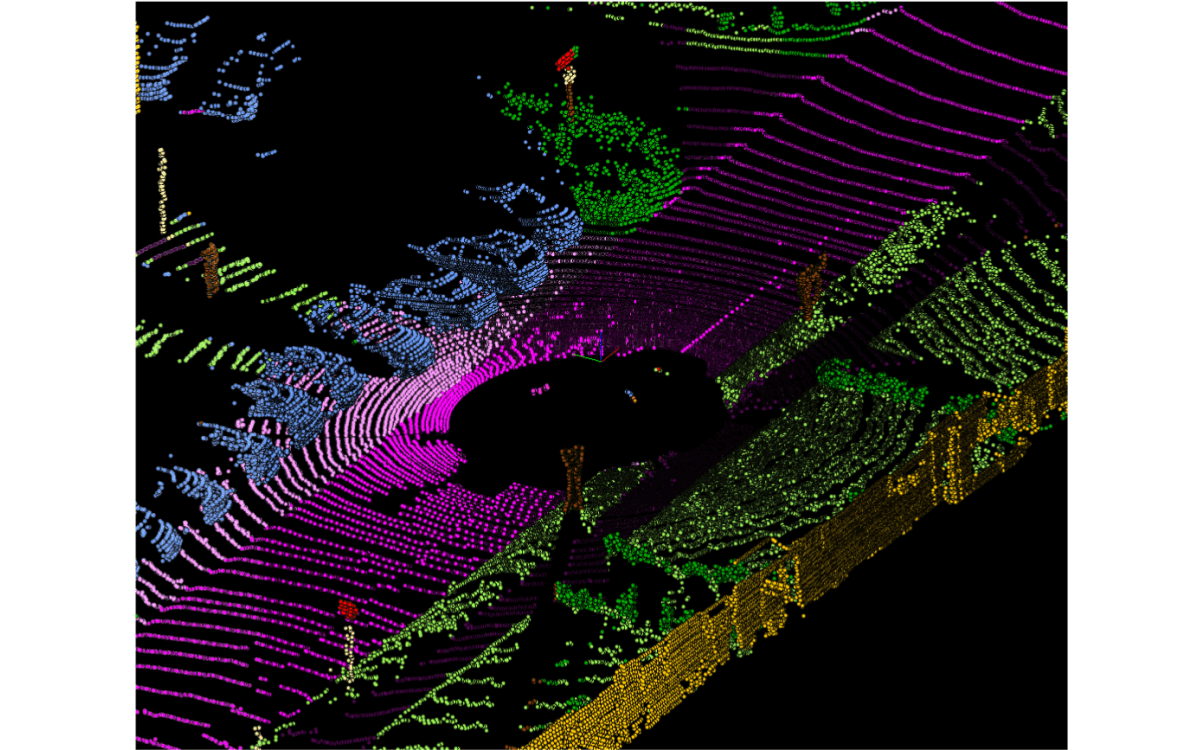
2D RGB images are greatly affected by light, fog, rain, and other factors. Because LiDAR relies on laser beams for its dataset, it is reliable regardless of environmental factors. This makes LiDAR reliable in low light, glare, fog, and complex outdoor scenes.
Its reliability and ability to provide precise depth estimation and 3D coordinates make LiDAR essential for several applications, such as topography, self-driving vehicles, and robotics.
However, the LiDAR 3D point cloud by itself is unusable. Applications need high-quality annotated LiDAR datasets to benefit from this precise laser technology.
What Is a LiDAR Dataset?
The raw, unstructured LiDAR 3D point cloud undergoes several processing steps to transform it into a usable 3D LiDAR dataset. First, this data is checked for completeness and correctness and then cleaned to remove abnormal noise.
The data undergoes several processing stages to transform the LiDAR point cloud into a 3D map. First, it is checked for correctness and completeness and cleaned to remove anomalous noise. Relevant, significant features such as buildings, cars, and road signs can be algorithmically identified and classified.
Specific algorithms such as VoxelGrid downsample the 3D point cloud to remove redundant, duplicate data and reduce file size. This is necessary because LiDAR systems generate enormous amounts of data. For example, self-driving cars can generate and process a terabyte of data for every hour of operation.
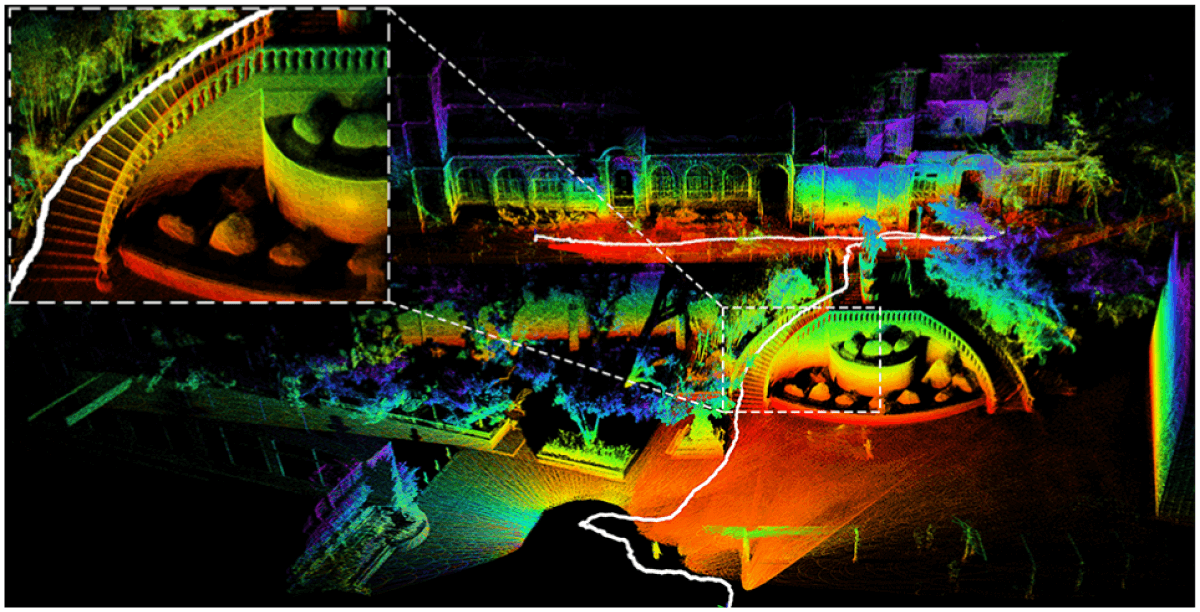
This cleaned data is then converted into the industry-standard LAS (Laser) or LAZ file format used for exchanging 3D x, y, z data. Finally, once converted into LAS, the point cloud data can be visualized and modeled into a 3D map or model of the scanned object. This final dataset is a LiDAR dataset that various applications use.
A LiDAR dataset usually includes:
- Raw point cloud frames
- Multi-frame sequences for motion and tracking
- Sensor calibration files
- Ego-position data from GPS and IMU
- Optional RGB camera data for sensor fusion
- Annotation files
Single-frame LiDAR datasets are used for static detection tasks, mostly in topography, mapping, and construction, while multi-frame LiDAR datasets support tracking, motion prediction, and scene understanding for robotics, drones, and self-driving cars.
This multi-stage processing, point cloud annotation, conversion to LAS, and resulting structure and metadata turn raw, unstructured 3D point clouds into essential LiDAR datasets.
Common LiDAR Dataset Formats
LiDAR data is stored in several standard formats. The industry-standard LAS format is one of the more popular formats, but there are point cloud formats as well:
- BIN: A raw binary format commonly used in autonomous driving datasets. It stores point coordinates and intensity with minimal overhead. Fast to load. Not human-readable.
- PCD: Point Cloud Data format created by the Point Cloud Library. Supports structured metadata and multiple point attributes. Widely used in robotics and research.
- LAS: An industry-standard format for storing LiDAR point clouds. Includes coordinates, intensity, classification, and metadata. Common in mapping, surveying, and geospatial workflows.
- LAZ: A compressed version of LAS. Reduces file size significantly without losing information. Preferred for storage and data transfer at scale.
These formats store LiDAR sensor output, that is, processed 3D points. They describe what this laser technology measured. There is no semantic meaning, identified object, or class. One laser return represents one point.
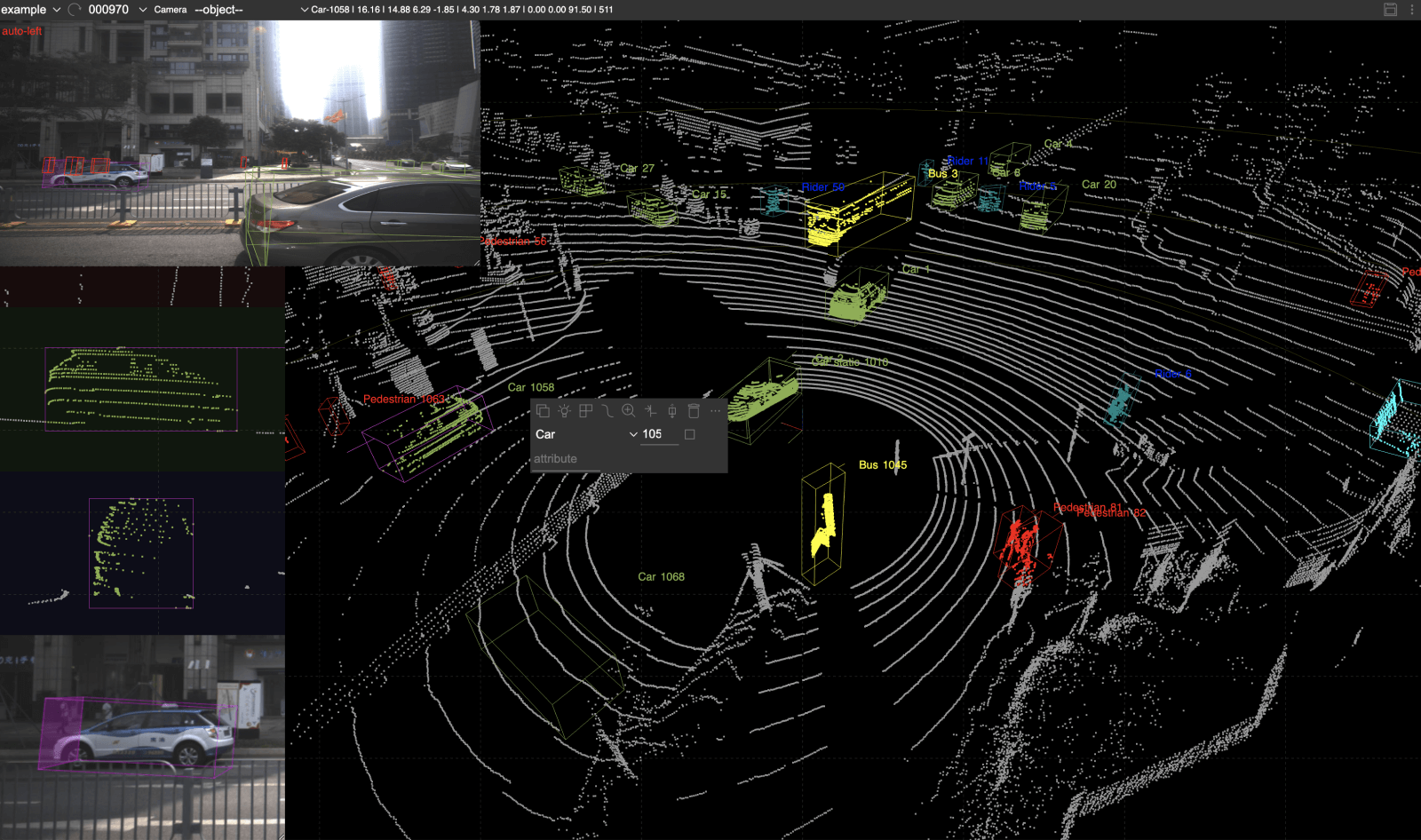
LiDAR annotation formats, by comparison, store human interpretation of the LiDAR dataset. They describe what 3D points represent: object labels, bounding boxes, class names, and segments. These add semantic meaning on top of LiDAR sensor measurements.
Annotations are often stored in:
- KITTI format: A simple, text-based annotation format introduced with the KITTI dataset. Commonly used for 3D object detection and tracking. Stores class labels, 3D bounding boxes, orientation, and camera–LiDAR calibration.
- nuScenes format: A JSON-based format designed for multi-sensor, multi-frame datasets. Supports camera, LiDAR, radar, and temporal sequences. Emphasizes scene-level context and long-range tracking.
- Waymo Open Dataset format: A protocol-buffer–based format optimized for large-scale autonomous driving data. Supports high-density LiDAR, multi-camera fusion, and detailed tracking labels. Built for scalable training and benchmarking.
- Custom JSON schemas: Flexible, project-specific annotation formats. Adapted to unique tasks, class taxonomies, or tooling constraints. Common in proprietary datasets and internal pipelines.
Each LiDAR annotation format defines:
- Coordinate systems
- Object orientation
- Class taxonomy
- Sequence structure
This separation between LiDAR measurement (point cloud formats such as LAS) and LiDAR annotation (formats such as KITTI) is intentional. It allows different annotations to be applied to the same point cloud for different purposes. Due to this decoupling, datasets remain flexible for specific tasks.
Therefore, choosing the right format for LiDAR point clouds and annotations affects tooling, storage cost, and model compatibility.
What Is LiDAR Annotation?
The most common tasks on LiDAR data are some variants of semantic segmentation, bounding boxes, and classification. From this perspective, annotating a 3D point cloud is similar to annotating images for these tasks.
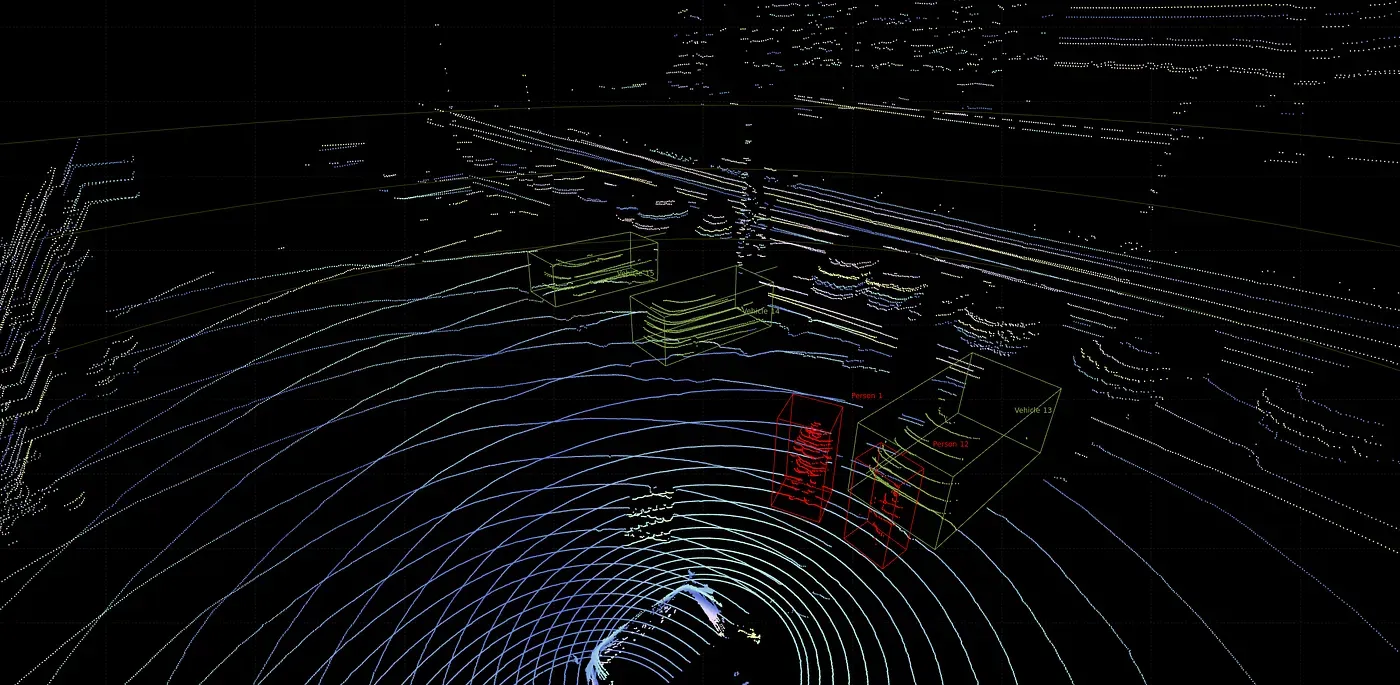
Data annotators put 3D cuboid boxes for LiDAR data instead of 2D bounding boxes for RGB images in the case of object detection. For semantic segmentation, a class is assigned to each point in the cloud, similar to labeling every pixel in an image.
LiDAR Annotation Demo
However, while 2D images are relatively easy to understand, label, and auto-annotate, the 3D nature of LiDAR data, combined with the 2D nature of annotation editors, makes accurate and efficient annotation difficult. Human annotators rely on images captured alongside LiDAR systems and must navigate the scene to understand and annotate objects correctly.
Compared to 2D annotation, LiDAR labeling:
- Happens in 3D space
- Requires orientation and depth accuracy
- Must handle occlusion and sparsity
In short, LiDAR annotation turns raw 3D geometry into structured, machine-readable information. Models cannot learn object shape, size, or motion without it.
Types of LiDAR Annotations
Different computer vision tasks require different annotation types. For example, object detection requires bounding boxes, instance segmentation requires polygons, and skeletal structures rely on keypoint annotation.
Because LiDAR annotation is essentially data annotation in 3D, it shares most annotation types with 2D image labeling. Common LiDAR annotations include:
- 3D bounding boxes (cuboids)
- Semantic segmentation
- Instance segmentation
- Ground and drivable area labeling
- Keypoints and skeletal structures
- Object tracking across frames
- Trajectory labeling
LiDAR Annotation
Autonomous driving multi-frame datasets often combine several of these in one dataset. They include 3D cuboids for object detection and tracking, semantic segmentation for scene understanding, and drivable area labeling for path planning. Camera–LiDAR fusion labels add 2D context to 3D geometry for better class disambiguation.
LiDAR Annotation Workflow
LiDAR annotation follows a structured pipeline with variations depending on the annotation type and deep learning task. For example, when building a 3D model of the environment for self-driving cars, these steps are followed:
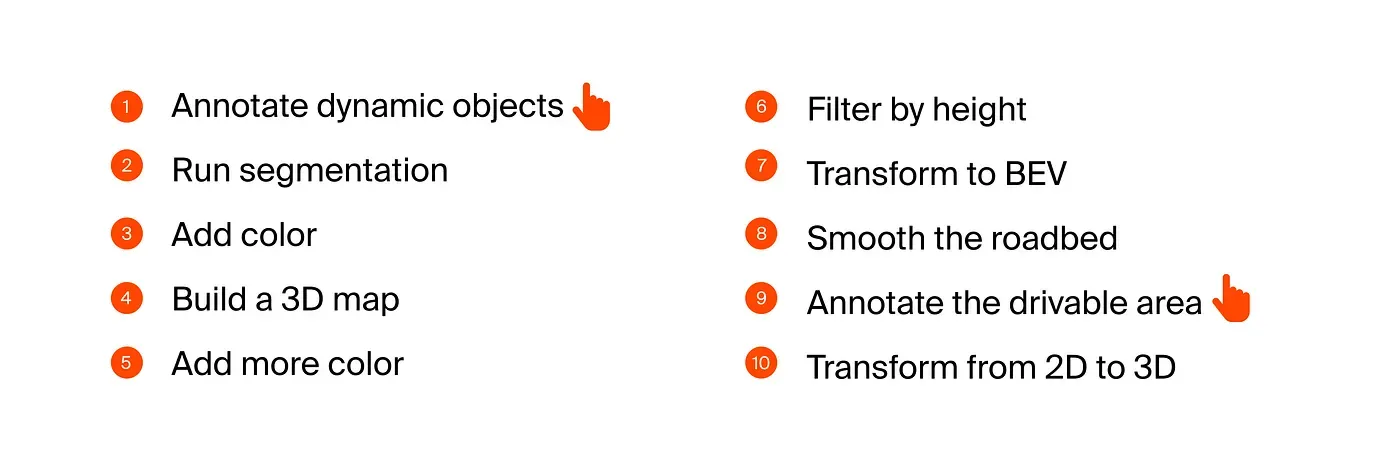
Effective LiDAR labeling tools provide automation. Most steps are handled automatically in the background. Annotators manually label dynamic objects, while machines propagate annotations across frames. In this use case, the drivable area is also annotated.
In multi-frame LiDAR annotation, maintaining temporal consistency is essential. This means the same object must retain its characteristics across frames.
LiDAR sequence data is not a set of independent frames. Each frame is linked in time. Objects retain the same labels, box sizes remain stable, orientations change smoothly, and position updates reflect real motion.
Cars do not rotate randomly between frames, and pedestrians do not change size or position every 100 ms. Inconsistencies accumulate across frames and eventually cause critical errors.
Tools Used for LiDAR Annotation
LiDAR annotation tools are specialized software systems that handle 3D LiDAR datasets and 3D annotation. In addition to standard 2D RGB image labeling features, LiDAR software must efficiently process large volumes of 3D data.
Core capabilities include:
- High-performance 3D viewers: They render millions of cloud points smoothly, rotating, panning, and zooming without lag. They filter 3D points by distance, class, or intensity.
- Multi-view interfaces: They support multiple synchronized 3D perspective views, providing a top-down bird’s-eye view. They also support side and front projections.
- Sequence playback: This plays point cloud frames over time, stepping frame by frame. This playback visualizes object motion.
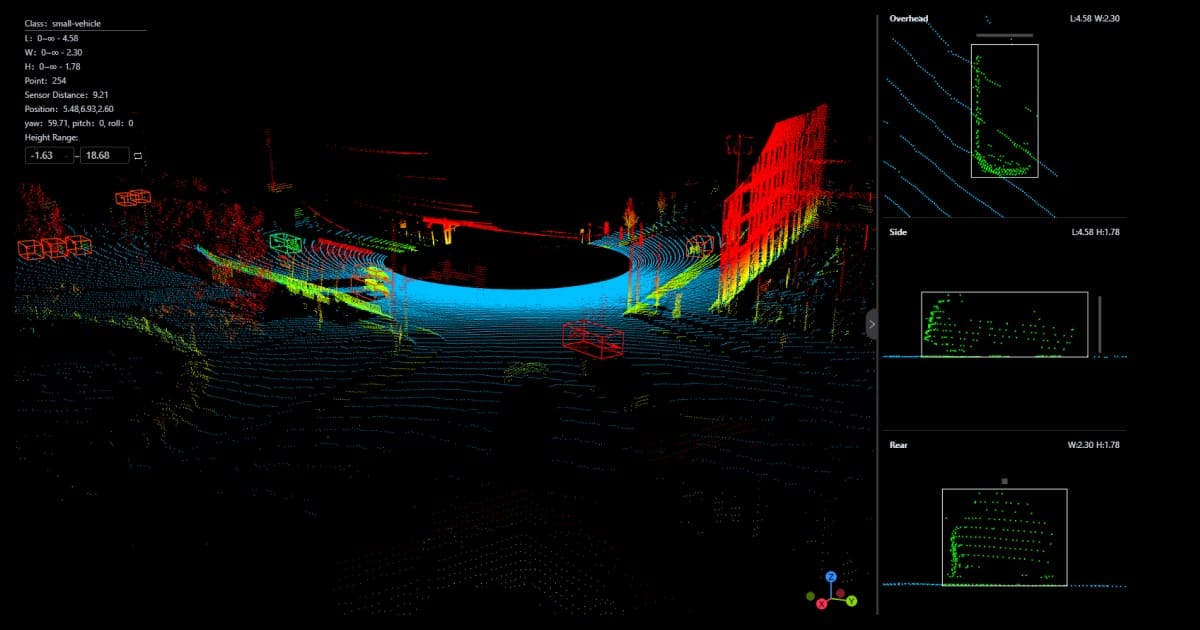
- Camera-LiDAR fusion: This overlays camera images onto LiDAR data, resolving sparse point ambiguity. This can improve class identification and align 2D and 3D annotations.
- Orientation and dimension controls: These enable LiDAR annotators to rotate 3D boxes precisely; adjust length, width, and height numerically; and snap boxes to object axes.
- Quality assurance workflows: These workflows include review and approval stages, rrror flagging, and annotator performance tracking.
- Export to standard formats: They support converting annotations to KITTI, nuScenes, or Waymo formats, preserving coordinate systems and timestamps, and integrating with training pipelines
Building effective LiDAR annotation software is a major engineering challenge. This is why few platforms offer LiDAR annotation and why there are fewer open-source tools compared to 2D RGB annotation.
At Unitlab Annotate, we are working to provide an end-to-end solution for data annotation tasks, including data augmentation, data labeling, dataset management, and model management. LiDAR annotation is one of the major features coming soon, along with multi-modal annotation.
Join our newsletter and create your free account to try the latest features.
Challenges in LiDAR Annotation
LiDAR annotation is one of the hardest labeling tasks in computer vision due to high data volume, 3D complexity, and sparsity. Annotators work with sparse, noisy, high-dimensional data.
Key challenges include:
- Sparse point clouds: Objects far from the sensor have very few points. Also, pedestrians, cyclists, and poles are often incomplete or fragmented.
- Occlusion and partial visibility: Vehicles block each other in traffic scenes. Only parts of an object may be visible in a single frame.
- Orientation ambiguity: Small rotation errors in 3D boxes lead to large training errors. This is critical for motion prediction and tracking.
- Long-range uncertainty: At distance, class boundaries blur. A cyclist can look like a pedestrian. A parked car can look like static clutter.
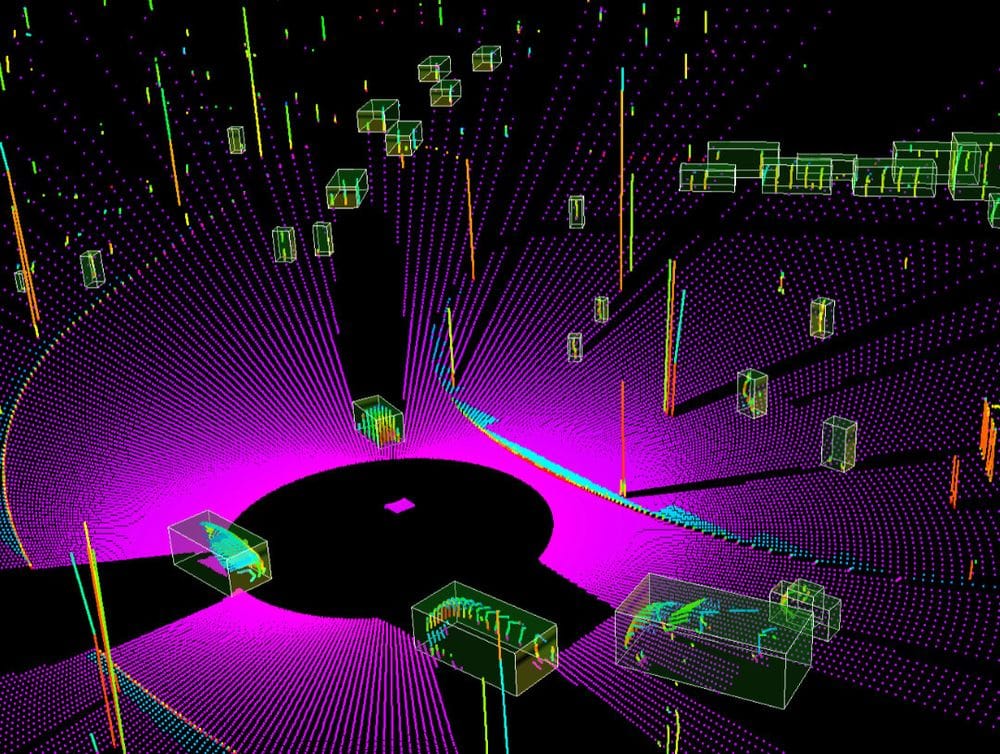
- Temporal consistency: Labels must stay stable across frames. Box drift breaks tracking and trajectory learning.
- Class imbalance: Cars dominate most datasets. Rare classes like animals, debris, or wheelchairs are underrepresented.
- Sensor noise and artifacts: Weather, reflective surfaces, and motion introduce outliers. Noise removal must not erase valid points.
- Tooling limitations: Poor 3D viewers slow annotators down. Lag and low frame rates increase human error.
- High cost and time requirements: Manual 3D labeling takes far longer than 2D annotation. QA multiplies total effort.
These challenges explain why LiDAR datasets are expensive. They also explain why annotation quality varies widely across vendors.
If your dataset fails here, models fail in production.
Quality Control in LiDAR Datasets
LiDAR datasets tend to have a few consistent mistakes that decrease its quality and affect applications negatively:
- Overlapping boxes: This happens when objects are too close, and annotators overcompensate for sparsity. This confuses detection and tracking models.
- Misaligned orientation: Small rotation errors cause wrong heading estimates and broken motion prediction. They compound in multi-frame datasets. That's why it is one of the most damaging LiDAR errors.
- Class confusion at long range: Sparse points at long distances are inherently difficult to assess correctly without camera-LiDAR fusion. Pedestrians resemble poles, and cyclists resemble pedestrians, while parked cars resemble static clutter.
- Drift across frames: Drift reduces trajectory accuracy. It happens when boxes slowly shift off the object, orientation errors compound, auto-propagation is not corrected.
Because LiDAR annotation is particularly challenging and multi-faceted, effective quality control is vitally important for LiDAR datasets to be usable and effective. That's why LiDAR software puts a high emphasis on QA practices:
- Consistent object dimensions: This means objects stay within realistic size ranges and do not grow or shrink across frames. Box dimensions match class definitions.
- Correct orientation and rotation: QA validates heading alignment with motion direction, sudden orientation jumps between frames, and box rotation that contradicts vehicle pose.
- Class taxonomy enforcement: Quality assurance ensures that classes follow a fixed label schema, that no unofficial or duplicate labels exist, and that similar classes are not mixed at distance.
- Temporal consistency: This ensures that object IDs persist across frames, that boxes move smoothly, and that no sudden teleportation or jitter.
- Inter-annotator agreement: This factor checks for box placement similarity, orientation variance, and class agreement rate. Low agreement signals unclear guidelines or tool limitations.
With so many variables that can go wrong at any time, high-quality datasets use multi-stage review and consensus checks.
Best Practices for Building High-Quality LiDAR Datasets
Strong LiDAR datasets are built deliberately. They are not built on goodwill, or happen by accident. They are intentionally designed, controlled, and iterated.
Best practices include:
- Clear annotation guidelines: Effective guidelines define what counts as an object, how to place box boundaries, and how to handle occlusion and partial visibility.
- Defined class boundaries: Classes must be mutually exclusive, unambiguous at distance, stable across projects. For example, decide early whether a parked vehicle is a vehicle or static object. Inconsistent objects across frames are problematic.
- Sensor fusion during labeling: Combining camera and LiDAR views reduces ambiguity in sparse point clouds, improves class accuracy, and speeds up LiDAR annotation.
- Tiered QA workflows: High-quality datasets use multiple QA layers: automated rule checks, human review and finally senior or consensus review.
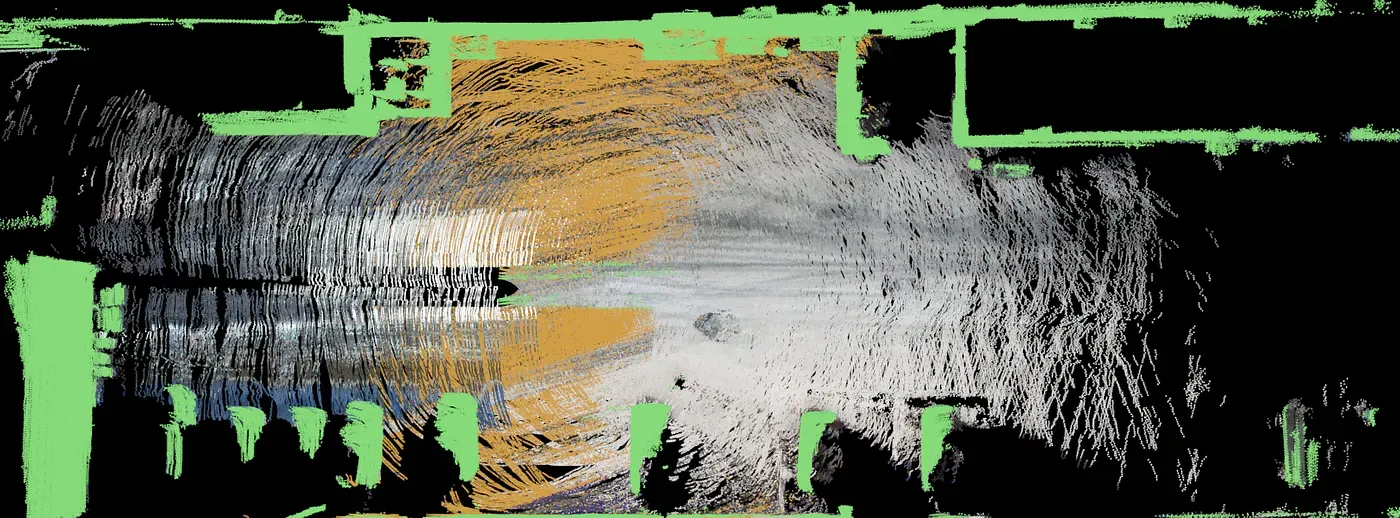
- Automated error detection: LiDAR software automatically flags invalid box sizes, sudden orientation jumps, ID switches across frames. This flagging likely reduces reviewer fatigue and human bias.
- Dataset versioning: Versioning enables annotators and data scientists to fix errors without losing history, to compare model performance across label revisions, and to roll back problematic changes.
- Active learning loops: Models guide labeling by highlighting hard or uncertain samples, focusing annotation effort where it matters, reducing redundant labeling. This improves dataset quality faster than random sampling.
These best practices and functions to implement them (dataset versioning, automated error flagging, active learning) should preferably be provided by your LiDAR annotation platform. Unitlab AI is one of such platforms that will release LiDAR support soon. Join now to get access to the latest features for free:
Future of LiDAR Annotation and Dataset
While it is impossible to predict the course of any particular piece of technology, we can see a few clear trends in this area:
- First, LiDAR datasets are getting larger, denser, and more complex. Manual LiDAR annotation, the slowest and hardest of all, alone does not scale to meet this growth. The future of LiDAR annotation is shaped by automation, multi-modality, and tighter integration with training pipelines.
- One major shift is model-assisted annotation becoming the default. Instead of drawing boxes from scratch, annotators correct machine-generated labels. This changes the human role from labeling to supervision.
- Another trend is stronger temporal automation. Labels will increasingly propagate across frames automatically. Humans will focus on edge cases, ID switches, and orientation corrections.
- Multi-sensor datasets will also dominate. LiDAR-only annotation is already giving way to camera–LiDAR–radar fusion. Future datasets will treat 3D and 2D labels as one coherent representation.
- Dataset versioning and continuous improvement will become standard. Datasets will evolve like software: versioned, audited, compared across model runs. This enables systematic quality gains instead of one-off labeling efforts.
- Active learning loops will further reduce wasted effort. Models will surface hard samples. Annotation time will be spent where it improves performance most.
The direction is clear. LiDAR annotation is moving from manual labor to human-in-the-loop systems designed for precision, scale, and iteration.
Conclusion
LiDAR (Light Detection and Ranging) is a remote-sensing technology that emits laser beams to measure distances, coordinates, intensity. This technology is reliable and precise because it is not affected by light or weather. This makes LiDAR particularly useful in applications that require 3D models and depth.
LiDAR datasets provide machines with true 3D understanding. Annotation transforms raw point clouds into usable training data.
Compared to 2D labeling, LiDAR annotation demands more precision, better tooling, and stricter quality control. When done correctly, it enables safe and scalable 3D perception systems.
Explore More
Check out these articles to learn more about computer vision:
- 50 Essential Computer Vision Terms (Part I)
- 50 Essential Computer Vision Terms (Part II)
- What is Computer Vision Anyway? [Updated 2026]
References
- Erik Harutyunyan (Mar 31, 2023). LiDAR: What it is, how it works, how to annotate it. SuperAnnotate: Source
- Hojiakbar Barotov (Dec 11, 2025). What is LiDAR: Essentials & Applications. Unitlab Blog: Source
- IBM Think (no date). What is LiDAR? IBM Think: Source
- Karyna Naminas (Jan 15, 2025). LiDAR Annotation: What It Is and How to Do It. Label Your Data: Source
- Sayan Protasov (May 14, 2024). Lidar annotation is all you need. Medium: Source
- Vladimir Burmistrov (Feb 20, 2023). Annotating 100 lidar scans in 1 hour. Medium: Source
![The Ultimate Guide to Multimodal AI [Technical Explanation & Use Cases]](/content/images/size/w360/2025/12/Robotics--6-.png)
