Building computer vision models for applications such as autonomous driving, robotics, retail, and video surveillance depends on accurate annotated video data.
Yet many teams underestimate one reality: poor video annotation is one of the most expensive failures in AI development. According to Forbes, up to 85% of AI project failures are attributed to data-readiness issues. Poor data quality costs organizations an average of $12.9 million every year.
When the video annotation process is flawed, models struggle to track objects, maintain identity across frames, predict trajectories, and operate safely in the real world. Errors in annotated data compound over time, especially in video labeling tasks where temporal context matters.
In this article, we will cover:
- Why is video annotation more complex than image annotation
- Hidden costs of poor video annotation
- Why does poor annotation happens and how to fix It
- How can Unitlab AI help fix poor video annotation
Why Video Annotation Is More Complex Than Image Annotation
Video annotation is different from image annotation because it introduces temporal complexity. Video requires maintaining frame-to-frame continuity, where objects must be tracked consistently as they move through time.
A major challenge is object persistence and ID tracking: a specific object, such as a car, must retain the same unique identity throughout the entire video, even if it is temporarily occluded by another object.
The sheer scale of video data also presents unique logistical hurdles. A single project often involves processing millions of frames, far exceeding the volume of typical image datasets.
This difficulty increases in multi-object tracking scenarios, where dozens of distinct objects must be tracked simultaneously across long-duration videos that can run for hours.
Standard data annotation tools struggle to load these large files without performance degradation, and increase the risk of crashes compared to simple image labeling.
Furthermore, video annotation is highly sensitive to small errors that might be negligible in static images. Minor bounding box shifts can create jitter that confuses the model. Also, ID switches (where an object is mistakenly assigned a new identity mid-sequence) can degrade tracking models.
Why Poor Annotation Happens
Understanding the root causes of low-quality data is the first step toward fixing it.
- Frame Misalignment from Playback-Based Systems: Many video annotation tools rely on media player playback timing rather than exact frame indexing, which leads to frame skipping and synchronization errors. When the video rendering is not synced with the data layer, annotation mismatches occur and cause the bounding box to drift from the actual object position.
- Manual Frame-by-Frame Labeling Fatigue: Annotating video footage is tedious, and manual frame-by-frame labeling leads to human inconsistency as attention spans drop. Over time, this causes annotation drift, where bounding boxes become less precise, and results in missed corrections that degrade the quality of the annotated video data.
- Weak Tracking Systems: Without automation, video labeling suffers from ID switching, where a single object is assigned multiple IDs as it moves or is occluded. Weak tracking systems fail to maintain object continuity across breaks and handle occlusion and motion poorly, and confuse computer vision models during training.
- Tooling That Doesn’t Scale: Many data annotation platforms experience UI lag with large datasets, and bring difficulty to manage video files that are hours long or contain thousands of frames. This performance issue leads to frame drops during interaction, slowing down data labeling teams and introducing errors into the video annotation process.
How to Fix It: A Modern Approach to Video Annotation
Video annotation quality determines the reliability of downstream models and the efficiency of annotation workflows. To address the hidden costs of poor annotation, modern workflows focus on clear standards, deterministic tooling, smart automation, rigorous QA, strong tracking continuity, and scalable performance.
Set Clear Annotation Standards
Before any annotation task begins, teams should define clear guidelines. Clear standards reduce inconsistency across annotators and help avoid mislabeling that later requires costly rework. Teams should document:
- Class definitions and taxonomy: Clearly define what a truck is versus a van. Visual examples are better than text.
- Edge case rules: Decide exactly how to handle occlusions, such as label the estimated full shape vs. label only the visible part.
- Labeling conventions: Standardize naming (lower_case vs. CamelCase) and hierarchy (is a school bus a child of a vehicle?).
- Timeline rules for persistent IDs: Explicitly state that if an object leaves the frame and returns, it should (or should not) keep the same ID, depending on the project's needs.
Use Deterministic Frame-Accurate Architecture
Many data annotation errors occur because tools rely on playback timing instead of exact frame indexing. In video annotation tasks, timing-based rendering creates frame skipping and misalignment.
Modern video annotation tools should work using deterministic frame rendering. They ensure that every annotation maps exactly to a specific frame index.
- Exact frame indexing: The tool must treat video as a sequence of numbered images.
- No frame skipping: Every frame must be accessible, regardless of network speed.
- Stable timeline synchronization: The data layer must be locked to the video layer with zero latency or drift.
- Perfect annotation-to-frame alignment: When you export the data, Frame 100’s labels must match Frame 100’s pixels exactly.
Adopt Automation-First Annotation Workflows
Manual annotation does not scale for large video datasets. Instead, teams should implement automated annotation workflows with human supervision. An effective automation pipeline includes:
- Object initialization (seed annotations): Humans draw the first box, and the system takes over.
- Auto segmentation using pre-trained vision models: Use tools like SAM (Segment Anything Model) to instantly generate polygon masks for complex objects.
- Cross-frame propagation: The tool should be able to predict the object's position over the next 50 frames based on its speed and trajectory.
- Tracking correction: Algorithms that automatically detect if an ID has likely switched and flag it for human review.
- Continuous refinement: Humans act as supervisors, correcting the auto annotation rather than doing the raw work.
Implement Rigorous Quality Assurance (QA)
Quality assurance must be proactive, not reactive. Waiting until model training to discover annotation errors is expensive.
- Automated checks: Scripts should run instantly to catch impossible geometry (a box with 0 area) or impossible motion (a person moving 500mph).
- Inter-annotator agreement metrics: Have two people annotate the same clip and measure how much they agree. Low agreement means the guidelines are unclear.
- Peer reviews: Senior annotators should review a random percentage of sequences.
- Feedback loops: When the model fails on a specific edge case, that information should go back to the annotation team to update the guidelines.
Ensure Stable and Persistent Auto-Tracking Across Frames
High quality video annotation depends on stable object tracking. Each object should maintain a persistent tracking ID across video frames, even during motion or partial occlusion. So video annotation tracking systems must:
- Maintain persistent tracking IDs: Ensure the tool keeps the ID Car_01 attached to the specific car even if it is occluded for 5 seconds.
- Handle motion adaptation: The tracker must adjust the box size as the object gets closer (larger) or moves away (smaller).
- Support occlusion awareness: The system should predict the object's position behind an obstacle so it "reappears" correctly.
How Can Unitlab AI Help Fix Poor Video Annotation
Unitlab AI addresses the root causes of poor video annotation by redesigning the video annotation process around precision, automation, and scale.
Instead of relying on playback timing, Unitlab uses deterministic frame rendering. Every annotation is tied to an exact frame index, which eliminates frame skipping and alignment errors. This frame-accurate architecture ensures stable timeline synchronization and precise annotation-to-frame mapping.
Unitlab AI also transforms how teams annotate video through automation-first workflows. Instead of manual frame-by-frame labeling, annotators supervise intelligent pipelines that include object initialization, auto segmentation, cross-frame propagation, tracking correction, continuous refinement, and batch auto-annotation.
Unitlab supports integration with pretrained and custom AI models BYO (Bring Your Own) and lets teams pre-label objects based on their domain needs. Advanced auto-tracking maintains persistent tracking IDs, adapts to motion, and handles occlusion-aware propagation.
Moreover, Unitlab AI is built for real-world video data at scale. It maintains stable performance across large projects, including long-duration video files, dense multi-object tracking scenarios, and tens of thousands of frames per project.
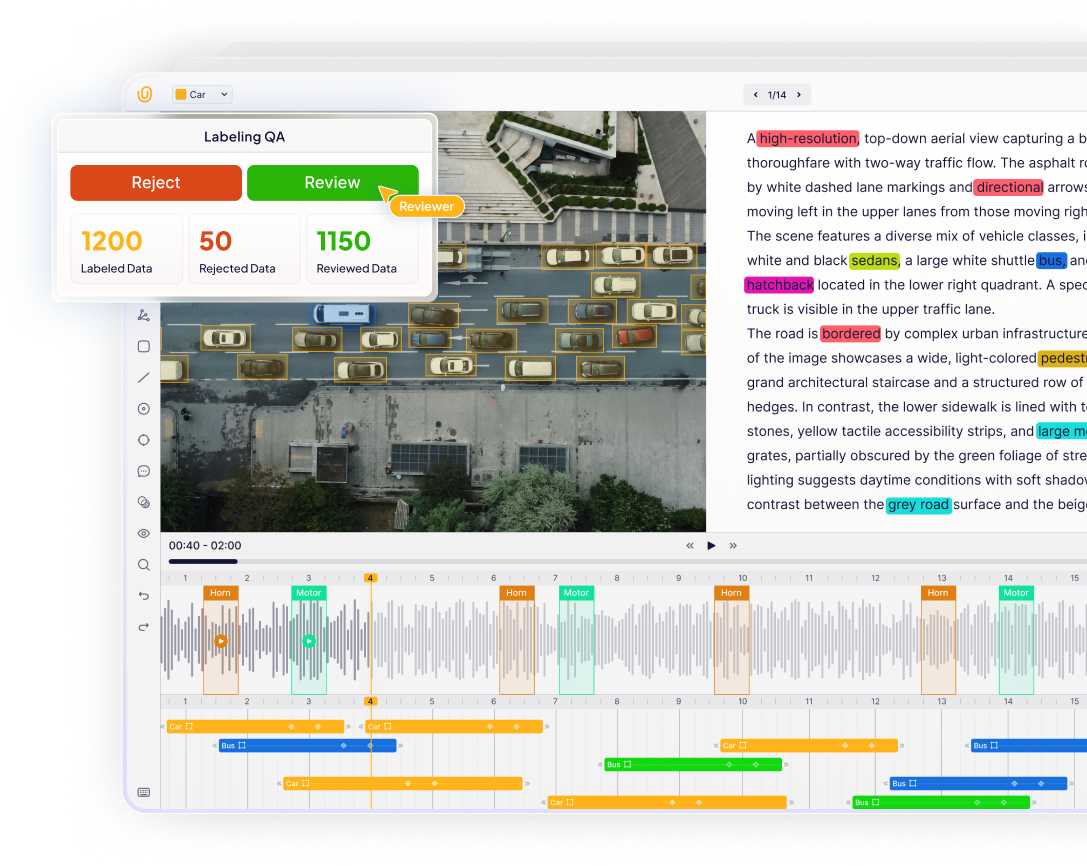
There are no frame drops, no UI lag, and no performance degradation during interaction. At the same time, scalable collaboration tools support structured workflows for data labeling teams through task management, review processes, and role-based access.
Conclusion
Poor video annotation wastes engineering time, inflates compute costs, and creates products that fail in the real world. By shifting from manual, frame-by-frame effort to a modern workflow, anchored by deterministic tooling, auto annotation, and rigorous QA, you can turn your video data into a competitive advantage.
References
- Improving annotation quality with machine learning
- An Evaluation of Hybrid Annotation Workflows on High-Ambiguity Spatiotemporal Video Footage
- SAM 3: Key Challenges in Video Annotation Tracking
FAQs
What are the hidden costs of poor video annotation?
Poor video annotation leads to degraded model performance, increased training costs due to wasted compute, and delayed time-to-market. It also introduces operational risks where computer vision models fail in production, leading to potential safety issues or revenue loss.
Can automated annotation improve annotation quality?
Yes. Human-in-the-loop automated annotation pipelines reduce annotation time by about 35% while maintaining similar quality, improving workflow efficiency.
How does frame misalignment affect video data quality?
Frame misalignment occurs when video annotation tools rely on playback timing rather than exact frame indexing. This causes annotated video data to drift, meaning the bounding box or polygon might lag behind the actual object, confusing the model during training and leading to poor video annotation results.
What is the best way to ensure high quality video annotation?
To achieve high quality video annotation, teams should use deterministic, frame-accurate tools that prevent skipping or syncing errors. Implementing auto annotation features and rigorous QA processes—such as automated checks for geometry and tracking consistency—ensures that annotated data is reliable.
How can automated annotation improve the video annotation process?
Automated annotation drastically reduces manual effort by using pre-trained models to generate seed labels and propagate them across frames. This speeds up the video annotation process, reduces human fatigue, and improves consistency, allowing data labeling teams to focus on refining complex edge cases rather than drawing every box from scratch.
Why is object tracking continuity important in video labeling?
In video labeling, maintaining a persistent ID for an object (like a car or person) as it moves through the video file is crucial. If the ID switches mid-video (e.g., "Car A" becomes "Car B"), the model fails to understand motion patterns, leading to "amnesia" in the system and degrading the performance of computer vision models.