![Featured illustration for “Data Annotation Tool Guide 2026 [The Best 10 + Comparison]”](https://storage.ghost.io/c/48/f4/48f4b614-5c29-430d-9cb3-e0b3f34395f3/content/images/size/w2000/format/avif/2025/12/image--13-.png)
When building AI models, algorithm choice is important, but the data annotation tool you use to get the ground truth of your training data matters just as much.
You need a data labeling platform that supports multiple annotation formats across data modalities and integrates with ModelOps pipelines. It should also automate tedious labeling tasks via active learning and AI-assisted tagging.
In this guide, we'll walk you through the best data annotation tools to help you choose the right one for your machine learning (ML) project.
Here’s what we cover:
- What is Data Annotation?
- Key Criteria to Select the Best Data Annotation Tool
- Top 10 Data Annotation Tools for 2026
- Data Annotation Tool Comparison Matrix
- Future Trends in Data Annotation Tools
See the Unitlab AI multimodal data platform in action
Unitlab helps AI teams curate, annotate, manage, version, and prepare multimodal training data at enterprise scale. This walkthrough shows video, documents, audio, images, synchronized layouts, workflow automation, review, and versioned datasets in one enterprise platform.
Explore Unitlab’s multimodal data annotation platform.
What is Data Annotation (Data Labeling vs. Auto Annotation)
Data annotation is the process of labeling raw data (assigning ground truth), such as images, videos, text, audio, or 3D point clouds, to make it usable for training machine learning models.
Annotators add metadata such as bounding boxes around objects, transcribe speech, tag entities in text, or segment regions in a visual scene.
The labeled data then enables supervised learning to build AI systems across industries such as finance, healthcare, agriculture, and autonomous driving.
Understanding the distinction between manual and automated processes is important since they are often used interchangeably.
Data labeling is the traditional process of manually assigning labels to data to train an ML model. It provides high accuracy but can be time-consuming and costly.
On the other hand, auto annotation uses pre-trained machine learning models to automatically assign labels to datasets. It considerably reduces manual effort and speeds up the labeling process.
Key Criteria to Select the Best Data Annotation Tool
Choosing the right data annotation platform may not be a fast or easy decision since it can make or break the efficiency, cost, and quality of your data pipeline.
Here are some factors to consider when selecting a dataset annotation tool.
- Data Types and Output Format: AI models now work with many different data types. So prioritize platforms that support images, video, 3D point clouds, LiDAR data, text, audio, and medical imaging formats like DICOM. Also, make sure the tool can export annotations in formats like COCO JSON, Pascal VOC, YOLO, TFRecords, or custom formats.
- Annotation Task Compatibility: Find a labeling tool that handles the annotation types your models need.
- Computer Vision Annotation: Look for image annotation and video annotation features like bounding boxes, polygons, semantic segmentation, instance segmentation, keypoints, and object tracking for computer vision applications.
- Natural Language Processing (NLP): Tasks include text annotation for named entity recognition (NER), text classification, relation extraction, and sentiment analysis, which are often types of sequence labeling.
- Audio and Multi-modal: Support for tasks like speech transcription, segment labeling, and speaker diarization.
- Auto-Labeling and AI-Assisted Features: Choose a labeling tool that supports foundation models or lets you integrate your own model to speed up the labeling process. Some tools use models like the Segment Anything Model (SAM) to generate segmentation masks from simple prompts, reducing repeated manual labeling. And other Grounding DINO for zero-shot object detection, while OCR integration automates text transcription.
- Quality Control and Review Mechanisms: Advanced tools implement multi-reviewer workflows with consensus scoring to measure agreement between annotators. Automated QA flags inconsistencies, while machine-based checks using ground truth provide metrics like precision, recall, and F1 scores.
- Team Collaboration: When working with large teams, select a tool with multi-user support, role-based access control, task assignment, review/QC workflows.
- Performance and Scalability: Enterprise-scale projects process millions of images, so ensure the data labeling platform can handle large datasets, say a dataset containing 100K+ images, without slowing down. Features such as distributed team support, quick image loading, an intuitive user interface for batch operations, and stable API throughput all matter at scale.
- Integrations: Check for REST APIs, Python SDKs, command-line interfaces (CLI), and webhook support for pipeline automation. The best data annotation platforms connect easily with ML frameworks (TensorFlow, PyTorch), cloud storage (AWS S3, Azure Blob, Google Cloud Storage), and MLOps orchestration tools (AWS SageMaker, Vertex AI, Databricks).
Top 10 Data Annotation Tools (Detailed Review)
Below, we review the ten leading annotation tools, highlighting technical capabilities, strengths, and ideal use cases.
Unitlab AI
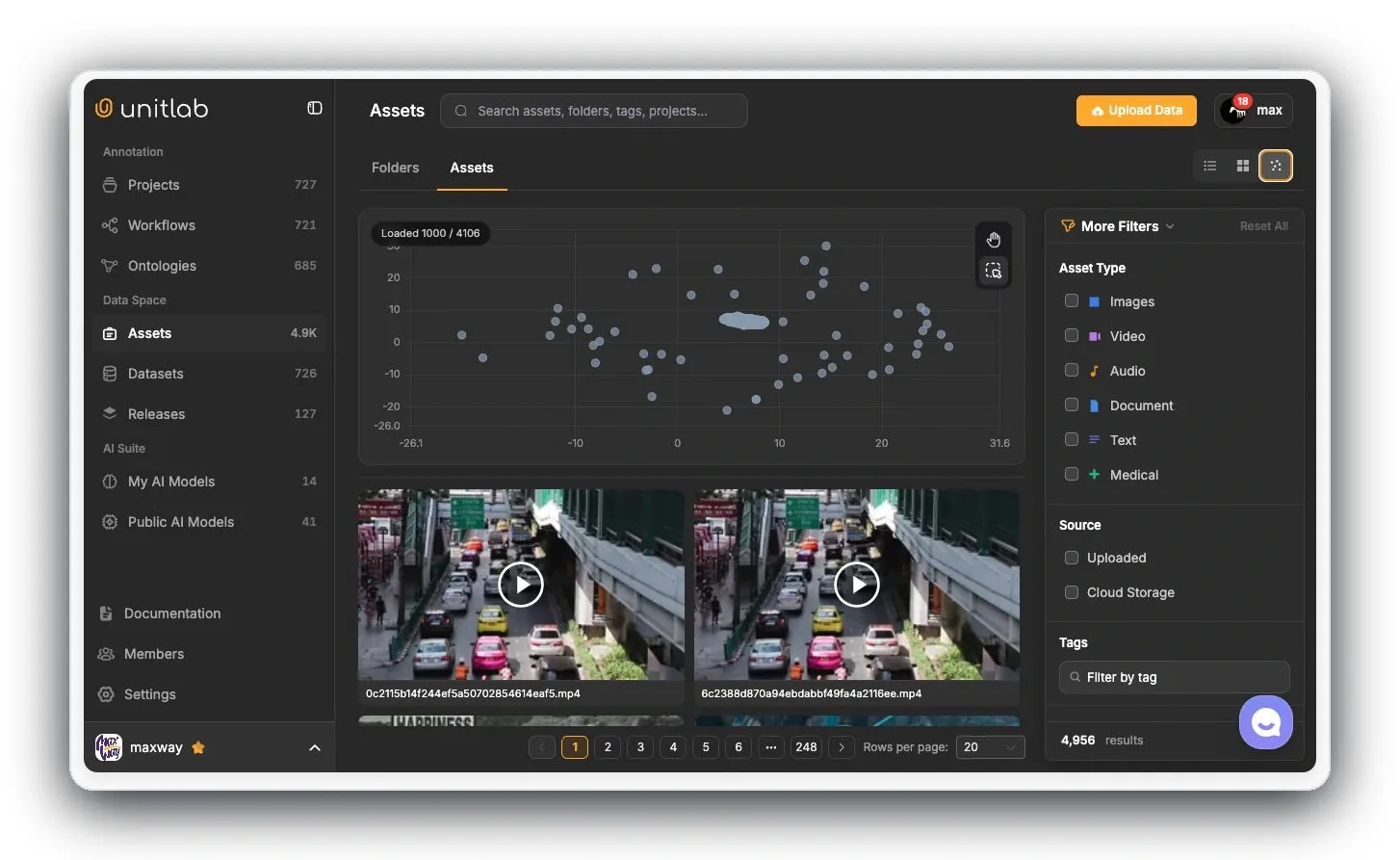
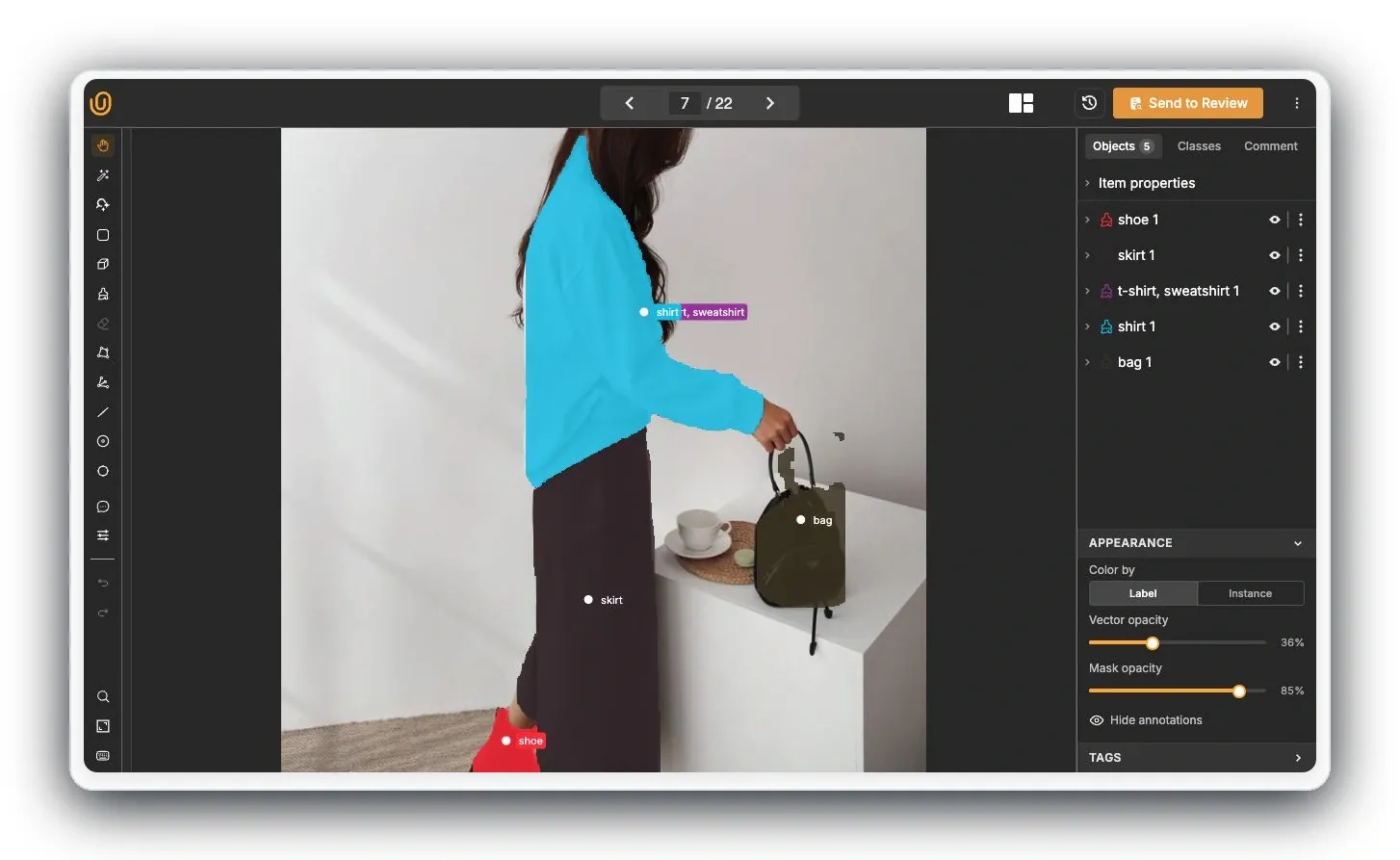
Unitlab AI is an enterprise multimodal data platform for AI teams to curate, annotate, manage, version, and prepare training data at scale.
Positioning: Multimodal Data Annotation Platform for AI Teams.
Technical architecture:
- Curate: Filter and explore source data with metadata, embeddings, auto-groups, and reusable Data Groups before labeling. See the data curation workflow.
- LiDAR scenes: Label 3D cuboids and point segments, inspect calibrated camera views, and review editable tracks. Camera-assisted Find Similar and Auto-Tracking require matching images and usable calibration. Export LiDAR annotations through UUEF.
- Annotate: Work across multimodal data with ontology-driven tools, AI assistance, model integration, and specialized video and medical workflows.
- Video: Use forward, backward, or full-sequence Auto-Tracking, keyframe and mask interpolation, dynamic properties, and timeline review. See the video annotation recipe.
- Quality: Route tasks through instructions, comments, issues, review, rejection, return, and rework with role-based workflows.
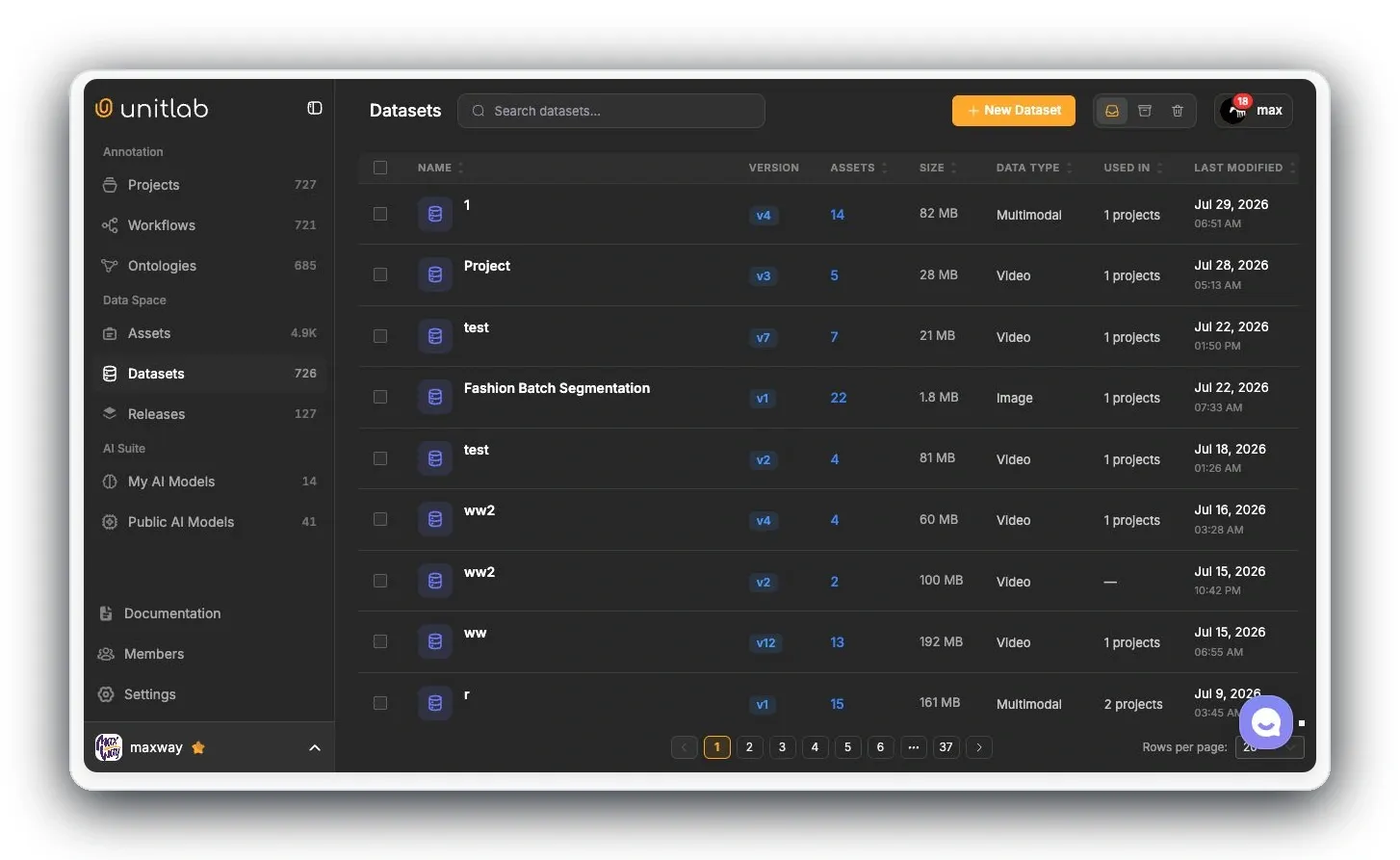
- Manage and version: Organize approved data in managed datasets and create versioned releases for reproducible downstream training.
- Deployment: Use cloud or on-premises deployment according to the organization’s data and infrastructure requirements.
Pricing: Review the current Unitlab pricing page or contact the team for enterprise requirements.
Best For: Enterprise AI teams—including frontier-model programs—that want curation, annotation, quality workflows, dataset management, and versioning in one platform.
Explore Unitlab’s multimodal data annotation platform.
Explore the Unitlab LiDAR demo and feature overview, or follow the LiDAR annotation guide.
CVAT (Computer Vision Annotation Tool)
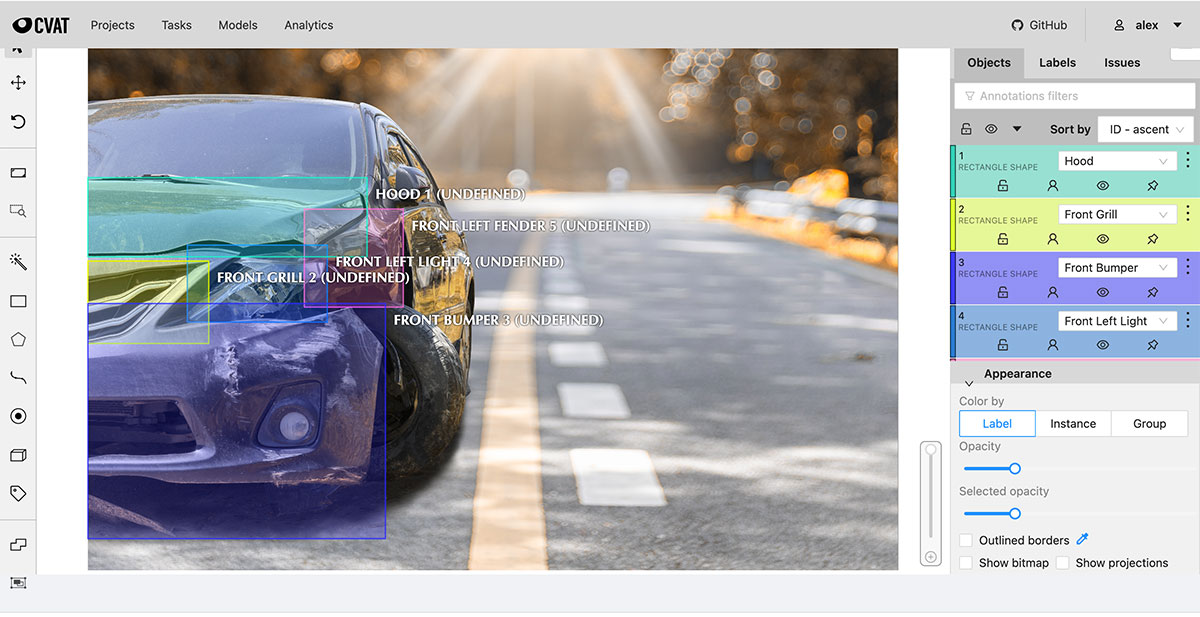
CVAT is the most widely used open-source image annotation tool for computer vision tasks such as object detection, image classification, and segmentation.
It supports image, video, and 3D point cloud annotation. CVAT comes with Community (self-hosted), Online (cloud), and Enterprise editions.
Technical architecture:
- Automated annotation: CVAT integrates the model zoo with SAM for interactive segmentation, YOLO variants, and the deployment of custom AI agents via a REST API.
- Supported frameworks: OpenVINO, PyTorch, TensorFlow, and ONNX runtime with CPU and GPU acceleration.
- Integrations: FiftyOne for dataset curation, Hugging Face and Roboflow model hubs (Online version), API for workflow automation, and cloud storage.
- Format support: COCO, Pascal VOC, YOLO, LabelMe, MOT
Pricing: As open source software, it is free for the self-hosted version, but it also offers cloud options.
Best For: Research teams, academic projects, and budget-conscious teams with technical capacity for self-hosting.
Limitations: Self-hosted deployment requires infrastructure management, as the UI is optimized primarily for Chrome; some advanced features require an enterprise license.
Label Studio
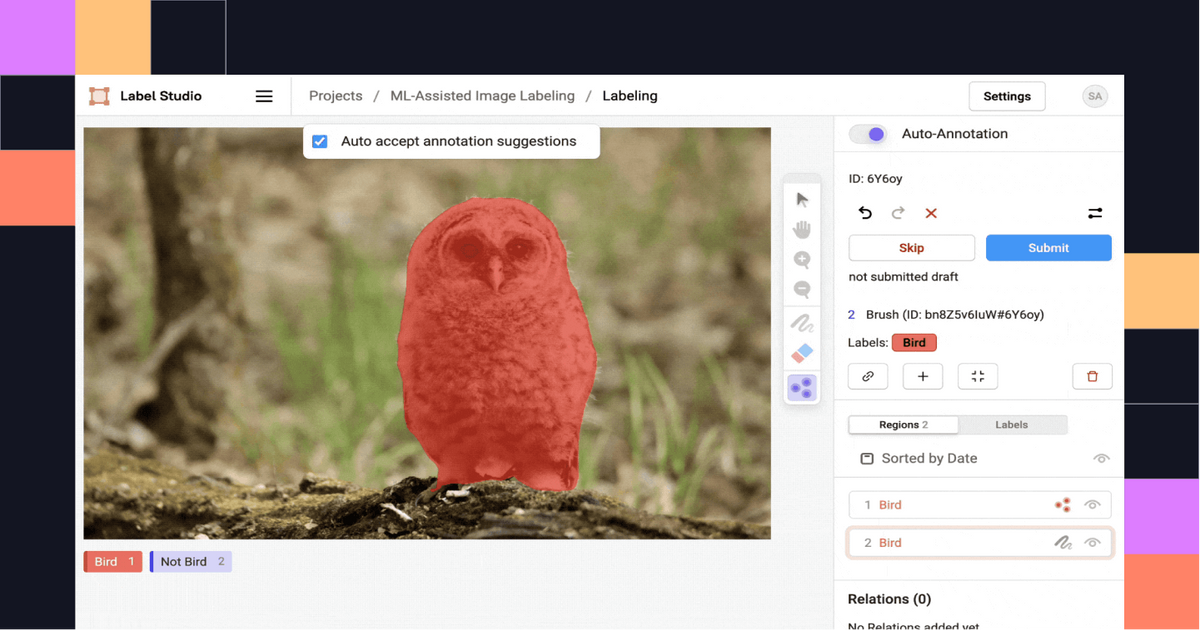
Label Studio is an open-source platform supporting diverse data types with customizable XML-based annotation interfaces. It offers community edition and enterprise versions for teams requiring advanced custom workflows. Label Studio is a versatile visual object tagging tool and much more.
Technical architecture:
- Multi-modal support: Label Studio lets you annotate images, video, text, audio, time-series data, HTML documents, and PDFs through XML template syntax (configurable).
- Integrations: Support SAM integration via community ML backend and custom model deployment via REST API. You can also connect it to cloud storage to import the data.
- Annotation types: It supports semantic segmentation, object detection, keypoint detection, and image captioning for vision. For NLP, it supports NER, text classification, and sentiment analysis. For audio, you can perform Transcription, segment labeling, and speaker diarization.
- ML Backend SDK: You can use its Python framework to connect custom models to pre-labeled data. And support the use of active learning loops to accelerate annotation with model predictions.
- Supported Formats: Label Studio provides export options for annotated data, including JSON, CSV, and CONLL2003 (for NER). Also, custom data export is supported through the Python SDK.
Pricing: Open-source free and Label Studio Enterprise for teams
Best For: Teams needing maximum flexibility across data types and custom workflows.
SuperAnnotate
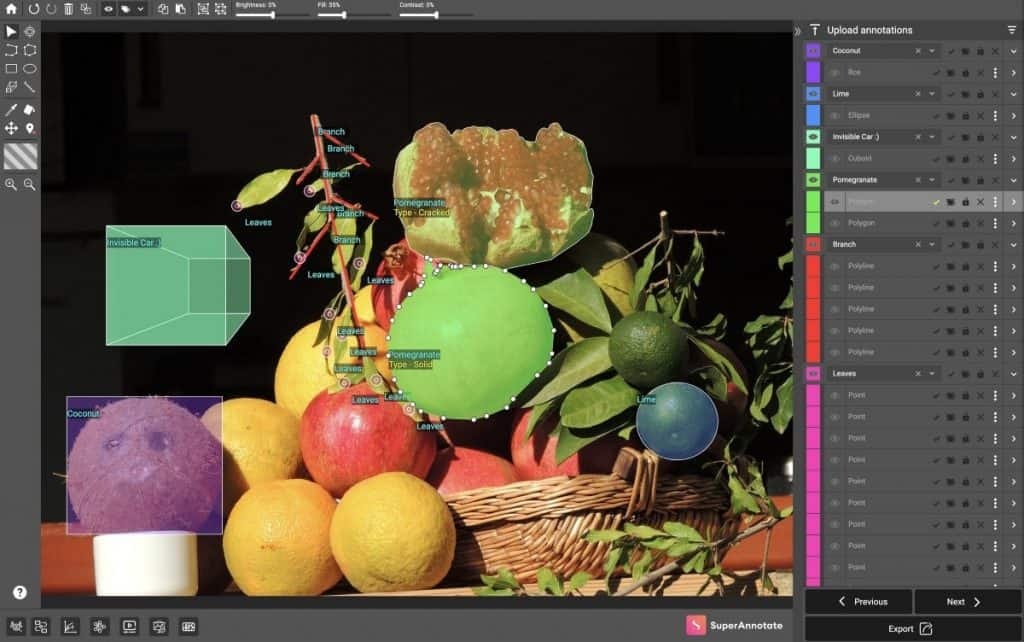
SuperAnnotate offers enterprise-grade features with quality assurance, data management, AI-assisted labeling, and data governance to build datasets and ML pipelines.
SuperAnnotate provides a drag-and-drop editor builder so you can design task-specific labeling tools. It supports annotation across images, including high-resolution satellite imagery, video, text, audio (transcriptions and segmentations), LiDAR point clouds, and geospatial tiles.
Technical architecture:
- AI-assisted labeling: You can use SAM integration, the Magic Select tool, to automate the annotation process and create more accurate annotations faster.
- Quality assurance: SuperAnnotate score between multiple annotators, benchmark comparisons against gold-standard annotations. And it offers multi-step review workflows with configurable approval chains.
- MLOps integration: The SuperAnnotate orchestration module offers integration with CI/CD pipelines and native connectors for Databricks, AWS, Snowflake, and Slack.
- Data governance: You can keep dataset versions, annotation audit trails, and compliance-ready infrastructure.
Pricing: Custom enterprise pricing based on volume and feature requirements.
Best For: Computer vision teams looking for annotation-to-deployment on a single platform.
Roboflow
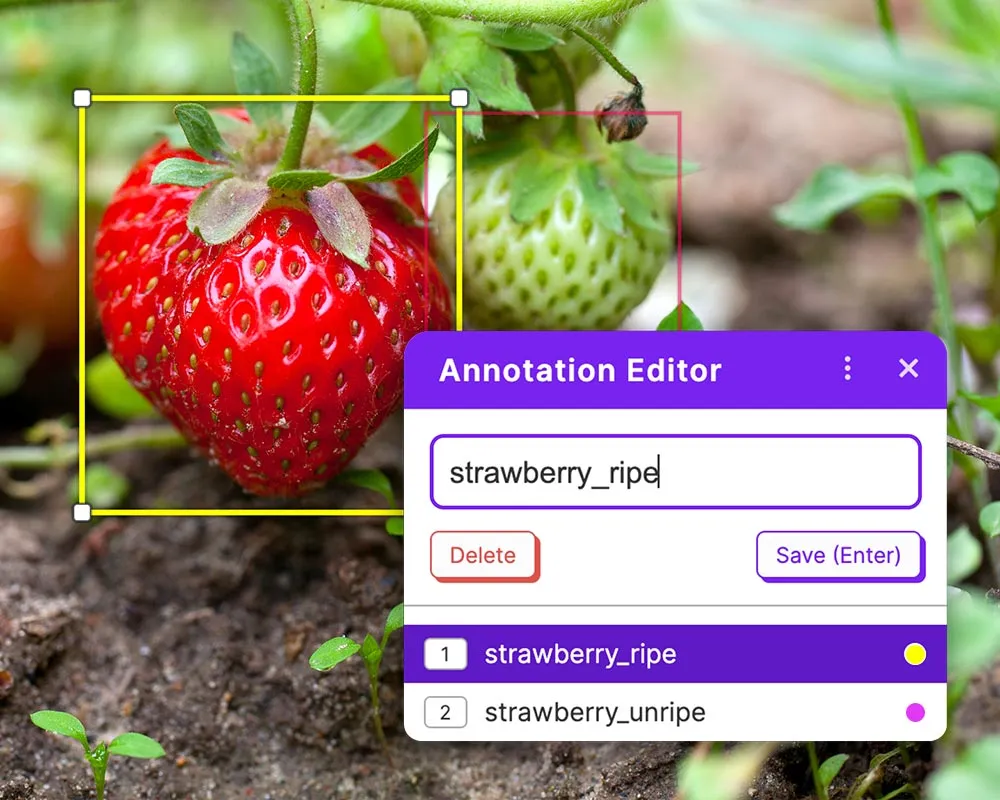
Roboflow provides an end-to-end computer vision workflow from annotation through deployment. It also lets you use annotation features like Label Assist, Smart Polygon (SAM-powered), Box Prompting, and model-assisted labeling with any of 50K+ trained Roboflow models.
Technical architecture:
- Auto Label workflow: Roboflow allows foundation model predictions preview on sample images, and adjusts confidence thresholds per class. It runs batch labeling on thousands of images without manual annotation.
- Model distillation pipeline: It allows you to convert unlabeled images into models compatible with YOLOv8 and others, without requiring manual labeling of common object classes.
- CVevals: Support evaluation framework for testing and refining natural language prompts before committing to large-scale annotation.
- Supported formats: It allows you to export annotated data in formats like COCO JSON, YOLO PyTorch TXT, Pascal VOC, CreateML, and 40+ others via universal conversion.
- API and Tools: SDKs and an API are available, plus a data pipeline tool (Rapid, Universe) beyond annotation.
Pricing: Free Public plan (public datasets). It also offers Basic ($65/month, 30 credits, 5 users), Starter ($249/month, private projects, 10K source images), and Enterprise custom plans.
Best For: Computer vision teams who want an easy-to-annotate-to-train workflow with YOLO models. Suitable for both startups and scaling teams, given its integrated features.
V7 Darwin
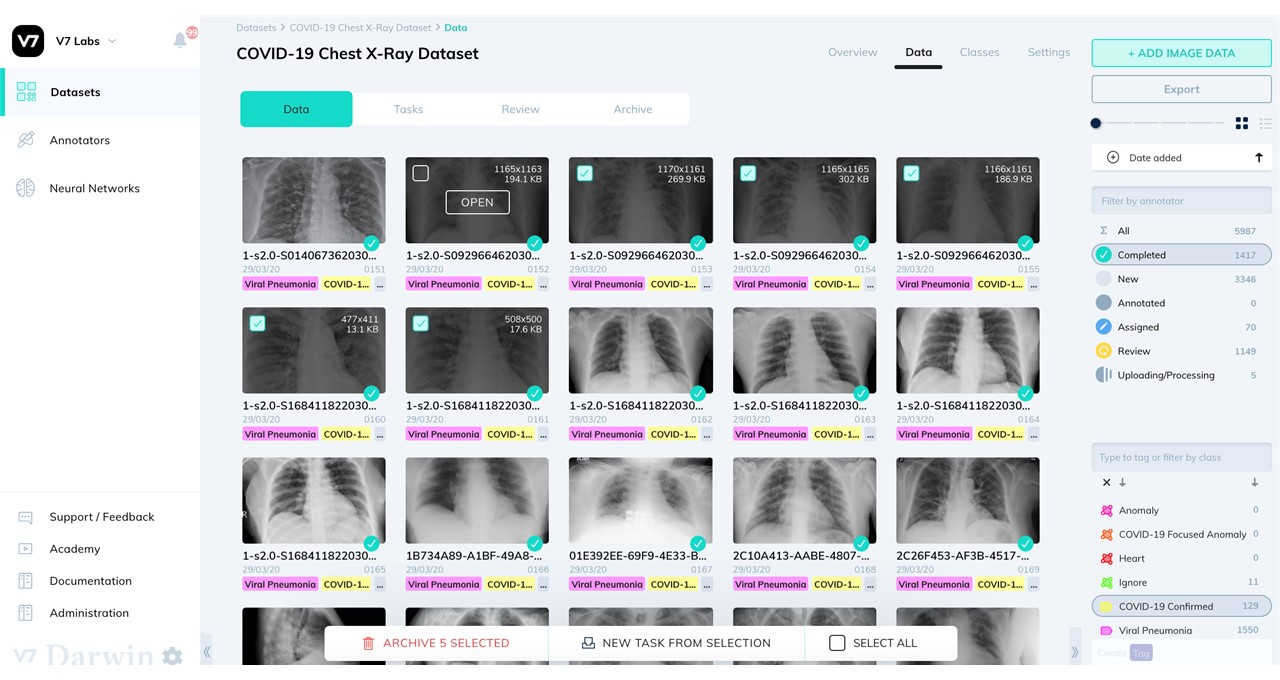
V7 Darwin specializes in high-accuracy annotation with top-tier support for medical imaging. Its neural network training integration enables the creation of auto-annotation models trained on your own data.
You can upload various types of data into V7, including images, videos, DICOM files (2D/3D), NIfTI, and whole slide images for digital pathology.
Technical architecture:
- Medical imaging suite: Darwin features a DICOM viewer with multi-planar reconstruction (MPR), 3D visualization, color overlays, and window controls. It supports CT scans, MRIs, X-rays, ultrasounds, digital pathology, and fluoroscopy.
- Auto-Annotate: It uses deep learning models to segment images and automatically generate detailed polygon masks. These models can be used within labeling workflows for initial annotation.
- Auto-track: It supports automatic object tracking across video frames with integration for zero-shot tracking using SAM.
- Voxel annotations: Darwin supports 3D medical data with volumetric pixels and allows multi-planar mask creation from any view.
- Collaboration features: V7 Darwin supports multiple data slots and channels. It also offers complex medical study protocols, comment threads, inter-reader variability measurement, and audit trails.
Pricing: Custom options are available.
Best For: Healthcare and life-science projects (medical imaging annotation) and any CV work needing high accuracy. Often used by regulated industries that require auditability and compliance.
Labelbox
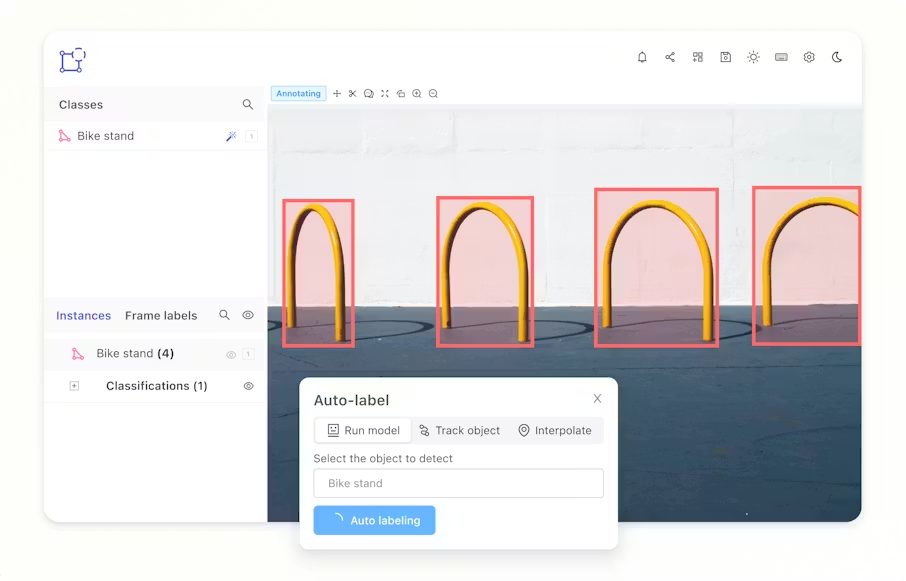
Labelbox manages the entire annotation lifecycle with a strong MLOps focus. Its Model Foundry integrates frontier AI models for pre-labeling and evaluation. It supports annotation for images, video, text (PDF with OCR), audio (with Whisper transcription), and geospatial tiles.
Technical architecture:
- Model Foundry: Access to GPT, Claude, Gemini, Amazon Nova, OpenAI Whisper, and custom model integration. Supports model-assisted labeling, data enrichment, and evaluation workflows.
- Multimodal Capabilities: It includes multimodal SFT annotation, preference-ranking interfaces, and chatbot arena-style evaluations that compare up to 10 models in parallel.
- Workflow orchestration: Node-based visual editor for multi-step labeling workflows with review stages, QA checkpoints, and rework paths. It provides real-time status visibility and bottleneck identification.
- Quality controls: Consensus labeling, benchmark/gold standard comparison, automated QA flags, inter-annotator agreement metrics.
- API and Integration: Extensive APIs, webhooks, and collaboration tools. It plugs into cloud ML pipelines and has built-in integrations.
Pricing: Custom enterprise pricing and Foundry are available as an add-on.
Best For: Enterprises with large teams and full data ops needs. Ideal if you want labeling tightly integrated into a broader MLOps pipeline and need advanced features like RLHF data labeling.
Encord
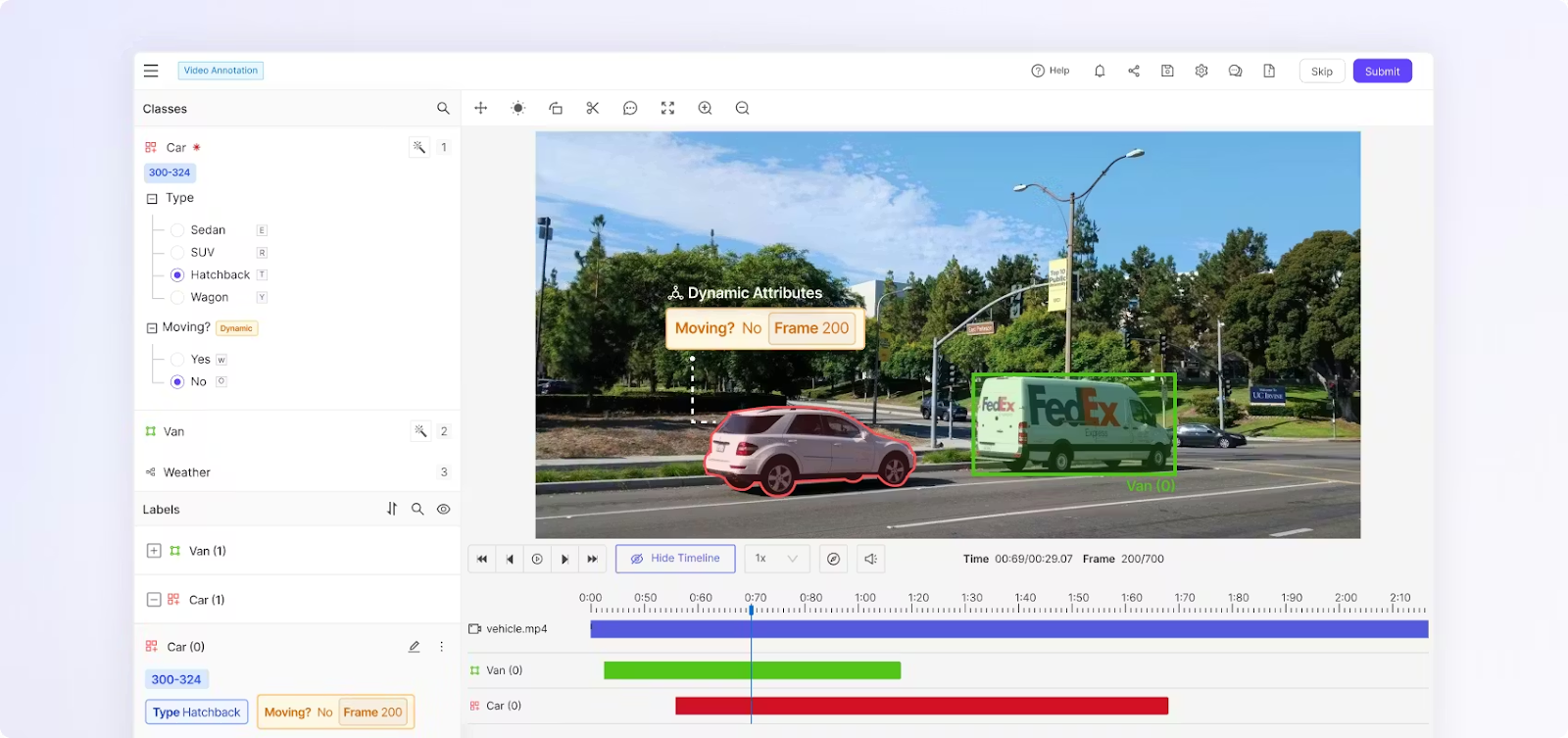
Encord targets enterprises' needs for security, compliance, and scalability for large annotation projects. It supports various types of data, including images, videos, medical images like DICOM and NIfTI, text, and audio.
Encord also offers tools for aligning large language models (LLMs) and text annotation with categories such as entities, intentions, and sentiments.
Technical architecture:
- Encord Annotate: Offers AI-powered labeling features, such as automatic interpolation for videos, pre-labeling for object detection, and ML-based quality control. It also supports DICOM files within a secure, HIPAA-compliant setup.
- Encord Active: It evaluates ML models with strong checks, detects failure modes, precision/recall curves, and lets you explore data interactively using embeddings.
- Encord Index: Index helps in data curation and management for large unstructured datasets.
- Active learning (AL) integration: Encord AL feature helps identify the most valuable data for annotation, which reduces labeling costs and improves model accuracy.
Pricing: Enterprise pricing
Best For: Organizations in regulated domains that need top-tier security. Also, for any large-scale multi-modal project requiring active-learning workflows and detailed auditability.
BasicAI
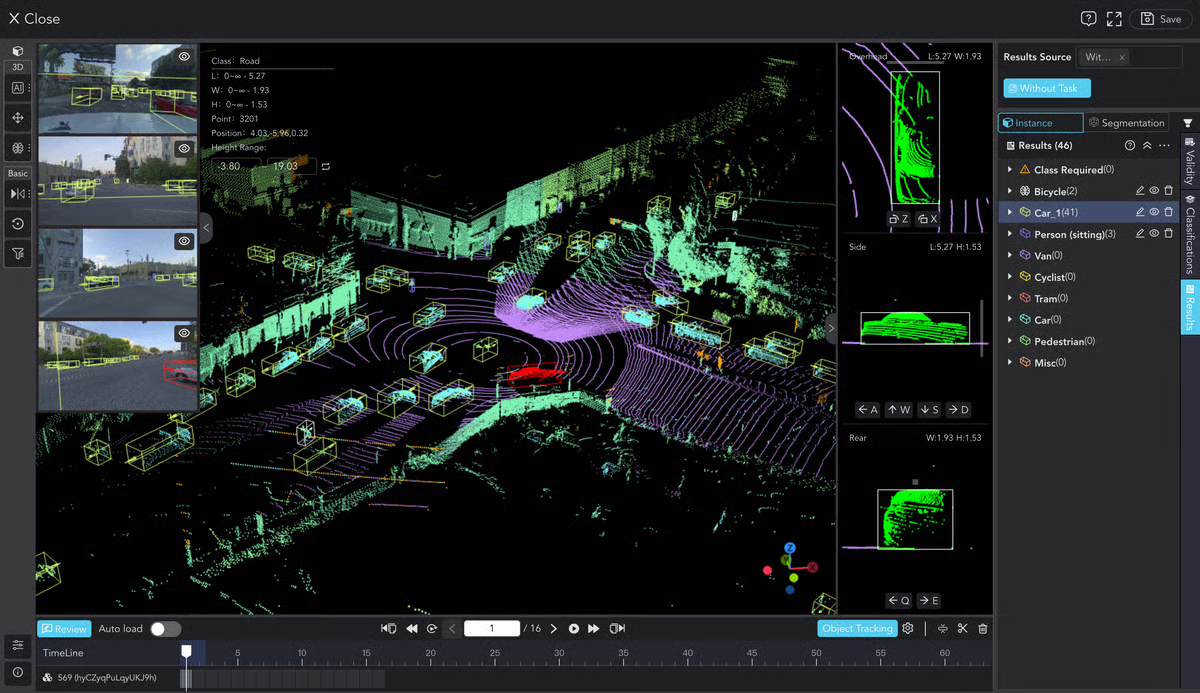
BasicAI leads in 3D annotation with advanced sensor-fusion capabilities purpose-built for autonomous-driving and robotics applications. Its automatic annotation process is 82x faster than manual annotation.
Furthermore, BasicAI offers a 72% faster rate for sensor fusion annotation. It can manage large datasets with over 150 million points across 300 frames.
Technical architecture:
- 3D LiDAR annotation: It uses an AI model to generate one-click 3D cuboid annotations for object detection, semantically labels points into categories, and smart manual annotation with two-click cuboid drawing.
- Sensor fusion: Syncs annotation of 3D LiDAR and 2D camera with real-time calibration. It projects 3D data onto 2D images for automatic pseudo-bounding box generation and point projection across modalities.
- 3D object tracking: Model-powered tracking over sequences of point cloud frames with interpolation, cross-frame adjustment tools, and consistent ID assignment.
- Supported formats: PCD and BIN for point clouds, standard image formats, and custom export options.
Pricing: Tiered usage-based pricing and annotation services with human-model coupling approaches.
Best For: If your data involves LiDAR, Radar, and cameras, or AV and robotics teams needing industrial-grade 3D annotation.
Supervisely
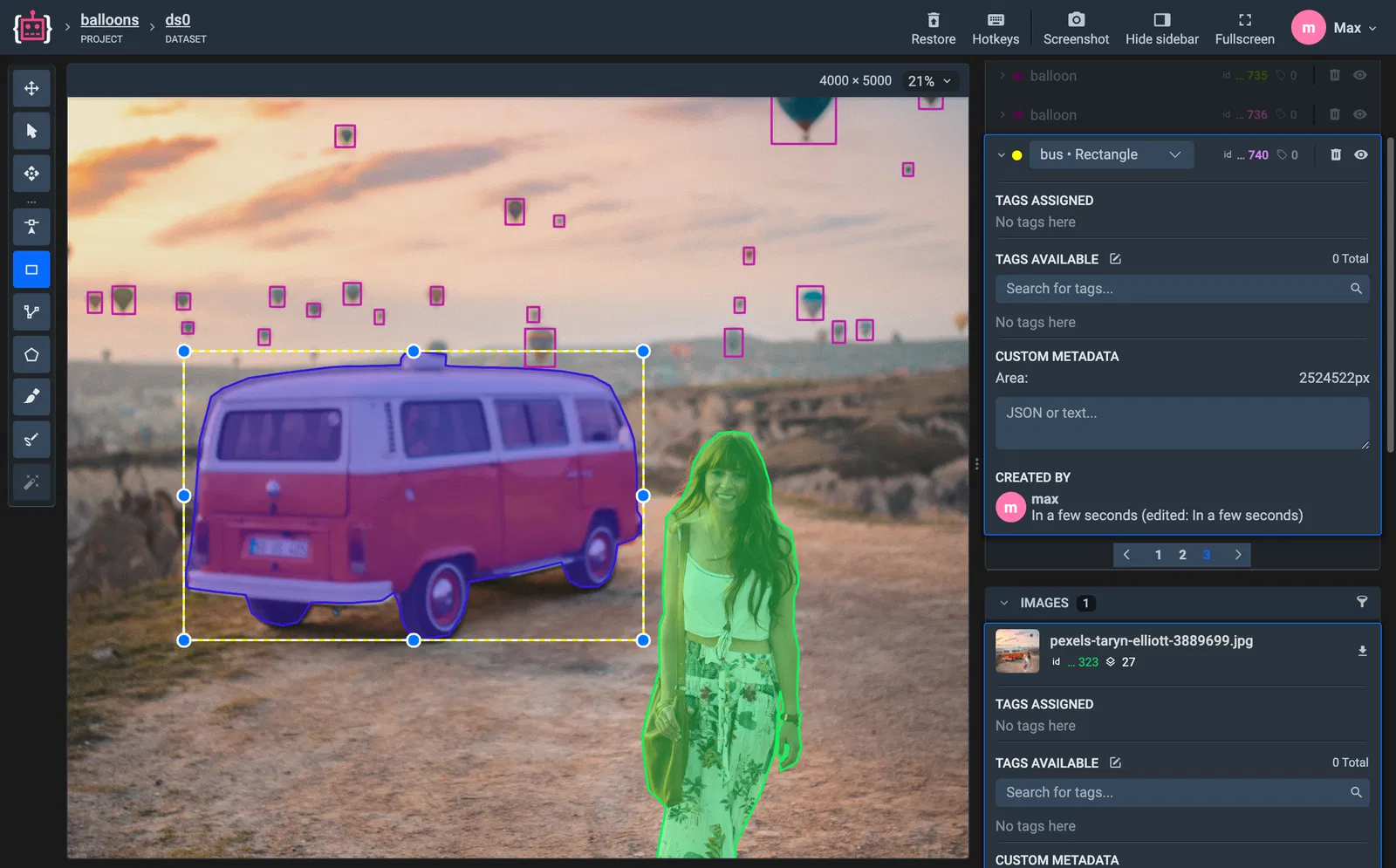
Supervisely offers an end-to-end computer vision platform combining annotation, neural network training, and model deployment in a single system.
It supports various data types, including images (high-resolution and multispectral), videos, 3D point clouds, and DICOM medical images. There is also an app marketplace where you can add custom features.
Technical architecture:
- Labeling toolbox: It includes bounding boxes, polygons, brushes, erasers, mask pens, smart tool with AI assistance, and graph (skeleton) annotations. It also supports multi-image view mode, high-resolution images, 16-bit+ color depth, and multispectral data.
- Neural network integration: The NN Image Labeling app connects models like OWL-ViT with the labeling process for automatic tagging. You can also use your own models.
- Quality assurance: You can view statistics about your datasets, filter images and objects based on specific conditions, track metadata, and recover previous versions.
- Collaboration features: It lets you assign labeling jobs, manage labeling queues, control access rights, track progress, and report issues.
- Integration: The platform includes its own training studio. You can train models on your labeled data within Supervisely and deploy them. An extensive API/SDK supports automation (REST + Python SDK)
Pricing: A free version for the community and paid enterprise options with extra features.
Best For: CV teams want an all-in-one solution for annotation and training.
Data Annotation Tool Comparison Matrix
We have compiled a side-by-side comparison to help you evaluate technical capabilities and deployment options at a glance.
Future Trends in Data Annotation Tools
As we move further into the decade, the landscape of data annotation tools is shifting.
New foundation models like SAM and Grounding DINO are making auto annotation more accurate. They also enable high-accuracy zero-shot annotation, which reduces the need for humans to do the work and speeds up the creation of training data.
The rise of LLMs and generative AI is creating new workflow needs, such as tools for preference annotation and ranking to help AI better match human values.
Furthermore, the growth of multimodal models is favoring unified platforms that can easily handle images, text, and videos. Also, data scientists prefer platforms that let them handle all data annotations in one place.
There is also a strong focus on human-centric design, with companies improving the user experience through simple interfaces and better project management to reduce fatigue, errors, and overall costs.
Conclusion
Selecting the right data annotation tool brings reliability to your computer vision project or machine learning initiative. The market offers various annotation tools, from open source data annotation platforms like CVAT to enterprise-grade solutions like Unitlab and Labelbox.
Whether you need collaborative image labeling, advanced video annotation, or 3D point cloud support, there is a tool designed for your specific needs.
- If you want fast, cost-effective scaling with auto annotation, Unitlab is a good-to-go choice.
- For flexibility, open source tools like Label Studio and CVAT are top choices.
- For specific needs in autonomous driving, BasicAI stands out.
- For medical imaging, V7 Darwin and Encord lead the pack.
Ultimately, the right tool depends on your specific data types, scale, budget, and use case. You can create strong, efficient data pipelines to develop advanced AI models by comparing these data labeling tools against the key features and criteria we outlined in this guide.
Explore related Unitlab capabilities: a data curation platform.