


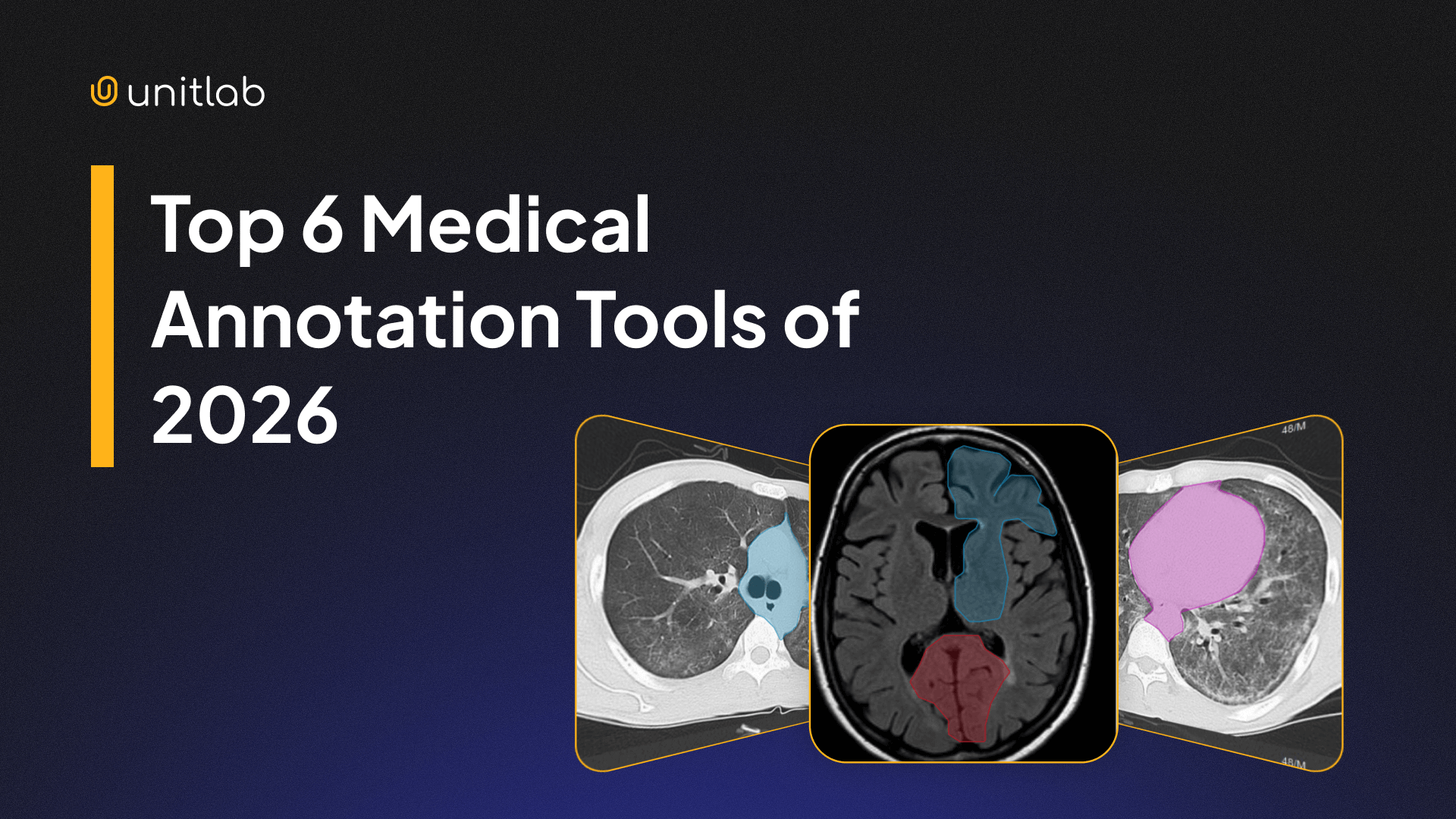
A fact of life: medical image annotation is vastly different from regular image labeling.
For one thing, medical image annotation is one of the hardest tasks in computer vision. You work with multi-slice DICOM files, 2D/3D volumes, and sensitive patient data. For medical AI models that will be used by doctors for analysis, diagnosis, and decision-making, every pixel of the training data matters because lives are at stake. False positives and false negatives reduce reliability and can harm lives.
For another, annotating medical images (MRIs, X-Rays, CTs, etc) is a difficult, specialized task because of the special domain knowledge required. Contrary to general image labeling, any random data annotator cannot label DICOM or NIfTI files. Even doctors sometimes struggle to annotate medical files due to the complexity of the medical field. Therefore, the tools they use to label medical imaging must be as performant, intuitive, and easy to work with as possible.
That's why the medical labeling platform of your choice shapes the final dataset quality to a large extent.
The annotation tool you choose shapes dataset quality to a large extent. Good medical labeling platforms support popular medical file formats (DICOM and NIfTI), handle large volumes and sizes of medical data smoothly, offer AI-powered auto-annotation and APIs && SDKs, and finally empower radiologists to annotate medical images with precision at ease.
This guide reviews the six best platforms you can use in 2026.
What Makes Medical Annotation Unique
As mentioned above, medical labeling has demands you don't see in regular image labeling. This includes, but is not limited to, the specialized domain knowledge required for medical imaging:
- You deal with CT, MRI, X-ray, ultrasound, and histopathology slides, often large in size (starting at around 50 MB).
- You annotate 2D, 3D, and even 4D and multi-slice scans. Regular image labeling almost always deals with 2D images only.
- You work with different file formats: DICOM, NIfTI, TIFF, and sometimes proprietary hospital formats. Conventional images require no specific format.
- You need special, advanced tools to work with 3D and multi-slice scans for segmentation, polygons, brushes, and contours.
- You must protect PHI (Protected Health Information) and follow HIPAA or GDPR rules, in addition to standard software protocols.
- You rely on domain expertise of your radiologists and their review cycles.
It is not difficult to see how and why medical annotation differs from regular image labeling. With so many requirements and variables, you should choose a medical image annotation tool that supports your project, workflows, and labeling process, not hinders them. You need a medical annotation platform built for these constraints.
Selection Criteria
We have written extensively on important factors to consider when choosing a data annotation platform. These factors apply to data annotation in general, regardless of data type or focus.
 Hojiakbar Barotov
Choosing a data annotation tool: 11 factors
Each data annotation tool should be evaluated based on these core functionalities:
- Automation features
- Collaboration and doctor review tools
- Dataset management
- Pricing and scalability
- Integration with ML pipelines
These are the basics. Medical labeling tools should also offer:
- Support for medical formats such as DICOM and NIfTI
- Support for MPR, window/level presets, and 3D volume review
- Strong RBAC, audit trails, encryption, and SSO
- High performance with large 3D scans
- Advanced segmentation tools for masks and contours
- Relevant protocol compliance (HIPAA, GDPR, PHI)
You will see each tool rated on these dimensions.
The 6 Best Medical Annotation Tools in 2025
We reviewed many tools, both open-source and proprietary, and selected the following:
- Unitlab AI
- Encord
- V7 Darwin
- MD.ai
- Labelbox
- Napari
Here is the quick summary table that sums up each tool:
| Tool | DICOM & NIfTI Support | 3D Support | Automation | Features |
|---|---|---|---|---|
| Unitlab AI | DICOM | Yes | Strong | Fast, scalable annotation |
| Encord | DICOM & NIfTI | Yes | Strong | One platform for labeling, curation, and evaluation |
| V7 Darwin | DICOM & NIfTI | Yes | Strong | Auto-annotation and clinical-oriented UI |
| MD.ai | DICOM | Limited 3D | Moderate | Radiologists, teaching |
| Labelbox | DICOM | Yes | Strong | Large teams and QA-heavy workflows |
| Napari + Plugins | DICOM & NIfTI with plugins | Excellent | Depends on plugins | Research and customization |
1. Unitlab AI — Fast, scalable medical annotation
Unitlab AI is built for fast, accurate data annotation across domains, including medical imaging. You get advanced segmentation tools, batch auto-annotation, and a smooth UI for data labeling, project management, and dataset management.
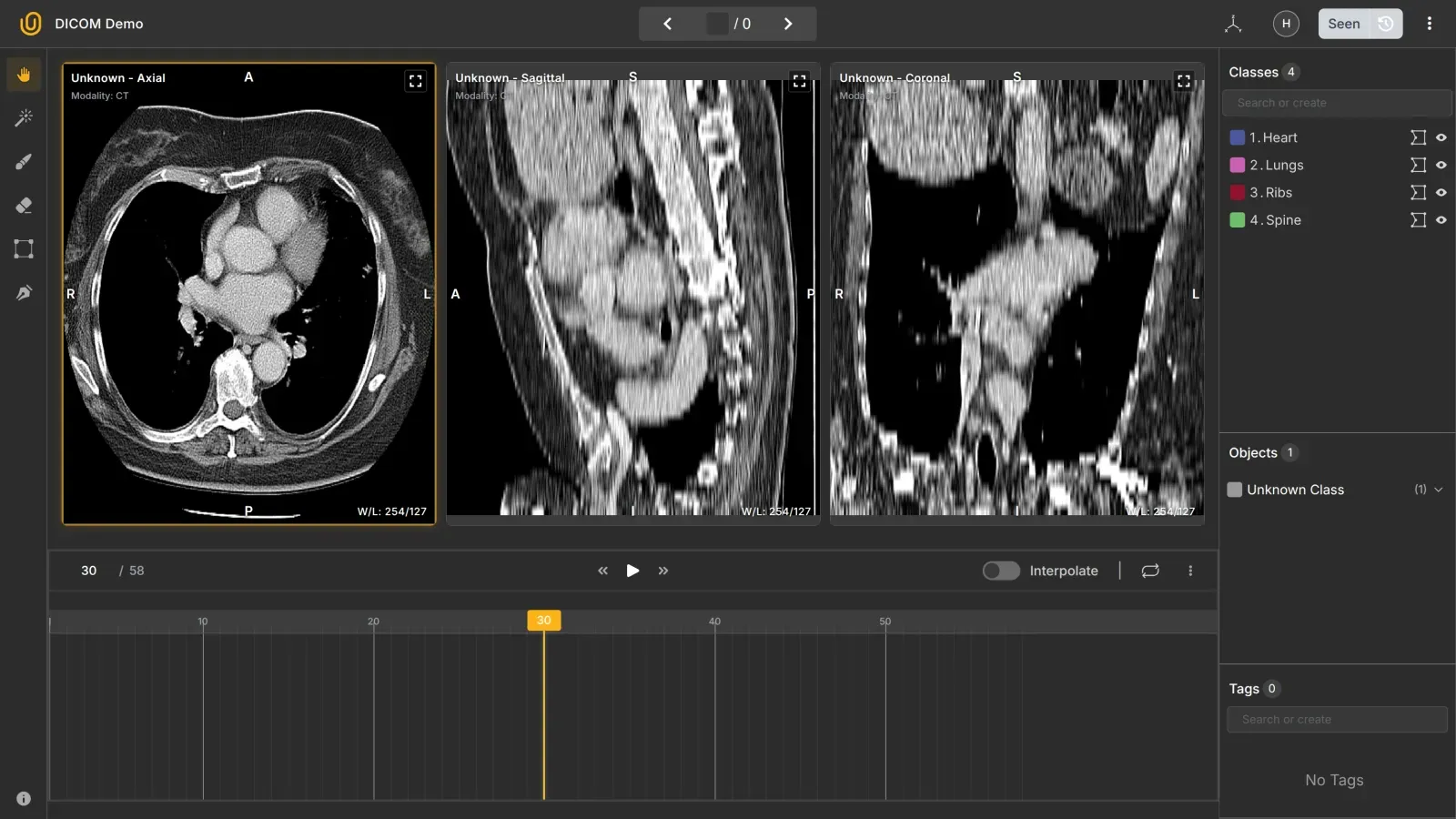
You can load CTs, MRIs, and X-rays, annotate slices, and apply AI-based interpolation suggestions to speed up work. Team workflows help radiologists review, comment, and correct masks.
Why use it:
- Fast medical labeling with automation
- Smooth handling of large datasets with version control and import/export features
- Accurate segmentation tools
- Strong real-time collaboration between annotators and reviewers
- Easy model integration with the platform
Pricing: Freemium + Transparent, SaaS plans listed on the website. You can try the DICOM annotation tool in under 5 minutes for free.
Best for: Teams that want scale, speed, and detailed control over their datasets.
2. Encord — end-to-end solution
Encord has a clear niche: it focuses heavily on medical imaging. Also, it is built for end-to-end data operations across annotation, curation, and evaluation. Encord supports multi-modal annotations: DICOM & NIfTI can be labeled alongside text, audio, and video.
Its medical viewer is strong, and the platform supports 2D, 3D, and multi-slice annotation with axial, sagittal, and coronal planes. You get tools for segmentation, polygons, and contours with active learning.
Encord DICOM Annotation
Its audit logs, SSO, and roles support enterprise governance necessary for medical image labeling. Its privacy and compliance features help hospital teams work with sensitive data easily. Radiologists can label scans inside a structured review workflow.
Why use it:
- Strong medical imaging support
- High-quality segmentation tools
- Active learning for medical annotation
- HIPAA-aligned workflows
Pricing: Pay-as-you-go. Your invoice depends on your project, quotes, and team members. To label DICOM & NIfTI files, you need at least a Starter pack.
Best for: Hospitals and medical research labs that need reliability.
3. V7 Darwin — speed & automation
V7 Darwin focuses on fast labeling while keeping clinical context visible. It supports direct uploads of DICOM and NIfTI files, and the workspace is optimized for keyboard-driven speed. Its auto-annotation tools quickly generate boxes, polygons, and masks on CT and MRI studies, which helps with repetitive segmentation tasks.
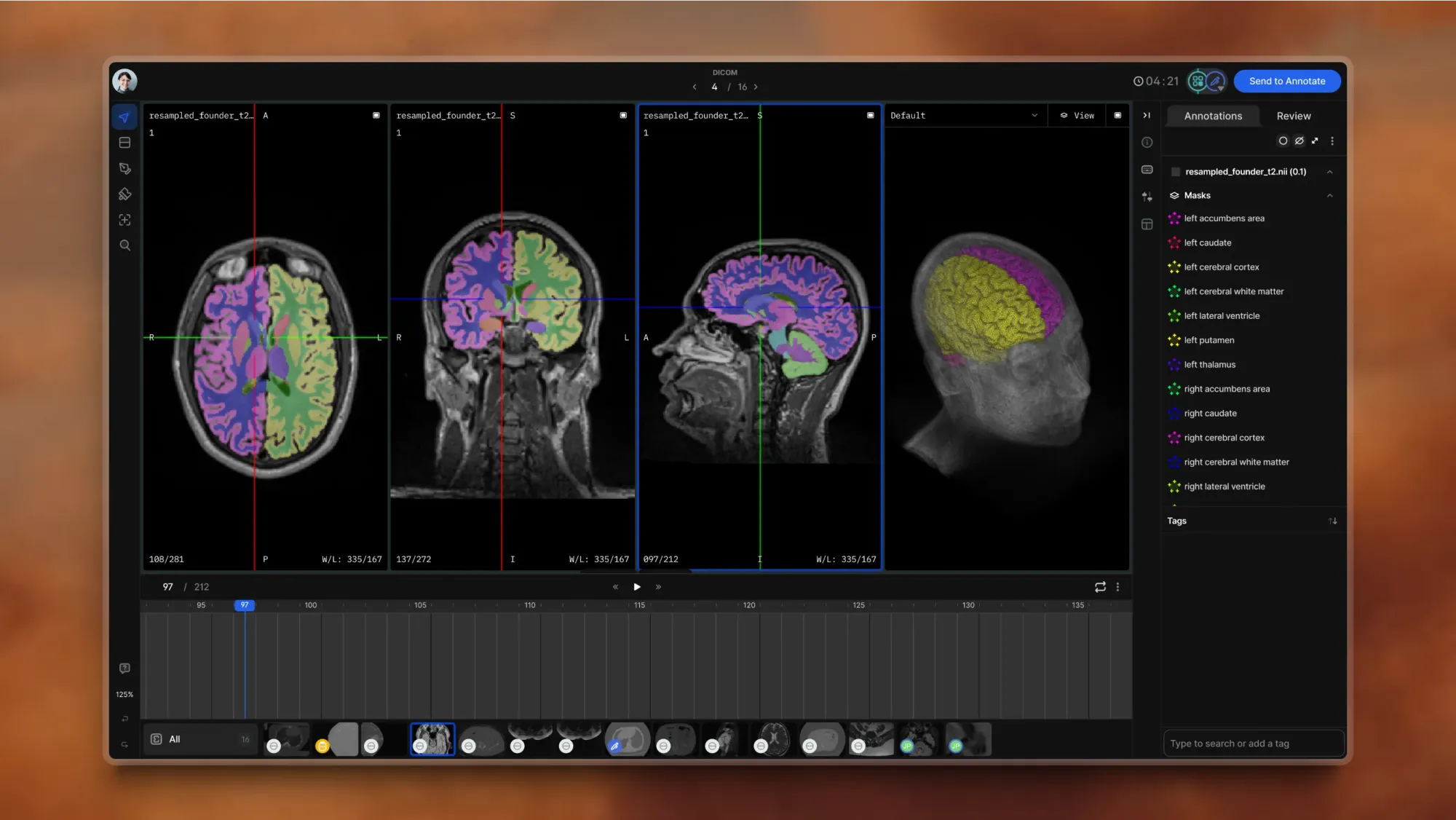
MPR and volumetric viewers support cross-plane inspection and tracking changes in lesions. Project dashboards highlight output, speed, and quality patterns. You can also use a managed labeling workforce when volume spikes. Set strict QA rules for soft-tissue edges, multi-phase scans, and tiny findings to keep annotations consistent.
Why use it:
- High speed without losing quality and context
- Intuitive, simple clinical UIs
- Auto-annotation of boxes, polygons, and masks
- Clear QA Policies for collaboration and quality
Pricing: Platform fee + user licenses + data charges. Pay-as-you-go, essentially.
Best for: Enterprise systems that prefer speed and quality.
4. MD.ai — radiology-native viewer
MD.ai works as a browser-based DICOM viewer built for radiology workflows. It organizes studies and series, supports hanging protocols, and includes tools for measurements and regions of interest, all in layouts similar to clinical PACS systems. Projects let you define cohorts, assign roles, and provide clear guidelines with reference cases to keep labeling consistent.
It provides a clean and simple interface for radiologists without heavy technical requirements. You annotate CTs, MRIs, X-rays, and ultrasound images directly in the browser.
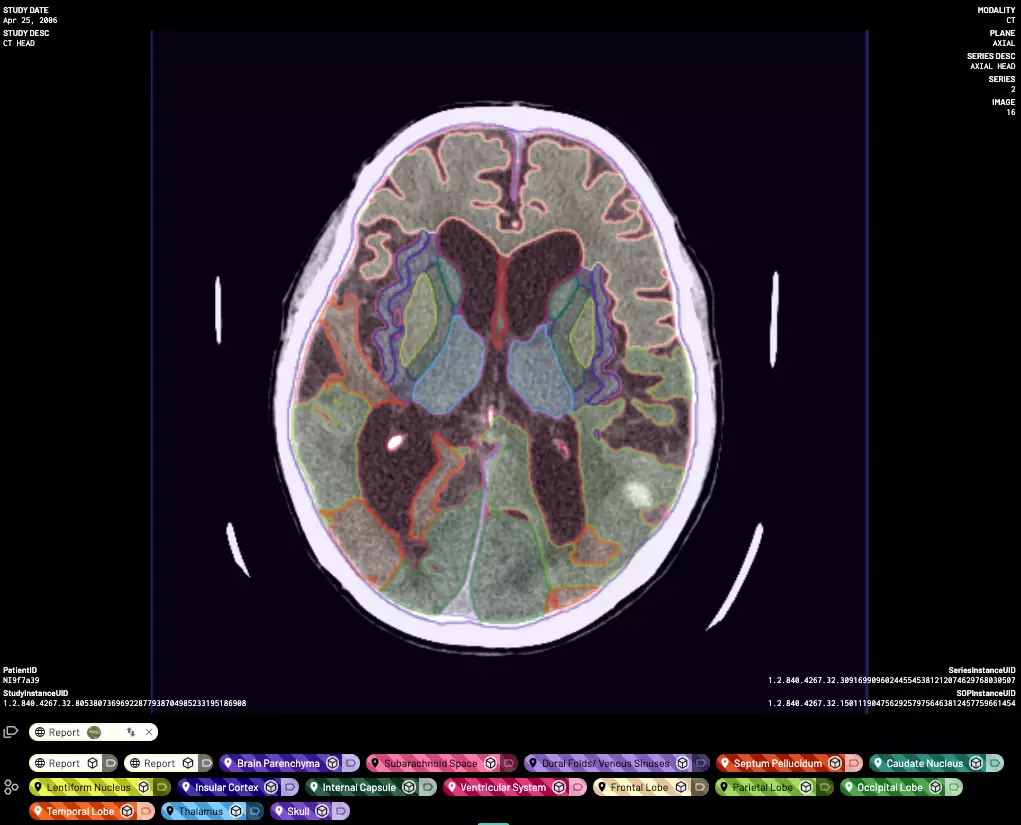
The system supports academic needs such as teaching sets and cohort curation while exporting data to research and model training formats. A 510(k)-cleared viewer is available within the product line. MD.ai is ideal for hospital radiology teams and academic centers that value reading-room ergonomics and structured review. Expect vendor-specific conventions in some workflows, and define SLAs for turnaround and discrepancy handling at scale.
It is commonly used in academic research, both for teaching and for creating curated datasets. The platform supports training sets, cohort selection, and exporting data for analysis or model development. A 510(k)-cleared viewer is also part of the product suite. Overall, MD.ai fits hospital radiology groups and academic institutions that prioritize a reading-room style interface and structured, organized review.
Why use it:
- Medical-focused interface
- Clean workflows for radiologists
- Good for training and academic research
Pricing: Not listed. Enterprise-level pricing.
Best for: Universities, teaching hospitals, and research groups.
5. Labelbox — cloud workflows
Labelbox offers a cloud-based data operations platform that works well for medical imaging, including high-resolution pathology slides and other large files. Its model-assisted tools speed up annotation on routine findings, and its review features help teams agree on labels and handle disagreements. You can upload DICOM studies, work with multi-slice scans, and apply segmentation tools directly in the interface.
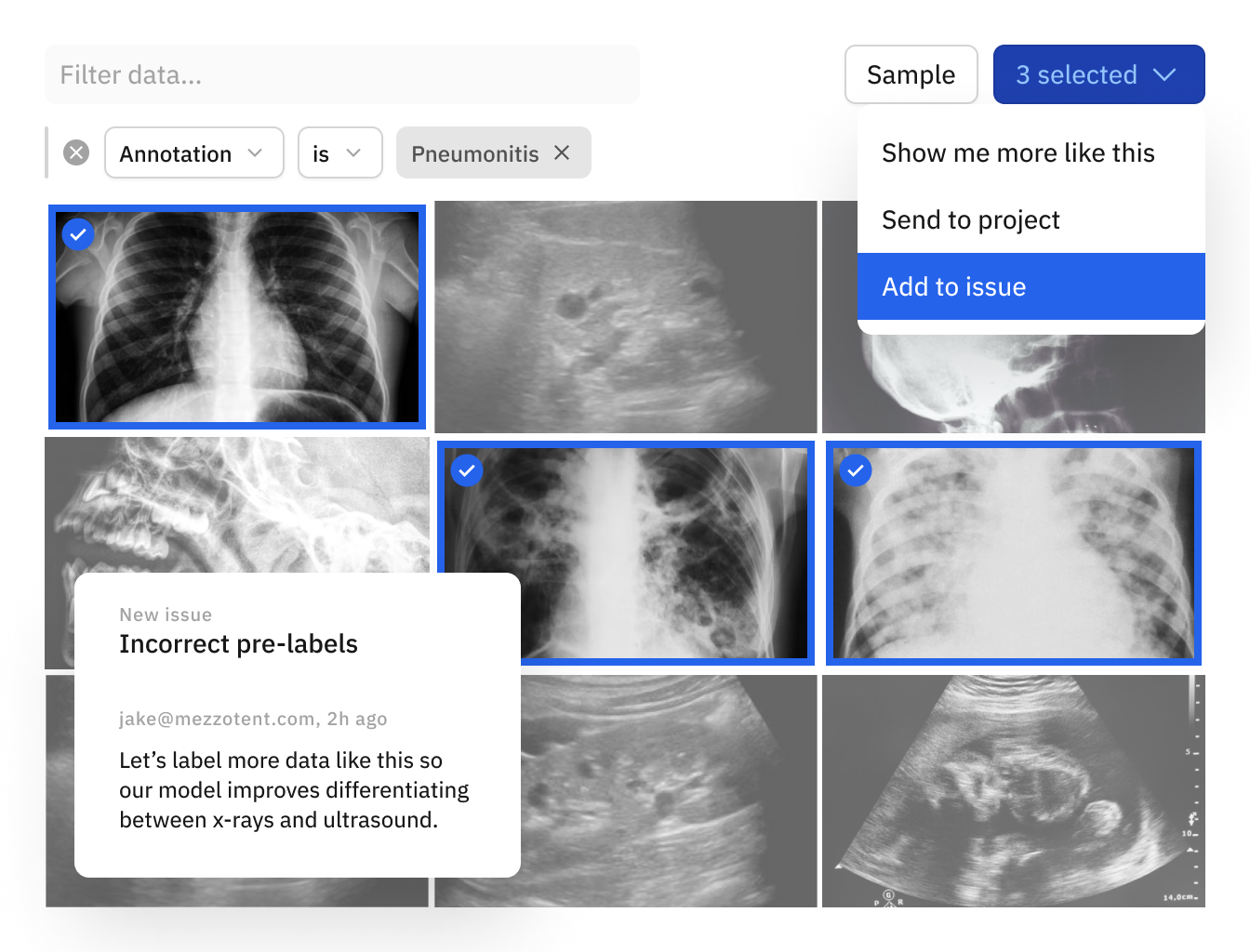
Its automation tools help teams handle large image volumes efficiently. The SDKs and webhooks make it easy to plug active learning into your training loop and trigger retraining from error cases. Robust quality checks limit mistakes and keep annotations consistent.
Why use it:
- Good medical imaging support
- Data curation, custom model integration, and labeling services
- Strong quality control with a human-in-the-loop
- Model-assisted labeling + auto-labeling
- SDKs, APIs, and webhooks
Pricing: Free tier + Subscription tiers. Exact costs depend on the project. For non-commercial uses, teachers and students at qualified universities can use Labelbox for free.
Best for: Teams that need tight QA and large-scale operations.
6. Napari — Open-Source Plugins Ecosystem
Napari is a fast, interactive viewer for multi-dimensional images in Python, built around a plugin ecosystem. It supports 2D, 3D, volumetric data, and scientific imaging. With plugins like napari-segmentation and DICOM readers, you can build your own medical annotation environment.
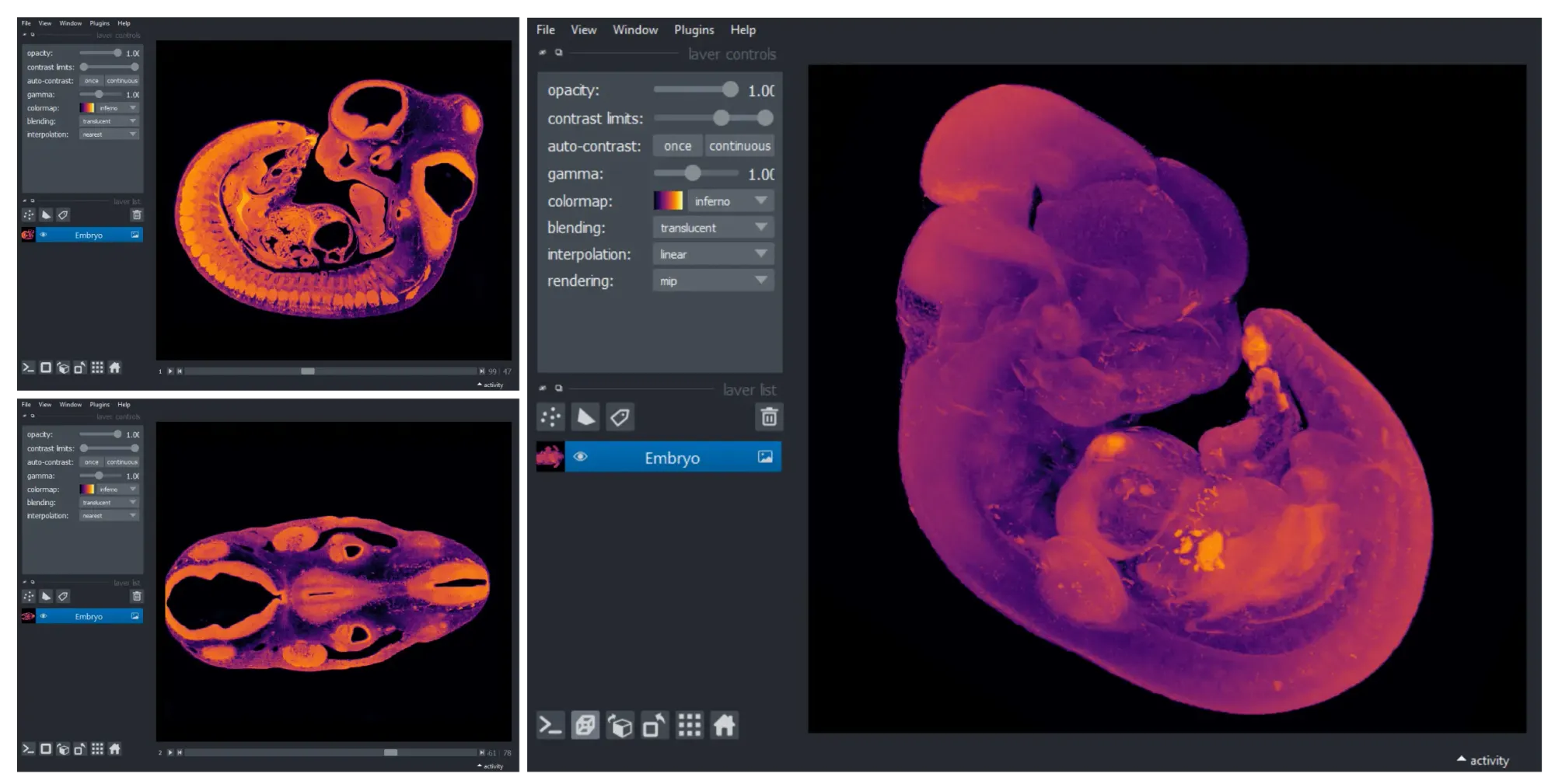
You get flexibility and control, but you need technical skills to configure it. It requires coding experience and familiarity with Python.
Why use it:
- Fully open source
- Large plugin ecosystem
- Great for 3D and volumetric data
Pricing: Free and open-source. However, you still incur time and opportunity costs.
Best for: Research teams that want custom tooling and reproducibility.
Choosing the Right Tool
Your budget is usually the first and most important factor (obviously). You may also consider other solutions that suit your specific use case.
Assuming cost is not a constraint, choose your tool based on your project and team, not the other way around.
- If you want speed and automation, use Unitlab AI.
- If you need clinical compliance, choose Encord.
- If you need auto-annotation with speed, go for V7 Darwin.
- If radiologists do the labeling, MD.ai is simple and effective.
- If you need automation and cloud, pick Labelbox.
- If you want complete flexibility, use Napari.
Conclusion
Medical image annotation requires precision, high-quality tools, and workflows designed for healthcare. The platforms above give you strong options for building reliable datasets in 2025.
When you work with CTs, MRIs, X-rays, or pathology slides, the right platform removes friction and helps your team stay accurate and efficient.
Explore More
Check out these resources for more on medical image annotation and top data labeling tools of 2025:
- The Guide to Medical Image Annotation: Essentials, Techniques, Tools [2026]
- Top 5 Text Annotation Tools in 2026
- 7 Best Proprietary Audio Annotation Tools of 2026 - A Comprehensive Review
References
- Cogito Tech (Aug 27, 2025). Top 6 Medical Image Annotation Tools in 2025. Cogito Tech: Source
- Dr. Andreas Heindl (Dec 04, 2024). 6 Best Open Source DICOM Annotation Tools. Encord Blog: Source
- Dr. Andreas Heindl (Aug 07, 2025). Best DICOM Annotation Platforms (2025): Radiology-Grade Tools. Encord Blog: Source
- Nanobaly (Sep 26, 2024). Best Medical Imaging Annotation Tools for AI. Innovatiana: Source
- Roman Boimystryuk (Oct 20, 2025). Choosing the Right Medical Data Annotation Tool: medDARE’s Experience. medDARE: Source
![Data Annotation Tool Guide 2026 [The Best 10 + Comparison]](https://storage.ghost.io/c/48/f4/48f4b614-5c29-430d-9cb3-e0b3f34395f3/content/images/size/w360/2025/12/image--13-.png)
